
In the bustling world of customer relationship management (CRM), where data is the backbone of strategic decisions, maintaining a pristine Salesforce database is crucial. However, as businesses scale and customer interactions increase, the influx of data can quickly lead to chaos—duplicate records, incomplete profiles, and data silos that obstruct the view of your customer relationships. Enter Cloudingo, the unsung hero of Salesforce users, designed to cleanse, organize, and enhance your CRM data. This narrative will walk you through the intricacies of Cloudingo, its technical prowess, and how it can transform your Salesforce environment into a streamlined, efficient powerhouse.
What is Salesforce Cloudingo?
Salesforce Cloudingo is not just another cloud-based application; it’s a sophisticated tool engineered to work seamlessly with Salesforce’s CRM platform. Imagine your Salesforce CRM as a dynamic ecosystem—Cloudingo is the gardener that tends to this ecosystem, ensuring that every piece of data is in its rightful place. Cloudingo is designed to enhance CRM capabilities, making it easier for businesses to manage customer relationships, automate processes, and ultimately, drive growth. With its intuitive interface and powerful features, Cloudingo serves as a bridge between your data and the actionable insights you need to propel your business forward.
The Importance of Data Deduplication
In any CRM system, duplicates are like weeds in a garden—they may seem harmless at first, but over time, they can choke the life out of your data’s potential. Deduplication, the process of identifying and merging duplicate records, is not just a housekeeping task; it’s a strategic initiative that directly impacts the efficiency and accuracy of your Salesforce CRM. Cloudingo’s robust deduplication tools allow you to maintain a single, accurate version of each customer or contact, ensuring that your team has access to clean, reliable data at all times.

Key Features of Salesforce Cloudingo
Data Deduplication:
Cloudingo’s primary feature is its powerful data deduplication capabilities. It identifies, merges, and removes duplicate records within your Salesforce CRM, ensuring that your data remains clean and accurate. This helps maintain a single source of truth for each customer, which is crucial for effective CRM management.
Data Cleansing:
Beyond just deduplication, Cloudingo offers tools to cleanse your Salesforce data. This includes standardizing fields, correcting common errors, and ensuring consistency across your CRM. Clean data leads to better decision-making and more efficient processes.
Mass Data Management:
Cloudingo allows you to perform bulk updates, deletions, and data migrations within Salesforce. This feature is especially useful when managing large datasets, allowing you to make sweeping changes or updates with minimal manual effort.
Automated Data Management:
Cloudingo enables users to set up automated data cleansing and deduplication schedules. This ensures that your Salesforce data is continuously maintained without requiring manual intervention, keeping your database in optimal condition.
Customizable Matching Rules:
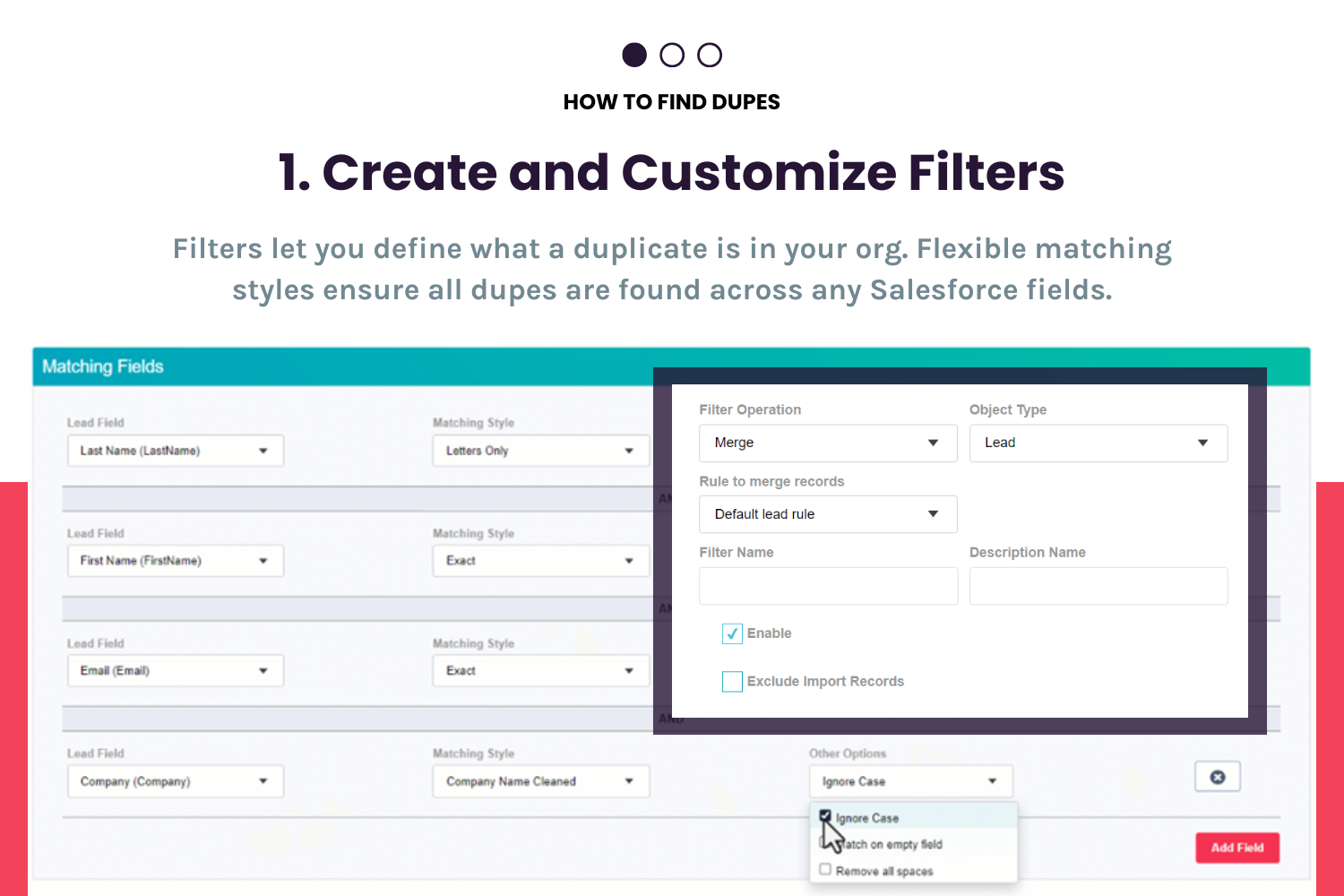
You can create and customize matching rules to define how Cloudingo identifies duplicates. This flexibility allows you to tailor the deduplication process to your specific needs, whether you’re working with standard Salesforce fields or custom objects.
Advanced Filtering Options:
Cloudingo provides advanced filtering capabilities that let you segment your data based on specific criteria. This is useful for targeting particular records for deduplication or cleansing, ensuring that only relevant data is processed.
Secure Salesforce Integration:
Cloudingo integrates directly with your Salesforce instance, ensuring that data management processes are secure and compliant with Salesforce’s security protocols. This seamless integration allows Cloudingo to work within your existing Salesforce environment.
Data Quality Dashboards:
Cloudingo offers dashboards that provide a visual representation of your data quality. These dashboards allow you to monitor the health of your Salesforce data, track the effectiveness of deduplication jobs, and identify areas that need attention.
Audit Trail and Compliance:
Cloudingo maintains an audit trail of all data changes, providing transparency and accountability for data management actions. This feature is particularly valuable for organizations that need to comply with data governance policies.

Support for Custom Objects:
In addition to standard Salesforce objects (like Accounts, Contacts, and Leads), Cloudingo can also work with custom objects. This makes it a versatile tool for organizations with complex, customized Salesforce implementations.
Setting Up Cloudingo for Salesforce
Initial Configuration and Setup Process:
Setting up Cloudingo is a straightforward process that begins with a seamless integration into your existing Salesforce environment. The initial configuration involves defining deduplication settings, connecting to your Salesforce instance, and tailoring the application to meet your specific data management needs. This setup process ensures that Cloudingo is not just another tool in your arsenal, but a fully integrated solution designed to enhance your CRM operations.
Connecting Cloudingo to Your Salesforce Instance:
Once connected, Cloudingo has the power to transform your Salesforce data management. This secure connection allows Cloudingo to access and manage your Salesforce data in real-time, providing immediate updates and continuous data cleansing. The integrity of your data is maintained at the highest level, with Salesforce’s robust security measures ensuring that your customer information is protected at all times.
Navigating the Cloudingo Dashboard
Understanding the User Interface:
Cloudingo’s user interface is designed with simplicity and functionality in mind. The dashboard offers a clean, intuitive layout that provides quick access to all the essential tools and features. Whether you’re running a deduplication job, monitoring data health, or reviewing detailed reports, the dashboard serves as your command center, allowing you to manage your Salesforce data with precision.
Accessing Key Tools and Features:
The tools and features accessible from the dashboard are designed to be powerful yet user-friendly. You can easily set up new deduplication jobs, manage data migrations, and keep an eye on the overall health of your CRM data. The dashboard is not just a tool—it’s a comprehensive workspace where you can oversee the entire data management process from start to finish.
Running Your First Data Deduplication
Step-by-Step Guide to Deduplicate Your Salesforce Data:
Running a deduplication job with Cloudingo is both a technical and strategic endeavor. Begin by defining your matching criteria—what specific fields should Cloudingo compare to identify duplicates? Once your criteria are set, initiate the deduplication job. Cloudingo will scan your database, flagging potential duplicates and providing options for merging records. This process is designed to be as automated or manual as you need, giving you control over the final outcome.
Best Practices for Running Deduplication Jobs:
For optimal results, it’s recommended to schedule regular deduplication jobs, carefully review flagged records, and use Cloudingo’s advanced filtering options to focus on specific areas of your database. These best practices ensure that your CRM data remains clean, accurate, and ready to support your business operations.
Automating Data Management with Cloudingo
Setting Up Automated Deduplication Schedules:
Automation is where Cloudingo truly excels. By setting up automated deduplication schedules, you can ensure that your Salesforce CRM data remains clean without the need for constant manual intervention. Cloudingo allows you to define the frequency of deduplication jobs and automate actions based on specific triggers, keeping your data in peak condition around the clock.

Utilizing Cloudingo’s Automation Features for Data Quality:
Beyond deduplication, Cloudingo’s automation features extend to various data management tasks, including scheduled data migrations, automated alerts for data health issues, and more. These features allow your team to focus on higher-value activities while Cloudingo takes care of the routine maintenance, ensuring that your CRM data remains a reliable resource for your business.
Advanced Cloudingo Techniques
Customizing Filters and Matching Rules:
For businesses with complex data management needs, Cloudingo offers advanced customization options. You can create custom filters and matching rules to fine-tune how duplicates are identified, allowing for a highly tailored approach that meets the specific requirements of your organization. This level of customization ensures that Cloudingo is not just a one-size-fits-all solution but a powerful tool that adapts to your unique data management challenges.
Leveraging Cloudingo for Large-Scale Data Management Projects:
Cloudingo is built to handle large-scale data management projects with ease. Whether you’re merging data from multiple sources, cleaning up a massive CRM database, or preparing for a significant data migration, Cloudingo’s robust tools are up to the task. Its ability to manage large datasets efficiently makes it an indispensable tool for businesses undergoing rapid growth or digital transformation.
Measuring Success with Cloudingo
How to Analyze Data Quality Improvements:
After implementing Cloudingo, it’s crucial to measure the impact on your Salesforce CRM data quality. Cloudingo’s reporting tools provide detailed analytics that allow you to track improvements, analyze the effectiveness of your deduplication efforts, and identify any areas that still need attention. This continuous feedback loop ensures that your data quality initiatives are delivering the desired results.
Reporting and Insights from Cloudingo:
Cloudingo’s advanced reporting capabilities offer valuable insights into your CRM data’s health. These reports not only help you make informed decisions about future data management strategies but also provide a solid foundation for reporting to stakeholders. With Cloudingo, you have the data you need to justify your CRM optimization efforts and plan the next steps with confidence.
Summary
Salesforce Cloudingo is not just a tool; it’s a transformative solution that enhances your Salesforce CRM by ensuring data accuracy, streamlining processes, and empowering your team with the insights needed to drive growth. By centralizing customer data, automating key processes, and offering advanced analytics, Cloudingo positions your business to thrive in a data-driven world. Whether you’re just starting with data deduplication or managing complex data migrations, Cloudingo provides the technical prowess and intuitive interface needed to keep your Salesforce CRM operating at its best. Embrace Cloudingo, and let your Salesforce environment evolve into a bastion of accuracy and efficiency.

