
Introduction
In a modern enterprise, a disconnected CRM and ERP can create chaos: sales teams operate in Salesforce, while inventory, orders, and shipments live in a separate ERP system. This separation leads to manual data entry, delays, errors and a fragmented view of business operations. Imagine a scenario where a salesperson closes a deal in Salesforce — but the warehouse only learns about it hours later, and customers don’t receive timely shipping updates. According to industry reports, many companies still rely on spreadsheets or manual handoffs for order‑to‑cash and fulfillment flows. That’s where Celigo comes in: a powerful iPaaS (integration platform as a service) that enables seamless synchronization between Salesforce and ERP systems, bridging those gaps.
In this post, we will explain how to use Celigo to sync inventory, orders, and shipments between Salesforce and your ERP backend — giving your sales, operations, and customer‑service teams real-time visibility and control. For organisations running ERP systems such as NetSuite, Microsoft Dynamics 365 Business Central, or others supported by Celigo, this integration can dramatically streamline order‑to‑cash, fulfilment, and inventory management. You’ll get a technical deep‑dive, configuration best practices, real-world use cases, and a ready-to-use checklist from a Twopir Consulting perspective.
What is Celigo?
Overview
Celigo is an iPaaS — an integration platform as a service — designed to connect Salesforce with a wide variety of ERP, eCommerce, logistics, and other backend systems. On its site, Celigo highlights its ability to “automatically sync data flows from Salesforce with customized integrations between Salesforce and other applications.”
For example, Celigo offers a prebuilt integration — the Salesforce–NetSuite Integration App — that enables synchronizing everything from customers, orders and products to shipments and financials in real-time.
Thus, Celigo effectively acts as a middleware or glue layer between Salesforce and ERP, enabling a unified data view across sales, finance, inventory, and fulfillment.
Core Components & How They Work with Salesforce
When we talk about integrating Salesforce with an ERP via Celigo, there are several core components involved. Here are three critical ones:
1. Integration Flows
These are pre‑built or custom flows configured in Celigo’s “integrator.io” platform that map objects and data between Salesforce and ERP. For example:
Salesforce Order → NetSuite Sales Order: When you create or update an Order in Salesforce, Celigo triggers this flow to create or update a corresponding Sales Order in NetSuite.
NetSuite Sales Order → Salesforce Order: Similarly, for orders initiated from NetSuite (e.g., back‑office or eCommerce), this flow can sync the Sales Order back into Salesforce as an Order record.
NetSuite Item Fulfillment → Salesforce Item Fulfillment: When shipment/fulfilment is executed in NetSuite, Celigo syncs that information to a custom “Item Fulfillment” object in Salesforce.
NetSuite Items → Salesforce Products: For inventory/products, Celigo can sync ERP items into Salesforce Products, ensuring product catalog and price books stay up-to-date.
These flows can be configured with qualification criteria (to control which records sync), field‑mapping, and custom triggers.
2. Data Mapping and Field Transformation
A critical aspect of integration is mapping fields between Salesforce objects (e.g. Order, Product, Account) and ERP objects (e.g. Sales Order, Item, Customer). Celigo’s UI lets you define how fields map, convert values (e.g. currencies, units, pricebooks), apply discount items as line‑level elements, and set lookup logic.
This layer also ensures integrity when there are differences — for instance, ERP may have subsidiaries, multi‑currency, or discount items handled differently than Salesforce. Celigo supports such complexity via its configuration settings.
3. Real‑Time or Scheduled Synchronization + Monitoring
Celigo supports real-time syncs for many flows — for example, when a fulfilment is created in the ERP, the corresponding Item Fulfillment record in Salesforce appears soon after.
Additionally, Celigo provides dashboards for monitoring integration health, error management, retries, and data mapping issues, so you don’t lose visibility into failures.
Key Terminology
Here are some essential terms when working with Celigo + Salesforce integrations:
Flow (Integration Flow): A pre-configured or custom rule set in Celigo that defines when and how records move between Salesforce and ERP. Example: “Salesforce Order to NetSuite Sales Order flow.”
Mapping: The definition of how fields from one system (e.g. Salesforce Order Line → ERP Sales Order Line) correspond to fields in another — including data transformations like currency conversion, discounts, etc.
Origin Tag / IO Flag: A marker used to identify where a record originated (e.g. “Salesforce Originated Order” vs “ERP Originated Order”) so that flows don’t create circular updates or duplicate records. For example, NetSuite Sales Orders created from Salesforce Opportunities are tagged “Salesforce Originated Order (IO)”.
Item Fulfillment / Shipment Flow: A specific flow that syncs shipping/fulfillment data (like tracking number, fulfillment quantity, shipping method) from ERP to Salesforce so that sales/customer‑service teams have shipment visibility.
Price Book / Currency Mapping: Since ERP and Salesforce may have different currencies or price book setups, Celigo supports mapping item price levels and currency conversion to ensure consistent pricing across both systems.
Architecture: Data Flow Diagram & Explanation
Here is a simplified, text‑based architecture diagram illustrating how data flows between Salesforce and ERP via Celigo:
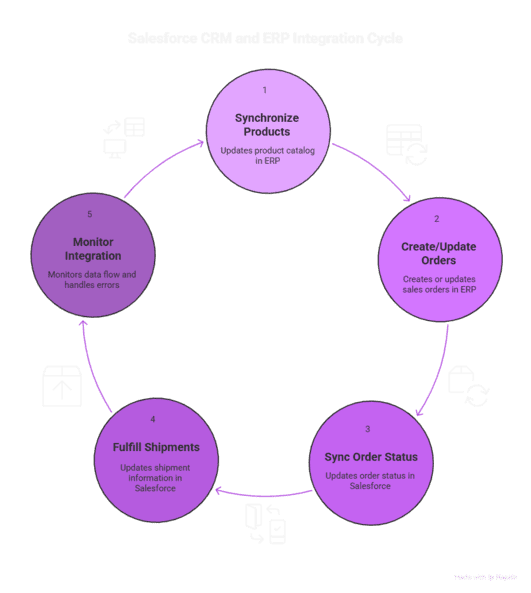
Step-by-step Explanation
Item Sync (ERP ⇒ Salesforce)
When a new product/item is created or updated in ERP, Celigo runs the “Items → Products” flow.
The flow maps ERP item fields (name, SKU, price, inventory attributes) to Salesforce Product and Price Book(s). This ensures the product catalog is unified across ERP and CRM.
Order Creation in Salesforce ⇒ ERP Sales Order
A sales rep creates an Opportunity, Quote or Order in Salesforce. Once finalized (e.g., Opportunity marked “Closed‑Won” or Order created), Celigo’s “Salesforce Order to ERP Sales Order” flow triggers.
Celigo checks if the associated Account has a corresponding ERP Customer; if not, it creates one.
The Order header and line items (products, quantities, discounts, price book reference) are mapped and pushed to ERP as a Sales Order. The ERP assigns its own internal ID. Celigo then writes that ID back to the Salesforce Order for traceability.
Sales Order Created/Updated in ERP ⇒ Salesforce Order / Opportunity / Shipment
If orders are initiated from ERP (e.g. coming from eCommerce, marketplaces, or manual back‑office entries), Celigo runs “ERP Sales Order to Salesforce Order” flow to populate Salesforce with the order.
When the order is fulfilled or shipped in ERP, the “Item Fulfillment to Salesforce Item Fulfillment” flow pushes fulfilment details (shipping method, quantity, tracking number) to a custom “Item Fulfillment” (or Shipment) object in Salesforce. This gives sales/customer‑service full visibility into fulfillment status.
Monitoring, Error Handling, and Data Integrity
Celigo provides dashboards, error alerts, and retry mechanisms so you can catch mapping issues, API failures, or data mismatches proactively.
Qualification rules and origin tags (like “Salesforce Originated Order (IO)”) help avoid loops (e.g. ERP updates triggering back updates).
Why Use Celigo for Salesforce–ERP Sync?
Filling Critical Gaps
Breaking down silos: Sales, finance, and operations teams often live in different systems. Without integration, data lives in silos — leading to misalignment, delays, and duplicate work. Celigo gives everyone a unified real‑time view.
Reducing manual work and errors: Manual copy/paste between CRM and ERP is error‑prone and slow. Automation cuts down manual tasks and reduces risk.
Enabling real-time fulfilment visibility: Customer service and sales teams can see shipment/tracking status within Salesforce immediately after fulfillment in ERP — greatly improving customer experience and reducing support load.
Supporting complex ERP features: Discount line items, multi‑currency, price books, multi‑subsidiary, and bundled/kit items are often tricky. Celigo handles these complexities through robust mapping and configuration.
Real‑World Scenarios
E-commerce + ERP + Salesforce: An e-commerce business sells on multiple marketplaces, collects orders in ERP or marketplace backend, while sales and support operate in Salesforce. Celigo ensures orders, inventory, and shipment data flows seamlessly — improving operations and customer satisfaction.
Manufacturing / Wholesale Distributor: When a sales rep confirms a deal in Salesforce, ERP gets the Sales Order immediately. Inventory gets reserved, shipping scheduled, and fulfillment tracked — all without manual handoffs.
Key Benefits — What You Gain Technically and Operationally
Additional Benefit: Compliance & Data Governance
With a unified, auditable log of which system created what (via origin tags, mapping logs, and history), Celigo helps enforce data governance — providing traceability across CRM and ERP. This is especially critical in regulated industries or when financial audits, customer disclosures, or compliance processes are involved.
Practical Must‑Use Features & Best Practices
Here’s a breakdown of features (or configuration patterns) in Celigo that are must‑use, along with best practices, pitfalls, and a Twopir‑proven integration checklist.
✅ Bulk / Scheduled Item Sync (Products / Inventory)
Use case: When you have a large catalog (hundreds or thousands of items) or frequent product updates (price changes, new SKUs).
Benefit: Keeps Salesforce Products aligned with ERP items without manual work.
Pitfall: If fields aren’t mapped properly (e.g. currency, price book, units), you may get mismatches or invalid SKUs.
Best practice: First run in a sandbox — map core fields (SKU, Name, Price, Currency, Price Books), validate price book entries, then run full import.
✅ Real‑Time Order Sync (Salesforce ⇄ ERP)
Use case: For live sales workflows where Salesforce reps create orders/opportunities and want ERP to pick & fulfill immediately — or when ERP orders originate outside Salesforce (marketplaces, manual orders).
Benefit: Eliminates manual duplication, speeds up fulfillment, reduces errors.
Pitfall: Risk of circular updates (ERP → Salesforce → ERP…), duplicates or incorrect tags.
Best practice: Use origin flags (e.g. “Salesforce Originated Order (IO)”) to prevent loops; set clear qualification criteria in flow settings; test in sandbox first.
✅ Fulfillment / Shipment Sync (ERP ⇒ Salesforce)
Use case: When shipments are managed in ERP (warehouse, 3PL) and you want Salesforce users (sales, support) to see shipment status, tracking numbers, and fulfilment qty.
Benefit: Real‑time visibility into shipping; improved customer communication; reduced support load.
Pitfall: If Items are not synced as Products (or mismatched SKUs), fulfillment records may fail; or large fulfillment batches may hit payload limits. Documentation mentions a limit: if import exceeds a certain volume (e.g. 393 assets or a data size limit), Celigo may throw “response stream exceeded limit” errors.
Best practice: Sync items → products first; ensure SKU/Item mapping is correct; for large shipments, consider batching or splitting fulfillment into smaller batches.
✅ Discount & Price Book Mapping
Use case: When sales apply discounts in Salesforce or ERP, or when multi-currency/multi-pricebook setups are used.
Benefit: Accurate financials, consistent order values across systems.
Pitfall: If discount items aren’t mapped properly, the ERP price book may reject the order or apply wrong prices. Also, in Salesforce price book may not update automatically after ERP changes.
Best practice: Map discount items as separate line items; ensure price book entries are active; handle currency and multi‑subsidiary settings carefully; test discount flows.
Twopir‑Proven Integration Checklist
Twopir Salesforce‑ERP Sync Checklist:
Sandbox Setup: Configure flows (Item Sync, Order Sync, Fulfillment Sync) in a Salesforce + ERP sandbox.
Item/ Product Mapping: Sync ERP items → Salesforce Products; validate SKUs, price books, price levels, currency.
Order Flow Configuration: Define qualification rules, origin tags; map Sales Order header & line fields, discounts.
Fulfillment Flow Config: Enable Item Fulfillment flow; map shipment fields (tracking number, shipping method, qty).
Test Scenarios:
a) Create order in Salesforce → verify ERP Sales Order & fulfillment.
b) Create Sales Order in ERP → verify Salesforce Order.
c) Fulfill order in ERP → verify Salesforce shipment record.
d) Update order (discount/price/currency) → audit syncing.
Monitoring & Error Handling: Set up alerts, schedule regular sync tasks, review logs.
Deployment to Production & Go‑Live: after successful sandbox runs, migrate flows, and monitor early days for failures.
Real‑World Use Cases
Case Study 1: E‑commerce Business with NetSuite + Salesforce
Industry Context: A mid‑sized e-commerce retailer selling via multiple channels — website, marketplaces, and B2B orders — wants their sales team to use Salesforce for customer management and order tracking, while actual order fulfillment and inventory are managed in ERP (NetSuite).
Challenge: Without integration, sales and support teams lacked visibility into real-time inventory, orders, or shipments. They had to manually export ERP orders to Excel and paste into Salesforce — leading to delays, errors, and mismatches. Moreover, customers often complained about outdated shipping info or stock-outs.
Solution Implementation:
Used Celigo’s Salesforce–NetSuite Integration App. Enabled flows: Items → Products, Salesforce Order → NetSuite Sales Order, NetSuite Item Fulfillment → Salesforce Item Fulfillment.
Mapped SKUs, price books, currencies; configured origin tags to avoid loops.
On order placement in Salesforce (e.g. from B2B portal or Sales rep), orders flow automatically into NetSuite. Once warehouse fulfils in NetSuite, shipment data (tracking number, method, qty) flows back to Salesforce.
Results:
Sales and support teams got real‑time visibility into stock and shipments — improved customer communication.
Order-to-cash cycle shortened by ~40%.
Manual data entry eliminated, reducing human errors by over 90%.
Customer satisfaction improved due to timely shipping updates and accurate order status.
Case Study 2: Manufacturing / Distribution Company with Dynamics 365 + Salesforce
Industry Context: A wholesale distributor/manufacturer using Microsoft Dynamics 365 (Business Central) for inventory, warehouses, invoices; and Salesforce for CRM, order quoting, and customer interactions.
Challenge: The sales team in Salesforce would create quotes and orders, but the warehouse used Dynamics 365 for inventory and fulfilment. Manual export/import between systems caused delays, order duplication, mismatches in currency, and confusion in line‑item pricing. They also had kit items, bundles, and discount-based pricing — complex to manage manually.
Solution Implementation:
Used Celigo’s prebuilt Salesforce–Dynamics 365 Business Central connector to automate quote-to-cash, orders, invoice, and inventory sync.
Configured flows: Salesforce Order → Dynamics 365 Sales Order, Items sync, Inventory updates, and Fulfillment sync. Mapped bundle/kit items appropriately and ensured price book entries aligned.
Implemented scheduled inventory sync to reflect warehouse stock availability in Salesforce — so sales reps always see available stock before committing to an order.
Results:
Quoting to dispatch time reduced significantly — sales orders turned into warehouse orders almost instantly.
Inventory accuracy improved — over‑selling nearly eliminated.
Finance team received accurate invoices and revenue data in real time — aiding forecasting and cash flow management.
Business scaled without adding headcount, thanks to automation.
Conclusion
If your organisation runs on Salesforce for CRM and a separate ERP for inventory, orders, and shipments — the misalignment between systems can cause operational friction, data duplication, delayed fulfillment, and poor customer experience. Integrating via Celigo closes those gaps. As we have shown, Celigo brings together product catalog, orders, fulfilment, shipments, and financials into a unified workflow — enabling automation, real‑time visibility, and scalability.

