
Introduction
Sales teams today face an increasingly complex environment—remote interactions, growing product lines, compliance needs, and shifting buyer expectations. Amid this landscape, consistency in sales conversations becomes not just a best practice but a necessity. According to a Salesforce State of Sales report, 58% of high-performing sales teams standardize key parts of their sales process. Yet for many businesses, that standardization is informal, inconsistent, or left entirely to individual reps. That’s where HubSpot Playbooks come in.
At Twopir Consulting, we work with growing businesses struggling to scale their sales efforts due to one major bottleneck: lack of consistency in messaging, objection handling, and qualification. HubSpot Playbooks solve this by embedding interactive content, scripts, and workflows directly into your CRM—equipping reps with the right messaging, questions, and information at exactly the right time.
Whether you’re coaching a newly hired sales rep or optimizing how your team handles discovery calls, Playbooks allow you to replicate your best sales conversations at scale. In this blog, we’ll break down how HubSpot Playbooks work, explore their architecture, show you how to implement them for different industries, and outline the measurable business value they deliver.
By the end, you’ll know how to use HubSpot Playbooks not just to document processes but to drive adoption, automate data capture, and improve conversion rates across every stage of the sales funnel.
What Are HubSpot Playbooks?
Technical Breakdown
HubSpot Playbooks are interactive, templated documents embedded into your CRM interface. They guide sales reps through standardized talk tracks, data capture, and decision trees during live calls or follow-ups. Think of them as smart, dynamic scripts that ensure consistency—without sacrificing flexibility.
Here’s how they work behind the scenes:
- CRM Embedding: Playbooks are tied directly to contact, company, deal, or ticket records. When a rep accesses a record, they can launch the relevant playbook from the right-hand panel.
- Conditional Content: Playbooks allow for branching logic—based on user input, reps can be guided down different paths (e.g., if Budget = Low, suggest alternate pricing model).
- Property Mapping: Fields in a playbook can be mapped to HubSpot properties, enabling auto-updates to the CRM as reps input data. This ensures data hygiene and reduces manual entry errors.
- Reporting Integration: Every playbook interaction can be tracked and analyzed—giving managers visibility into usage rates, adherence, and impact on deal progression.Example: A B2B SaaS company uses a “Discovery Call” playbook where reps ask about pain points, budget, authority, and timeline. Inputs auto-fill deal properties, which then trigger follow-up workflows based on qualification.
Key Terminology
- Playbook Card – A single interactive module inside a playbook, such as a text block, multiple-choice question, or CRM property field. Cards are the building blocks of your playbook flow.
.gif?width=746&height=381&name=move-recommended-enablement-crm-card%20(1).gif)
- CRM Property Mapping – The process of linking input fields in playbooks to CRM properties, so responses automatically populate and update records.
- Conditional Logic – Branching mechanisms within a playbook that dynamically change the flow or show different questions based on earlier answers.
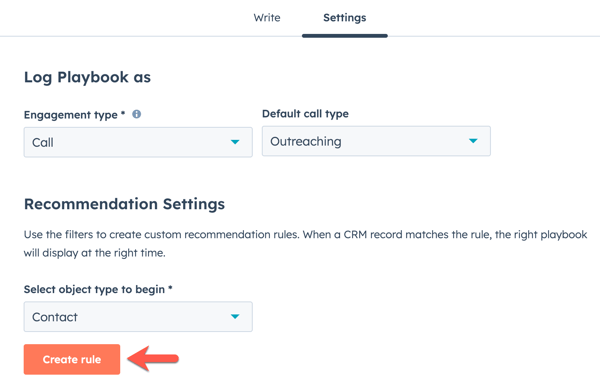
- Guided Selling – A sales enablement strategy that uses tools like playbooks to provide reps with structured prompts and real-time coaching during calls.
- Call Outcome Tagging – Attaching the result of a call (e.g., “Interested, Not Qualified”) to a playbook session, which can trigger deal stage movements or follow-up workflows.

Architecture of a HubSpot Playbook
Data Flow and System Interactions
Step 1: Rep accesses a contact/deal record
Step 2: Launches relevant playbook (Discovery, Objection Handling, etc.)
Step 3: Inputs answers into fields/cards
Step 4: Conditional logic displays follow-up content
Step 5: Responses map to CRM properties (e.g., Budget, Timeline)
Step 6: CRM workflows and reports update based on data
Step-by-Step Explanation
- Record Access: A rep opens a deal/contact record in HubSpot.
- Playbook Launch: From the right-hand panel, the rep selects the appropriate playbook.
- Live Input & Guidance: The rep reads from talk tracks, asks prompted questions, and records responses.
- Logic Execution: Based on answers (e.g., timeline < 30 days), the playbook may reveal next steps or talking points.
- CRM Sync: All mapped fields instantly update HubSpot properties—ensuring clean data for future automation.
- Trigger Actions: Based on new property values, workflows may send emails, assign tasks, or update pipeline stages.
Why Use HubSpot Playbooks?
1. Bridging Skill Gaps Across Sales Teams
Not every rep is a natural closer. HubSpot Playbooks empower newer or less experienced salespeople to follow the same high-converting talk tracks as your top performers. A software company we worked with had a 40% drop-off in mid-funnel deals due to inconsistent qualification. After implementing standardized discovery playbooks, their SQL-to-demo rate rose by 28%.
2. Compliance & Data Capture
In regulated industries like finance or healthcare, missing a key disclosure or failing to document consent can be costly. With Playbooks, you can mandate key scripts and ensure reps complete required fields before proceeding. This reduces legal risk and improves audit readiness.
Key Benefits of HubSpot Playbooks
| Benefit | How It Works Technically | Business Impact | Real-World Example |
| Consistent Messaging | Structured prompts ensure reps use approved talk tracks | Reduces rep deviation and increases conversion | Healthcare sales team improved close rate by 22% |
| Automatic Data Capture | CRM properties auto-populated via field mapping | Improves data hygiene, reduces admin time | SaaS client cut admin tasks by 8 hours/week |
| Guided Objection Handling | Logic-based cards offer responses to common objections | Boosts rep confidence and win rate | Fintech firm cut drop-off in pricing discussions by 30% |
| Faster Onboarding | New reps use playbooks from day one | Reduces ramp-up time | New hires closed first deal 2 weeks faster |
| Workflow Integration | Inputs can trigger automation sequences | Enables timely follow-ups | Auto-task creation improved SLAs by 35% |
| Call Outcome Analytics | Playbook usage can be tracked and analyzed | Enables coaching and performance tracking | Manager spotted rep missteps early with usage reports |
| Cross-Functional Alignment | Marketing can align messaging within sales playbooks | Improves customer experience | Aligned messaging reduced churn by 15% |
Practical Must-Use Features
1. Property-Linked Questions
Use Case: Automatically update deal stage or qualification fields.
Pitfall: Not all reps remember to fill fields unless required.
Best Practice: Make critical fields mandatory. For example, if “Timeline” isn’t answered, reps cannot complete the playbook.
2. Conditional Content Blocks
Use Case: Tailor the script based on prospect answers.
Pitfall: Overcomplicating logic can confuse reps.
Best Practice: Limit to 2–3 levels of branching and use clear labels like “If budget under $5K, suggest Lite Plan.”
3. Playbook Reporting
Use Case: Track which playbooks are used and by whom.
Pitfall: Data overload.
Best Practice: Focus on completion rate and outcome tags to inform coaching sessions.
4. Required Completion Triggers
Use Case: Ensure reps complete the full call process.
Pitfall: Reps may skip optional questions.
Best Practice: Use triggers that enforce minimum data input before saving a session.
5. Embedding in Deals vs. Contacts
Use Case: Run different playbooks at contact vs. deal level.
Pitfall: Wrong playbook shown.
Best Practice: Use naming conventions and team permissions to organize access.
Twopir-Proven Checklist for Playbook Success
- Test playbooks in a sandbox environment
- Map every key question to a CRM property
- Use conditional logic for major qualification routes
- Track usage weekly and refine based on feedback
- Include coaching tips inside playbooks
- Set up workflows tied to playbook fields
- Create role-specific playbooks (e.g., SDR, AE, CS)
Real-World Use Cases
Case Study 1: SaaS – Standardizing Discovery Calls
- Industry Context: B2B SaaS with a 12-person sales team.
- Challenge: Inconsistent discovery process led to bad-fit demos and poor win rates.
- Solution: Twopir created a Discovery Playbook with mapped fields for Budget, Authority, Need, and Timeline. The playbook auto-updated deal stages and triggered nurturing sequences based on fit.
- Result: SQL quality improved by 31%, and rep confidence grew—reducing manager shadowing time by 50%.
Case Study 2: Healthcare – Regulatory Compliance
- Industry Context: Medical device company with HIPAA concerns.
- Challenge: Sales reps were missing mandatory compliance statements during calls.
- Solution: We built a Compliance Playbook embedded in every contact record. It included legally required language and a checkbox for confirmation, synced to audit logs.
- Result: The company passed its compliance audit with 0 findings and reduced rep errors by 70%.
Conclusion
HubSpot Playbooks are far more than digital checklists—they’re scalable, flexible, and powerful tools to turn every sales conversation into a consistent, data-rich, and high-converting interaction. By embedding your processes directly into reps’ workflows, Playbooks eliminate guesswork and unlock performance gains across onboarding, coaching, and pipeline progression.
If you’re looking to scale your team or improve deal quality, start by testing a simple Discovery Call playbook. Map it to key properties. Add branching logic. Track completion rates. In just weeks, you’ll see measurable gains in rep productivity, data quality, and win rates.
At Twopir Consulting, we specialize in customizing HubSpot for high-growth teams—integrating sales strategy with technical execution. Want to get the most out of your CRM investment? Let’s standardize your sales conversations with Playbooks that close deals and drive scale.

