
What is HubSpot Sales Hub?
Supercharge your sales process with Sales Hub, a powerful and easy-to-use sales CRM that includes sales engagement tools, configure-price-quote (CPQ) functionality, and robust sales analytics for growing teams.
Sales Hub is built on the HubSpot CRM platform where customer data, tools, and teams come together to create a single source-of-truth for unprecedented sales rep efficiency. When using the full CRM platform, reps can get richer insights, warmer leads, and aligned enablement materials to help them operate at max efficiency. Plus, tap into our expansive ecosystem of app and solutions partners to craft an exceptional end-to-end customer experience.
HubSpot Sales Hub Features
1.Lead Management & Prospecting Software
- Connect with the human behind the lead:
Successful sales teams know that prospecting is as much about quality as it is about quantity. Empower your reps with the tools to turn up the volume without affecting the value. With the prospecting workspace, your teams have all the relevant context they need to create more authentic and engaging buyer experiences.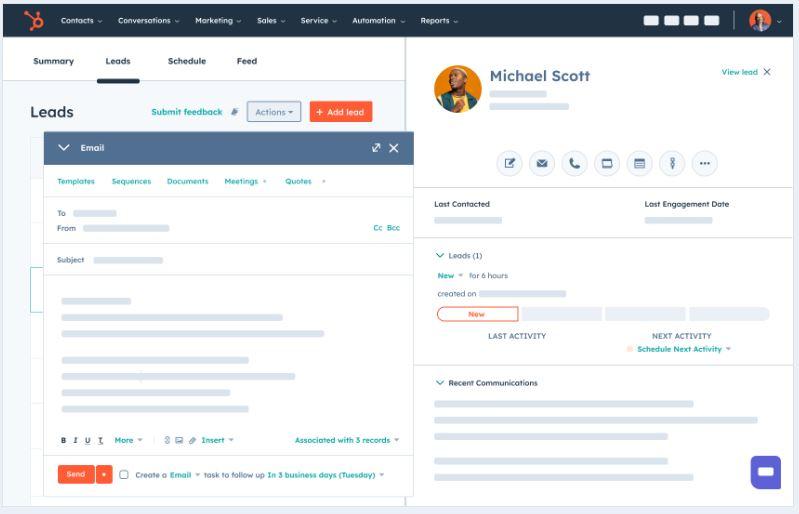
- Lead management made simple:
Never let grunt work distract your reps from working their leads. HubSpot’s leads tool takes the pain out of lead management. Leads automatically move through your pipeline as your reps engage them so your sellers can keep selling and managers can confidently report using up-to-date information.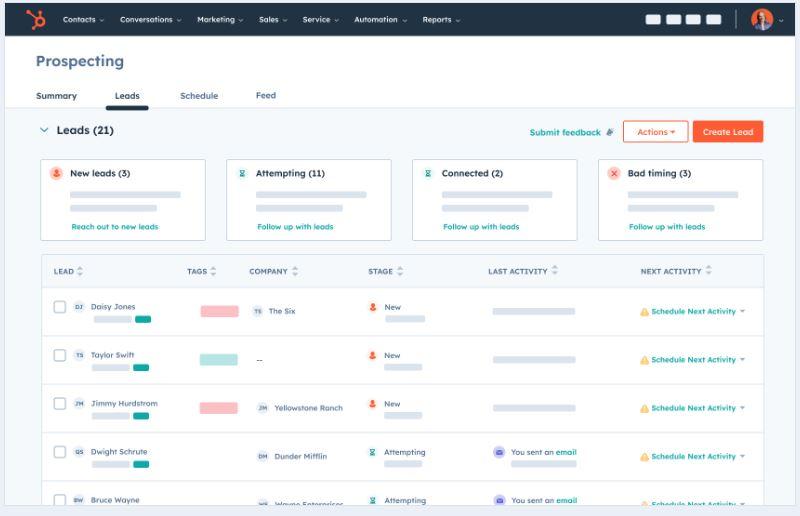

- Prospect at scale:
Don’t make your reps face an endless queue of tasks and activities. Keep your reps motivated from start to finish with a personal summary and progress bar of their daily to-dos that lets them jump into work without delay.

2. Email Templates
- Optimize email templates with built-in reporting:
With HubSpot’s email template builder, you get real-time insight into email open rates, attachment clicks, and more. You can then use those metrics to determine which templates perform best and double-down on the content that converts.

- Personalize your one-on-one emails at scale:
Keep prospects engaged by tailoring email content to them. Add personalization tokens, relevant sales documents, meeting links, and personalized videos using the built-in Vidyard integration. Once you receive email responses, stay organized and efficient with HubSpot’s AI capabilities, which summarize emails for you.

- Send email templates from your inbox:
HubSpot’s email template builder is compatible with the apps you already use so you can see and send templates straight from your inbox. Personalize and send sales emails from the platform of your choice including Google Workspace, Outlook, or Office 365. You can also use the Gmail Chrome extension to create sales emails faster with generative AI.

3.Email Tracking
- Eliminate guesswork with email tracking:
You spend a lot of time crafting compelling emails for sales outreach. But without understanding how prospects interact with your emails, you have to rely on gut instinct to know which leads to follow up on.
HubSpot’s free email tracking software takes the guessing out of your sales outreach. HubSpot notifies you when a prospect opens your email and clicks a link inside, so you can understand exactly who’s engaging with your emails and what they’re interested in. Then, as these interactions are saved in your HubSpot Smart CRM database, personalize your follow-up and build meaningful connections with your leads. - Follow up when you’re top of mind:
Reach out to your buyers when they’re thinking of you and increase your odds of closing a deal. With HubSpot’s email tracking software, reps can set up push notifications to follow up seconds after a lead opens an email, clicks a link, or downloads a document.

- See a lead’s entire history at a glance:
With the email tracking tool, you can see what emails, links, and documents your leads looked at and when — all on the contact record in HubSpot. With all the context in one place, you can stop guessing what content resonated and personalize your next move to close the sale.

4.Sales Automation Tools
- Automate your follow-up and put time back into your day:
Sales reps have a lot on their plate. Wasting time with repetitive tasks can lead to inefficiency, frustration, and even lost sales. Save time and prevent prospects from slipping through the cracks with HubSpot’s sales automation tools.
Create flows of timed personalized emails, A/B test different messaging, and queue up automated follow-up tasks for each prospect — so you never lose touch. Choose from a list of email templates and task options, and enroll a contact right from your HubSpot inbox. Enroll up to 50 prospects in a sequence at once.

- Personalize your automated sales emails:
Save your sales emails from becoming impersonal. Personalize your messages and create valuable human connections with your prospects. Increase your response rates by tailoring your email sequences with information from your CRM database.

- Streamline your sales process with workflows:
Use workflows to rotate leads, create deals, and automate tasks. Manage your data in bulk by updating properties, copying values, and more. Trigger notifications for your team when a contact takes meaningful action. Easily add tasks to alert your sales team about contacts they should follow up with.

- Unlock the science of prospecting:
Test, observe, and measure the impact of your sequences at every step. Run A/B tests on your sequence sales emails to optimize your messaging and maximize your outreach strategy with deal outcome reports to uncover what sequences generate the most revenue.

- Connect with the apps your team already uses:
You don’t need to waste time training your team on new sales software. HubSpot’s sales automation tools work seamlessly with Gmail, Google Workspace, Outlook, and Office 365 for Windows. Enroll contacts in sequences right from Gmail or Outlook for desktop so you never lose touch.

5. Call Tracking
- Automatically track and log sales:
Say goodbye to manually logging calls. HubSpot’s call tracker automatically logs every call to your CRM database. Now, managers can efficiently coach reps with transcriptions, keyword searching, call commenting, and call analysis. This means your sales teams are always iterating, improving, and selling better.

- Manage complex calling processes:
It’s never been easier to manage large, complex calling processes inside HubSpot. With inbound calling, simultaneous ringing for support teams, and IVR calling trees, your support operations will take a step forward in providing a seamless calling experience for your customers.

6. Meeting Scheduler
- Meeting scheduling made simple:
Don’t get stuck in a back-and-forth email chain trying to find a time that works for everyone to meet. With HubSpot’s meetings tool, prospects can automatically book a meeting with you or multiple people in your company.
The HubSpot meeting scheduler works with the apps your team already uses, and is connected to your HubSpot contacts database, so every time a prospect books a meeting your database grows and stays in sync. Start booking more appointments with less hassle, and get your time back to focus on more important things.

- Offer flexibility with round robin and group links:
Let prospects schedule time with multiple people with group meeting links, or use a round robin meeting link so they can meet with whichever rep’s schedule works best. As prospects schedule meetings, they’ll automatically be added to your HubSpot contacts database, so your database grows and stays organized.

- Book more meetings by emailing or embedding your calendar:
Get more meetings and leads by embedding your calendar on your website — no coding required — so prospects can conveniently schedule meetings directly on your website. If you’re emailing with a prospect, include your calendar link in your email to make scheduling appointments convenient.

- Use the appointment scheduler to automate your sales process:
When you have high quotas to hit, managing your prospects can feel impossible. Take the manual work out of appointment scheduling to free up more time to close deals. Send prospects your appointment booking link so they can book directly on your available calendar.

- Meeting scheduling made simple:
7. Deal Pipeline
- Create new deals easily:
The deal pipeline recognizes when you add new deals from an existing contact or company record in the HubSpot CRM and updates it automatically.
Eliminate manual data entry and get the most up-to-date information delivered to you directly.

- Customize your deal pipeline:
Create a custom pipeline easily using HubSpot’s drag-and-drop editor.
Empower your sales team to own their process — they’re the ones that know the most. Let them add or modify deal stages and properties without the help of IT.

- Track performance across your team:
Monitor your team’s performance individually and as a whole. Use sales dashboards to get quick, straightforward insights into where you’re excelling and failing. Revenue data combined with detailed analytics helps everyone understand their impact.

- Work deals wherever you are:
Sales reps are often on the go, and HubSpot makes it easy for them to keep up with leads while away from their desk.
Monitor leads and performance on the move with the HubSpot mobile app, available for Android and iOS.

8.Payment
- Create a payment link:
Create and share secure one-time or recurring payment links directly with your customers, so they can pay you in just a few clicks. Choose to process payments with your Stripe account or HubSpot payments.
Embed and share payment links in emails, your website, forms, meetings, and more to speed up the payment process.

- Deliver an exceptional checkout experience:
When your customer opens your payment link, a user-friendly checkout page launches. Customers can easily pay with credit or debit cards, ACH, Apple Pay, Google Pay and more. Secure transactions with reliable payment processing.

- Centralize commerce on HubSpot’s customer platform:
With payment links conveniently integrated into HubSpot’s Smart CRM, you no longer have to switch between multiple tabs, tools, and systems. Keep your commerce and customer data in one unified solution for a seamless and efficient workflow.

9.Sales Reporting & Performance Management
- Gain total visibility into sales performance at the click of a button:
Is your team on track to hit its targets? When you work out of cobbled-together systems, it can be difficult to figure out if you’re on track to hit your sales goal. With dozens of free pre-built sales reports that come standard with HubSpot’s sales reporting software, getting started with sales reporting is easy. Use the out-of-the-box reports to track deal forecasts, prospecting, and sales activities.

- Leverage easy-to-build custom reports:
As your business grows, so will your reporting needs. While other tools may require an admin to collect and analyze data, HubSpot’s reporting tools come out of the box, so there’s no delay or fuss. Use the custom report builder to report on any single-object and cross-object data within your CRM. Easily visualize reports and create AI-generated descriptions about anything relevant to your business, such as lead funnels, target account engagement, and custom objects.

- Demystify your sales performance:
Having all the data you need is one thing. Understanding the why behind your results is another. HubSpot’s easy-to-use interface makes light work of extracting insights so you can spend more time figuring out your next move. Whether it’s prioritizing your sales team’s efforts with real-time deal data or identifying opportunity areas with waterfall reporting, HubSpot’s sales reporting software is powerful enough for an analyst but accessible enough for everyone.

Benefits of HubSpot Sales Hub
1. Free up your Sales Reps
- When you scale up, a major concern sales reps fall into is the heavy workload.
- In fact, salespeople spend less than 36% of their time selling due to repetitive tasks like data input, report creation, etc.
- This is exactly where HubSpot Sales Hub comes in handy.
- It offers features like email scheduling, sequences, workflows, predictive lead scoring, etc. that automates your daily repetitive tasks like sending emails, targeting and nurturing leads, and personalizing your outreach.
- This helps you offload your salespeople from daily administrative tasks and let them focus on more productive jobs.
2. Keep Customers Stick with your Brand
- Having a loyal customer base is a dream for every business.
- Loyal or existing customers are 50% more likely to try your product.
And HubSpot Sales Hub has all the tools in its arsenal to help you retain your customers. - You can create personalized emails and send them at the right time to the right customers for this.
- Personalization makes customer retention a cakewalk.
- According to 66% of consumers, their loyalty is influenced by how well a company understands its individual needs.
- And as I said, Sales Hub has enough tools to help you personalize your content that’s more likely to engage and make customers loyal to your brand.
3. Smooth Goals and Performance Monitoring
- A powerful feature that makes HubSpot stand out are its reporting tools.
You can create custom reports in your HubSpot CRM to track the performance of your products, sales teams, forecast revenue, and much more. - Having these reports will help you track your performance on the go.
Relevant read: A Guide to HubSpot Sales And Marketing Reporting
4. Encash Every Sales Opportunity
- Businesses always seek solutions that prevent users from slipping through cracks.
- And filling these cracks increases the likelihood of getting more sales.
HubSpot Sales Hub: Plans & Features

Let’s talk about the plans and uncover the HubSpot Sales Hub features you get.
HubSpot’s Sales Hub offers four different plans where the first one is,
1) Free Sales Hub
HubSpot’s foundation is its free CRM, which allows you to store all contact data and interactions in one secure overview. In addition to this free CRM, HubSpot offers other free features across its Marketing, Sales, and Service Hubs.
Here is a summary of Sales Hub’s free tools:
- Contact management
- Email scheduling
- Deal tracking
- Meeting scheduling
- Reporting dashboards
These tools are designed to help streamline your sales process at no cost.
2) Sales Hub Starter
With Sales Hub Starter, you get everything included in the free Sales Hub and additional features such as multi-currency support, goal tracking, and quote creation directly within HubSpot. We recommend starting with Sales Hub Starter to familiarize yourself with the platform and its capabilities.
Here is everything Sales Hub Starter has to offer:
- Contact management
- Deal pipelines
- Email tracking and scheduling
- Meeting scheduling
- Task management
- Reporting dashboards
- Goal tracking
- Multi-currency support
- Quote creation
These features can help streamline and enhance your sales process.
3) Sales Hub Professional
Are you ready for the next step? Interested in features like sales automation with sequences, personalized videos, or the product library? Then Sales Hub Professional might be the right choice for you!
Here is a list of all the features included in the Professional plan:
- Sales automation (sequences)
- Personalized video creation
- Product library management
- Customizable reports
- E-signature integration
- Workflow automation
- Custom deal stages and properties
- Enhanced reporting and analytics
These tools offer advanced functionality to optimize your sales processes further.
4) Sales Hub Enterprise
When you’re ready to take your business to the next level, Sales Hub Enterprise is the way to go! This plan provides access to everything HubSpot offers for sales. In addition to the features included in the Professional plan, you’ll also gain access to playbooks, quote-based workflows, and phone transcriptions.
Here’s a summary of all the features included in Sales Hub Enterprise.
Sales Hub add-ons
Besides the different plans within the Sales Hub, HubSpot also let you add more contacts and choose between additional add-ons. You can use these add-ons to expand your HubSpot account even further.
The add-ons of HubSpot are:
- Reporting: Increase the number of dashboards you can create to up to 300, and build up to 3,000 extra custom reports.
- Ads: Increase your ad spending limit to $ 50K and create 50 extra audiences.
- Custom SSL: The Professional and Enterprise plan come with a standard SSL certificate. This custom SSL is a premium SSL for additional customization.
- API: Increase the API call volume for your integrations with HubSpot and other services to 1,000,000 calls per day.
Summary
HubSpot Sales Hub is a versatile and powerful tool that can transform the way your sales team operates. By automating routine tasks, providing valuable insights, and streamlining the sales process, HubSpot Sales Hub helps you focus on what really matters – closing deals and growing your business. Ready to take your sales to the next level? Sign up for a free trial of HubSpot Sales Hub today and experience the difference for yourself.

