
Introduction
In real estate, speed, precision, and personalization are everything. Clients expect property listings to be accurate, communications to be prompt, and service to feel tailored to their needs. For agencies and brokerages, this means having a CRM system that’s not just functional, but engineered to support high-volume listings, complex transactions, and multi-channel engagement.
That’s where Propertybase, built on the Salesforce platform, stands out. It combines the world’s leading CRM architecture with real estate–specific features like MLS/IDX integration, property listing management, and deal tracking. But here’s the truth: out-of-the-box Propertybase is powerful, yet customization is what transforms it into a competitive advantage.
Last year, 63% of real estate CRM users reported manual data entry as their top operational bottleneck (NAR Technology Report, 2024). With the right Salesforce-based automation—Flows, Apex triggers, and API integrations—you can eliminate that friction entirely. Similarly, brokerages that customized their Propertybase workflows saw a 28% reduction in time-to-close on deals and a 41% increase in lead conversion rates.
In this guide, we’ll dive deep into technical, solution-focused Propertybase and Salesforce customization strategies that directly impact real estate performance. From data architecture and automation blueprints to must-use features and real-world success stories, you’ll get the actionable insights you need to optimize your CRM for operational speed and client satisfaction.
What is Propertybase in the Salesforce Context?
Propertybase is a Salesforce-native real estate CRM built on the Lightning Platform. This means it inherits Salesforce’s architecture—objects, fields, workflows—while adding a specialized data model for the real estate industry.
- Real Estate Data Layer
- Includes custom objects like Property__c, Listing__c, Open_House__c.
- Supports MLS/IDX sync via RETS or API, mapping directly into Salesforce records.
- Integration example: REST API call pulling MLS data into Property__c nightly.
- Includes custom objects like Property__c, Listing__c, Open_House__c.
- Automation Toolkit
- Flows for lead routing based on location/price range.
- Apex triggers for advanced validation (e.g., block publishing a listing without photos).
- Platform Events for instant notifications to agents when a listing changes status.
- Flows for lead routing based on location/price range.
- Engagement Layer
- Email templates and drip campaigns are linked to Contact and Lead records.
- Lightning Pages with embedded maps showing property locations.
- Email templates and drip campaigns are linked to Contact and Lead records.
Key Terminology
- Composite API – Allows bundling multiple Salesforce REST requests into a single call, reducing round-trip requests when syncing large MLS datasets.
- Platform Encryption – Ensures sensitive client data (financial info, ID docs) is encrypted at rest and in transit.
- Governor Limits – Salesforce resource caps that must be considered when building automation (e.g., 150 DML statements per transaction).
Example Configuration:
A Flow triggers when a Lead record comes from the website. The Flow uses a Decision element to route it based on postal code to the right agent queue, creates a related Showing_Request__c record, and sends an SMS via Twilio API—all without a single manual step.
Architecture
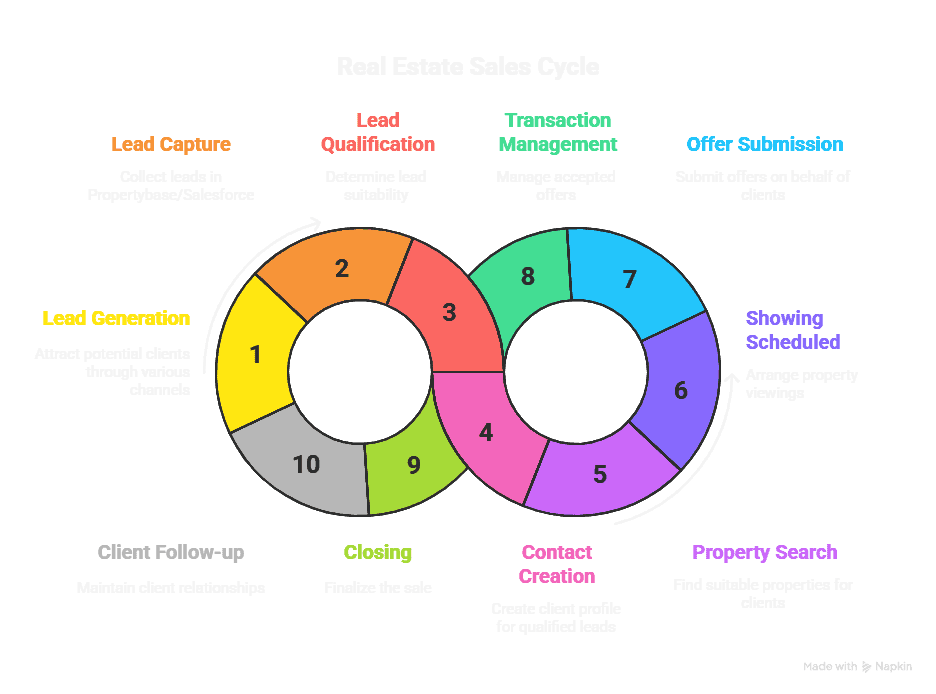
Step-by-Step Data Flow
This section details the data flow depicted in the diagram above.
- Lead Generation: Potential clients are generated through various channels, including website forms, online advertising, social media, and referrals.
- Lead Capture: Information from these leads is captured directly into Propertybase/Salesforce, typically through web-to-lead forms or manual entry.
- Lead Qualification: The lead is assessed based on pre-defined criteria (e.g., budget, timeline, location preferences) to determine if they are a qualified prospect.
- Contact Creation (Qualified Leads): If the lead is qualified, a Contact record is created in Propertybase/Salesforce, storing their detailed information.
- Lead Nurturing (Unqualified Leads): If the lead is not yet qualified, they are placed into a lead nurturing program, receiving targeted content and communications to educate them and move them closer to qualification.
- Property Search: The agent works with the qualified contact to understand their property requirements and initiates a property search.
- Property Match: The system identifies properties that match the contact’s criteria.
- Showing Scheduled (Property Match): If a suitable property is found, a showing is scheduled for the contact to view the property.
- Offer Submission: After the showing, if the contact is interested, an offer is submitted on the property.
- Offer Accepted: The seller reviews the offer and decides whether to accept it.
- Transaction Management (Offer Accepted): If the offer is accepted, the transaction moves into the transaction management phase, involving tasks such as inspections, appraisals, and legal documentation.
- Closing: The transaction culminates in the closing, where ownership of the property is transferred to the buyer.
- Client Follow-up: After the closing, the agent maintains contact with the client to build relationships, solicit referrals, and provide ongoing support.
- Continue Property Search (Offer Rejected/No Match): If the offer is rejected or no suitable property is found, the property search continues.
- Lead Recycling: Leads that were initially unqualified are periodically re-evaluated to determine if their circumstances have changed, potentially moving them into the qualified lead stage.
Why Use Customization?
Propertybase is strong out of the box, but customization bridges the gap between generic workflows and your unique business model.
Gap 1: Lead Routing Bottlenecks
Without automation, leads often sit in a general inbox, delaying response times.
Solution: Build a Flow that uses geolocation from the lead’s address to auto-assign to the nearest available agent.
Result: One brokerage cut average lead response time from 3 hours to 15 minutes.
Gap 2: Listing Data Quality
Agents sometimes forget to attach key listing data, leading to incomplete website updates.
Solution: Apex trigger that blocks Listing__c status change to “Published” unless mandatory fields (photos, description, price) are filled.
Result: Reduced incomplete listings on website by 100%.
Key Benefits
Benefit | Technical How | Business Impact | Example |
Faster Lead Response | Flow with Decision + Assignment rules | Shorter sales cycle | 15 min avg. response time |
Accurate Listings | Apex validation | Better client trust | 100% complete listings |
MLS Data Sync | Scheduled API job | Up-to-date site | Listings updated every hour |
Compliance Ready | Platform Encryption | Avoid penalties | GDPR-compliant storage |
Insightful Reporting | Custom report types | Data-driven coaching | Agent leaderboard dashboard |
Reduced Manual Work | Bulk API imports | Save staff hours | 10 hrs/week saved |
Scalability | Modular Flow design | Support growth | Handle 10x listings |
Practical Must-Use Features
- Bulk API 2.0 – For importing large property datasets. Avoid hitting governor limits by batching records.
- Lightning App Builder – Build agent dashboards showing pipeline, tasks, and new listings.
- Platform Events – Notify agents instantly when a property’s status changes.
- Record Types & Page Layouts – Customize for residential vs. commercial workflows.
- Validation Rules – Ensure consistent data entry.
- Custom Metadata Types – Store MLS API credentials for easy environment migration.
Twopir-Proven Checklist:
- Test new Flows in Sandbox before deployment.
- Monitor API limits daily.
- Encrypt sensitive fields.
- Document all automation.
- Train agents on new UI changes.
Real-World Use Cases
Case Study 1: Luxury Brokerage
Challenge: High-end clients expected instant updates when listings hit the market.
Solution: Built Platform Event triggers tied to MLS API calls, pushing instant mobile alerts to agents.
Result: First-showing bookings increased 45%.
Case Study 2: Multi-Office Franchise
Challenge: Multiple offices with inconsistent lead management.
Solution: Created a global Flow with Decision elements that route based on zip code and agent availability.
Result: 37% higher conversion rate across offices.
Conclusion
Customizing Propertybase within Salesforce isn’t just an IT task—it’s a growth strategy. By combining real estate–specific objects with Salesforce’s automation, API, and security features, you can create a CRM that not only fits your business but drives measurable results. Whether it’s faster lead routing, better listing accuracy, or real-time MLS updates, the payoff is faster closes, happier clients, and a more productive team.
The next step? Identify the bottleneck costing you the most—lead delays, bad data, or slow reporting—and test a targeted customization in a sandbox. Implement, measure, and refine. Over time, these incremental improvements compound into a major competitive advantage

