
Introduction
In today’s fast-paced business environment, automation is no longer a luxury—it’s a necessity. Salesforce, the leading CRM platform, provides businesses with robust tools to manage customer relationships efficiently. However, when it comes to document workflow automation, Salesforce’s native capabilities may not be enough. This is where AirSlate, a powerful no-code workflow automation platform, comes into play.
Integrating AirSlate with Salesforce enables businesses to automate document-heavy processes, from contract generation to approvals, invoicing, and beyond. This integration helps companies reduce manual efforts, eliminate human errors, and significantly speed up business operations. Studies show that businesses that implement workflow automation see up to a 40% increase in operational efficiency and a 30% reduction in document processing time.
In this blog, we will explore the technical aspects of integrating Salesforce with AirSlate, key benefits, real-world use cases, and best practices to ensure a seamless implementation.
Understanding Salesforce and AirSlate
What is Salesforce?
Salesforce is a leading customer relationship management (CRM) platform that enables businesses to manage customer interactions, sales processes, and marketing campaigns efficiently. It offers a suite of tools designed to enhance customer engagement, automate tasks, and provide valuable insights through data analytics.
What is AirSlate?
AirSlate is an end-to-end workflow automation platform that empowers businesses to digitize and streamline document processes. It provides features such as electronic signatures, document generation, robotic process automation (RPA), and integration with CRM systems like Salesforce.
Core Components of AirSlate for Salesforce Integration:
Bots & Automation: AirSlate offers no-code bots that automate document workflows without requiring extensive IT involvement.
eSignature Integration: Secure and legally binding eSignatures allow businesses to process agreements without delays.
Data Mapping & Syncing: Seamless two-way data flow between Salesforce and AirSlate ensures that documents remain updated in real-time.
Pre-Built Templates: Businesses can use pre-built contract, invoice, and proposal templates for rapid deployment.
Workflow Analytics: Gain insights into bottlenecks and process efficiency through built-in analytics dashboards.
Why Integrate Salesforce and AirSlate?
Integrating Salesforce with airSlate combines the strengths of both platforms, allowing businesses to leverage Salesforce’s robust CRM capabilities alongside airSlate’s powerful workflow automation. This integration can significantly enhance operational efficiency, reduce manual tasks, and ensure seamless data flow between systems.
Manual Paperwork Overload:
Before: Sales teams manually create contracts, leading to errors.
After: Automated contract generation and eSignatures reduce delays.
Compliance & Security Concerns:
Before: Storing and tracking documents manually leads to compliance risks.
After: AirSlate ensures compliance with HIPAA, GDPR, and SOC 2 standards.
Inefficient Approval Workflows:
Before: Multi-level approvals slow down contract finalization.
After: Automated routing speeds up approvals and reduces turnaround time.
Key Features of AirSlate in Salesforce:
A. Build Documents:
- Create Custom Documents: Use pre-built templates or create custom documents from scratch.
- Drag-and-Drop Editor: Easily format text, add images, and incorporate fields with a user-friendly drag-and-drop editor.
- Collaboration: Work collaboratively on documents with team members in real time.
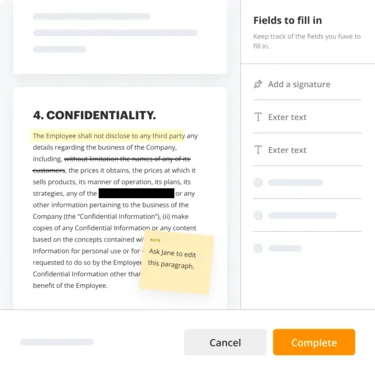
1.PDF Editing:
- Annotate PDFs: Highlight text, add comments, and draw shapes on PDFs.
- Edit Content: Modify text and images directly within PDF files.
- Merge and Split PDFs: Combine multiple PDFs into one document or split a single PDF into multiple files.
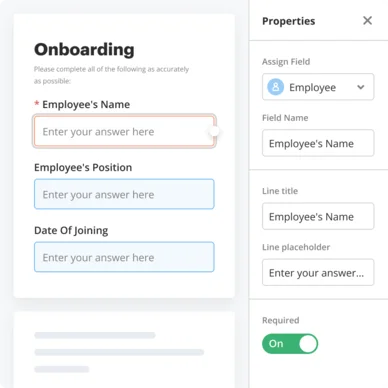
2. Web Forms:
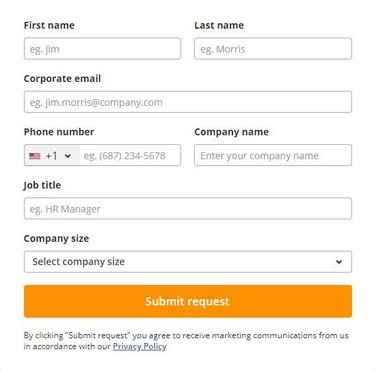
- Form Builder: Create custom web forms with various field types, including text, dropdowns, checkboxes, and more.
- Conditional Logic: Implement logic to show or hide fields based on user responses.
- Responsive Design: Ensure forms are accessible and functional on any device.
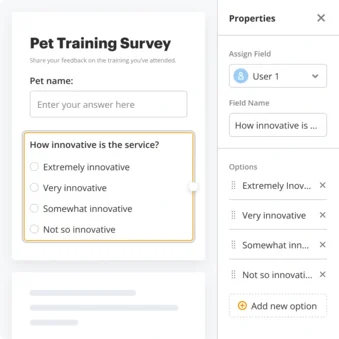
3. Online Surveys:
- Survey Builder: Design surveys with multiple question types, including multiple-choice, rating scales, and open-ended questions.
- Automated Data Collection: Automatically collect and store survey responses in a structured format.
- Analysis Tools: Use built-in tools to analyze survey results and generate reports.
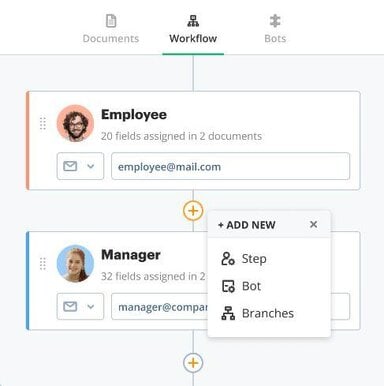
B.Automate Workflows
- Workflow Designer: Create automated workflows with a visual, drag-and-drop interface.
- Integrations: Connect workflows with other tools and systems to automate data transfer and tasks.
- Triggers and Actions: Set up triggers to initiate workflows and define actions to be taken automatically.
1. Flow Creator:
- Flow Templates: Use pre-built flow templates for common business processes.
- Custom Flows: Design custom flows to meet specific business needs.
- User-Friendly Interface: Create and manage flows without needing coding skills.
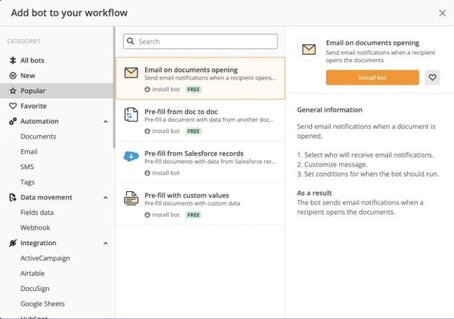
2. Robotic Process Automation (RPA):
- Task Automation: Automate repetitive tasks such as data entry, file handling, and more.
- Bots: Use bots to perform tasks without human intervention.
- Integration: Connect RPA with existing systems to streamline operations.
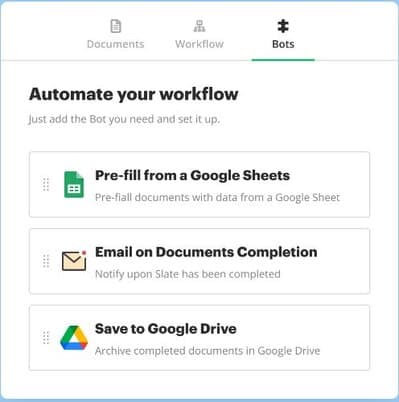
3. Workflow Automation Software:
- Comprehensive Automation: Automate end-to-end workflows across departments and systems.
- Real-Time Monitoring: Track the progress and performance of automated workflows in real time.
- Scalability: Scale automation efforts as business needs grow and change.
C. Complete Contracts:
- Contract Templates: Use standard templates for various types of contracts.
- Customization: Customize contracts to fit specific requirements and conditions.
- Automated Workflows: Automate the creation, review, and approval of contracts.
1. E – Signature:
- Digital Signatures: Collect legally binding electronic signatures on documents.
- Multiple Signers: Manage documents requiring signatures from multiple parties.
- Audit Trails: Maintain detailed records of signing activities for compliance purposes.
2. Contract Negotiation:
- Collaborative Editing: Allow multiple parties to review and edit contract terms simultaneously.
- Version Control: Track changes and maintain a history of contract versions.
- Approval Workflows: Set up automated approval workflows for contract negotiations.

3. Contract Management:
- Repository: Store and organize contracts in a centralized repository.
- Lifecycle Management: Manage the entire lifecycle of contracts from creation to renewal or termination.
- Alerts and Notifications: Receive alerts for key contract dates and milestones.
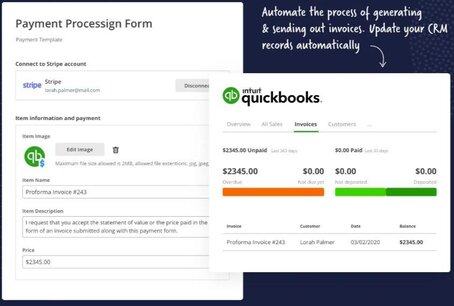

D.Integrate Systems
- API Integrations: Connect airSlate with various third-party applications and systems via APIs.
- Pre-Built Connectors: Use pre-built connectors for popular tools like CRM, ERP, and more.
- Custom Integrations: Build custom integrations to meet specific business needs.
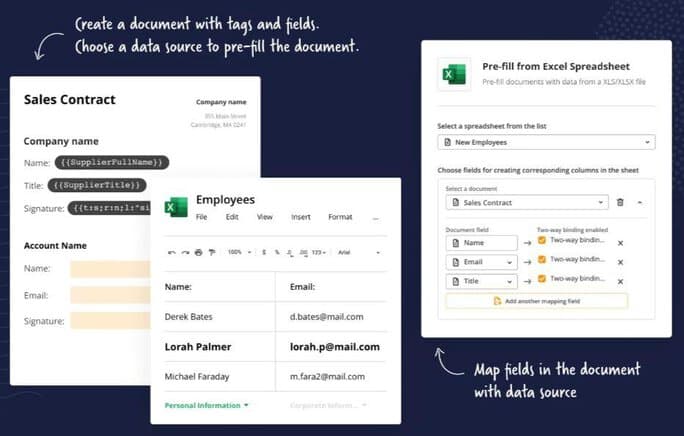
1. Document Generation:
- Dynamic Documents: Generate documents dynamically based on data inputs.
- Templates: Use and customize templates for various document types.
- Batch Processing: Generate multiple documents in bulk with a single action.
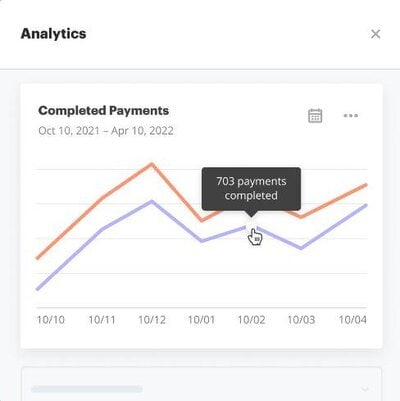
2. Process Analytics:
- Dashboard: Monitor the performance of workflows and processes with an intuitive dashboard.
- Reports: Generate detailed reports on process metrics and performance.
- Insights: Gain insights into process efficiency and identify areas for improvement.
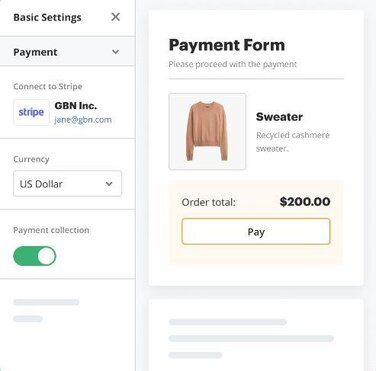
3. Payments:
- Payment Collection: Integrate payment collection into workflows and forms.
- Payment Gateways: Use popular payment gateways like Stripe, PayPal, and more.
- Automated Invoicing: Generate and send invoices automatically based on workflow actions.
How to Integrate AirSlate with Salesforce
1. Install AirSlate:
1. Go to the Salesforce AppExchange and find the AirSlate app.
2. Install the app in your Salesforce environment.
2. Connect AirSlate to Salesforce:
1. Use the AirSlate connector to integrate with your Salesforce instance.
2. Authenticate and configure the connection settings.
3. Create Document Templates:
1. Design your document templates within AirSlate.
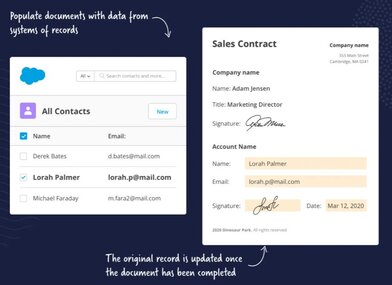
2. Map Salesforce fields to the appropriate sections of your templates.
4. Set Up Workflows:
1. Define your workflow steps, including document generation, review, approval, and signing.
2. Configure triggers based on Salesforce events.
5. Automate and Monitor:
1. Enable your workflows and monitor their progress.
2. Use AirSlate’s analytics and reporting features to track performance and identify bottlenecks.
Benefits of Using AirSlate with Salesforce
1. Increased Efficiency:
1. Reduce manual data entry and document handling.
2. Streamline processes to save time and reduce errors.
2. Improved Customer Experience:
1. Speed up the document signing process for customers.
2. Provide a seamless and professional experience.
3. Enhanced Collaboration:
1. Enable better collaboration among team members with automated workflows.
2. Ensure that everyone is on the same page with real-time updates.
4. Data Accuracy:
1. Ensure data consistency between Salesforce and your documents.
2. Minimize the risk of errors due to manual data entry.
5. Scalability:
1. Scale your document workflows as your business grows.
2. Handle increased document volumes without additional manual effort.
6. Compliance and Auditability:
1. Maintain compliance with industry standards and regulations.
2. Keep detailed audit trails for all document actions.
Real-World Use Cases:
1. Real Estate Firm Streamlining Contracts:
- Challenge: Real estate agents wasted hours manually creating, editing, and sending contracts, leading to delays.
- Solution: AirSlate automated contract generation and eSignatures, enabling quick, error-free document processing.
- Results: Contract turnaround time was reduced by 60%, improving deal closure speed and client satisfaction.
2. Healthcare Provider Enhancing Compliance:
- Challenge: Paper-based consent forms caused inefficiencies and compliance risks with HIPAA regulations.
- Solution: AirSlate digitized and automated the consent form collection process, ensuring secure storage.
- Results: Achieved 100% compliance, with automated audit trails for regulatory verification.
Conclusion:
Integrating AirSlate with Salesforce unlocks new levels of automation, efficiency, and compliance for businesses handling extensive document workflows. By leveraging features like automated document generation, eSignatures, and real-time data syncing, organizations can significantly reduce manual effort and operational bottlenecks.
Next Steps:
Test the integration in a Salesforce sandbox environment.
Customize workflows to match specific business needs.
Monitor analytics to optimize efficiency over time.
As digital transformation accelerates, businesses that embrace automation will stay ahead of the competition. With Salesforce & AirSlate, you can streamline operations, improve compliance, and enhance customer satisfaction—ensuring long-term success in today’s dynamic market.

