
Introduction
In the digital-first real estate market, visibility is currency. You could have the most advanced Propertybase-powered Salesforce setup, a highly trained sales team, and a portfolio of dream properties — but if your target audience can’t find you online, those investments underperform.
According to recent industry research, 68% of real estate buyer journeys begin with a Google search. Yet, many Propertybase websites underperform in search rankings, not because the agents aren’t great at closing deals, but because their SEO foundations are weak.
This is where a technical SEO audit becomes critical. By systematically evaluating your Propertybase website’s structure, content, and integration with Salesforce, you can unlock visibility, boost organic lead generation, and create a seamless bridge between marketing and CRM.
The Real Estate Sales Cycle (as shown in the diagram) — from lead generation to closing — depends heavily on timely, high-quality leads. An SEO audit ensures your online funnel is optimised to feed that sales cycle continuously, whether you’re targeting local buyers, international investors, or niche commercial segments.
In this guide, we’ll walk through a comprehensive SEO audit checklist designed specifically for Propertybase websites running on Salesforce, breaking down both the technical and strategic elements you need to address.
What is an SEO Audit for Propertybase Websites on Salesforce?
An SEO audit is a systematic review of your website to identify technical issues, content gaps, and optimisation opportunities that may be limiting search engine visibility.
For Propertybase websites integrated with Salesforce, the audit takes on an added layer of complexity because you’re not just optimising a static marketing site — you’re optimising an active CRM-driven property portal that may pull listings dynamically, manage lead forms, and sync client data with Salesforce.
Core Components of a Propertybase SEO Audit
- Technical Website Health Check
- Crawlability, indexing, and sitemap validation.
- Ensuring the website is accessible to search bots without exposing sensitive CRM data.
- On-Page Optimisation Review
- Title tags, meta descriptions, header structures, and property detail page optimisation.
- Dynamic field handling for MLS/IDX feeds within Propertybase templates.
- CRM & Website Integration Performance
- Ensuring forms, lead capture mechanisms, and property search tools load fast, work on mobile, and sync seamlessly with Salesforce.
Key Terminology
- IDX (Internet Data Exchange) – Protocol that allows real estate websites to display MLS listings. Proper implementation affects SEO indexing.
- Dynamic Rendering – Serving pre-rendered HTML to search engines for content-heavy pages generated via JavaScript.
- Structured Data Markup – Schema.org property listing tags that help Google understand your content and enhance search results with rich snippets.
- Canonical Tags – Preventing duplicate content when the same listing appears under multiple URLs.
- Core Web Vitals – Google’s page speed and user experience metrics, which directly influence ranking.
Architecture of a Propertybase + Salesforce Website SEO Setup
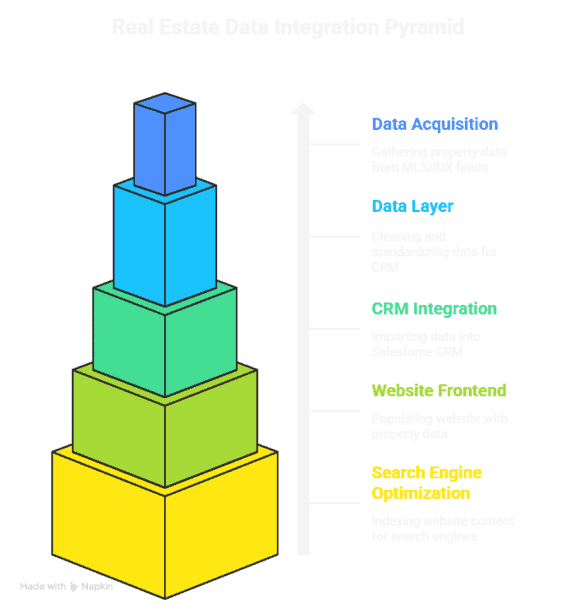
A simplified architecture for how SEO elements interact in this environment looks like this:
Step-by-Step Data Flow
- MLS/IDX Data Feed brings in property listings via API or RETS protocol.
- Propertybase Data Layer stores and structures this data for both CRM and website.
- Salesforce CRM Core manages leads, clients, and associated listings.
- Website Frontend dynamically displays listings, agent profiles, and resources.
- Search Engine Crawlers index optimised pages based on sitemap and metadata.
Why Use an SEO Audit for Propertybase Websites?
Without an SEO audit, you risk losing up to 50% of your potential organic leads due to:
- Duplicate MLS Content – Multiple agents showing the same listing can cause ranking conflicts.
- Slow Page Loads – Heavy images, scripts, or poorly cached API calls hurt both UX and SEO.
- Incomplete Metadata – Automated listing pages often miss unique meta descriptions or titles.
Case Example:
A mid-sized brokerage in California noticed a sharp decline in organic leads despite heavy PPC spend. The audit revealed that their dynamic property pages weren’t being indexed due to JavaScript rendering issues. After implementing server-side rendering for those pages, organic traffic grew by 37% in 90 days without additional ad spend.
Key Benefits of Running a Propertybase SEO Audit
Here are six strategic benefits — each tied to technical improvements:
- Improved Crawlability
- Technical: Clean XML sitemaps ensure Google discovers all key pages.
- Impact: More listings are indexed faster.
- Example: A New York agency saw 20% more property pages in Google’s index after sitemap restructuring.
- Faster Page Loads (Core Web Vitals)
- Technical: Lazy-load images and leverage CDN.
- Impact: Lower bounce rates and higher engagement.
- Better Mobile Usability
- Technical: Responsive IDX templates and mobile-first design.
- Impact: More leads from mobile users (now >65% of traffic).
- Duplicate Content Resolution
- Technical: Use canonical tags and unique property descriptions.
- Impact: Prevents SEO dilution and ranking drops.
- Enhanced Lead Capture
- Technical: Optimised form loading and CRM sync speed.
- Impact: Higher form completion rates.
- Structured Data Implementation
- Technical: Rich results for listings (price, location, status).
- Impact: Higher click-through rates from SERPs.
Practical Must-Use Features in a Propertybase SEO Setup
- Bulk Metadata Editing
- Benefit: Quickly optimise hundreds of listing titles/descriptions.
- Pitfall: Avoid over-optimisation (keyword stuffing).
- Dynamic XML Sitemap Generation
- Benefit: Always up-to-date with current listings.
- Best Practice: Separate sitemaps for listings, blog posts, and location pages.
- Schema.org Property Markup
- Benefit: Rich search snippets with pricing and photos.
- IDX Integration Optimisation
- Benefit: Faster page rendering via caching.
- Local SEO Enhancements
- Benefit: Google Business Profile integration and location-specific landing pages.
Twopir-Proven Checklist:
- Test page speed on mobile and desktop.
- Validate schema with Google’s Rich Results Test.
- Crawl site for duplicate URLs.
- Check robots.txt for accidental blocking.
- Verify Salesforce-Propertybase form tracking in GA4.
Real-World Use Cases
Case Study 1: Luxury Brokerage, Miami
- Challenge: High bounce rate on mobile property pages.
- Solution: Compressed images, implemented AMP for property detail pages.
- Result: 45% faster load times, +28% organic leads.
Case Study 2: Nationwide Real Estate Franchise
- Challenge: Duplicate content from syndicated listings harming SEO.
- Solution: Added canonical tags and unique meta data for each office’s pages.
- Result: 60% increase in indexed pages, 20% uplift in organic search traffic.
Conclusion
A Propertybase website on Salesforce is more than a digital brochure — it’s the front door to your sales cycle. An SEO audit ensures that door is wide open for the right traffic, at the right time, feeding your CRM with high-quality leads.
From technical fixes like crawlability and Core Web Vitals to strategic enhancements like structured data and local SEO, this checklist is your roadmap to outperforming competitors in search rankings.
Pro Tip: Run a full SEO audit at least twice a year and after any major Propertybase or Salesforce update to stay ahead of algorithm changes and industry shifts.
The payoff? A steady, optimised flow of leads that keeps every stage of your Real Estate Sales Cycle — from lead generation to closing — running at full speed.

