
Introduction
Imagine a manufacturing plant where cutting, lathe, or CNC machines face unexpected downtime—but service teams struggle to locate asset history or track warranty coverage. In fact, a recent PTC/ServiceMax study found that organizations without proper asset visibility lose up to 25% in service revenue due to free labor, parts, and missed upsell opportunities.
ServiceMax’s Installed Product Management delivers a 360° view of customer-installed assets—CNC, cutting, lathe, and other manufacturing machines—providing teams with granular insight into every asset’s location, service history, and operational status . Whether you’re embedded in Salesforce or running a standalone ServiceMax deployment, IPM centralizes all asset data into a single system of record, enabling real-time intelligence and operational control.
With each Installed Product record—able to represent either a single unit or a batch—your organization tracks assets by serial number, batch number, or product number, based on needs. These records become the core reference for entitlements, service delivery, and material movement.
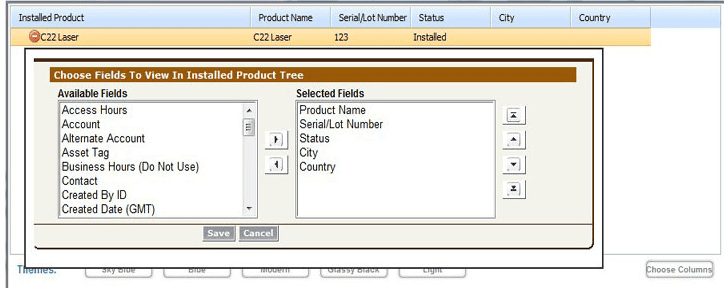
Organizations gain full asset lifecycle visibility—including location, usage, maintenance history, and operational status—all of which drive accurate planning, regulatory compliance, and proactive field operations.
ServiceMax users typically experience:
- 23% boost in technician productivity
- 15% rise in first-time fix rates
- 25% added service revenue
Here’s the nitty-gritty: this guide dives into the core components, architecture, benefits, features, and robust use cases of Installed Product Management—giving you the Twopir-level detail you need to implement and excel.
What is Installed Product Management?
Installed Product Management (IPM) is the enterprise-grade capability for asset-centric field service operations. It empowers businesses with a comprehensive 360° view of customer-installed equipment—CNC, cutting, lathe, and more—through precise tracking and management.
Core Components:
- Installed Product Object
Each record represents one or multiple units—tracked via serial number, batch/lot number, or product number—meeting diverse tracking requirements. The Installed Product record is foundational, driving entitlements, service delivery, and material movement. - Installed Product Lookup (IPL)
Enables accurate mapping between external systems (IoT, ERP) and ServiceMax records by leveraging unique identifiers or combination keys (External Unique Key). - Service Flow Manager (SFM)
A no-code Salesforce-based engine managing workflows—automatic PMs, more intelligent RMAs, case auto-creation, and work-order generation—tied directly to Installed Product records.
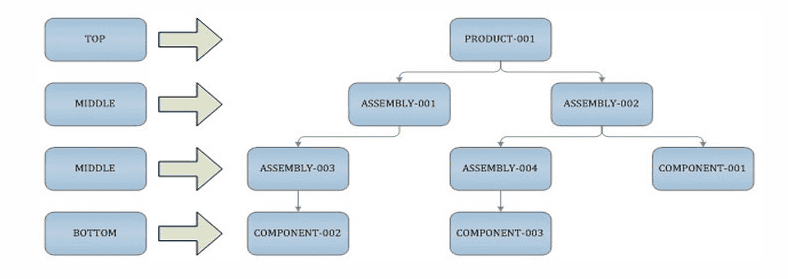
In Salesforce-integrated setups (Asset 360):
- Asset Hierarchy & Timeline: Parent-child structures and rich asset timelines enhance operational insight.
- Technical Attributes: IoT-driven metrics support condition-based servicing.
- Entitlement Engine: Automated warranty and contract enforcement enables smarter decision-making.
Configuration Example:
Deploying serial‑tracked CNC machines across global sites? Here’s a practical setup:
- Define serial number as the External Unique Key in IPL to map event payloads accurately.
- Configure an SFM transaction:
- Source: Installed Product
- Action: Create Preventive Maintenance WOs, mapping scheduled-date and technician fields.
- Source: Installed Product
- Activate recurring work-orders automatically in the Service Board.
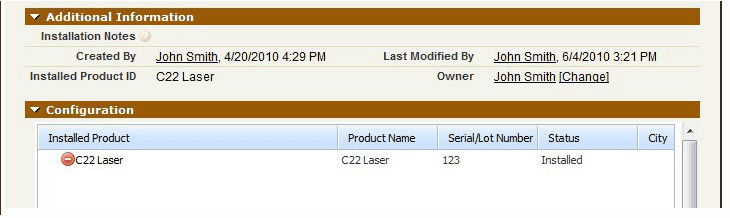
Architecture:
Data/Process Flow Diagram

Architecture Walk‑Through:
- Entry Point:
Technical or IoT events, triggered by serial or batch identifiers, land via Installed Product Lookup into the ServiceMax record . - Processing via SFM:
Pre-configured workflows generate work orders, PM campaigns, field change orders, and RMAs based on asset context. - Entitlements & Coverage:
Cases and WOs pass through the automated entitlement engine which validates warranty and contract entitlements. - Material Logistics / RMA:
Service flows auto-generate part orders, reverse logistics, and shipments based on Installed Product status. - Analytics & Optimization:
Dashboards display asset utilization, cost‑to‑serve, contract health, and campaign effectiveness via Asset 360 analytics.
For Salesforce-led environments, this architecture overlays smoothly onto Field Service Lightning with Asset relationships, entitlement layers, and real-time dispatching.
Why Use Installed Product Management?
Addressing Visibility and Lifecycle Gaps:
Field teams often struggle to track where assets are, what their maintenance history looks like, and whether they’re still operational. ServiceMax’s Installed Product Management solves this by providing a 360° view of all customer-installed assets—CNC, cutting, lathe, and more—enabling teams to see every asset’s location, maintenance history, and live operational status.
Enhancing Compliance and Recall Readiness:
When regulatory compliance or manufacturer recalls hit, organizations without asset lifecycle tracking risk non-compliance and costly delays. With Installed Product records serving as a core reference for service delivery, entitlements, and material movement, you can rapidly identify impacted units and trigger automated field change orders and RMAs.
Optimizing Service Delivery:
Each Installed Product record—tracking single or multiple units by serial, batch, or product number—drives entitlement verification, work order creation, and part logistics. This foundation supports Service Flow Manager (SFM) automation and entitlement engine integrations, delivering tightly coordinated, proactive field operations.
Proactive Field Operations:
With 360° asset lifecycle visibility, teams can transition from reactive break-fix tactics to proactive maintenance, condition-based triggers via IoT, and preventive planning. The result: less downtime, higher first-time fix rates, and more efficient service routes.
Key Benefits:
Benefit Summary Table
Feature | Technical Mechanism | Business Impact | KPI Improvement |
Serial/Batch Asset Handling | Installed Product record | Single unit or batch visibility | 100% accurate service planning |
Entitlement Validation | EPL + Entitlement Engine | Prevents free labor and parts | 15–25% reduced leaks |
Automated Work Order & PM Loop | SFM-triggered PM creation | Consistent, preventive servicing | 20%+ reduction in downtime |
Recall & Compliance Campaigns | Asset filters + Field Change Order | Faster, targeted asset notifications | 30% quicker turnaround in campaigns |
IoT‑Driven Condition-Based Plans | Asset Technical Attributes | Predictive repairs before failures | ~15% decrease in unplanned outages |
Analytics & Dashboards | Asset 360 dashboards | Data-driven decision-making for service leaders | 7%+ increase in contract attach rates |
Deep Dive: Mechanisms & Outcomes:
- Serial/Batch Tracking
Installing a product under single or batch mode allows tailored tracking per asset, improving service accuracy. This is configured within the Installed Product record fields. - Entitlement and Coverage Enforcement
When a work order or service request is generated, the entitlement engine matches contracts against the Installed Product using account, date, and location fields. This ensures that service jobs are covered and billable. - Preventive Maintenance Automation
Using SFM, scheduled PM work orders are auto-generated from Installed Product data—no manual intervention. Standard templates support this included in Asset 360. - Recall / Compliance Campaigns
Filter on Installed Product criteria to identify affected assets, then push Field Change Orders and RMAs at scale using automated workflows . - IoT‑Enabled Condition-Based Maintenance
By ingesting telemetry into Asset Technical Attributes, ServiceMax can auto-trigger PMs when thresholds are exceeded, reducing unplanned downtime. - Service Analytics & Dashboards
Built-in dashboard templates monitor cost-to-serve, contract attach ratio, and asset profitability, enabling leaders to identify service gaps.
Practical Must‑Use Features:
Feature 1: Installed Product Lookup (IPL)
Description: Maps external identifiers to ServiceMax records.
Benefits: Accurate event-to-asset routing.
Pitfall: Misconfigured External Unique Keys cause mismatches.
Best Practice: Use concatenated formulas for unique key mapping.
Twopir Checklist – IPL
- Choose identifier strategy (serial, batch).
- Build formula field for unique key.
- Align payload structure.
- Run tests in sandbox.
- Backfill missing records.
Feature 2: Automated PM via SFM
Description: Scheduled PMs created per asset record.
Benefits: Reliable preventative maintenance.
Pitfall: Misaligned scheduling dates.
Best Practice: Include custom date fields in mapping and use Service Board for oversight.
Feature 3: Entitlement Validation Engine
Description: Auto-validates service coverage during WO creation.
Benefits: Reduces revenue leakage.
Pitfall: Incomplete contract configurations.
Best Practice: Define entitlement rules checking account, date, and location fields
Feature 4: Asset Hierarchy & Technical Attributes
Description: Parent-child asset structuring with IoT data.
Benefits: Detailed insights for component-level servicing.
Pitfall: Data overload.
Best Practice: Filter key attributes; configure hierarchy views .
Feature 5: Field Change Order Campaigns
Description: Asset-wide updates and recalls.
Benefits: Streamlined compliance responses.
Pitfall: Over-broad filters.
Best Practice: Test queries in sandbox before rollout.
Case Studies:
Case Study 1: CNC Manufacturer:
Industry Context
A CNC OEM tracked machines globally but lacked unified asset insight. Installed products varied by serial numbers and had no record of service history or location. Regulatory audits and maintenance scheduling were manual and error-prone.
Challenge
Asset visibility gaps led to 18% revenue leakage from missed entitlements. Downtime issues often took days to diagnose. Recall compliance required manual searches.
Solution
Twopir configured Installed Product records using serial+model formula keys. IPL was set up to map all IoT events and ERP data. SFM flows generated PM work orders every quarter per asset. Entitlement rules (account, date, location) were implemented for each WO. Asset hierarchy was built for component traceability and IoT thresholds triggered condition-based PMs. Campaign flows issued firmware updates using field change order automation.
Results
- PM compliance soared to 98%
- Downtime decreased 35%
- Dispatch labor costs cut 20%
- Contract renewals increased by 22%
Insights
Right key configuration is mission-critical. Testing in sandbox with hierarchies avoided data skew. Quarterly tracking validated ROI.
Case Study 2: Regional Printing Services:
Industry Context
An EMEA large-format print services company had hundreds of printers with tracking managed in spreadsheets. Field techs often went to sites without correct parts or service history.
Challenge
First-time fix rate hovered around 68%. RMAs were delayed due to wrong parts. Contract attach fell below 60%.
Solution
Twopir built Installed Product records with serial tracking linked to ERP parts master via IPL. SFM transactions created RMAs and shipments directly tied to the installed product from service cases. Entitlement grid surfaced live warranty and contract details. Automated PMs and field change campaigns enforced asset updates. Dashboards tracked cost-to-serve, asset performance, and renewal opportunities .
Results
- First-time fix rate jumped to 89%
- Service revenue grew 18% YoY
- Technician travel time reduced by 25%
- Contract attach rate rose to 78% (+15%)
Insights
Mobile-enabled asset visibility saves time and prevents part errors. Automated campaigns accelerated recall compliance.
Conclusion:
Installed Product Management in ServiceMax empowers teams to manage CNC, cutting, lathe, and other assets with full visibility, accurate service planning, and proactive workflows. At its core, each Installed Product record—whether tracking single units or batches—drives entitlements, service delivery, and material movement.
By leveraging IPL, SFM, entitlement rules, and IoT data alongside Asset Hierarchy and Analytics, organizations unlock real-time operational control with measurable impact: reduced downtime, higher FTF rates, stronger contract renewals, and compliance readiness.
Your Checklist:
- Set up Installed Product records with correct tracking modes.
- Configure IPL mappings and entitlement rules.
- Automate PMs and field campaigns with SFM.
- Deploy asset hierarchies and IoT attributes.
- Leverage analytics to optimize service outcomes.
Call to Action:
Start in sandbox: create an Installed Product, enable IPL and entitlement rules, and trigger your first PM WO. Monitor results over 30 days, and iterate based on dashboard insights.
Forward Look:
Elevate IPM with AI-driven failure prediction and IoT analytics in Asset 360 to shift to outcome-based service agreements.

