
Introduction
In the fast-paced world of Salesforce management, bulk operations are crucial to keep up with growing data and tasks. Mass Action Scheduler simplifies this by automating large-scale data processing, updates, and actions across records in Salesforce. In this blog, we’ll explore how this tool empowers Salesforce admins and developers to save time and increase operational efficiency.
What is Mass Action Scheduler?
Mass Action Scheduler is a free, open-source Salesforce app that allows users to schedule and automate mass updates, deletions, or actions on Salesforce records without the need for custom code. By configuring jobs, you can schedule actions on hundreds or thousands of records based on customizable criteria.
Key Features
- Automated Processes: Schedule mass updates, deletes, or actions on any Salesforce record type.
- Scheduled and Recurring Jobs: Set jobs to run at a specific time, on a recurring schedule, or trigger based on specific events.
- Customizable Filters: Use Salesforce report filters to precisely target records for mass action.
- Support for Standard & Custom Objects: Whether you’re working with standard Salesforce objects like Accounts or custom-built objects, the app supports both.
- Integration with Flows and Processes: Leverage Salesforce’s declarative tools like Process Builder and Flows to further enhance automation.
How to Use Mass Action Scheduler
- Install the App: Available on the Salesforce AppExchange, the Mass Action Scheduler installation is straightforward and includes basic configuration steps.
- Create a Job: After installation, you can create new jobs directly from the app. Select the action you want to perform (mass update, delete, etc.), specify the record type, and add your filters using report criteria.
- Set a Schedule: Define when and how often the action will be performed—whether it’s a one-time process or a recurring task.
- Monitor and Manage Jobs: You can track the status of each job, view detailed logs, and even pause or modify jobs as necessary.
What can you do with a Mass Action Scheduler?
- Run a process monthly, maybe to create a record or callout to an external system
- Run data correction actions daily
- Automatically add leads and contacts to campaigns based on report or list view criteria
- Send emails on a periodic basis
- Create “infinite” flows that continuously loop on a schedule
- Perform field updates without exporting or importing data
Steps:
1. Create a new record under Mass Action Configurations.
2. Add detailed information.
- Choose Source data to process.
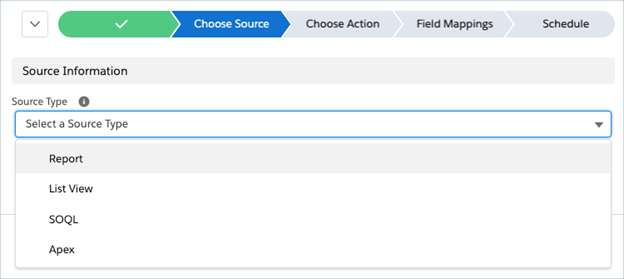
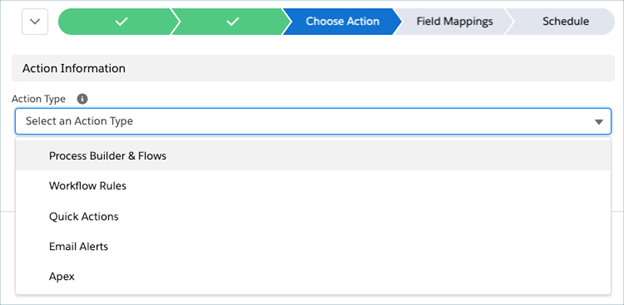
- Choose an action to automate
- Map fields as inputs to selected action
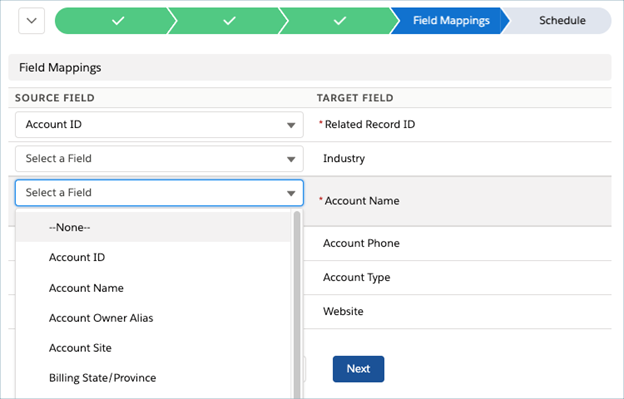
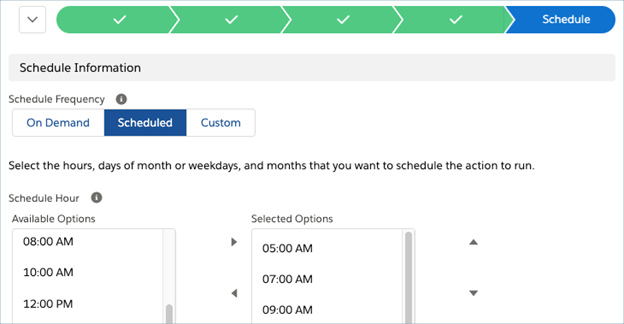
- Choose how often to automate action.
Receive near real-time updates on batch job successes and failures like below.
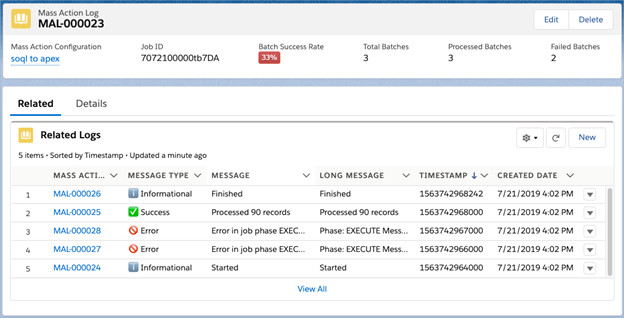
how to use Mass Action Scheduler with examples.
Summary
The Mass Action Scheduler for Salesforce is a powerful tool for admins looking to automate bulk operations and improve workflow efficiency. By leveraging this free app, Salesforce users can save time, avoid repetitive tasks, and focus on higher-level strategy and optimization.

