
Introduction :
In the hyper-competitive SaaS market, speed, precision, and customer insight are everything. Deals can be won or lost in the space of a single customer interaction. Yet, many SaaS companies still rely on fragmented sales processes, disconnected tools, and manual reporting, which cause pipeline blind spots and missed opportunities.
Enter Salesforce CRM — not just a contact database, but a powerful, configurable sales engine designed to handle the unique demands of SaaS sales cycles. From automated lead qualification to AI-powered forecasting, Salesforce equips sales teams with the intelligence, automation, and integration capabilities needed to close deals faster.
Consider this: According to a 2024 SaaS Sales Benchmark Report, companies using advanced CRM automation see a 32% higher lead-to-customer conversion rate compared to those using manual systems. Salesforce’s ability to centralise customer data, connect marketing, sales, and customer success, and offer real-time analytics makes it the go-to platform for top SaaS players like Slack, Zoom, and Asana.
In this guide, we’ll unpack why SaaS leaders choose Salesforce CRM to gain a competitive edge, walking you through its architecture, technical features, key benefits, and real-world use cases. We’ll also share a Twopir-proven checklist to ensure your Salesforce implementation delivers measurable ROI.
What is Salesforce CRM?
At its core, Salesforce CRM is a cloud-based platform that centralises customer and prospect data, enabling teams to manage the full customer lifecycle — from lead acquisition to renewal — in one unified system.
Core Components for SaaS Sales:
Sales Cloud:
- Designed for managing opportunities, accounts, and contacts.
- Automates lead routing, scoring, and follow-up tasks.
- Integrates with marketing automation and subscription billing tools.
Einstein AI:
- Uses predictive analytics to identify the most promising deals.
- Offers next-best-action recommendations to sales reps.
- Example: Einstein Lead Scoring can automatically assign a 0–100 score to prospects based on engagement patterns.

API & Integration Layer:
- REST and SOAP APIs connect Salesforce to billing systems (e.g., Chargebee, Stripe), support platforms (e.g., Zendesk), and data warehouses (e.g., Snowflake).
- Enables real-time sync of subscription statuses, payment records, and customer health metrics.
Key Terminology for SaaS Implementations:
- Opportunity Stage Pathing – Customizable sales process stages in Salesforce that align with SaaS lifecycle stages (Trial, Demo Scheduled, Negotiation, Closed Won).
- Platform Events – Event-driven architecture for triggering actions in external apps (e.g., when a trial user upgrades to a paid plan).
- Governor Limits – Salesforce’s processing thresholds to ensure multi-tenant performance; critical for developers building custom SaaS automation.
- Composite API – Allows batching multiple API requests into a single call to reduce latency.
- Lead Conversion Mapping – Ensures that fields from Leads map correctly to Accounts, Contacts, and Opportunities during conversion.
Why Use Salesforce CRM for SaaS?
Gap 1: Disconnected Customer Data:
Without Salesforce, SaaS teams often juggle separate tools for marketing, sales, and support, making it hard to get a unified customer view. Salesforce’s native integrations and APIs consolidate all interactions, providing a single source of truth.
Gap 2: Inaccurate Forecasting
SaaS sales depend on accurate MRR and ARR predictions. Einstein Forecasting uses historical data and engagement trends to deliver real-time, AI-powered forecasts, closing the gap between pipeline perception and reality.
Case Study Example:
A mid-sized SaaS analytics firm was struggling with manual spreadsheets for sales forecasting, leading to missed revenue targets. After implementing Salesforce with Einstein Forecasting and automated renewal alerts, they improved forecast accuracy by 27% in three months and cut churn by 15%.
Is Your Service Built on a Monthly Subscription Model?
For SaaS businesses, churn can be a silent killer. Renewals should never be assumed, especially when operating on a subscription basis. If your product depends on recurring revenue, ensuring customer retention must be a top priority.
Many companies consider a 5% monthly churn rate acceptable, yet this translates to losing more than 40% of customers annually. That not only represents a huge revenue loss but also wastes the investment made in acquiring those customers. Churn often marks the beginning of the end for SaaS companies. No matter how great your product or how strong your marketing team is, your business cannot thrive if customers don’t stay.
The key to reducing churn and driving renewals lies in having a proactive customer success team. By actively onboarding and training new users, while continuously monitoring their engagement and outcomes, businesses can improve customer satisfaction, strengthen loyalty, and secure long-term growth.
Practical Must-Use Features:
1. Einstein Lead Scoring:
- Benefit: Einstein uses machine learning to analyse past opportunities, engagement data, and firmographics to automatically score leads on a 0–100 scale. This allows sales teams to focus their time on the highest-converting prospects instead of manually evaluating every lead.
- Pitfall: The model needs a large enough dataset of won and lost opportunities to generate reliable scoring patterns. Without historical data, predictions may be inaccurate, so start small by training with available records and scale as data volume increases.
- Best Practice: Continuously retrain and refresh the scoring model as customer behaviour, product features, or market conditions change. Regular tuning ensures that scoring remains aligned with the company’s evolving sales motion.
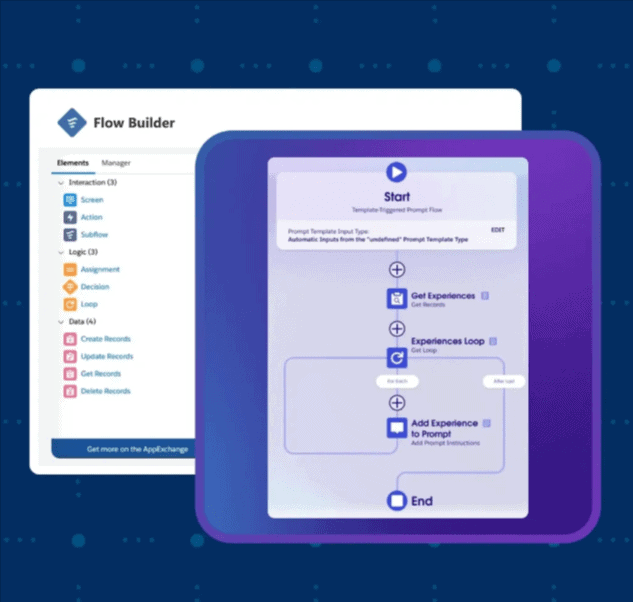
2. Flow Builder for SaaS Automation:
- Use: Salesforce Flow Builder allows you to automate critical SaaS workflows like sending alerts when a trial user upgrades, creating tasks for Customer Success at renewal dates, or auto-generating onboarding cases. This reduces repetitive manual work and ensures no revenue opportunity slips through.
- Best Practice: Always test new Flows in a sandbox before deploying them in production to prevent unexpected errors from disrupting live processes. Use version control for Flows so changes can be rolled back easily if needed.
3. Custom Reports for MRR & Churn
- Use: With Salesforce’s advanced reporting, SaaS companies can create dashboards that track Monthly Recurring Revenue (MRR), Annual Recurring Revenue (ARR), Customer Acquisition Cost (CAC), and Lifetime Value (LTV). These metrics give leadership real-time visibility into growth and retention performance.
- Best Practice: Apply filters to segment reports by customer tier, industry, or geography for deeper insights. For example, tracking churn rates separately for SMBs vs. enterprise clients helps teams prioritise retention strategies where the impact is highest.
Top 4 Key Benefits of Salesforce for SaaS Companies:
Salesforce is a game-changer for SaaS businesses, enabling them to operate more efficiently and accelerate growth. By automating routine tasks, enhancing collaboration, and providing a deeper understanding of customers, it empowers companies to deliver better experiences while staying agile.
The major advantages of Salesforce for SaaS companies include:
1. Streamlining business processes:
Salesforce simplifies workflows by automating repetitive tasks and integrating seamlessly with other business tools. This frees up teams to focus on strategic growth initiatives. Its customizable dashboards and real-time reporting deliver actionable insights that help leaders make smarter, faster decisions.
2. Strengthening customer relationship management:
With its robust CRM capabilities, Salesforce provides a complete view of every customer interaction, making it easier to deliver personalised experiences. Combined with AI-powered analytics, it helps predict customer needs, boost engagement, and strengthen long-term loyalty.
3. Scaling and adapting with ease:
Salesforce’s flexible, scalable platform grows alongside the business. It can easily adapt to shifting market demands and allows organisations to customise workflows to meet evolving requirements, ensuring that processes never hold back growth.
4. Unlocking advanced data analysis and reporting:
Its powerful analytics and reporting tools allow SaaS companies to uncover trends, extract valuable insights, and identify optimisation opportunities. This data-driven approach ensures that decisions are based on facts, not guesswork.
In short, Salesforce equips SaaS companies to automate operations, build stronger customer connections, scale effortlessly, and make smarter data-driven decisions—ultimately fueling sustained growth.
Key Benefits:
| Benefit | How it Works Technically | Business Impact | Example |
| 1. Unified Data Model | Connects marketing, sales, and billing via APIs | Eliminates duplicate records | HubSpot + Stripe integration in Salesforce reduced reconciliation time by 80% |
| 2. Intelligent Lead Scoring | Einstein AI assigns priority scores | Focus on high-value prospects | Increased demo booking rate by 22% |
| 3. Automated Renewal Workflows | Platform Events trigger Success tasks | Proactive retention | Reduced churn by 18% |
| 4. Customizable Pipelines | Opportunity Stages tailored to SaaS | Better pipeline visibility | Faster deal cycle by 14% |
| 5. Subscription Management | API sync with billing systems | Accurate MRR tracking | Chargebee integration improved invoicing accuracy |
| 6. Advanced Reporting & Dashboards | Real-time Salesforce analytics | Data-driven decisions | Improved ARR tracking accuracy |
| 7. Scalable Integrations | REST/SOAP APIs with middleware | Future-proof setup | Enabled quick addition of a second billing platform |
Real-World Use Cases
1 – SaaS Cybersecurity Platform:
- Challenge:
The company relied on spreadsheets and manual checks to track subscription renewals, which often resulted in missed renewal dates and lost upsell opportunities.
Sales and customer success teams lacked real-time alerts, so they were reacting after contracts had already lapsed instead of proactively engaging customers. - Solution:
Salesforce Platform Events were configured to trigger notifications whenever a subscription reached 90 days before expiry.
A Flow Builder automation then assigned tasks to the responsible Customer Success Manager, ensuring timely renewal discussions and upsell offers. - Result:
By automating proactive engagement, the company captured previously missed upsell opportunities and ensured zero renewals slipped through the cracks.
Within six months, upsell-driven revenue grew by 20%, directly improving ARR and reducing churn risk.
2 – Marketing Automation SaaS:
- Challenge:
Sales reps were spending excessive time qualifying leads manually, many of which turned out to be poor fits or low-quality prospects.
This not only delayed pipeline progression but also diverted focus from high-value leads that were ready to convert. - Solution:
Einstein Lead Scoring was deployed to automatically prioritise leads based on engagement history, firmographics, and behavioural patterns.
At the same time, low-scoring leads were automatically routed into nurture sequences, ensuring they were still engaged until sales-ready. - Result:
Sales reps focused only on high-scoring, high-probability prospects, cutting wasted time dramatically.
As a result, pipeline velocity increased by 35%, with faster deal closures and higher win rates across the sales team.
Conclusion:
Salesforce CRM isn’t just a tool — for SaaS companies, it’s the central nervous system of the revenue engine. With AI-driven insights, robust automation, and deep integration capabilities, it transforms scattered customer data into a cohesive, deal-winning strategy.
The message is clear: if you want faster deal cycles, better forecasting, and higher retention, Salesforce CRM is the platform to deliver it. Start by piloting a sandbox environment, integrating your billing system, and enabling Einstein AI — then scale your automation as you see measurable results.

