
Introduction
In today’s digital marketing landscape, lead management is crucial for converting prospects into customers. Salesforce’s Account Engagement, formerly known as Pardot, offers powerful tools to enhance lead management. Among these tools, the Account Engagement Form Handler stands out as an essential feature for businesses that prefer using their existing forms over migrating to Account Engagement’s hosted forms. This blog explores what Account Engagement Form Handlers are, how they function, and the benefits they offer for seamless integration with third-party or custom forms. By leveraging Form Handlers, businesses can maintain their current processes while efficiently tracking and managing prospects within Account Engagement.

What is an Account Engagement Form Handler?
Account engagement form handlers play a crucial role in modern digital marketing strategies. These tools allow businesses to capture leads efficiently by processing form submissions from websites, marketing campaigns, and other digital touchpoints. Form handlers ensure that information is collected and automatically directed to relevant CRM systems, enabling sales and marketing teams to respond in real-time.
Using a form handler streamlines lead management and ensures no lead slips through the cracks. Whether you’re using Salesforce or another CRM system, an effective form handler can be tailored to meet your business needs. By improving the process of collecting data, companies can increase their engagement with prospects and customers, ultimately driving conversions.
As businesses continue to prioritize personalized marketing strategies, form handlers remain an essential tool for capturing and nurturing leads. In this post, we’ll explore the importance of form handlers in account engagement, how to set them up, and best practices for optimizing them.
How Form Handlers Enhance Account Engagement
Form handlers simplify how businesses manage the influx of leads generated from digital channels. They provide a direct connection between web forms and CRM systems, allowing for instant data transfer and reducing manual input.
With a proper setup, form handlers can automatically segment leads based on the information provided in the form. This segmentation helps marketing teams craft more personalized responses, improving the chances of engaging with the right audience at the right time.
For businesses using Salesforce, form handlers integrate seamlessly with the platform’s lead management capabilities. This allows for real-time tracking, ensuring that leads are nurtured throughout the customer journey. As a result, form handlers play a pivotal role in improving the overall account engagement process by reducing response times and ensuring accurate data collection.
The Role of Form Handlers in Lead Management
At the core of any lead management process is the ability to collect, store, and act on lead information efficiently. Form handlers help achieve this by capturing data directly from web forms and funneling it into the CRM system.
For businesses operating on platforms like Salesforce, the form handler acts as a conduit between customer-facing forms and the backend system that stores lead information. This real-time data transfer not only saves time but ensures that leads are processed quickly and accurately.
In addition, form handlers can automate processes such as assigning leads to sales reps, sending automated follow-up emails, or triggering other marketing automation workflows based on user inputs.
Key Benefits of Using Form Handlers for Account Engagement
Using form handlers brings a variety of benefits to businesses aiming to enhance account engagement. First, they automate lead capture, which minimizes errors and ensures that no lead is overlooked.
Another advantage is the ability to track user behavior based on form submissions. This can provide insights into which products or services customers are interested in, allowing for more personalized follow-ups.
Form handlers also provide businesses with the ability to create custom forms tailored to their specific audience. Whether you need a simple contact form or a more detailed questionnaire, the flexibility of form handlers ensures that you can capture the exact information you need to drive engagement.
How to use Form Handler
You can simply use any third-party form or create the new web-to-lead form in Salesforce to use it as a third-party form
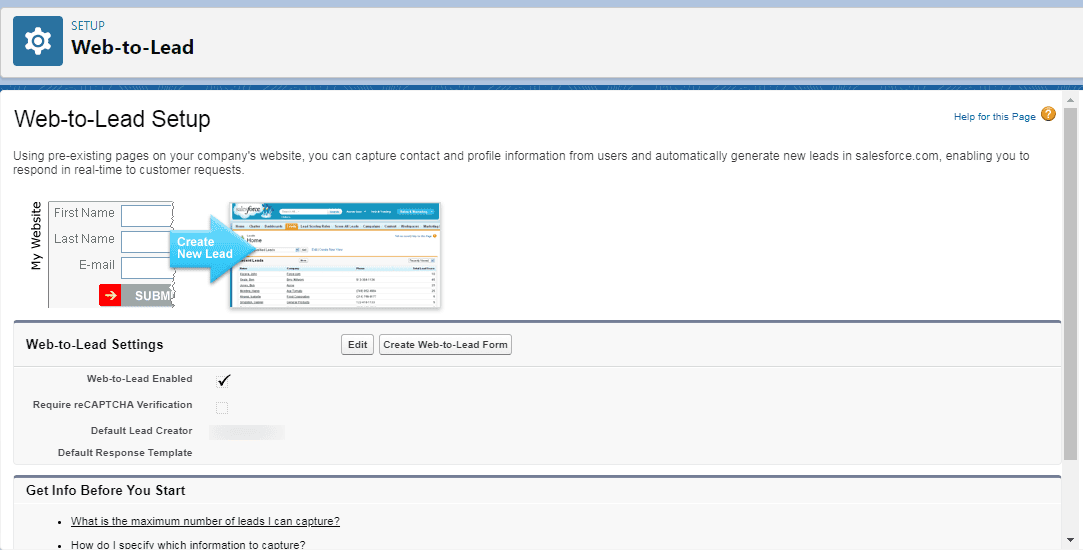
Implementation Process for Account Engagement Form Handler
To successfully implement an Account Engagement Form Handler using Salesforce or any similar platform, you need to follow a detailed step-by-step process. Here’s a clear breakdown of the essential stages involved in setting up and optimizing the form handler for your business.
1. Define Lead Data Requirements
Before setting up the form handler, it is crucial to define the information you want to collect from users. This data typically includes:
- Name (first and last)
- Email address
- Phone number
- Company name
- Job title
- Custom fields for your specific business (e.g., product interest, budget)
By knowing what information you need upfront, you can configure the form fields accordingly.
2. Create the Form Handler in Salesforce
In Salesforce, form handlers can be created using Pardot or other marketing automation tools. Here are the basic steps:
Step-by-Step Process:
- Log in to Salesforce: Navigate to your Salesforce Pardot dashboard.
- Access Pardot Settings: Go to the Marketing tab and select Pardot Settings.
- Create a New Form Handler:
- Select Form Handlers under the Forms section.
- Click the “Create New” button.
- Configure Basic Settings:
- Name the form handler.
- Set a specific campaign to track this form handler’s submissions.
- Specify success and error URLs where users will be redirected after submission.
- Customize Form Fields:
- Add required fields such as name, email, phone, etc.
- Map each form field to corresponding Salesforce CRM fields.
- Set Notification and Assignment Rules:
- Decide which team member or sales representative will be notified when a new lead is submitted.
- Automate lead assignment to different teams based on predefined criteria.
- Generate the HTML Code:
- Once the form handler is created, Salesforce will generate an HTML form code snippet. This code needs to be added to your website’s HTML to enable the form.
- Once the form handler is created, Salesforce will generate an HTML form code snippet. This code needs to be added to your website’s HTML to enable the form.
3. Embed the Form on Your Website or Landing Page
Once the form handler is configured in Salesforce, the next step is embedding the form into your website or landing page. Here’s how:
- Copy the HTML Form Code from the form handler setup.
- Paste the Code into the appropriate section of your website’s HTML. Typically, this will be placed on the contact page, product pages, or landing pages where you want to capture leads.
- Customize the Form Appearance: Ensure the form matches your website’s style and branding. Adjust CSS if necessary to make it mobile-friendly.
4. Test the Form Handler
Testing is essential to ensure your form handler works as expected. Here’s how to do it:
- Submit Test Data: Use the form on your live site or landing page to submit test data.
- Check Salesforce: Verify that the data is automatically captured in Salesforce and directed to the correct campaign or sales rep.
- Test Redirects: Make sure users are properly redirected to success or error pages after submission.
- Confirm Notifications: Check that your team receives proper email notifications for new leads.
5. Configure Lead Assignment Rules
To make your form handler more effective, automate the lead assignment process in Salesforce:
- Set Lead Assignment Rules: Use criteria such as geography, product interest, or lead score to route leads to specific sales reps or departments.
- Automate Follow-Ups: Set up automatic follow-up emails or tasks for sales reps to engage with leads right after they submit a form.
6. Track and Analyze Form Handler Performance
Finally, track the performance of your form handler to ensure it’s delivering value:
- Monitor Lead Flow: Use Salesforce reports to track how many leads are captured by the form handler over time.
- Analyze Conversion Rates: Measure the number of leads that convert to customers from the form handler submissions.
- A/B Test Form Variations: Experiment with different form fields, CTAs (calls-to-action), and layouts to see which version yields the highest engagement and conversion rates.
7. Optimize and Improve Over Time
After analyzing the performance of your form handler, make necessary optimizations:
- Simplify Forms: If users drop off during form submission, try reducing the number of fields to make the form shorter and easier to complete.
- Personalize Fields: Use dynamic fields or progressive profiling to gather specific information based on past interactions.
- Improve Mobile Responsiveness: Ensure your forms are mobile-friendly since many users will fill out forms via their smartphones.
Best Practices for Optimizing Form Handlers
Optimizing your form handlers is essential for improving user experience and ensuring high-quality data capture. One of the first areas to focus on is making sure your form is easy to fill out and mobile-friendly.
Personalizing the Form Experience for Users
A personalized form experience can lead to higher conversion rates. Tailor the form fields based on the needs of your target audience. For example, if you’re targeting B2B customers, you might want to include fields that capture company size or industry.
Consider using progressive profiling, where returning users are asked different questions each time they interact with the form. This helps to gather more information over time without overwhelming the user.
Integrating Form Handlers with CRM and Marketing Tools
To fully maximize the benefits of form handlers, integrate them with your existing CRM and marketing tools. In Salesforce, this can be done by connecting the form handler to specific campaigns or automation rules.
Integrating your form handler with other marketing tools such as email automation platforms or analytics tools can also provide additional insights into customer behavior. This holistic approach ensures that the data collected from forms is used effectively across all marketing channels.
Summary
Account Engagement Form Handlers offer a flexible solution for businesses wanting to use their existing forms rather than Account Engagement’s hosted forms. They enable seamless integration with third-party or custom forms, allowing for efficient tracking and management of prospect data without disrupting current processes. By accurately mapping fields and defining success and error locations, Form Handlers enhance lead capture and forwarding to both Account Engagement and Salesforce. This makes them a powerful and adaptable tool for optimizing lead management strategies while maintaining existing form setups.

