
Introduction
The real estate industry runs on relationships, speed, and accurate data. Agents, brokers, and teams often juggle multiple systems—MLS feeds, CRM tools, email marketing platforms, and transaction management apps. This fragmentation leads to wasted time and missed opportunities. According to NAR (National Association of Realtors), 48% of agents say managing leads consistently across systems is their top challenge. That’s where Propertybase, built on Salesforce, comes in.
Propertybase combines CRM, marketing, transaction management, and MLS integration in one place. Since Salesforce powers it, teams benefit from enterprise-grade automation, reporting, and scalability, while keeping workflows tailored to the real estate industry. For a growing team, this means no more manual lead imports, no more guessing at pipeline health, and fewer dropped client communications.
In this guide, we’ll walk through everything you need to know about getting started with Propertybase and Salesforce—from the technical underpinnings to real-world use cases. We’ll break down architecture, benefits, must-use features, and case studies that show how top-performing real estate teams are using the platform to grow faster, serve clients better, and close deals more efficiently.
What is Propertybase?
Propertybase is a real estate CRM and marketing platform built on Salesforce. It provides out-of-the-box tools for managing leads, listings, transactions, and marketing campaigns, all under the umbrella of Salesforce’s proven CRM engine.
Core Components
- MLS/IDX Integration
Propertybase pulls in MLS and IDX data directly into Salesforce. This lets agents see live listings alongside client records. Instead of switching between MLS portals and spreadsheets, you can link properties to opportunities, create saved searches, and trigger alerts when new listings match a client’s criteria.
Example: An agent working with a buyer searching for a 3-bedroom home under $500K can automatically send daily updates from MLS data synced into Salesforce. - CRM & Lead Management
At its core, Propertybase is a CRM. Leads are captured from multiple sources—web forms, Zillow, email, or manual entry—and automatically routed to the right agent. With Salesforce automation (Flows, Process Builder, Apex triggers), follow-up tasks and drip campaigns are created instantly. - Marketing Automation
Propertybase includes integrated email and SMS marketing. You can build nurture journeys in Salesforce Marketing Cloud or Pardot, segmenting contacts by buying stage, location, or budget. Campaign performance is tracked back to deals, closing the loop on ROI.
Key Terminology
- IDX (Internet Data Exchange): The system that allows real estate websites to display MLS listings. Propertybase integrates IDX feeds directly into Salesforce.
- Opportunity Pipeline: A Salesforce object customized in Propertybase to represent real estate transactions (buy, sell, rent).
- Lead Routing Rules: Automation logic that assigns leads to agents based on geography, budget, or lead source.
- Transaction Management: Workflow templates that guide agents from offer to closing, with compliance steps, document tracking, and approvals.
- Chatter Collaboration: Salesforce’s internal messaging tool, used in Propertybase to coordinate between agents, admins, and brokers.
Architecture
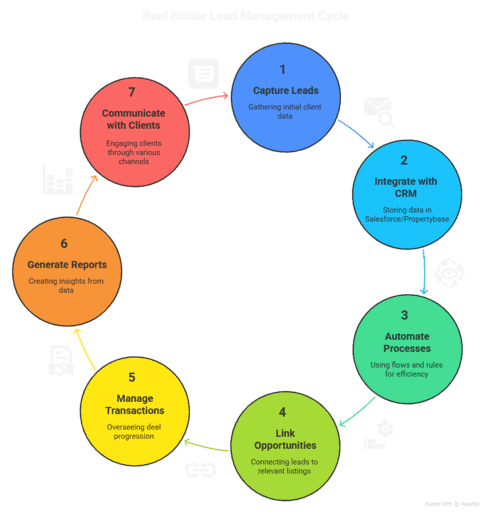
Step-by-Step Flow
1) Capture Leads
Leads are collected from websites, ads, referrals, or portals. Basic client details like name, email, phone, and preferences are recorded.
2) Integrate with CRM
The captured lead data is stored inside Salesforce/Propertybase. This keeps all client details in one system for easy access and tracking.
3) Automate Processes
The system automatically assigns leads to the right agent, creates follow-up reminders, and may send initial emails or texts.
4) Link Opportunities
Qualified leads are connected to property listings and opportunities in the pipeline so agents can track deals.
5) Manage Transactions
Agents and coordinators oversee the deal from offer to closing, making sure documents and compliance steps are completed.
6) Generate Reports
Data is turned into reports and dashboards that show pipeline progress, agent performance, and marketing results.
7) Communicate with Clients
Agents keep in touch with clients through emails, calls, or text updates, building trust and ensuring smooth communication.
Why Use Propertybase and Salesforce?
Many brokerages use separate CRMs, marketing tools, and transaction systems. This creates silos. Propertybase solves two major gaps:
- Unifying MLS Data with CRM
Most CRMs don’t natively integrate with MLS feeds. Agents waste time copying listings into spreadsheets. With Propertybase, MLS data flows directly into Salesforce objects, powering automated alerts and faster deal cycles.
Case Example: A Florida brokerage reduced manual MLS exports by 90% by setting up automated MLS-to-Opportunity linking. - End-to-End Client Journey Tracking
Traditional CRMs stop at lead capture. Propertybase extends to transaction management, so you can see the full client lifecycle—from inquiry to closing.
Case Example: A New York luxury team used Propertybase workflows to standardize compliance steps, cutting audit prep time by 70%.
Key Benefits
Here are seven practical benefits, explained technically and with real-world impact:
1. Centralized Lead Management
- How it works: Salesforce objects unify all lead sources. API integrations with Zillow, Trulia, and Realtor.com feed leads automatically.
- Impact: No more duplicate spreadsheets. Agents see every lead in one place.
- Example: A team of 15 agents saved ~8 hours weekly on lead imports after implementing automated routing.
2. MLS Listing Integration
- How it works: IDX/MLS data syncs with Salesforce objects. Triggers can match listings with client criteria.
- Impact: Faster response to buyers.
- Example: An Austin brokerage increased showing-to-offer conversion by 25% after setting up MLS alerts.
3. Automated Nurture Journeys
- How it works: Salesforce Marketing Cloud segments contacts and sends targeted campaigns.
- Impact: Consistent engagement without manual effort.
- Example: A team reported a 40% higher re-engagement rate from cold leads using automated SMS campaigns.
4. Transaction Compliance Workflows
- How it works: Opportunity stages are tied to approval processes. Required docs (inspection, financing) must be uploaded before moving forward.
- Impact: Reduced compliance risk.
- Example: Brokerage avoided $50K in fines by enforcing document approval steps.
5. Real-Time Dashboards
- How it works: Salesforce reports aggregate pipeline and agent performance.
- Impact: Brokers make data-driven decisions.
- Example: Leadership meetings cut prep time in half with dashboards that auto-update daily.
6. Mobile Access
- How it works: Salesforce mobile app extends Propertybase features to agents in the field.
- Impact: Agents respond to leads instantly.
- Example: A team increased lead-to-appointment conversion by 18% after adopting mobile notifications.
7. Scalability
- How it works: Built on Salesforce, Propertybase scales with added agents, offices, and integrations.
- Impact: Future-proof investment.
- Example: A 20-agent brokerage scaled to 150 agents without switching CRMs.
Practical Must-Use Features
1. Bulk API 2.0 for Data Imports
- Benefit: Load large datasets (e.g., historical leads) quickly.
- Pitfall: Exceeding governor limits.
- Best Practice: Use batch sizes of 5,000 and test in a sandbox.
2. Lead Assignment Rules
- Benefit: Automatically route leads based on geography or source.
- Pitfall: Overlapping rules can cause conflicts.
- Best Practice: Document all rules and review quarterly.
3. MLS Alert Automations
- Benefit: Automatically notify clients of new listings.
- Pitfall: Too many alerts = unsubscribes.
- Best Practice: Limit to one daily digest email.
4. Transaction Workflow Templates
- Benefit: Standardize closing steps.
- Pitfall: Overly rigid workflows frustrate agents.
- Best Practice: Allow exceptions with manager approval.
5. Dashboards & Reports
- Benefit: Instant visibility into the pipeline and performance.
- Pitfall: Too many reports = confusion.
- Best Practice: Create role-based dashboards (Agent, Broker, Admin).
Twopir-Proven Checklist
- Test MLS integration in the sandbox before going live.
- Set lead assignment rules and validate routing accuracy.
- Configure at least one transaction workflow template.
- Train agents on Salesforce mobile app usage.
- Review dashboards monthly to align KPIs with business goals.
Real-World Use Cases
Case Study 1: Residential Brokerage in California
- Challenge: Leads from Zillow and website forms were scattered in spreadsheets. Agents often missed follow-ups.
- Solution: Implemented Propertybase with Salesforce Flow for lead routing and MLS integration.
- Technical Details: Used Apex triggers for automatic assignment and custom objects for MLS data.
- Results: Follow-up time dropped from 24 hours to under 2 hours. Closed deals increased by 22% in the first year.
Case Study 2: Luxury Brokerage in New York
- Challenge: Compliance audits consumed weeks of staff time.
- Solution: Deployed Propertybase transaction workflows requiring document uploads before opportunity stage changes.
- Technical Details: Configured approval processes and validation rules tied to compliance requirements.
- Results: Audit prep time reduced by 90%. Team handled 30% more transactions with the same staff.
Conclusion
Propertybase, powered by Salesforce, is more than just a CRM—it’s an end-to-end real estate platform. From capturing leads to managing MLS data, automating marketing, and ensuring compliance, it addresses the critical pain points of real estate teams.
Getting started doesn’t mean overhauling everything at once. Start small: test MLS integration in a sandbox, configure lead assignment rules, and roll out transaction workflows for one team.
The results compound quickly—faster responses, better client experiences, and measurable growth.
For real estate teams aiming to scale in 2024 and beyond, Propertybase and Salesforce provide a foundation that grows with your business. The forward-looking strategy is clear: adopt automation, centralize your data, and use insights from dashboards to stay ahead of market shifts.
The sooner your team implements Propertybase, the faster you’ll see efficiency gains, happier clients, and stronger pipelines.

