
Top 10 Ways to Optimize Propertybase CRM on Salesforce for Higher Conversions
Brokerages rarely lose deals because they lack leads. They lose them between one stage and the next: a lead nobody called, a buyer whose saved search never emailed, a showing with no follow-up. These ten changes close those gaps using tools Propertybase and Salesforce already provide.
Key Takeaways
- Propertybase lead conversion improves when you fix the hand-offs between stages, not when you add more tools. Measure each stage first so you know where leads drop out.
- Speed matters most at the top: one capture point, instant routing with Lead Router, and a Salesforce Flow that escalates any lead nobody contacts.
- In the middle, clean inquiry data and active matching do the selling. Check that saved searches actually email clients: MLS Matching defaults to "Never".
- At the bottom, record showing feedback, re-market listings when an offer falls through, and guard the offer-to-closing path with checklists, validation rules and e-signature.
- Test every change in a sandbox, keep automation on Flow (Process Builder support ended in 2025), and add AI only once routing and data are reliable.
Improving Propertybase lead conversion is mostly about what happens between stages. Propertybase is a real estate CRM that runs inside Salesforce, so a lead, the buyer's search criteria, every showing, the offer and the closing can all sit on linked records. When those records are complete and automation moves them along, fewer buyers go quiet between first enquiry and signed contract.
This guide is for broker-owners, sales and operations leaders and Salesforce admins at growing and mid-market companies in real estate, from single-office teams to multi-office and enterprise brokerages. It replaces our 2025 version of this article, which promised ten ways but listed five. Every product detail now links to Propertybase's, Salesforce's or Docusign's own documentation, figures we could not source have been removed, and the example comes from a published Twopir case study.
What Are the Best Ways to Optimize Propertybase for Higher Conversions?
Measure conversion by stage, capture every lead in one place, route and escalate it fast, prioritise by intent, keep inquiry data clean, let matching send listings, nurture by stage, turn showings into offers, and guard the path to closing. Each change uses a Propertybase or Salesforce feature you probably already pay for.
| # | Optimization | Main tools | Metric it moves |
|---|---|---|---|
| 1 | Measure conversion by stage and source | Reports, dashboards, campaigns | All of them, by making them visible |
| 2 | Capture every lead through one entry point | Front Desk, duplicate rules | Leads lost or duplicated |
| 3 | Route leads the moment they arrive | Lead Router | Time to assignment |
| 4 | Escalate leads nobody contacts | Flow scheduled paths, custom notifications | Time to first contact |
| 5 | Prioritise by buying intent | Website activity records, Flow | Lead-to-appointment rate |
| 6 | Keep inquiry data clean | Inquiry fields, MLS field values, validation | Match quality |
| 7 | Let matching send listings automatically | Matching, MLS Matching, saved searches | Engaged buyers |
| 8 | Nurture by stage, not by blast | Quicksend, drip campaigns, Action Plans | Re-engaged leads |
| 9 | Turn showings into offers | Showings, Linked Listings, Offer path | Showing-to-offer rate |
| 10 | Remove friction from offer to close | Closings, Path, validation rules, Docusign | Offers that close, days to close |
Where Do Leads Drop Out of a Propertybase Funnel?
At the hand-offs. A lead arrives but waits for a person to assign it, an inquiry is saved without the criteria matching needs, a showing happens and nobody records the feedback, an offer stalls because a document is missing. Each hand-off maps to a Propertybase record, so each one can be measured and automated.
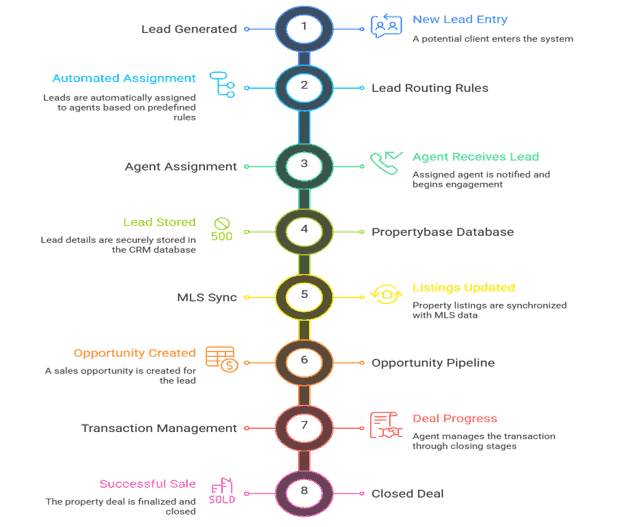
Propertybase models this path as a chain of records. A contact can be a lead, a customer or a partner. An inquiry holds what the buyer wants. Showings and linked listings record interest, an offer ties a listing to buyer and seller, and an accepted offer becomes a closing. The common leaks look like this:
1. How Do You Measure Lead Conversion in Propertybase?
Report the share of leads that reach each stage, split by lead source, agent and office. Propertybase dashboards are built from Salesforce reports, so you can track contacts to inquiries, inquiries to showings, showings to offers and offers to closings. Without this baseline you cannot tell which of the other nine changes matters most.
| Metric | How to define it | Built from |
|---|---|---|
| Time to first contact | Minutes from contact creation to the first logged call, email or text | Contact created date, first activity |
| Lead-to-appointment rate | Share of new leads with a showing or meeting within your chosen window | Contacts, showings, meetings |
| Showing-to-offer rate | Share of buyers with a showing who go on to make an offer | Showings, offers |
| Offer-to-close rate | Share of accepted offers that reach a closed closing | Offers, closings |
| Conversion by source | Closed deals and commission per lead source or campaign | Lead source, campaigns, closings |
| Untouched leads | Open leads with no activity in your agreed number of days | Contacts, last activity date |
- One report per dashboard component. In Propertybase, each dashboard component maps to one report, so build the six reports above first and assemble the dashboard after.
- Track change over time. Salesforce historical trend reporting compares data across up to five snapshot dates, which shows whether a change actually moved the number.
- Attribute to sources. Populate lead source on every contact, and use Salesforce campaigns with Customizable Campaign Influence when a deal touches several campaigns.
- Send it to people. Report subscriptions email results on a schedule, so team leads see untouched leads without opening the CRM.
Pitfall: setting targets before you have a baseline. Record last quarter's numbers first, then set targets with your sales leaders.
Our guide to Propertybase reports in Salesforce walks through building these reports step by step.
2. How Should Leads Enter Propertybase?
Through one entry point that creates a record for every lead, with its source, and checks for duplicates. Propertybase's Front Desk accepts web forms and structured lead emails, so portal and website leads arrive as contacts and inquiries instead of inbox messages. Duplicate rules keep returning buyers on their existing record.
Connect every source to Front Desk
PropertybaseFront Desk takes leads through Propertybase webforms, the WebToProspect REST API, and JSON-to-Email or XML-to-Email formats. List every source (website, each portal, referral partners, open-house sign-ins) and confirm each one creates a record with the right lead source.
Pitfall: a portal that sends only plain notification emails. Ask for a structured format or connect it through an integration, so leads are not re-typed.
Keep one record per buyer
SalesforceSalesforce matching and duplicate rules warn or block when someone creates a contact that already exists, and duplicate jobs find existing duplicates across the org. Start with warnings, review what they catch, then block.
Checklist: every source mapped · lead source required · UTM values captured in hidden form fields where your website supports it · duplicate rule live · a weekly report of leads with no source.
3. How Do You Set Up Propertybase Lead Routing for Faster Response?
Use Lead Router to send each lead to the right team and agent automatically, and alert the agent on their phone. Lead Router assigns by routing source and team, then a distributor picks the agent: Click to Claim, Auto-Assign or Round Robin. Agents who are away can opt out, so leads do not wait in an empty queue.
| Distributor | How it works | Best for |
|---|---|---|
| Click to Claim | Every team member is emailed; the first to claim gets the lead | Teams that reward speed and have agents free during the day |
| Round Robin | Leads rotate through the team, with a "Next Up" indicator | Even distribution across a team of similar agents |
| Auto-Assign | All leads from a source go to one user | An inside sales agent, ISA team or a listing agent's own leads |
The details are in Propertybase's Lead Router guide. Two behaviours matter for conversion. First, a returning contact goes straight to their previous owner, and Propertybase says this is "not configurable at this time", so an inactive previous owner needs a process to catch it. Second, agents are notified through Chatter in the Salesforce mobile app, or by text message in North America and Australia if they opt in. Make the mobile alert part of onboarding.
Pitfall: agents on holiday still in the rotation. Use the opt-out status, review team membership monthly, and set a fallback team for leads outside every territory.
4. How Do You Stop Assigned Leads From Going Cold?
Add a Salesforce Flow that checks, a set time after assignment, whether anyone contacted the lead, and escalates if not. Lead Router assigns but does not check follow-up. A record-triggered flow with a scheduled path can alert a team lead, reassign the lead or create an urgent task when no call, email or text has been logged.
The full build, with entry conditions and testing, is in our guide to Propertybase workflows from lead to close.
5. How Can Agents Tell Which Propertybase Leads to Call First?
Use behaviour the CRM already records as a priority signal. Where a brokerage runs the Propertybase Website integration, listing views, favourites, saved searches and contact requests become records on the contact. A flow can flag or escalate contacts whose activity crosses a threshold you set, so agents call the buyers who are actively looking.
Propertybase documents how website activity syncs into the CRM: a visitor who logs in creates a contact, a saved search creates an inquiry, and views, favourites, shares and contact requests each create a "Website Listing" record. With website activity reports enabled, those records can feed lists, dashboards and automation.
Repeat listing views
Several views of listings in one area or price band in a short period usually signal an active search.
Favourites and shares
A buyer who saves or shares a listing has a specific home in mind. Route the alert to the agent who owns the contact.
Contact requests
A request about a specific listing is the clearest buying signal. Treat it as a new lead with the shortest response time.
New saved searches
A saved search creates an inquiry with the buyer's own criteria. That is the moment to send a personal shortlist.
Start with simple rules you can explain to agents, then refine them against your conversion reports. Lone Wolf's product page also lists "Salesforce Agentforce AI for lead scoring and deal predictions"; check with Lone Wolf what your edition includes before you plan around it.
6. Why Does Inquiry Data Quality Affect Propertybase Conversions?
Because matching, alerts, segmentation and reports all read the inquiry. An inquiry without budget, area or property type matches everything or nothing, so the buyer receives irrelevant listings or none. Standard picklists, required criteria and values that mirror the MLS make every automated step downstream more accurate.
- Standardise intake fields. Inquiries hold property type, bedrooms, baths and budget, and custom fields can add criteria that matter in your market. Use the same picklists on web forms, portal mappings and the agent's entry screen.
- Mirror the MLS. Propertybase's Importing MLS Field Values tool brings MLS values into Propertybase picklists, so a buyer's "condo" means the same thing as the MLS's.
- Require the minimum before a stage moves. A validation rule can stop a contact moving to "active buyer" until the inquiry has a budget and area.
- Clean up every quarter. Merge duplicates, close dead inquiries and review blank-field reports. Align the inquiry fields with the segments marketing uses, so one set of criteria drives both matching and campaigns.
7. How Do You Use Propertybase Matching to Convert More Buyers?
Make the inquiry the source of every listing sent, and make sure saved searches actually email the buyer. Propertybase matches inquiry criteria to listing inventory, and matching works in reverse when a new listing arrives. Where the Propertybase Website is active, MLS Matching creates saved searches, but their email frequency starts at "Never".
| Feature | What it does | Conversion move |
|---|---|---|
| Inquiry matching | Lists listings that fit the buyer's criteria; filter, email, create linked listings or start an action plan | Send a shortlist on the first call, from the matching screen |
| Listing matching | Shows the inquiries a listing fits | Email every matching buyer when a new listing or price change lands |
| MLS Matching | Matches the inquiry to MLS properties and creates a saved search | Set an email frequency; the default is "Never" |
| Market Insight subscriptions | Subscribes contacts to market reports built on MLS data | Keep sellers and long-cycle buyers engaged between searches |
Quick win: run a report of saved searches with frequency "Never" this week, and agree a default frequency with your agents.
Matching depends on inventory being current. Ask your MLS and integration partner how often listings refresh in your org; Propertybase's documentation does not state a single sync frequency.
8. What Is the Best Way to Nurture Real Estate Leads in Propertybase?
Match the follow-up to the buyer's stage and timeline, and log every touch on the contact. A buyer ready this month needs calls and shortlists; one moving next year needs a monthly market update. Quicksend, drip campaigns and Action Plans cover each case, with SMS where consent and channels allow.
Personal sends
QuicksendQuicksend emails listings with templates, merge fields and inline listing details, and logs the send on the record. Keep a small set of templates by stage, written to be personalised, not blasted.
Scheduled series
Drip campaignsDrip campaigns need a set-up checklist: a public site with the unsubscribe page enabled, a restarted email scheduler and an automated email opt-out checkbox. Propertybase's automation instructions start drips with Process Builder, which Salesforce stopped supporting on 31 December 2025. Build that trigger in Flow.
Agent cadences
Action PlansAction Plans are task templates with day offsets, dependencies and assignees. A new-buyer plan (call today, shortlist tomorrow, check-in on day three) gives every agent the same rhythm.
For text messages, Salesforce's automated messaging works on enhanced messaging channels and only reaches customers with a messaging user record, respecting their consent settings. Larger programmes can connect a dedicated marketing platform; our Propertybase lead nurturing guide compares the options.
9. How Do You Turn More Showings Into Offers?
Record the buyer's reaction to every showing, and act on it the same day. Propertybase showings carry a 1 to 5 client rating and feedback, and linked listings track each buyer's interest in a property. Those fields let a flow create the next step, and let agents re-market a listing to every interested buyer if an offer falls through.
- Make feedback required after the showing. Showings include Client Rating and Client Feedback. A flow can create a follow-up task when a showing ends without them.
- Turn high ratings into a next step. A rating of 4 or 5 can trigger a task to discuss an offer or book a second viewing within a day.
- Keep linked listings current. Linked listings hold status and feedback per buyer, and an action emails every contact linked to a property, which Propertybase suggests for when "an offer falls through or you had an open house".
- Use the offer path. Offers record counter-offers and addenda, with a path showing status, so managers can see negotiations that have gone quiet.
10. How Do You Reduce Fall-Through Between Offer and Closing?
Turn every accepted offer into a closing record with a checklist, dates and gates, and send documents for signature from the record. Propertybase creates closings from offers, copying the deal data. Salesforce Path, validation rules and a Docusign flow action then make missing steps visible early, when they can still be fixed.
| Gap | Fix | Tool |
|---|---|---|
| Deal data re-typed after acceptance | Create the closing from the offer | Closings |
| Nobody knows what is outstanding | Use the closing checklist and key fields per stage | Closing checklist, Path |
| Stages move with documents missing | Block the stage change until required items are complete | Validation rules |
| Deadlines slip | Remind agents and coordinators before contingency and closing dates | Flow scheduled paths |
| Signatures chased by email | Send envelopes automatically when a stage is reached | Send with Docusign flow action |
If your org still uses the legacy Docusign eSignature for Salesforce app, note that Docusign set 16 October 2026 as the last day it could be used; move to the current app before building signature automation on it. Our article on Docusign with Salesforce for real estate covers the set-up.
How Do You Roll Out Propertybase Changes Without Breaking Routing?
Build in a sandbox, keep one automation entry point per object, test with real scenarios, and retest after each Propertybase release. Routing and escalation touch every new lead, so a faulty flow costs deals quickly. Propertybase is updated often, which makes a short regression test after each release worth the time.
Sandbox first
A sandbox copies production metadata. Test routing with sample leads from every source before go-live.
Know what runs
Flow Trigger Explorer lists every record-triggered flow on an object and its order, so new automation doesn't collide with old.
Retest after releases
Lone Wolf says Propertybase is updated every three to six weeks. Rerun your routing and matching test cases after each update.
Guide agents in the app
In-App Guidance adds prompts and walkthroughs, so agents learn a new step where they use it.
Track adoption alongside conversion: a dashboard nobody opens and a feedback field nobody fills in are both signs the change needs training, not more automation.
Can AI and Agentforce Improve Propertybase Conversions?
They can help, once the basics work. Because Propertybase runs on Salesforce, Salesforce's Agentforce sales agents can work with its records, subject to edition and licence requirements. AI that prioritises or contacts leads is only as good as the routing, activity logging and inquiry data underneath, so fix ways 1 to 6 first.
Salesforce lists Lead Generation, Qualification and Engagement agents for Enterprise, Performance and Unlimited editions with the Sales and Einstein for Sales add-ons. Lone Wolf separately advertises Agentforce AI for lead scoring and deal predictions in Propertybase. Confirm with both what your licences include, start with one use case such as after-hours enquiry qualification, and measure it against the same funnel reports. Our Propertybase AI and Agentforce page explains how we approach this.
What Does This Look Like in a Real Brokerage?
In one published Twopir project, a brokerage of more than 120 agents moved from manual lead triage to automated routing and escalation on Propertybase and Salesforce. Lead response fell from four to six hours to under 15 minutes, and lead-to-appointment conversion rose 35% within 90 days of go-live.
The case study describes four offices whose leads from portals, website forms and referral partners were triaged by hand. The rebuilt process combined several of the ways above: Flow routing in under 90 seconds by geography, property type and agent workload; escalation of high-intent leads (three or more listing views, or a form completion) to senior agents; stage-gated transaction workflows; and lead-source attribution from first inquiry to closed deal. Your results will depend on your sources, team and starting point, which is why way 1 comes first.
Should You Optimize Propertybase In-House or With a Partner?
In-house works when you have an experienced Salesforce admin and the gaps are configuration: distributors, saved-search frequencies, templates and reports. A partner helps when conversion depends on new automation, integrations or a clean-up of inherited flows and Process Builder, or when nobody has time to measure and iterate.
Do it in-house if you have a dedicated admin, your automation is already on Flow, lead sources are connected, and the work is switching on and tuning features the package ships.
Bring in a partner if leads still arrive by email, routing logic lives in old Process Builder or Apex, portals or the MLS need integration, or you need escalation, scoring and closing automation built and tested together.
Twopir Consulting's Propertybase optimization services start with an audit of routing, data and automation, and our Propertybase automation team builds and tests the flows. For a broader view of the platform, see our Propertybase best practices guide.
The Bottom Line
Higher conversion in Propertybase comes from closing the gaps between stages: measuring where leads drop, getting every lead to the right agent quickly, keeping the buyer's criteria clean so matching does the selling, following up by stage, and making the road from offer to closing visible. None of it needs a new system. It needs the one you have, set up and kept honest.
- 1
Measure each stage and source before changing anything.
- 2
Capture, route and escalate every lead automatically.
- 3
Prioritise by behaviour and keep inquiry data clean.
- 4
Let matching and staged nurture keep buyers engaged.
- 5
Act on showing feedback and gate the path to closing.
Find Where Your Propertybase Funnel Leaks
On a 30-minute discovery call, a Twopir Salesforce architect will review your lead capture, routing and follow-up with you, point to the stage losing the most buyers, and suggest the first fix to make.
Schedule a Discovery CallFrequently Asked Questions
Fix speed to lead first. Connect every lead source to Front Desk so leads arrive as records, route them automatically with Lead Router, and add a Salesforce Flow that escalates any lead nobody contacts within your agreed time. Then measure the result against last quarter's baseline before moving to the next change.
Build Salesforce reports for each stage: contacts to inquiries, inquiries to showings, showings to offers and offers to closings, split by lead source, agent and office. Each Propertybase dashboard component maps to one report. Historical trend reporting and report subscriptions show whether the numbers change after each fix.
Lone Wolf lists Salesforce Agentforce AI for lead scoring and deal predictions on its Propertybase product page, so confirm what your edition includes. Many brokerages start with simple rules instead: a Flow that flags contacts whose website activity, such as repeated listing views or a contact request, crosses a threshold you set.
When MLS Matching creates a saved search from an inquiry, its email frequency defaults to Never, so the client receives nothing until an agent sets a frequency. Run a report of saved searches set to Never, agree a default frequency with agents, and make setting it part of the new-buyer process.
Lead Router assigns leads but does not check follow-up. Add a record-triggered Salesforce Flow with a scheduled path that runs a set time after assignment, looks for a logged call, email or text, and alerts a team lead, reassigns the lead or creates an urgent task if nothing was logged.
Yes, plan to. Salesforce ended support for Workflow Rules and Process Builder on 31 December 2025. Existing automation still runs but gets no fixes. Propertybase's drip-campaign automation instructions use Process Builder, so rebuild those triggers in Flow and test them in a sandbox before going live.
Quick wins such as saved-search frequencies, distributor settings and funnel reports can take days. Escalation flows, intent rules and closing gates usually take a few weeks each, including sandbox testing. A full programme with integrations or a clean-up of inherited automation takes longer, so scope it after an audit.
