
Lead Nurturing Best Practices Using Propertybase and Salesforce Marketing Tools
Most real estate leads aren't ready on day one. This guide shows how to run Propertybase lead nurturing on Salesforce: which tracks to build, which tool runs each part, how scores reach agents, when to recycle, and how to prove it produces closings.
Key Takeaways
- Lead nurturing in Propertybase means keeping every buyer, seller and past client in touch with the brokerage, on a schedule set by their timeframe, until they are ready to talk to an agent.
- Run at least three tracks (new, warm and recycle) and add seller, past-client and re-engagement tracks as you grow. Each track needs an entry rule, a goal and an exit rule.
- Propertybase's own drips, matching and saved searches cover simple nurture. Account Engagement or Marketing Cloud adds behaviour-based branching, scoring and text messages, and Salesforce Flow turns a score into an agent task.
- Sync marketing to Propertybase Contacts, keep one opt-out record for every channel, and rebuild any Process Builder triggers in Flow.
- Measure nurture by appointments and closings, not by opens, and treat every score threshold as a starting point to test.
Propertybase lead nurturing is how a brokerage keeps the buyers and sellers who aren't ready yet from going cold or going to another agent. Propertybase runs inside Salesforce, so its contacts, inquiries and listings can drive Salesforce marketing tools directly: the right email, text or agent call at the right moment, with every response recorded on the client's record.
This guide is for marketing leaders, operations managers and Salesforce admins at growing and mid-market companies in real estate, from single-office teams to multi-office and enterprise brokerages. It replaces our 2025 version of this article. We removed the statistics and case studies we could not source, replaced retired automation tools with Flow, and added nurture tracks, a step-by-step program, hand-off and recycle rules, consent essentials and measures that tie nurture to closings. For choosing and connecting a marketing platform, see our companion Propertybase marketing automation guide.
What Is Lead Nurturing in Propertybase and Salesforce?
It is a repeating loop: capture the lead as a record, enrol it in the right track, send useful messages, score the response, and hand the lead to an agent when it is ready. Leads that aren't ready go back into a slower track instead of being dropped. Propertybase holds the records, and Salesforce marketing tools and Flow run the loop on them.
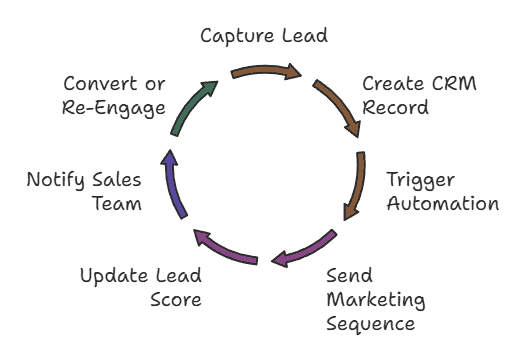
| Stage | What happens | Where it runs |
|---|---|---|
| 1. Capture | Web, portal and form leads arrive as a Contact and an Inquiry | Propertybase Front Desk, website integration |
| 2. Enrol | The lead joins a track based on type, timeframe and source | Flow, Engagement Studio, Journey Builder |
| 3. Send | Emails, listing alerts and texts go out on a schedule | Propertybase drips and matching, or a marketing platform |
| 4. Score | Opens, clicks, listing views and forms raise or lower the score | Account Engagement scoring, or a custom score field |
| 5. Hand off | A threshold creates a task or alert for the contact's agent | Flow or an Engagement Studio action |
| 6. Convert or recycle | The agent books an appointment, or returns the lead to nurture with a reason | Propertybase records, Flow |
Why Does Real Estate Lead Nurturing Need a System?
Because real estate leads move at very different speeds, and agents can't track them all by memory. A buyer ready to tour this weekend needs a call within minutes. A buyer moving next year needs months of useful, unpushy contact. Without a system, fast leads wait and slow leads are forgotten.
Buyers usually start alone and pick an agent early. In NAR's 2024 Profile of Home Buyers and Sellers, 43% of buyers said their first step was looking at properties online, and most interviewed only one agent (77% of repeat buyers and 67% of first-time buyers). The 2025 Profile puts the typical search at 10 weeks and found that 88% of buyers bought through an agent. So the brokerage that stays useful during those weeks is well placed to be the one agent a buyer calls.
Speed still matters for the leads that are ready. Research published in Harvard Business Review found that most companies respond to online leads far too slowly. Nurture and response are two halves of the same system: route and call the hot leads fast, and nurture the rest until they turn hot.
Past clients matter too. NAR's 2024 Profile found that 40% of buyers found their agent through a friend, neighbour or relative, and 91% of buyers in the 2025 Profile said they would use their agent again or recommend them. A past-client track keeps those referrals coming.
Which Lead Nurturing Tracks Should a Real Estate Brokerage Run?
Start with three: new, warm and recycle. Then add seller, past-client and re-engagement tracks as you have content and capacity. Segment by what the person wants and when, which Propertybase already records on the Contact and the Inquiry. A track without an entry rule, a goal and an exit rule is just a mailing list.
| Track | Who enters | Goal | Typical content | Exit when |
|---|---|---|---|---|
| New lead | A new web, portal or form lead | First conversation with the assigned agent | Agent introduction, matching listings, a short local guide | The agent logs a conversation or books a showing |
| Warm buyer | Buyers with a timeframe of months, not weeks | Stay the brokerage they trust | Saved-search alerts, area guides, price-change and new-listing alerts | Score threshold reached, or the buyer asks for a showing |
| Seller | Valuation requests and homeowner contacts | A listing appointment | Market updates, recent nearby sales, listing-prep advice | A valuation or listing appointment is booked |
| Past client | Closed buyers and sellers | Referrals and repeat business | Purchase anniversary, annual home-value note, local news | The client opts out, or a new inquiry starts |
| Recycle | Leads an agent returned as "not now" | Re-qualify later | Lower-frequency market updates and listings | New activity raises the score, or the lead goes unengaged |
| Re-engagement | No opens or activity for a set period | Confirm interest or stop sending | A short "still looking?" series | A response moves them back; silence marks them unengaged |
Segment on the data you already have. An Inquiry holds the property type, bedrooms, baths and budget a buyer gave, and website activity such as saved searches and listing views can be recorded in Propertybase when the brokerage uses the Propertybase Website integration. Add two fields if you don't have them: a buying or selling timeframe, and a nurture track picklist that every automation reads, so a contact is in one track at a time.
Which Propertybase and Salesforce Marketing Tools Should Run Each Part?
Let Propertybase send what it already does well, let a marketing platform branch on behaviour, and let Flow create agent work. Propertybase covers listing alerts, drips and newsletters. Account Engagement or Marketing Cloud adds journeys that react to opens, clicks and visits, plus scoring and text messages. Give each job one owner so two systems never email the same contact.
| Job | Propertybase native | Salesforce marketing tool | Salesforce platform |
|---|---|---|---|
| Listing alerts | MLS Matching saved searches, Quicksend | Content around the alerts, not a second alert | — |
| Timed email series | Drip campaigns, Recurring Emails for anniversaries | Engagement Studio programs, Journey Builder or Marketing Cloud Next flows | Flow starts and stops enrolment |
| Behaviour branching | Not available | Engagement Studio triggers and rules; Journey Builder splits | — |
| Scoring | Not available | Account Engagement scoring and grading; Einstein Behavior Scoring | A formula or Flow-maintained score field |
| Text messages | Not available | Marketing Cloud Next Advanced, MobileConnect, or SMS on Account Engagement+ | Salesforce messaging actions in Flow |
| Agent tasks and alerts | Action Plans | Engagement Studio "Create Salesforce Task" and "Notify User" | Record-triggered Flow |
Account Engagement (formerly Pardot) is the usual fit for nurture. Engagement Studio, which Salesforce calls "a robust lead nurturing tool", is in every edition, and its Salesforce connector syncs every two to four minutes. Propertybase stores individual clients as standard Contacts with a hidden account behind each one, not as person accounts. That means Account Engagement can sync them as ordinary contacts.
Marketing Cloud Next is Salesforce's newer marketing product on the core platform. On it, every campaign starts with a flow and uses Data 360 for segments. Salesforce's Account Engagement pricing page says current Account Engagement editions include Marketing Cloud Next access. Marketing Cloud Engagement suits high-volume, multi-channel programmes run through Journey Builder's Salesforce Data entry source.
AI agents are now an option. Salesforce's Agentforce Engagement agent (formerly Agentforce Lead Nurturing) can run personalised outreach to prospects, subject to edition, licence and email limits. Lone Wolf says on its Propertybase product page that the product uses Agentforce AI for lead scoring and deal predictions. Put the tracks, data and consent in place first, because an agent follows the same rules your nurture does.
For the full platform comparison, data mapping and connector set-up, see the Propertybase marketing automation guide and our HubSpot vs Marketing Cloud vs Account Engagement comparison.
How Do You Build a Buyer Nurture Program Step by Step?
Prepare the data, then build the program in a sandbox: enrol, send, wait, branch on behaviour, and end with a hand-off or a recycle. The example below uses Account Engagement's Engagement Studio, which has three step types: triggers wait for a prospect's action, rules branch on their data, and actions change their record. The same pattern works in Journey Builder or a Marketing Cloud Next flow.
Before you build
- Sync to Contacts, not Leads. Propertybase works from Contacts. A connector that creates Salesforce leads builds a second database that agents never see.
- Make the buyer's criteria usable. Inquiries (
pba__Request__c) are a custom object. Account Engagement can sync custom objects linked to a contact (up to four in Advanced edition, and in Plus at extra cost), and use them in lists and automation rules, but not in email content. For personalised emails, copy key criteria such as area and budget to contact fields with a flow. - Move old triggers to Flow. Propertybase's documented drip and recurring-email automation uses Process Builder, which Salesforce stopped supporting on 31 December 2025. Rebuild those triggers as record-triggered flows.
An example new-buyer program
Engagement Studio considerations: programs must be paused to edit, changes only affect prospects who reach those steps later, and the number of programs depends on edition (from 20 in Growth to 200 in Advanced and Premium, according to Salesforce's considerations page). Test every branch in a sandbox with test contacts before going live.
What Content and Cadence Keep Real Estate Leads Engaged?
Send what the buyer or seller would ask an agent for anyway: listings that fit, prices nearby, and what happens next. Match the cadence to the timeframe rather than a fixed calendar, and let each message come from the assigned agent. Fewer, more relevant messages beat a weekly blast, and they protect your sending reputation.
Lead with listings that fit
Build emails from the inquiry's area, budget and property type. A listing block that matches beats a generic newsletter.
Send from the agent
Propertybase's Mass Email "Send on Behalf" uses each recipient's contact owner as the sender. Do the same in your marketing platform, so replies reach the agent.
Pace by timeframe
Weekly for buyers moving soon, monthly for long horizons, a few times a year for past clients. Agree the pacing with your agents and review it after a month.
Keep texts for time-sensitive moments
Showing reminders, a price drop on a saved home, or a reply to a question. Use text only with recorded consent, and keep marketing content in email.
Refresh content on a schedule
Market-update and area-guide content dates quickly. Review templates each quarter and retire any that quote old prices or rates.
Protect deliverability
Propertybase's deliverability guidance says to email only people who opted in, authenticate your domain, remove bouncing addresses and stop mailing long-inactive contacts.
How Should Lead Scores Hand Real Estate Leads to Agents?
Score behaviour, grade fit, and let a threshold create an agent task through Flow or an Engagement Studio action. The score says how interested the lead is; the grade says how well they match the buyers you serve. Agree the threshold with sales leaders, and leave ownership with Propertybase's Lead Router, so marketing never reassigns a lead.
Score and grade are different. In Account Engagement, a prospect's score changes with behaviour, and the default model gives, for example, +50 for a form submission, +3 for a link click and +1 for a page view, with nothing for an email open. The grade runs from A+ to F, starts at D and moves as profile criteria match. A high score with a poor grade is curiosity, not a buyer.
An example real estate model to start from and adjust after a month of agent feedback (these values are illustrative, not a standard):
| Signal | Example change | Why it matters |
|---|---|---|
| Showing or valuation request form | Hand off straight away | An explicit request skips scoring |
| Repeat views of the same listing | Raise the score sharply | A strong buying signal |
| Click on a listing or price-change email | Small increase | Interest, not intent |
| Email open | No change | Account Engagement's default scoring gives opens no points |
| Timeframe under three months, budget in your range | Raise the grade | Fit, from the inquiry |
| No activity for 90 days | Decay the score | Keeps old interest from triggering calls |
Machine-learning scores need history. Einstein Behavior Scoring recommends at least six months of engagement data and at least 20 prospects linked to opportunities, and it doesn't score person accounts. It is listed for Advanced and Premium editions, so confirm eligibility with Salesforce. Smaller or newer databases should begin with rules.
Make the hand-off measurable. When the threshold is crossed, a record-triggered flow creates a task for the contact owner. A scheduled path checks later that the task was done and alerts a team lead if not. The escalation build is in our guide to Propertybase workflows from lead to close.
When Should a Lead Leave Nurture or Be Recycled?
A lead leaves nurture when an agent is talking to them, and returns when that conversation ends without a deal. Every return needs a reason and a date, so the right track picks it up. Leads that stop responding altogether should be marked unengaged and stop receiving marketing, not emailed for ever.
- Pause on conversation. When an agent logs a call or books a showing, a flow takes the contact out of marketing tracks. One voice at a time.
- Recycle with a reason. Add a "returned to nurture" reason picklist (not ready, financing, timing, renting first) and a date. The reason picks the track and the content.
- Re-enter on new activity. A new inquiry, a saved-search click or a valuation request takes a recycled lead back to its agent, not into a fresh round-robin. Lead Router already returns repeat contacts to their previous owner.
- Sunset the unengaged. After a re-engagement series with no response, stop marketing sends. It protects deliverability and keeps reports honest.
- Keep closed deals out of buyer tracks. A closing should move the contact to the past-client track automatically.
What Consent Rules Apply to Real Estate Nurture Emails and Texts?
Every track needs consent that matches the channel and the market, a working opt-out, and one opt-out record that every sending system reads. An unsubscribe in Account Engagement must also stop Propertybase drips, and the reverse. This is a design summary, not legal advice: confirm your obligations with counsel in each market you serve.
| Market | What the rule says | What to build |
|---|---|---|
| United States, email | The CAN-SPAM Act (15 U.S.C. 7704): a valid postal address, a clear opt-out that works for at least 30 days, and opt-outs honoured within 10 business days | Brokerage address in every template; unsubscribes written to every opt-out field |
| United States, text | The TCPA rules require prior express written consent for autodialed marketing to mobile numbers; replies such as "stop" revoke it, and revocations must be honoured within 10 business days | A separate SMS consent field with date and source; stop words handled automatically |
| United Kingdom | Under PECR, marketing emails and texts to individuals need specific consent, apart from a limited "soft opt-in"; the ICO says the guidance is under review | Consent captured on forms, never assumed for bought-in or portal lists |
| UAE | The Personal Data Protection Law requires provable consent with an easy way to withdraw, and lets people object to direct marketing; free zones such as DIFC have their own laws | Consent date and source stored; objection stops all marketing |
For brokerages across several markets, Salesforce's consent data model records consent per channel and purpose, using objects such as Contact Point Type Consent and Data Use Purpose. If you adopt Marketing Cloud Next, note that it treats records without a consent value as opted out, so plan an initial consent import. Propertybase also has its own opt-out fields for mass email and automated email, which must stay in step with the standard Email Opt Out.
How Do You Measure Whether Lead Nurturing Is Working?
Measure appointments and closings from nurtured leads, not opens. Opens and clicks show that content is read; they don't show that nurture produces business. Put every track in a Salesforce Campaign so its members, responses and influenced deals can be reported, and review the numbers with sales leaders each month.
| Measure | What it tells you | Source in Salesforce |
|---|---|---|
| Time to first agent contact | Whether hand-offs are acted on | Task created vs completed dates |
| Nurture to appointment rate | Whether tracks produce conversations | Contacts handed off vs showings or valuations booked |
| Recycled leads that re-engage | Whether the recycle track is worth running | Track history and later hand-offs |
| Closings influenced by nurture | Revenue the programme touched | Campaign members and campaign influence |
| Unsubscribe and bounce rates | Whether cadence or list quality is hurting reputation | Propertybase campaign statistics, platform reports |
| Referrals from past clients | Whether the past-client track works | Lead source on new contacts |
In Account Engagement, connected campaigns push engagement metrics to the Salesforce campaign and enable campaign influence reporting. Propertybase's older Campaign ROI module was Classic-only and is not available in the Lightning version, so use Salesforce Campaigns instead. If your reports don't add up, see our guide to Propertybase reports in Salesforce.
What Are the Most Common Lead Nurturing Mistakes in Propertybase?
Most come from tracks without rules and systems without one owner. Duplicate sends, opt-outs that don't travel and scores nobody acts on are the problems we are most often asked to fix. Each is cheap to prevent when the program is designed and expensive to clean up later.
What Does Propertybase Lead Nurturing Look Like in a Real Brokerage?
A multi-office residential brokerage with more than 120 agents shows the pattern. Leads were triaged by hand by one coordinator and reports were weekly spreadsheets. Twopir Consulting implemented Propertybase on Salesforce with Flow-based routing and a nurture sequence that starts as soon as a lead is captured, using the same three pools this guide recommends.
According to the published case study:
- Each new lead starts a 10-step email and text drip sequence through Salesforce Marketing Cloud.
- High-intent leads, such as those with three or more listing views or a completed form, are escalated to senior agents with a priority alert.
- Weighted scoring sorts leads into hot, warm and recycle pools, each with its own follow-up cadence.
- Lead response time went from 4–6 hours to under 15 minutes, and lead-to-appointment conversion rose 35% within 90 days of go-live.
The same scoring discipline applies outside real estate. In our Account Engagement case study for a manufacturer, a scoring and grading framework, separate scoring for high-intent requests and automatic notifications to reps replaced guesswork about which prospects were ready. These are individual organisations' results against their own starting points. Yours depend on your data, channels and baseline.
Should You Build Lead Nurturing In-House or With a Partner?
In-house works when you nurture with Propertybase's own tools and have an admin with time. A partner pays off when you add Account Engagement or Marketing Cloud, need scoring that hands off to agents through Flow, must rebuild Process Builder automation, or market in several countries with different consent rules. Many brokerages split the work.
Do it in-house if you send drips, listing alerts and newsletters from Propertybase, your triggers are already on Flow, and one person owns consent, templates and list hygiene.
Bring in a partner if you are connecting a marketing platform, inquiries must drive segments, scores must become agent tasks, attribution has to reach closings, or a past project left duplicate sends and broken opt-outs.
Twopir Consulting is a Propertybase consulting partner with Account Engagement and Journey Builder services, and has worked with 500+ clients since 2014. We implement, rescue, optimize, and integrate complex CRM and revenue systems.
The Bottom Line
Lead nurturing works in Propertybase when every lead is in one track with clear rules, every message is useful to that buyer or seller, and every sign of intent reaches an agent as a task. Use what Propertybase ships, add a Salesforce marketing tool for behaviour and scoring, and judge it all by appointments and closings.
- 1
Define new, warm and recycle tracks with entry, goal and exit rules.
- 2
Give each job one tool, and sync marketing to Propertybase Contacts.
- 3
Build programs in a sandbox, on Flow, with saved searches actually sending.
- 4
Score behaviour, grade fit, and turn thresholds into checked agent tasks.
- 5
Keep one opt-out record, and measure nurture by closings.
Turn Your Propertybase Leads Into Appointments
On a 30-minute discovery call, a Twopir Salesforce architect will review how your brokerage nurtures, scores and hands off leads today, and tell you which track or fix to build first.
Schedule a Discovery CallFrequently Asked Questions
It is a repeating process that keeps buyers, sellers and past clients engaged until they are ready to talk to an agent. Leads are captured as Propertybase contacts and inquiries, enrolled in a track, sent useful emails and listing alerts, scored on their response, and handed to their agent as a task when they show intent.
Yes. Propertybase includes drip campaigns, Quicksend listing emails, MLS Matching saved searches, Mass Email Campaigns, Recurring Emails and Action Plans. These cover listing alerts and timed email series. For branching on behaviour, scoring and text messages, brokerages usually add Account Engagement or Marketing Cloud.
Yes. Propertybase stores individual clients as standard Salesforce Contacts, which Account Engagement syncs through its Salesforce connector every two to four minutes. Engagement Studio then runs the nurture programs. Inquiries are a custom object, so sync them as a custom object or copy key criteria to contact fields with a flow.
Start with three: new leads, warm leads and recycled leads. Add seller, past-client and re-engagement tracks once you have content and an owner for each. Every track needs an entry rule, a goal and an exit rule, and each contact should be in only one track at a time.
There is no standard number. Agree a starting threshold with sales leaders, combine the behaviour score with a fit grade, and hand off immediately on explicit requests such as a showing or valuation form. Review the threshold after a month of agent feedback and adjust it.
The drips still send, but Propertybase's documented drip and recurring-email automation uses Process Builder, which Salesforce stopped supporting on 31 December 2025. Those processes keep running without fixes. Rebuild the triggers as record-triggered flows, test them in a sandbox, then switch off the old processes.
Track appointments and closings from nurtured leads, not opens. Put each track in a Salesforce Campaign, measure time to first agent contact, nurture-to-appointment rate and recycled leads that re-engage, and use connected campaigns and campaign influence to see which tracks touched closed deals.
