
Introduction:
Asset management firms today operate in one of the most complex data ecosystems in the financial services industry. With increasing regulatory scrutiny, rising client expectations, multi-layered investment products, and the need for rapid digital transformation, traditional CRMs often fail to deliver the agility and precision that asset managers require. Last year, more than 58% of wealth and asset management firms reported difficulty managing multi-source client financial data, and nearly 70% noted operational inefficiencies due to scattered information and disconnected systems.
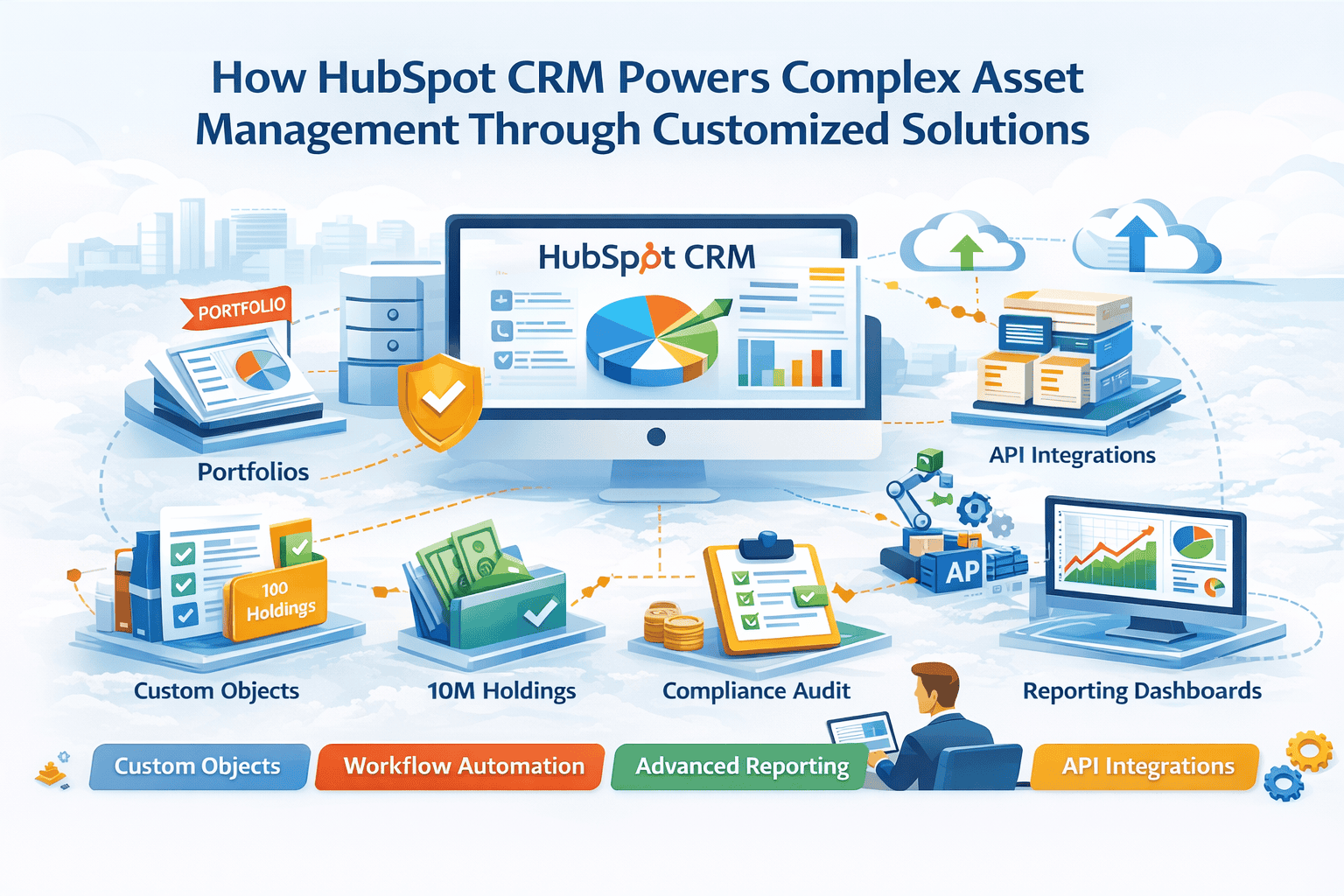
This is where HubSpot CRM, combined with customised extensions like Custom Objects, workflow automation, advanced reporting, and API integrations, becomes a powerful solution for asset management practices. Although originally built for sales and marketing teams, HubSpot’s flexible architecture now enables deep customisation—making it suitable for industries with highly specialised data structures, including asset and wealth management.
- Complex investment portfolios
- Multiple account types and holdings
- Compliance-driven data
- Multi-channel client interactions
- Advisor productivity optimisation
You’ll learn not just what HubSpot can do, but how it works under the hood, how to extend it with APIs, and what real financial firms have achieved with tailored HubSpot implementations.
What Is HubSpot for Asset Management?
In its native form, HubSpot CRM is a powerful, core database designed to store contacts, companies, deals, and activities. For asset management, however, the magic lies in its extensibility—primarily through Custom Objects, programmable automation, HubSpot APIs, and data enrichment workflows.
Three Core Components for Asset Management:
1. Custom Objects (The Financial Data Layer):
Custom Objects form the backbone of asset management in HubSpot. They allow firms to design structured data models that accurately reflect real-world financial entities.
Using Custom Objects, asset management firms can create and manage:
- Portfolios
- Investment Accounts
- Holdings
- Transactions
- Advisory Relationships
- Compliance Audits
Each Custom Object supports:
- Custom properties to store financial details such as NAV, risk level, or account type
- Associations to define relationships between clients, advisors, and portfolios
- Automation triggers to initiate workflows when data changes
2. Automation Tools (Workflows & Programmable Actions)
Automation tools in HubSpot help asset management firms eliminate manual tasks and ensure consistency across operations.
With HubSpot Workflows, firms can automatically:
- Trigger portfolio review reminders for advisors
- Schedule KYC and compliance checks based on renewal dates
- Create follow-up tasks after client meetings
- Push updated transaction data into analytics dashboards
For more advanced scenarios, Custom Coded Workflow Actions allow firms to run JavaScript-based logic directly within HubSpot. These serverless functions are ideal for financial calculations and validations.
Example: Portfolio Value Calculation
const totalValue = holdings.reduce((sum, h) => sum + (h.units * h.nav), 0);
output.set(“portfolio_value”, totalValue);
3. HubSpot APIs (The Integration Layer):
HubSpot APIs enable seamless integration with external financial systems such as custodians, fund accounting platforms, RIA tools, and portfolio management systems.
Firms typically use:
- HubSpot CRM API to create and update records
- Associations API to link clients, portfolios, and accounts
- Custom Objects API to manage financial data structures
- Webhooks to receive real-time updates from external systems
Integration Example
Using the CRM API, firms can automatically sync daily holdings data from a custodian into HubSpot. This ensures advisors always have access to the most current investment information without manual uploads.
Key Terminologies:
| Term | Meaning & Relevance in Asset Management |
| Custom Objects | Create financial structures like portfolios and holdings beyond standard CRM objects. |
| Associations API | Links clients → portfolios → holdings to reflect real investment structures. |
| Programmable Automation | Serverless functions to calculate returns, risk scores, etc. |
| Webhooks | Push real-time updates from custodians or trading systems into HubSpot. |
| Property Groups | Organise large financial data fields logically (e.g., “Risk Profile,” “Investment Preferences”). |
End-to-End Data Flow in HubSpot for Asset Management
This section explains how investment data moves seamlessly from external financial systems into HubSpot, how it is processed, and how it finally supports advisors, operations, and leadership teams.
Step 1: Data Ingestion from External Financial Systems
- Custodians and Portfolio Management Systems (PMS) send daily transaction data, holdings, and NAV updates to HubSpot using secure APIs or webhooks.
- For example, when a NAV changes in the PMS, a webhook instantly triggers an update in HubSpot, ensuring holdings reflect the latest market values.
Step 2: Automated Data Processing & Calculations
- Once the data enters HubSpot, automated workflows process it without manual intervention.
- These workflows calculate portfolio values, update risk scores, schedule upcoming review cycles, and track KYC/AML renewal deadlines in real time.
Step 3: CRM Data Enrichment & Relationship Mapping
- The system automatically links data across relevant records to maintain accurate relationships.
- Holdings are connected to Investment Accounts, Accounts roll up into Portfolios, Portfolios link to Clients, and each Client is associated with the assigned Advisor.
Step 4: Advisor & Operations Team Interaction
- Advisors and operations teams receive real-time alerts and tasks based on automated triggers.
- These include rebalancing notifications, market-driven portfolio changes, key client milestones, and compliance-related action items.
Step 5: Reporting & Insights
- HubSpot dashboards present a consolidated view of critical business metrics.
- Teams can track Assets Under Management (AUM) by portfolio segment, advisor productivity, client engagement levels, and overall asset class exposure.
Why Use HubSpot for Asset Management?
Asset management firms face unique operational challenges that traditional CRMs were never designed to handle. From managing complex investment data to ensuring compliance and empowering advisors with real-time insights, HubSpot fills critical gaps through flexibility, automation, and customisation.
1. Traditional CRMs Can’t Handle Financial Data Well
- Legacy CRMs are not designed to manage portfolios, holdings, and investment relationships, often requiring complex custom development.
- HubSpot’s Custom Objects allow firms to model financial data easily and keep everything connected.
Example:
An RIA firm managing 2,700+ clients mapped portfolios to clients, updated holdings daily, and triggered alerts automatically—reducing manual reconciliation by 40%.
2. Advisors Need Real-Time Client Intelligence
- Advisors often work with outdated reports and scattered data, slowing decision-making and client response times.
- HubSpot automation provides real-time activity tracking, alerts, and reminders in one place.
Example:
A wealth firm synced 45,000 holdings nightly and generated daily advisor summaries, increasing advisor productivity by 27%.
3. Manual Compliance Processes Create Risk
- Managing KYC, AML, and regulatory requirements manually increases errors and compliance risk.
- HubSpot workflows automate reminders, logging, and renewals to ensure consistency.
Example:
By automating FATCA/CRS compliance, one firm reduced processing time by 70%.
Key Benefits:
1. Customizable Data Architecture:
Technical:
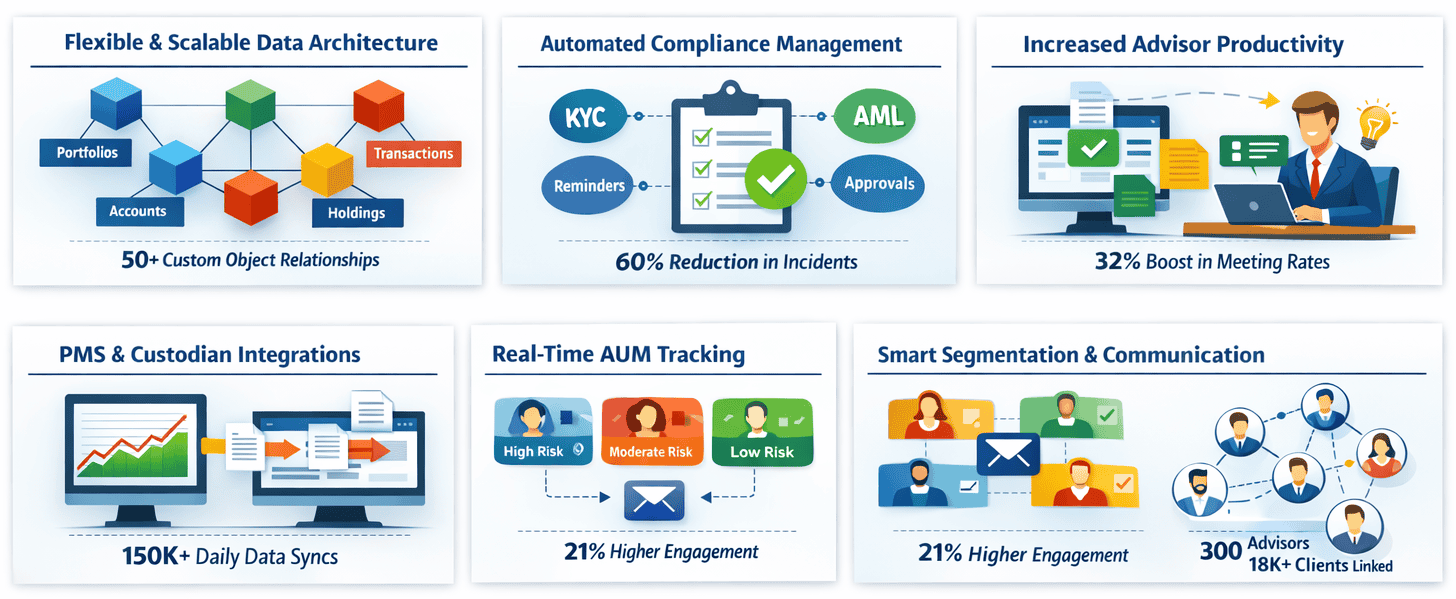
- Supports 50+ relationships between Custom Objects, allowing asset managers to mirror portfolios, accounts, holdings, and transactions exactly as they exist in financial systems.
- This creates a structured, scalable data model that can handle complex multi-entity relationships without performance issues.
Business Impact:
- Provides a single, accurate source of truth so teams no longer chase data across Excel sheets, PMS tools, or custodian platforms.
- Improves decision-making and reduces operational friction by keeping every client and portfolio detail accessible in one place.
Example:
- A firm consolidated data from five separate systems into HubSpot using Custom Objects, eliminating duplication and inconsistencies.
- This resulted in saving over 15 hours per week previously spent on manual cross-verification.
2. Automated Compliance Management
Technical:
- Uses time-based workflows and programmable automation to trigger KYC/AML reminders, document renewals, and compliance approvals.
- These workflows ensure compliance rules are applied consistently and automatically across all clients.
Business Impact:
- Eliminates missed regulatory deadlines and removes manual tracking, significantly reducing compliance risk.
- Firms experience smoother audit processes and lower chances of operational oversight or human error.
Example:
- Automating the entire KYC workflow—from due-date reminders to reviewer assignments—dramatically improved accuracy.
- As a result, compliance-related incidents dropped by 60% within the first quarter
3. Improved Advisor Productivity:
Technical:
- Task queues, sequences, and AI-driven insights help advisors prioritize high-value activities and automate routine outreach tasks.
- Real-time engagement tracking ensures advisors act at the right moment with the right context.
Business Impact:
- Advisors complete more client interactions in less time, reducing follow-up delays and improving responsiveness.
- This leads to better client relationships and more efficient workload management across teams.
Stat:
- After implementing automated activity workflows, firms saw a 32% increase in meeting completion rates.
- Advisors also reported a noticeable reduction in manual admin tasks.
4. Integrations With PMS & Custodians:
Technical:
- API-based integrations push daily transactions, holdings, and NAV updates from portfolio management systems directly into HubSpot.
- Batch endpoints and automated sync scheduling ensure large-scale data flows run smoothly.
Business Impact:
- Advisors gain real-time visibility into client portfolios, enabling more informed conversations and faster servicing.
- Operational teams no longer waste time reconciling disparate systems or waiting on manual data imports.
Example:
- One firm synced over 150,000 rows of holdings data per day into HubSpot in under 20 minutes using automated API pipelines.
- This ensured advisors always had access to up-to-date investment positions.
5. Real-Time AUM Tracking:
Technical:
- JavaScript-coded workflow actions recalculate AUM whenever holdings, NAV values, or account positions change.
- This ensures portfolio valuations remain accurate and immediately updated across the CRM.
Business Impact:
- Leaders and advisors get an instant view of total assets under management, supporting daily decision-making.
- It also speeds up review cycles by eliminating manual AUM calculations.
Example:
- After automation, quarterly portfolio review prep time was reduced by 28%, allowing advisors to focus on client strategy. Teams no longer needed to rely on spreadsheets for value updates.
6. Segmentation & Personalized Communication:
Technical:
- Smart lists and custom fields dynamically segment investors by risk profile, asset class preference, engagement level, or portfolio behaviour.
- These segments update automatically as new data flows into the system.
Business Impact:
- Allows firms to deliver highly targeted, relevant communication that improves investor engagement and retention.
- Marketing and advisory teams tailor messages precisely to investor needs.
Stat:
- Personalized investor communications produced a 21% increase in newsletter open rates.
- Firms also observed stronger client participation in portfolio review meetings.
7. Advisor–Client Relationship Mapping
Technical:
- Multi-association functionality links advisors to clients, portfolios, accounts, and activities in complex relationship structures.
- Each advisor’s involvement and responsibilities are clearly mapped within HubSpot’s data model.
Business Impact:
- Improves coordination across advisory teams by clarifying ownership and ensuring smoother client handoffs
- Reduces confusion in multi-advisor scenarios and enhances team accountability.
Example:
- One firm successfully mapped 300 advisors to over 18,000 clients while maintaining accurate associations.
- This enabled operations teams to track responsibility and performance with precision.
Features:
1. Custom Objects for Portfolios & Holdings:
- Use Case: Helps store multi-layered investment data like portfolios, accounts, and holdings with clean relationships for advisors.
- Pitfalls: Creating too many associations or unnecessary custom objects slows CRM performance and complicates reporting.
- Best Practice: Maintain fewer than 10 associations per object and define your data model before building to ensure scalability.
2. Workflows for KYC/AML Automation:
- Use Case: Automates KYC/AML renewals, compliance tasks, and reminders so advisors never miss regulatory deadlines.
- Pitfalls: Incorrect date fields or renewal logic may trigger workflows at the wrong time, causing compliance gaps.
- Best Practice: Always use the “last renewal date” field as the workflow trigger and test logic with sample records before deployment.
3. HubSpot API for Daily Syncs:
- Use Case: Syncs transactions, NAV updates, and holdings from custodians or PMS systems into HubSpot daily.
- Pitfalls: High-volume data may hit API rate limits, causing failed or incomplete syncs.
- Best Practice: Use batch API endpoints (CRM/v3/batch) to process large datasets efficiently and schedule syncs during low-traffic hours.
4. Programmable Automation for Financial Calculations:
- Use Case: Handles complex calculations like portfolio value, risk scoring, and asset allocation using custom JavaScript actions.
- Pitfalls: Incorrect data types or string values can lead to wrong calculations or workflow errors.
- Best Practice: Always convert properties to numbers (parseFloat) and validate values before running portfolio-level calculations.
5. Reporting & Dashboard Templates:
- Use Case: Provides clear visibility into AUM, client segmentation, advisor performance, and portfolio trends.
- Pitfalls: Misconfigured filters or mixed advisor groups lead to inaccurate reporting and misleading insights.
- Best Practice: Create separate dashboards per advisor or segment and lock filters to maintain consistent data accuracy.
Real-World Use Cases
1: Mid-Sized Wealth Firm – Portfolio Visibility Challenge
- Industry: Wealth Advisory
- Challenge: The firm struggled to manage 20,000+ holdings, slow portfolio review cycles, and inconsistent advisor notes impacting client updates.
- Solution: Implemented Portfolio/Account/Holding custom objects, added a custodian API feed, automated quarterly reviews, and applied advisor activity scoring.
- Results: Portfolio reviews became 35% faster, advisor meetings increased by 22%, and manual reconciliation dropped to zero after automation.
2: Asset Management Firm – Compliance Burden
- Industry: Asset Management
- Challenge: High compliance risk due to manual KYC tracking, missed renewal dates, and long audit preparation times.
- Solution: Created a “Compliance Check” custom object, automated AML/KYC renewals, added supervisor alerts, and integrated document storage.
- Results: Audit prep time reduced by 90%, compliance schedules became fully automated, and incidents fell from 18 per year to just 3.
Conclusion:
As asset management firms embrace digital transformation, HubSpot CRM proves itself as a powerful, flexible, and scalable platform—especially when enhanced through customized data models, automation, integrations, and analytics. While HubSpot is not a traditional financial CRM, its modern architecture and extensibility make it ideal for firms that require agile, real-time client and portfolio management solutions.
With the right technical setup—Custom Objects, API integrations, programmable automation, and compliance workflows—HubSpot becomes a central operating system for advisors, operations, and compliance teams. This results in higher productivity, fewer errors, faster reviews, and better client experiences.
If you’re looking to get started, begin by testing the data model in a sandbox, building custom objects for your portfolios and accounts, and structuring your integrations through HubSpot’s API layer.
The future of asset management CRM lies in flexible, scalable platforms, and HubSpot—with the right configuration—delivers exactly that.

