
How to Automate Order-to-Cash in Manufacturing with Celigo
A practical guide for manufacturers connecting Salesforce to NetSuite or another ERP with Celigo: which system owns each step, what the prebuilt integration app does and doesn't do, how to handle credit holds, fulfilment, invoices and payments, and how to keep failed syncs from becoming lost orders.
Key Takeaways
- Order-to-cash runs from receiving an order to receiving payment: customer order, credit, fulfilment, invoicing, and payments and collections. Automation means each handoff between Salesforce and the ERP happens without re-keying.
- Celigo integrator.io moves data in flows (export, then lookups and mapping, then import), in real time or on a schedule, with error management built in.
- For Salesforce and NetSuite, Celigo's integration app already syncs Closed Won opportunities to sales orders, and sends fulfilments, invoices and payments back to Salesforce. Some flows are Premium-only, and order updates stop once the sales order passes Pending Approval.
- Agree which system owns each record before mapping a single field. In most manufacturers the ERP owns items, stock, credit, invoices and payments.
- Design for failure: unique external IDs to prevent duplicate orders, Celigo's retry and auto-resolve settings, and a named person who owns open errors.
We first published this guide in December 2025. This version replaces the general claims and unsourced figures with Celigo's, Salesforce's and Oracle NetSuite's current documentation, corrects how Celigo actually connects to Salesforce, and adds what the earlier version left out: credit holds, assemblies and serialized items, prebuilt versus custom flows, API limits, and EDI orders.
Celigo order-to-cash automation connects the systems that sell, make, ship and bill, so an order captured in Salesforce becomes an ERP sales order, and its status, shipment, invoice and payment flow back to the people who face the customer. This guide is for operations, finance, sales operations and IT leaders at growing and mid-market companies in manufacturing and distribution, and for the admins who will build the flows. Enterprise manufacturers will find the same design applies at a larger scale.
What Is Order-to-Cash Automation with Celigo?
Order-to-cash automation with Celigo uses Celigo's integration platform to pass each order-to-cash handoff between Salesforce, the ERP and other systems automatically: won deals become sales orders, and stock, shipments, invoices and payments come back to Salesforce. People handle exceptions, not data entry.
APQC, the process benchmarking body, defines order-to-cash as the processes for receiving and fulfilling customer requests for goods and services and getting paid for them, from receipt of the order to receipt of payment. Its component processes are customer order, customer credit, order fulfilment, invoicing, and payments and collections. APQC notes that organizations still processing orders manually see higher processing costs and error rates.
Celigo describes integrator.io as a cloud-native integration platform (iPaaS) whose flows run on a schedule or in real time. It offers prebuilt connectors, universal connectors such as HTTP, FTP, AS2 and SQL, fully managed integration apps, and installable templates. For order-to-cash, three of those matter most:
Flows
An export pulls records from the source, lookups and mappings reshape them, and an import writes them to the destination. Flows can branch, merge and run in sequence.
Integration apps and templates
Prebuilt Salesforce and NetSuite flows you configure in settings, or a template you install and customize for another ERP.
Error management
Errors shown per flow step, with notifications, assignment, automatic retries and bulk retry after a fix.
Why Is Order-to-Cash Harder to Automate for Manufacturers?
Manufacturing order-to-cash is harder because the order that sales sees is not the order that operations builds, ships and bills. Items are assemblies, kits or serialized parts. Credit limits block orders in the ERP. Orders arrive from reps, distributors and EDI, and fulfilment is often partial. Each of these needs an explicit rule in the integration.
Which System Should Own Each Order-to-Cash Step?
Salesforce should own the sale up to the won quote or order; the ERP should own credit, the sales order once accepted, stock, fulfilment, invoices and payments. Celigo moves the handoff in one direction and the status back in the other. Two systems editing the same field is the most common cause of sync loops and overwritten data.
| O2C stage | System of record | Moves via Celigo | What Salesforce users see |
|---|---|---|---|
| Customer and contacts | Agree explicitly | Account to customer when the first order is won; ERP ID written back | One account linked to one ERP customer |
| Items and prices | ERP | ERP items to Salesforce products on a schedule | Quotable products with ERP item codes |
| Order capture | Salesforce | Closed Won opportunity or activated order to ERP sales order | ERP order number and status on the record |
| Credit check | ERP | Credit limit, balance and hold status to the account | Read-only credit fields before closing |
| Fulfilment and shipping | ERP | Item fulfilments, quantities and tracking numbers back | Shipped lines, tracking, serial numbers |
| Invoicing | ERP | Invoices and invoice PDFs back | Open invoices and copies on the account |
| Payments and collections | ERP | Payments, deposits and balances back | Paid status and overdue balances |
This is a typical starting point, not a rule. Confirm every row with sales, finance and operations, and write the result down as a field ownership spec before anyone builds. Our page on Salesforce NetSuite billing integration shows how credit limit, accounts receivable and hold status can appear read-only on the Salesforce account.
How Does a Celigo Flow Move an Order from Salesforce to the ERP?
A Celigo flow starts when Salesforce signals a change or a schedule runs, exports the record, looks up related data, maps it into the ERP's format, imports it, and writes the result back. Each step can be filtered, branched or extended with JavaScript, and every failure is recorded against the step where it happened.
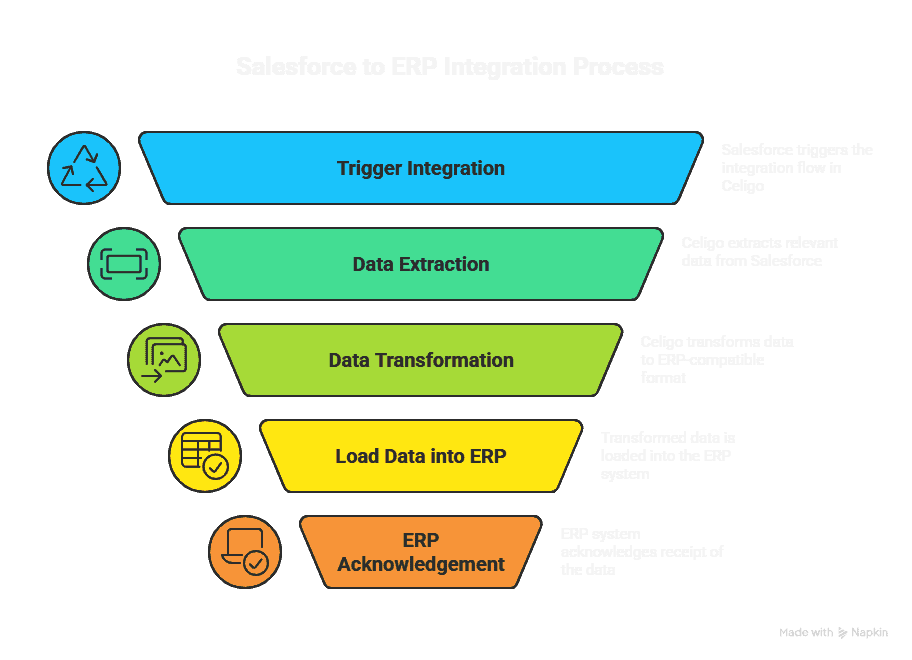
Two corrections to common advice. Celigo connects to Salesforce with an OAuth 2.0 connection (refresh token or JWT bearer), not with Salesforce Named Credentials, which define endpoints for calls that Salesforce makes outward. And because the real-time trigger is Apex, Salesforce's test coverage rules apply when you deploy it to production. Celigo notes that Salesforce revokes refresh tokens that sit idle for more than 30 days, so a connection used rarely may need reauthorizing.
Hook scripts are for small, fast checks: Celigo limits each hook run to 4 seconds of processing and 120 seconds of cumulative API calls per flow run. Heavier logic belongs in a stack (a server-side hook) or in the ERP.
What Are the Stages of an Automated Manufacturing Order-to-Cash Flow?
An automated manufacturing order-to-cash flow has six stages: order capture, credit check, sales order creation, fulfilment and shipping, invoicing, and payment and cash application. The examples below use Celigo's Salesforce and NetSuite integration app, because that is where Celigo documents the most prebuilt behaviour; the same stages apply with other ERPs through templates or custom flows.
1. Order capture in Salesforce
SalesforceTrigger: an opportunity reaches Closed Won, or an order is activated.
Reps quote from products that carry ERP item codes, using standard Order and Order Product records or opportunities with line items. A record-triggered flow can stop incomplete orders: required ship-to, payment terms and item codes before the stage can close. Celigo's opportunity to sales order flow lets you configure which stage triggers the sync.
2. Credit check
ERPGoal: reps see a credit problem before the order is won, not after.
NetSuite's credit limit handling can ignore, warn or enforce holds, with an optional grace period for overdue balances, and a hold lifts after payment or when a manager overrides it. Sync the credit limit, open balance and hold status to the Salesforce account on a schedule, and show them on the opportunity. Celigo's integration app brings customer financials to the Salesforce account for this purpose.
3. Sales order creation
HandoffGoal: one ERP sales order per Salesforce order, every time.
Celigo's app syncs Closed Won opportunities to NetSuite sales orders in real time, creating the customer and contact if they are missing. Later opportunity updates also sync, but not once the sales order has moved past Pending Approval. From that point the ERP owns the order. If you use Salesforce orders instead, the order to sales order flow syncs the header and order products, including discounts, and writes back the NetSuite ID, order number and status. It does not sync reduction orders, negative quantities or deleted orders, so returns and cancellations need their own process.
4. Fulfilment and shipping
ERPGoal: sales and service answer "where is my order?" without asking the warehouse.
Celigo's item fulfilment flow creates an Item Fulfillment record in Salesforce with shipping method, fulfilled quantity and tracking number, for partial and full shipments. It supports inventory, assembly, kit, item group, service and non-inventory items, and serialized, lot or bin items create Salesforce Asset records against the account. That gives service teams the installed base for warranty and field work.
5. Invoicing
ERPGoal: bill as soon as goods ship, from one source of truth.
In NetSuite a sales order doesn't affect your accounts until you deliver and create an invoice or cash sale. Without Advanced Shipping, fulfilling the order creates the invoice automatically; with it, fulfilment and billing are separate steps. Celigo's financials flows bring invoices back to Salesforce and can attach the NetSuite PDF to the record, so account managers can resend a copy without asking finance.
6. Payment and cash application
ERPGoal: sales knows who has paid before the next order or renewal.
Payments, deposits, cash sales and refunds recorded in NetSuite flow back as Salesforce financial records, according to Celigo's Salesforce NetSuite integration page. Cash application itself stays in the ERP. Payment processors and bank files can feed the ERP through separate Celigo flows.
Should You Use Celigo's Integration App, a Template or a Custom Flow?
Use the integration app when your ERP is NetSuite and your process fits its flows; use a template when you want a starting point you can change freely; build custom flows for other ERPs or for steps the app doesn't cover. Most manufacturers end up with the app plus a few custom flows around it.
| Option | What you get | Fits when | Watch for |
|---|---|---|---|
| Salesforce–NetSuite integration app | Managed flows and a settings page: customers, opportunities and orders, items, fulfilments, financials | NetSuite ERP and a fairly standard quote-to-order process | Some flows are Premium-edition only; update cut-off at Pending Approval |
| Salesforce–NetSuite quickstart template | Installable lead-to-cash flows both ways, including sales order status and financials | You expect heavy customization and want to own the flows | You maintain the flows yourself after install |
| Template for another ERP | Celigo templates such as Salesforce–Acumatica; Dynamics 365 integrations that include Salesforce | Acumatica or Dynamics 365 Business Central or Finance and Supply Chain | Confirm which O2C steps the template covers before scoping |
| Custom flows | Exports, imports and mappings built on Celigo connectors or HTTP | Other ERPs, returns, EDI orders, configured products | Needs design, testing and ownership like any software |
On editions, Celigo's documentation lists Salesforce Order to NetSuite sales order, product and item syncs, exchange rates and item fulfilment as Premium additions, and notes that customers onboarded from 2026 onward are provisioned on the highest tier. If you have a legacy licence, check your edition before you design around those flows.
Should Order Sync Run in Real Time or on a Schedule?
Sync orders, credit holds and shipments in real time, because someone is waiting on them; sync items, prices and historical financials on a schedule, because volume matters more than seconds. Then size both against Salesforce's and Celigo's limits before go-live, not after the first month-end.
| Data | Suggested timing | Why |
|---|---|---|
| Won opportunities and orders | Real time | Production planning and the customer wait on the order |
| Fulfilments and tracking | Real time | Customer-facing teams answer status questions |
| Credit limit and hold status | Frequent schedule | Reps check it before closing |
| Invoices and payments | Frequent schedule | Visibility, not a transaction in Salesforce |
| Items, price lists, stock levels | Scheduled delta | High volume; only changed records need to move |
Salesforce gives each org a daily API allocation (for Enterprise Edition, 100,000 plus a per-licence amount, such as 1,000 calls per Salesforce licence) and allows 25 concurrent long-running requests in production. Every integration shares that allocation. Salesforce recommends Bulk API 2.0 for operations over 2,000 records, and a Composite request counts as one call however many requests it contains, which matters for custom HTTP calls.
On the Celigo side, each connection has its own first-in, first-out queue and a concurrency level. You can use separate connections to keep a large nightly item load from delaying a real-time order, or let connections borrow one shared limit so they don't overload the ERP. Our Salesforce NetSuite integration architecture page covers these patterns in more depth.
How Do You Handle Failed Syncs and Duplicate Orders?
Prevent duplicates with a unique external ID on every order, let Celigo retry what is temporary, and give every remaining error an owner and a deadline. In order-to-cash, an unnoticed failed sync is an unshipped order or an unsent invoice, so error handling is part of the design, not a support task.
- Idempotent writes. Store the Salesforce ID on the ERP sales order and the ERP ID on the Salesforce record, and use lookups or upserts on them. If a flow runs twice, it updates the same order instead of creating a second one.
- Automatic recovery. Celigo's auto-recover setting (on by default) drops concurrency to one after a rate-limit error and retries with a doubling delay. With trace keys configured, Celigo retries intermittent errors up to four times and marks older duplicate errors for the same record as resolved once it succeeds.
- Ownership. Celigo's error management lets you subscribe people to notifications, tag and assign errors, inspect the data, then retry it as sent or after fixing it. Celigo also uses machine learning to classify errors, and its Ora assistant on the Errors page helps analyse them.
- Retention. Open errors can be retried for 30 days by default (up to 180 days, depending on subscription), and Celigo keeps retry data for the most recent 20,000 errors per flow step. A weekly review keeps old errors from aging out unresolved.
- Reconciliation. Compare counts of won orders in Salesforce and sales orders in the ERP daily during hypercare, and weekly after that.
Retry automatically: rate limits, timeouts, connection drops and record locks. These usually succeed on a later attempt without anyone changing data.
Route to a person: unknown item codes, credit holds, missing ship-to addresses and closed accounting periods. Retrying these only repeats the failure.
Can Celigo Automate EDI Orders, Shipping and Other ERPs Too?
Yes. The same Celigo platform can take EDI purchase orders from retailers and distributors, exchange orders and shipments with shipping platforms, and connect ERPs other than NetSuite. That matters for manufacturers, because many orders never pass through Salesforce at all, yet sales still needs to see them.
- EDI. Celigo's B2B Manager handles trading partner onboarding, mapping and monitoring for X12 and EDIFACT documents such as purchase orders (850), invoices (810) and advance ship notices (856), on the same platform as the CRM flows. Celigo also publishes a NetSuite order-to-cash EDI template.
- Shipping. Celigo's ShipStation integrations sync orders, fulfilment and product data with ERPs such as NetSuite.
- Other ERPs. Celigo lists Dynamics 365 integrations, including order-to-cash use cases, and a Salesforce–Acumatica template. We didn't find a published Celigo app for Salesforce with SAP S/4HANA, so plan custom flows there.
- NetSuite web services. Oracle has announced that SOAP web services will stop working with NetSuite release 2028.2, and recommends SuiteTalk REST with OAuth 2.0 for new integrations. If an older order integration uses SOAP, plan its replacement now.
Celigo's own order-to-cash solution page covers payment reconciliation, 3PL management and quote-to-cash use cases if your scope reaches beyond Salesforce.
How Do You Roll Out Celigo Order-to-Cash Automation Safely?
Roll out in a fixed order: design ownership, clean master data, build in a sandbox, test the failure cases, run in parallel, then cut over with daily reconciliation. Use this checklist as the minimum before go-live.
- 1
Field ownership spec signed by sales, finance and operations for customers, items, orders, credit, fulfilments, invoices and payments.
- 2
Master data cleaned: duplicate customers merged, ship-to addresses standardized, every quotable product mapped to one ERP item.
- 3
Order entry rules in Salesforce: required fields and validation that stop an incomplete order before it reaches Closed Won.
- 4
Sandbox build and promotion path: Celigo's integration lifecycle management clones an integration, merges changes between environments and creates a snapshot at each merge you can revert to.
- 5
Test cases beyond the happy path: partial shipments, kits and assemblies, serialized items, credit holds, cancelled and changed orders, and a flow that runs twice.
- 6
Error owners and alerts assigned per flow, with a daily review during hypercare.
- 7
Parallel run of one to two order cycles with order counts reconciled between Salesforce and the ERP.
- 8
Runbook and documentation for every flow: trigger, mapping, owner, and what to do when it fails.
How Do You Measure Order-to-Cash Automation Results?
Measure the cycle, not the integration: end-to-end order-to-cash cycle time, days sales outstanding, on-time delivery and perfect order performance. APQC names the first three as the top order-to-cash measures it finds in practice and recommends the fourth. Take a baseline before go-live so you can compare honestly.
| Measure | What it tells you | Where the data comes from |
|---|---|---|
| Order-to-cash cycle time | Days from order received to cash received | Salesforce close date, ERP payment date |
| Order entry lag | Time from Closed Won to ERP sales order | Salesforce close timestamp, ERP created date |
| Days sales outstanding | How fast invoices turn into cash | ERP receivables |
| On-time delivery | Shipments on or before the promised date | ERP fulfilments against the order |
| Perfect order rate | Orders delivered complete, on time, undamaged and correctly invoiced | ERP fulfilments, credits and returns |
| Open integration errors | Orders and invoices stuck between systems | Celigo error dashboard |
How Does Twopir Consulting Help Manufacturers Automate Order-to-Cash?
We start with the field ownership spec and an audit of your Salesforce org and ERP data, then build and test Celigo flows in a sandbox, run them in parallel, and stay through hypercare. Twopir Consulting is a Salesforce Partner and HubSpot Partner. We implement, rescue, optimize, and integrate complex CRM and revenue systems for growing, mid-market, and enterprise organizations, and Celigo is one of the integration platforms we implement.
- Celigo implementation. Flow design, mapping, JavaScript hooks and error management across Salesforce, NetSuite and other systems. See our Celigo iPaaS implementation services.
- Salesforce and NetSuite. Closed Won to sales order, with invoice, payment and fulfilment status back in Salesforce. See Salesforce NetSuite integration.
- Salesforce for manufacturers. Quoting, order and inventory visibility, ERP handoff and service on one model. See Salesforce for manufacturing. For a mid-market B2B manufacturer, we rebuilt Salesforce activity tracking, call logging and dashboards, and stopped duplicate customer codes. Read the manufacturing CRM case study.
For more detail on the data that moves between the systems, read our related guides on syncing inventory, orders and shipments with Celigo and integrating Salesforce and your ERP with Celigo.
The Bottom Line
Celigo can carry a manufacturer's order from Salesforce into the ERP and bring credit, shipments, invoices and payments back, much of it with prebuilt flows if you run NetSuite. The tool is the easier half. The results come from deciding who owns each step, cleaning the data the flows depend on, and designing for the order that fails.
- 1
Map the six order-to-cash stages and name a system of record for each.
- 2
Use the integration app where it fits, and know its limits: editions, Pending Approval, reduction orders.
- 3
Run orders and shipments in real time, and bulk data on a scheduled delta.
- 4
Prevent duplicates with external IDs, and give every open error an owner.
- 5
Baseline cycle time and DSO before go-live, then measure monthly.
Map Your Order-to-Cash Flow With an Integration Architect
On a 30-minute discovery call, a Twopir consultant will review how orders move between Salesforce and your ERP today, and outline which steps Celigo can automate first.
Schedule a Discovery CallFrequently Asked Questions
Order-to-cash automation connects the steps from receiving a customer order to receiving payment: order capture, credit check, sales order, fulfilment, invoicing and payment. In manufacturing it usually means orders captured in Salesforce or received by EDI flow into the ERP automatically, and shipment, invoice and payment status flow back without re-keying.
Yes. Celigo's Salesforce–NetSuite integration app syncs accounts and customers, Closed Won opportunities to sales orders, items and products, item fulfilments, and invoices and payments back to Salesforce. Some flows, such as Salesforce orders to sales orders and item fulfilments, are Premium-edition features. Celigo also offers a quickstart template you can customize.
Yes. For real-time exports from Salesforce, Celigo generates an Apex trigger on the object and uses qualification criteria to decide which records to send, such as opportunities that reach Closed Won. The integration app syncs those opportunities to NetSuite sales orders in real time. Bulk data such as items and price lists usually runs on a schedule.
The ERP. Credit limits, holds, invoices and payments are financial records, so they belong in the ERP and appear read-only in Salesforce. In NetSuite, the Enforce Holds preference blocks sales orders and invoices that would put a customer at or above their credit limit, so reps should see credit status before they close an order.
Store each system's record ID in the other and use lookups or upserts on those external IDs, so a repeated run updates the existing sales order instead of creating a new one. Configure Celigo trace keys so retries and duplicate errors resolve against the same record, and reconcile order counts between Salesforce and the ERP during hypercare.
Yes. Celigo lists integrations for Microsoft Dynamics 365 Business Central and Finance and Supply Chain, including Salesforce, and a Salesforce–Acumatica template. Other ERPs can be connected with custom flows using Celigo connectors or HTTP. Check which order-to-cash steps a template covers before you scope the project.
Yes. Celigo B2B Manager handles EDI onboarding, mapping and monitoring for X12 and EDIFACT documents such as purchase orders, invoices and advance ship notices, on the same platform as CRM and ERP flows. Celigo also publishes a NetSuite order-to-cash EDI template, so EDI orders can follow the same ERP process as Salesforce orders.
References
Every product fact in this guide comes from Celigo's, Salesforce's or Oracle NetSuite's own documentation, or from APQC, checked in October 2026. Editions and features change, so confirm current details with each vendor before you buy.
- APQC: What is the order-to-cash process?
- Celigo: Overview of integrator.io
- Celigo: Data flows and integrations
- Celigo: Introduction to webhook listeners
- Celigo: JavaScript hooks
- Celigo: Set up a Salesforce connection
- Celigo: Listen for real-time data from Salesforce
- Celigo: Salesforce NetSuite integration app
- Celigo: Sync Salesforce opportunity to NetSuite sales order
- Celigo: Sync Salesforce order to NetSuite sales order
- Celigo: Sync NetSuite item fulfilment to Salesforce
- Celigo: NetSuite financials to Salesforce
- Celigo: Standard and Premium editions
- Celigo: Salesforce NetSuite quickstart template
- Celigo: Error management overview
- Celigo: Resolve errors automatically or manually
- Celigo: Connection concurrency
- Celigo: Integration lifecycle management
- Celigo: Order-to-cash automation
- Celigo: B2B Manager for EDI
- Celigo: NetSuite order-to-cash EDI template
- Celigo: ShipStation integrations
- Celigo: Microsoft Dynamics 365 integrations
- Salesforce Help: Named Credentials
- Salesforce Help: Record-triggered flows
- Salesforce Developers: Order object
- Salesforce Developers: SalesAgreement (Manufacturing Cloud)
- Salesforce Developers: API request limits and allocations
- Salesforce Developers: Bulk API 2.0
- Salesforce Developers: Composite resource
- Oracle NetSuite: Sales orders, invoices and payments
- Oracle NetSuite: Customer credit limit handling
- Oracle NetSuite: SuiteTalk REST web services
- Oracle NetSuite: SOAP web services end of support
