
Introduction:
At TwoPir Consulting, we constantly strive to refine how we gather and utilize customer data for more personalized marketing efforts. As modern marketers, we understand that having accurate, comprehensive data on our prospects and customers is critical to delivering targeted and relevant messaging. The key is in how this data is collected—without causing friction in the user experience. Enter progressive profiling, a technique that allows us to gather valuable information incrementally over time. By using this approach, we can avoid overwhelming users with lengthy forms and instead, build detailed profiles through multiple interactions.
Progressive profiling offers a strategic advantage for businesses using Salesforce Marketing Cloud Account Engagement. It allows marketers to replace previously completed form fields with new ones during subsequent interactions, giving customers a smoother experience and gradually collecting the data needed to personalize future engagement. This blog explores how progressive profiling works in Marketing Cloud, its benefits, and the practical steps involved in setting it up for success.
How does Progressive Profiling work?
Progressive profiling helps you gather information over time by replacing form fields for which data is already collected with new ones during future interactions.
When a prospect visits a progressive profiling-enabled form, only fields they haven’t filled out previously will appear, unless you’ve enabled the setting “Always display even if previously completed.” This dynamic process ensures that with each interaction, you collect new data points, gradually building a more detailed prospect profile.
filled out before unless the ‘Always display even if previously completed’ setting is enabled. By doing so, you gradually collect more information about your prospects over multiple interactions.
- When a prospect first interacts with your marketing content, Marketing Cloud Account Engagement should display a short form with essential fields such as first name, last name, email address, and company name. The goal is to capture basic prospect data to initiate the engagement.
- Upon subsequent engagement, Marketing Cloud Account Engagement flips previously completed fields with new ones. For instance, if the prospect has completed the Company Name field, the next time they interact with a form, it could be replaced with the Job title field.
- Through every interaction, Marketing Cloud Account Engagement will ask the prospect to provide additional data beyond what is collected already.
- Gradually you can build a comprehensive profile of your prospects, and it can be used to tailor your marketing campaigns to cater to their specific needs and preferences.
Key Benefits of Progressive Profiling:
- Progressive profiling ensures that quality prospect data is collected, as the risk of data entry errors is minimized due to this gradual approach to presenting fields.
- Since the number of fields displayed at a time is limited, it makes the form submission exercise seamless, reduces burnout, and increases the likelihood of getting more form submissions.
- Segmentation and targeting of prospects also become a lot more easier and effective as more and more prospect data is collected.
- Through better segmentation, marketers can send personalized content to the prospects and improve the chances of conversion.
- Collecting additional information regarding the needs and preferences of the prospects can aid marketers in channelling marketing efforts in the right areas.
Setting Up Progressive Profiling in Marketing Cloud:
Step 1: Define Your Data Collection Strategy:
Determine the key pieces of information you need from your customers and prioritize them. Create a roadmap for how you will collect this data over multiple interactions.
Step 2: Create Data Extensions:
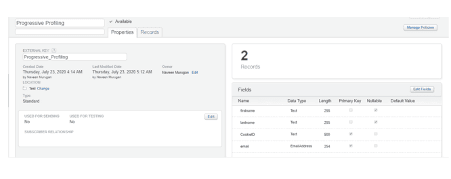
In Marketing Cloud, data extensions are used to store customer data. Create data extensions to hold the information you plan to collect through progressive profiling.
1. Navigate to Contact Builder: In Marketing Cloud, go to Contact Builder.
2. Create New Data Extension: Click on “Data Extensions” and create a new data extension for each set of information you want to collect.
3. Define Fields: Add the necessary fields such as First Name, Last Name, Email, etc., ensuring you include fields for the progressive data points.
Step 3: Design Your Forms:
Design forms that will be used to collect data from your customers. Ensure these forms are integrated with your data extensions.
1. Navigate to CloudPages: In Marketing Cloud, go to CloudPages.
2. Create a New Landing Page: Create a new landing page where you will embed your form.
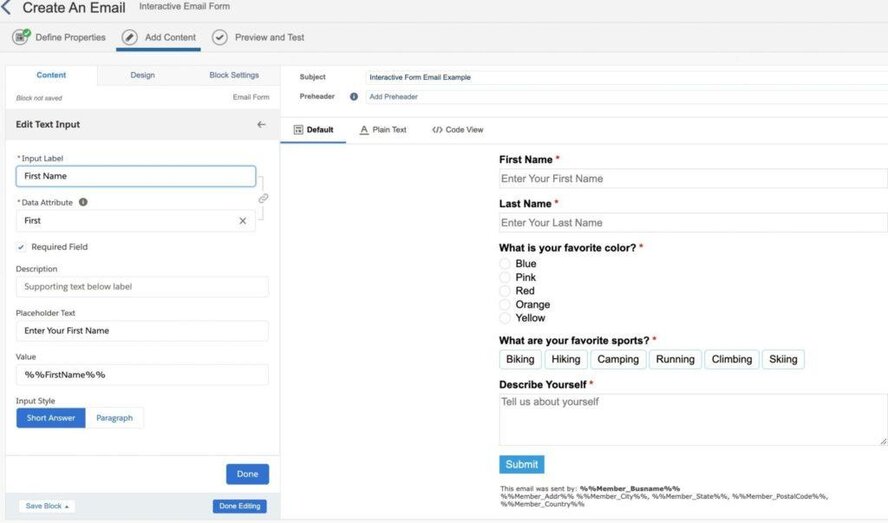
3. Add Smart Capture: Use the Smart Capture tool to build your form, mapping form fields to the corresponding data extension fields.
Step 4: Implement Progressive Profiling Rules:
Set up rules to control the progressive profiling process. Determine which data points to request at each stage of customer interaction.
1. Navigate to Automation Studio: In Marketing Cloud, go to Automation Studio.
2. Create an Automation: Create an automation to trigger the progressive profiling process based on customer interactions.
3. Define Rules: Use decision splits and other logic to determine which data points to request and when to update the data extensions.
Step 5: Test Your Setup:
Before going live, thoroughly test your progressive profiling setup to ensure it works as expected.
1. Test Data Collection: Submit test data through your forms and verify it correctly updates the data extensions.
2. Check Automation: Ensure that the automation and decision splits are functioning correctly and triggering the appropriate data requests.
Considerations:
1. GDPR and Privacy:
Adhere to GDPR laws; ensure explicit consent for placing cookies and tracking individuals. Consult your legal team for additional disclaimer requirements.
2. Google Chrome Same Site Cookie Change:
Be mindful of changes in Google Chrome’s Same Site Cookie policy, adjusting the code in SSJS according to this Salesforce Doc, comply with Chrome version 76 or later.
3. Cache and Browser Changes:
Note that clearing the cache or switching browsers generates a new cookie, displaying the original form. This insight hopes to elucidate the implementation of Progressive Profiling in Marketing Cloud through a custom solution on CloudPages, leveraging SSJS and other elements. While gaining Progressive Profiling functionality, strategic consideration of the fields to request at each stage is crucial before implementing any technology.
Summary:
Progressive profiling is a game-changer in Salesforce Marketing Cloud that allows businesses to enhance their data collection processes without sacrificing user experience. By using a thoughtful approach, marketers can gather more detailed information about their prospects over time, leading to better-targeted campaigns and improved personalization. The key to its success lies in carefully planning your data collection strategy, ensuring that forms are seamlessly integrated with CloudPages and Automation Studio for smooth data flow.
Ultimately, progressive profiling offers a balance between collecting the data you need and maintaining high engagement rates. By reducing the burden on prospects with shorter forms and using automations to control when and which data is requested, businesses can improve their marketing efforts and better tailor communications to meet customer needs. For marketers looking to maximize conversion rates and enhance their segmentation efforts, progressive profiling is an invaluable tool.

