
Introduction
Manufacturing companies today face a common challenge: data lives in too many disconnected systems. Salesforce manages customer relationships, quoting, and service requests; your ERP—whether NetSuite, Microsoft Dynamics, SAP, or Infor—handles production planning, purchase orders, inventory, and financials. When these systems don’t talk to each other, teams struggle with inaccurate inventory data, delayed order fulfillment, manual re-entry errors, and operational blind spots.
A 2024 industry report found that 61% of manufacturers still rely on manual processes to sync orders, inventory, and production data between Salesforce and their ERP, leading to slower sales cycles and inconsistent customer experiences. This is where Celigo, a modern integration platform (iPaaS), solves the problem with automated, bidirectional data flows.
At Twopir Consulting, we’ve seen manufacturing teams transform their operations by integrating Salesforce with ERPs through Celigo—reducing manual tasks, improving forecasting accuracy, and ensuring real-time production visibility. Whether you’re managing complex Bill of Materials (BOMs), high-volume orders, multi-location inventory, or service parts, Celigo bridges the gap with scalable automation.
This blog dives deep into how to integrate Salesforce and your ERP using Celigo, tailored specifically for manufacturing success. You’ll learn the architecture, key components, features, code snippets, and real-world case studies of manufacturers that achieved seamless operations and higher revenue efficiency.
If “operational excellence” is a priority in 2025, mastering Salesforce–ERP integration is non-negotiable—and Celigo is one of the most powerful ways to do it.
What is Celigo Integration for Salesforce–ERP?
Celigo is an Integration Platform as a Service (iPaaS) that automates data movement between Salesforce and ERP systems. It eliminates manual entries and ensures both systems stay synchronized in real time. For manufacturers, Celigo acts as the intelligent bridge connecting CRM-driven operations with the production and supply chain world.
Core Technical Components
1. Integration Apps (IAs)
Pre-built, configurable templates designed for popular ERP–Salesforce integrations.
Example: Salesforce – NetSuite IA automates accounts, opportunities, quotes, orders, and fulfillment sync.
2. Flow Builder (Logic Engine)
Celigo’s visual automation canvas where you map objects, define transformations, set conditions, and add business logic.
A manufacturing use case:
- When a Salesforce Opportunity is marked Closed/Won, auto-create a Sales Order in the ERP only if the product SKU exists in ERP inventory.
3. Orchestration Module
Allows multi-step workflows—critical for manufacturing operations that require multi-layered approval chains or multi-system interactions (ERP → MES → WMS).
How Celigo Interacts with Salesforce
Celigo uses a combination of:
- REST/SOAP APIs
- Salesforce Connected Apps
- OAuth-based authentication
- Event-driven triggers (Platform Events)
- Apex support for extensions
Example: Syncing inventory levels from ERP → Salesforce
- ERP publishes inventory availability → Celigo Flow → Salesforce Product2 and Inventory__c updates in near-real time.
Key Terminology
Term | Definition |
Composite API | A Salesforce API that allows sending multiple operations in a single request—used heavily in bulk-sync operations. |
Upsert | API operation that updates if the record exists, inserts if not—essential for syncing Accounts, SKUs, and Order lines. |
Delta Sync | Syncing only the changes rather than full dataset, improving performance for large manufacturing inventories. |
Transformation Rules | Mapping logic used to convert ERP fields into Salesforce formats and vice-versa. |
Celigo makes these processes not only seamless but also scalable for complex manufacturing workflows.
Architecture of Salesforce–ERP Integration with Celigo
Below is a simplified text-based architecture diagram:
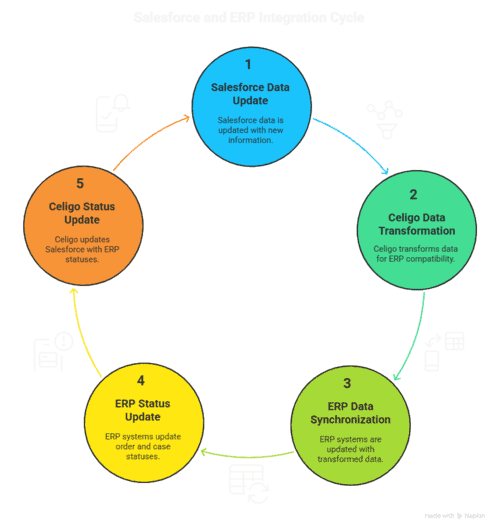
Step 1: Data Initiation
A salesperson updates a quote or closes an opportunity in Salesforce.
Example: Opportunity → Closed Won.
Step 2: Celigo Trigger
Celigo detects the update via:
- Scheduled sync
- Event-based trigger
- API call from Salesforce
Step 3: Data Mapping
Celigo Flow maps Salesforce fields → ERP fields:
- Account.Name → CustomerID
- Product2.SKU__c → ItemNumber
- OpportunityLineItem → ERPSalesOrderLines
Step 4: Data Transformation
Business rules applied:
- Convert quantity units (EA → BOX)
- Adjust tax codes
- Validate inventory availability
Step 5: ERP Writes the Data
ERP creates:
- Sales Order
- Work Order
- Purchase Requisition (if stock low)
Step 6: Sync Back to Salesforce
ERP sends real-time updates back to Salesforce:
- Order confirmation
- Shipment updates
- Production status
- Inventory adjustments
Step 7: Service & Sales Visibility
Sales teams now see live production timelines and inventory forecasts—reducing customer follow-ups.
This robust architecture ensures manufacturing teams get the single source of truth they need.
Why Use Celigo for Salesforce–ERP Integration?
Gap 1: Manual Data Entry Between Systems
Manufacturers often re-enter data between CRM → ERP manually.
Celigo automates this with real-time, bidirectional sync.
Scenario:
A machinery manufacturing firm spent 6 hours daily entering Quotes from Salesforce into their ERP.
With Celigo:
- Sync became instant
- Human errors dropped by 92%
- Order turnaround improved by 40%
Gap 2: Lack of Real-Time Inventory Visibility
Manufacturers often struggle with:
- Overselling due to outdated inventory
- Inefficient demand forecasting
- Delayed production scheduling
Celigo solves this by pulling ERP inventory data into Salesforce on a scheduled or event-based cycle.
Example:
A B2B fastener manufacturer used Celigo to sync inventory every 5 minutes.
- Sales reps started quoting accurate lead times
- Stockouts were reduced by 30%
Gap 3: Multi-System Complexity
Manufacturing ecosystems rarely involve just one ERP.
Celigo integrates Salesforce with:
- ERP
- MES (Manufacturing Execution System)
- WMS (Warehouse Management System)
- Logistics/Shipping APIs
This provides a truly unified operations command center.
Key Benefits
1. Real-Time Order Sync
Celigo immediately syncs Salesforce Opportunities/Orders → ERP.
Technical Insight:
Uses Composite API to batch create orders, preventing API limits.
Business Impact:
Faster order processing → quicker revenue recognition.
2. Accurate Inventory Sync
ERP inventory → Salesforce Inventory object.
Technical:
Uses Delta Sync to update only changed inventory rows.
Impact:
Sales reps quote correct lead times and avoid customer dissatisfaction.
3. Automated Production Planning
Sales Order triggers Work Order creation in ERP.
Technical:
Conditional flows evaluate product type, BOM, and routing rules.
Impact:
Eliminates delays in the production line.
4. Financial Automation
Invoices and payments sync automatically.
Technical:
ERP → Salesforce Billing integration via Celigo’s mappings.
Impact:
Improves cash flow and reduces AR disputes.
5. Fewer API Limit Errors
Batch processing and parallel data pipelines reduce Salesforce API consumption.
6. Rapid Onboarding and Scalability
Prebuilt connectors accelerate rollout by 60%.
7. Improved Service and Warranty Management
ERP shipment + serial number sync → Salesforce Service Cloud.
Comparison Table: Benefits at a Glance
Benefit | Salesforce Alone | ERP Alone | With Celigo |
Inventory Accuracy | Low | Medium | High |
Order-to-Cash Time | Slow | Medium | Fast |
Customer Visibility | Limited | Limited | Full 360° |
Automation | Medium | Medium | High |
Practical Must-Use Celigo Features
1. Flow Builder
Drag-and-drop data syncing engine.
Use Case: Sales Order → ERP
Pitfall: Incorrect field mapping
Mitigation: Use Celigo’s “Preview Run” to validate.
2. Error Management Dashboard
Tracks failed jobs and retries automatically.
Best Practice:
Set auto-retry to 3 attempts with exponential backoff.
3. Dev & Sandbox Environments
Allows safe testing.
4. Lookup & Transformations
Critical for manufacturing units with unit conversions.
Example rule:
{
“if”: “Unit = ‘EA'”,
“convert_to”: “BOX”,
“factor”: 10
}
5. Bulk API 2.0
Needed for syncing large BOMs or inventory lists (10M+ rows).
Twopir-Proven Checklist
- Test integration flows in Sandbox
- Use Upserts for deduplication
- Enable error notifications
- Document all mappings
- Validate ERP constraints before deployment
- Set rate limits to avoid throttling
Real-World Use Cases
Case Study 1: Industrial Equipment Manufacturer
Industry: Heavy Machinery
Challenge: Fragmented order processing; sales and production teams not aligned.
Solution:
- Configured Celigo flow: Salesforce Opportunity → ERP Sales Order → Work Order
- Used conditional logic to auto-generate Work Orders only for certain product families
- Implemented ERP-to-SF syncs for production status and shipment updates
Results:
- 45% faster production scheduling
- 70% reduction in manual entry
- 35% increase in sales forecasting accuracy
Case Study 2: Automotive Parts Manufacturer
Challenge: No real-time inventory visibility in Salesforce → frequent overselling.
Solution:
- ERP inventory sync every 5 minutes using Delta Sync
- Apex trigger to refresh Quote pricing based on new inventory
Apex Snippet:
if(Inventory__c.Available_Qty__c < QuoteLineItem.Quantity) {
QuoteLineItem.Status__c = ‘Backordered’;
}
Results:
- 90% reduction in stockouts
- 25% increase in customer satisfaction
- Accurate delivery commitments improved win rates by 18%
Conclusion
Integrating Salesforce and your ERP using Celigo is no longer optional for manufacturers aiming for efficiency, accuracy, and growth. By automating critical processes—from order syncing to inventory management—Celigo creates a seamless digital thread across your sales, production, warehouse, and finance teams.
This guide showed you the deep technical architecture, real-world use cases, and actionable features that make Celigo the ideal integration platform. Whether you manage complex BOMs, operate multiple warehouses, or handle high-volume orders, Celigo provides the automation power needed for manufacturing success.

