
Introduction
In today’s fast-paced digital world, reaching your audience through their mobile devices is more important than ever. This is where Marketing Cloud MobileConnect comes into play.With the ability to send personalized messages directly to your audience’s phones, businesses can engage with their customers in a more direct and meaningful way.
What is MobileConnect?
MobileConnect is a powerful feature within Salesforce Marketing Cloud’s Mobile Studio that allows you to create SMS and MMS messages. However, MobileConnect itself does not send messages directly to subscribers’ mobile phones. Instead, it forwards messages to intermediaries known as Aggregators. These Aggregators then relay the messages to local phone carriers via their SMS gateways, ensuring final delivery to subscribers.
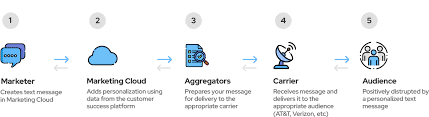
Local carriers, often telecommunications companies based in specific countries, are subject to local regulations and restrictions. Therefore, it’s essential to verify the capabilities of these carriers with Salesforce and consult your legal department before proceeding. This step ensures that the carriers meet your business expectations and helps avoid potential issues.
SMS Campaign Setup in Marketing Cloud
When you become familiar with MobileConnect and its extensive functionalities, you will undoubtedly appreciate its capabilities as much as I do! I highly recommend enabling MobileConnect in your Salesforce Marketing Cloud instance if you aim to diversify your messaging strategies, create on-demand services, and ensure optimal customer engagement.
MobileConnect simplifies the setup of SMS campaigns, thanks to its intuitive message creation wizard in Content Builder. Using the guided options in Mobile Studio, you can:
- Generate bidirectional conversations or surveys
- Implement opt-in functionalities
- Perform progressive profiling
- Trigger emails on-demand
Additionally, AMPScript offers limitless personalization options, allowing you to tailor messages to individual customer preferences.
Mobile Codes
Mobile codes are essential for connecting your Marketing Cloud instance to local carriers for SMS delivery across various countries. The cost of a mobile code can vary significantly based on the country and type of code. Each mobile code has an associated tier, which determines the activation price, not necessarily the type.
Current Tiers:
1.Tier 1:
- UK private long
- Italy private long
- Czech Republic private long
- Netherlands shared short
- Mexico shared short
2.Tier 2:
- Colombia private short
- Singapore private long
- UAE private short
3.Tier 3:
- UK private short
- Canada private short
4.Tier 4:
- Brazil private short
- France private short
- Mexico private short
Salesforce Marketing Cloud Enterprise licenses usually include a few Tier 1 codes, but it’s always advisable to verify this with Salesforce to ensure you have the necessary codes for your campaigns.
Long Codes vs. Short Codes
Comparison Table
Feature | Long Codes (AKA International Code) | Short Codes (AKA Local Code) |
| What they do: | Unidirectional SMS communication | Bidirectional communication. Always specific to a country. |
| What they’re used for: | Meaningful 1:1 conversations with customers, e.g., collecting survey responses or sending international messages | Engagement campaigns, security authentication, or service disruption notifications (better throughput) |
| Send rate: | 1 SMS per second | Up to 100 SMS per second |
| Activation period: | 1-2 weeks (depends on country-specific requirements) | 2 to 12 weeks (requires pre-registration forms, documents, legal commitment) |
| Price: | Cheaper | More expensive |
Long Codes
Long codes enable unidirectional SMS communication and are used for meaningful one-on-one conversations with customers, such as collecting survey responses or sending international messages. These codes, also known as international codes, can only send out messages at a rate of 1 SMS per second. Long codes can be specific to one country or serve multiple countries, with the UK long code being widely used for international SMS campaigns. Activation typically takes 1-2 weeks, depending on country-specific requirements like pre-registration forms and documents. Long codes are generally cheaper than short codes and are often associated with Tier 1.
Short Codes
Short codes enable bidirectional communication and are always specific to a country. Countries like the USA, Canada, and France require short codes for message delivery. These codes, also known as local codes, can also be used for unidirectional communication. Activation can take from 2 to 12 weeks and usually requires pre-registration forms, documents, and legal commitments regarding content and intent. Short codes offer better throughput and are commonly used for engagement campaigns, security authentication, or service disruption notifications, allowing the sending of up to 100 SMS per second. Although more expensive than long codes, short codes enhance campaign effectiveness.
Shared Codes vs. Private Codes
Shared Codes : Shared codes are used by multiple companies simultaneously to deliver SMS messages in specific countries. They are usually quick to activate, taking about 1 week. However, their main limitation is the availability of keywords due to sharing with other clients. Shared codes come with 5 keywords of your choice and the opportunity to purchase 5 additional ones.
Private Codes : Private codes are used exclusively by your company, often more expensive than shared codes. They provide the benefit of an unlimited number of keywords and the option to have an Alpha Sender ID (From Name). Alpha IDs represent your brand better, though users cannot respond directly to the SMS. Therefore, it’s crucial to add a phone number at the bottom of the message for users to reply.
Private codes vs. shared codes. Which is Better?
In my experience implementing SMS with Marketing Cloud, I strongly prefer private codes over shared codes. Brand identity is crucial, and having a recognizable send name is essential for implementing a trusted, multichannel user experience. Private codes add significant value to your brand by enhancing its identity and trustworthiness.
Should You Use Keywords?
To keyword, or not to keyword?
Using short codes enables you to use keywords for bidirectional communication with your customers, addressing various use cases such as:
- SMS campaign subscriptions
- Providing services
- FAQs
- Automated SMS bots
Keywords must contain more than three characters and be unique within a code. They are often displayed in all CAPS (capital letters) to be easily identifiable as keywords.
Tip: MobileConnect keywords are case insensitive and can process all variations of a word. For example, these variations would be recognized as the same word: CALLME, CallMe, callme, callmE, cAllme.
System Keywords
System keywords in MobileConnect cannot be edited, assigned to any campaign, or used in an automated process. They are primarily related to opt-out management, including:
- CANCEL
- END
- HELP
- HLP
- QUIT
- STOP
- UNSUBSCRIBE
Keyword Usage
Brands often use keywords for country-based campaigns. In the United States, keyword usage is particularly extensive. Keywords and bidirectional communication are powerful tools but should be used only when SMS is the best communication channel for a specific country or campaign.
Remember, Marketing Cloud offers several other options, such as WhatsApp or Line, for bidirectional communication, which might better fit your company’s use case.
Why Use MobileConnect?
MobileConnect offers a range of functionalities and can achieve impressive results. Here are some real use cases from campaigns implemented by my company, Merkle Switzerland:
Types of Messages You Can Send:
1.Transactional Messages: Order confirmations, registration confirmations, appointment scheduling, product delivery, and shipment tracking.
2.Commercial Messages: Product promotions.
3.Security Messages: Security alerts and notifications.
4.Progressive Profiling: Collecting customer data progressively for better personalization and engagement.
1.Transactional Messages
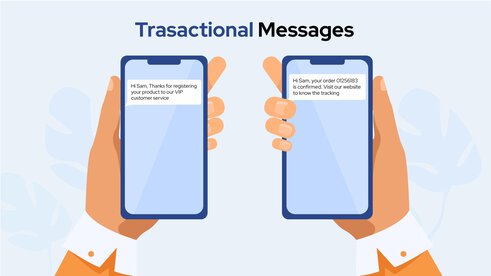
Transactional messages are widely used and easy to implement due to the low level of personalization required relative to the service benefits. Examples include:
- Order confirmations
- Registration confirmations
- Appointment scheduling
- Product delivery and shipment tracking
2.Commercial Messages
Commercial messages are designed to engage customers in one-on-one conversations. Typically, the goal is to re-engage dormant customers. As SMS is an alternative channel to email, it can be more effective in reaching and engaging certain subscribers. Commercial messages can also be used to redirect mobile traffic to websites or landing pages. Examples include:
- Promoting rewards, competitions, discounts, or brand advantages: Offering exclusive deals or incentives to drive customer interaction and sales.
- Surveys and reviews: Collecting customer feedback to improve products or services and enhance customer satisfaction.

3.Security Messages
Security messages are a crucial subcategory of transactional messages. They play an essential role in maintaining the security and integrity of user accounts and systems. Examples include:
- Multi-Factor Authentication (MFA) Codes: Sending one-time passcodes to users for additional verification during the login process.
- Security Notifications: Alerts about important security events such as password expiration reminders or expiring tasks that need to be completed.
- Guidelines: Providing useful links to web resources with security guidelines and best practices.
- Message Sending Limits Exceeded: Notifying users or administrators when message sending limits have been exceeded to prevent abuse or system overload.

4.Progressive Profiling
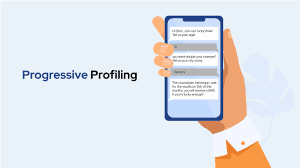
Progressive profiling is an intelligent approach to using bidirectional codes for data enrichment campaigns. The goal is to gather customer interests or demographic data based on what is missing from their records in your database. This method involves processing a campaign in multiple waves, requesting only the missing information each time and skipping questions if the data is already available in the database.
How Progressive Profiling Works
1.Wave-Based Data Collection:
The campaign is designed to send out messages in waves, each wave asking for specific missing information.
2.Personalized Requests:
Each message is tailored to the individual, requesting only the information that is not already in the database.
3.Interactive and Engaging:
To increase the success rate, questions are often kept funny, short, and engaging, making customers more likely to respond.
SMS Marketing Principles
I’m always excited when brainstorming customer engagement strategies, regardless of the channel or industry. MobileConnect is a crucial asset for anyone using Marketing Cloud and aiming for multichannel marketing on a unified platform. However, it’s essential to consider channels and industries when drafting journeys and messages. Key factors include message frequency, target audiences, and personalization. SMS as a marketing channel has specific best practices and mandatory content requirements to ensure worldwide compliance.
Key SMS Marketing Principles
1.Message Frequency:
Optimal Timing: Avoid sending messages too frequently to prevent customer fatigue. Aim for a balance that keeps your audience engaged without overwhelming them.
Timing: Consider the best times to send messages to ensure they are read and not ignored. Avoid late-night or early-morning messages unless they are urgent.
2.Target Audiences:
Segmentation: Segment your audience based on demographics, behavior, and preferences to ensure messages are relevant and personalized.
Relevance: Tailor your messages to the specific needs and interests of your audience to increase engagement and conversion rates.
3.Personalization:
Use of Data: Leverage customer data to personalize messages. Use their names, past behavior, and preferences to create a more engaging experience.
Dynamic Content: Use dynamic content to customize messages based on real-time data and customer interactions.
SMS Marketing Checklist
To ensure you adhere to best practices and regulatory requirements, use this checklist every time you set up an SMS marketing campaign:
1.Get Permission:
Obtain explicit permission to send messages to your users.
This can be through a global subscription or an ad-hoc campaign opt-in.
2.Be Clear About Your Campaign/Program:
Clearly explain the purpose and content of your campaign or program to your users.
Transparency builds trust and sets expectations.
3.Clarify Message Frequency:
Inform users about the frequency of messages they will receive.
Ensure the opt-in process reflects this information.
Address complaints about message frequency promptly, as local carriers can stop your service if there are too many complaints.
4.Include Disclaimers:
Include necessary disclaimers such as “message and data rates may apply” when users reply to your messages.
5.Provide an Opt-Out Option:
Always offer a clear and easy way for users to opt out.
This can be through an inbound SMS triggered by the user or an external link to a web preference center.
Ensure compliance with local regulations, some of which require an opt-out keyword and the ability to opt out directly via SMS.
Integrating MobileConnect with Other Marketing Cloud ‘Studios’
1.Email Studio:
Allows you to build emails using Content Builder, preview, test, and send them to your audience. It’s a comprehensive tool for managing email campaigns within Salesforce Marketing Cloud. Read more
2.Mobile Studio :
Includes MobileConnect for creating, sending, and monitoring SMS messages. It also handles GroupConnect for group messaging. MobilePush is used for sending push notifications, including silent notifications, in-app messaging, and leveraging technologies like Bluetooth Beacons and Geo-location for targeted messaging. Read more
3.Social Studio :
Facilitates the creation, scheduling, and monitoring of social media posts across various platforms. It provides real-time engagement capabilities and robust analytics, though it is set to retire by November 2024. Read more
4.Advertising Studio :
(formerly Advertising Studio): Aligns your online advertising efforts with CRM data. It helps in identifying new prospects using lookalike audiences that resemble your existing high-value customers. It supports integration with platforms like Facebook for lookalike audiences and Google for similar audiences. Read more
5.Automation Studio:
Enables the creation of marketing automation and data management activities. These activities can be integrated into Journey Builder for creating multi-step automated workflows. Examples of activities include importing files, data extraction, SQL querying, filtering data, and scripting tasks. Read more
Marketing Cloud ‘Builders’
1.Journey Builder :
(AKA Marketing Cloud Engagement): Allows you to automate and visualize customer journeys through your marketing touchpoints. You can segment contacts into targeted audiences, define paths, and utilize various entry sources, activities (e.g., send SMS), and flow controls to create personalized customer experiences. Read more
2.Contact Builder:
Manages data related to contacts (individuals) within Marketing Cloud. It provides access to demographic and behavioral information organized into attribute groups (e.g., abandoned carts), events, and populations, enabling segmentation and personalization of marketing campaigns. Read more
3.Audience Builder :
(Being retired): Previously used for building targeted audiences based on various criteria. It is being phased out in favor of other tools like Audience Studio for advanced audience segmentation. Read more
4.Content Builder :
Facilitates the creation of email and landing page templates, including reusable and interactive content blocks. It streamlines content creation and management across different marketing campaigns. Read more
Common Challenges with MobileConnect
While using MobileConnect, you may encounter several challenges, including:
1. Form Registration for the Alpha Sender ID: This involves registering the SMS ‘From Name’ to ensure proper sender identification.
2. Opt-Out Keyword Pre-Registration: Keywords such as STOP, UNSUBSCRIBE, etc., must be pre-registered to manage opt-outs effectively.
3.US and CA Registration Forms: Specific forms are required for SMS campaigns in the United States and Canada to comply with regulations.
4. Auto-Messages for Opt-Out and Opt-In Pre-Registration: Pre-registering automated messages for opt-in and opt-out processes ensures compliance and enhances user experience.
Summary
Marketing Cloud MobileConnect is a powerful tool for any business looking to leverage the power of mobile marketing. By setting up effective campaigns, personalizing messages, and using automation, you can engage with your audience like never before. Start exploring MobileConnect today and see how it can transform your marketing strategy.
Before launching a new marketing channel in the Salesforce Marketing Cloud, organizations should first evaluate if they have strong use cases, particularly if the rollout is planned on a global scale.
A recommended approach is to begin with SMS marketing use cases, focusing on unidirectional SMS and targeting a limited number of countries. This method helps build confidence in creating SMS messages, configuring journeys, personalizing with basic fields, and gathering the necessary data for successful SMS delivery.

