
Salesforce Marketing Cloud WhatsApp Integration: Setup, Templates, Pricing and Compliance
WhatsApp can carry your order updates, reminders and offers straight into Journey Builder, but only after you have chosen the right connection, registered a fresh number, won template approval and proved consent. Here is how the integration works in 2026, what it costs under Meta's new pricing, and where implementations go wrong.
Key Takeaways
- Marketing Cloud Engagement connects to WhatsApp in two ways: WhatsApp-First Business Messaging, a direct link to Meta, or the older WhatsApp Chat Messaging through Sinch. Unified WhatsApp adds one shared number for marketing and service.
- Each business unit needs its own WhatsApp Business Account and a phone number that has never been used on WhatsApp. Meta can take up to 48 hours to approve the account.
- Business-initiated messages must be approved templates sent to opted-in contacts. Free-form session replies are allowed only inside the 24-hour customer service window.
- Meta charges per delivered message. From October 1, 2026 it charges again for service messages and for utility messages inside the window, after 1,000 free service messages per number each month.
- Meta will stop carrying marketing messages over the Cloud API on October 13, 2027, so new builds should plan for the Marketing Messages API, which Salesforce supports as MM Lite.
What is the Salesforce Marketing Cloud WhatsApp integration? It is the WhatsApp channel built into Marketing Cloud Engagement, which lets you send approved WhatsApp template messages and two-way session messages from Journey Builder. Contact Builder holds the opted-in audience, Content Builder or the WhatsApp template editor holds the content, and Journey Builder decides who receives what and when, alongside email, SMS and push.
We first published this guide in March 2024. This version replaces general claims and unsourced engagement statistics with Salesforce Help, Trailhead and Meta's own developer documentation, checked in October 2026. It adds the account rules that block most setups, the template and media limits, Meta's per-message pricing and the October 2026 changes, messaging-limit tiers, reporting, and the API change coming in 2027. It is written for marketing, CRM and operations leaders at growing and mid-market companies, and for the Marketing Cloud admins who will configure the channel.
What Does WhatsApp in Salesforce Marketing Cloud Actually Do?
It turns WhatsApp into another message activity in your journeys, with Meta's rules applied on top. You can send approved templates to opted-in contacts at any time, reply freely when a customer writes to you, branch journeys on their answers, and hand a conversation to Service Cloud. WhatsApp itself reports more than 3 billion users in over 180 countries, so in many markets it is the channel customers already read first.

Template messages
Pre-approved marketing, utility and authentication messages you can start a conversation with, personalized from contact data.
Two-way conversations
Keyword entry, wait-for-reply steps, quick-reply buttons, lists and WhatsApp Flows, with free-form replies inside the 24-hour window.
Hand-off to service
The Session Transfer activity passes the conversation, its history and journey data to Service Cloud, so an agent or bot can continue it.
Which WhatsApp Connection Should You Use in Marketing Cloud?
For a new build, choose WhatsApp-First Business Messaging, the direct Meta connection Salesforce launched in 2022. Keep the older Sinch-based Chat Messaging only if it already runs and works for you. If marketing and service should share one WhatsApp number and one conversation history, Unified WhatsApp is the option built for that, on Data Cloud and the editions listed below.
| Option | How it connects | Best for | Watch out for |
|---|---|---|---|
| WhatsApp-First Business Messaging | Direct to Meta. Accounts are added through Meta's embedded sign-up in Mobile Studio > WhatsApp. | New Marketing Cloud Engagement WhatsApp programs | Needs the WhatsApp-First SKU. Buying it stops every Sinch send, so existing templates, journeys and audiences must be rebuilt. |
| WhatsApp Chat Messaging (Sinch) | Through Sinch, with a "Chat Messaging Setup" package from AppExchange and verification in Facebook Business Manager | Teams already live on it | Approved templates can't be edited, and Sinch numbers can't be moved to a WhatsApp-First business unit. |
| Unified WhatsApp | One WhatsApp Business Account shared across Marketing Cloud and Service Cloud, set up in Data Cloud, Marketing Cloud, Service Cloud and Meta | Brands that want campaigns and customer service in one thread on one number | Edition-gated: Marketing Cloud Engagement Pro+, Corporate+ or Enterprise+; Marketing Cloud Next Growth or Advanced; Service Cloud Enterprise or Unlimited. |
| Service Cloud Enhanced WhatsApp | Messaging for WhatsApp in Service Cloud, routed through Omni-Channel | Inbound customer support handled by agents and bots | A separate WhatsApp Business Account from Marketing Cloud unless you use Unified WhatsApp; outbound needs a message-credit add-on. |
Sources: Salesforce Help on WhatsApp messaging in Marketing Cloud Engagement, getting started with WhatsApp, the Unified WhatsApp channel and WhatsApp in Service Cloud. Salesforce's Unified WhatsApp documentation also describes Marketing Cloud Engagement as its legacy marketing product and recommends Marketing Cloud Next, which lists WhatsApp as a channel. If you are planning a move, design the WhatsApp channel with that in mind.
How Do You Set Up WhatsApp in Salesforce Marketing Cloud?
Buy the WhatsApp-First SKU, then add a WhatsApp Business Account through the embedded sign-up in Mobile Studio, register a new phone number, and wait for Meta's approval. After that you create templates, import opted-in contacts and build journeys. Everything must go through Marketing Cloud's sign-up tool: changes made directly in Meta Business Manager are not reflected in Marketing Cloud.
Prerequisites
- The right licence. If Mobile Studio does not show WhatsApp, Salesforce Help says to ask your account executive to confirm the WhatsApp-First SKU was purchased. Users also need WhatsApp access granted through GroupConnect.
- A Meta business presence. Access to the Facebook account associated with the business, and a Meta Business account whose name fits your channel names.
- A fresh phone number. It must be in international format, reachable internationally, and new to the WhatsApp Business API. It can't be linked to an existing personal or business WhatsApp account, and it can't be a short code, a toll-free number or an IVR line.
- One account per business unit. Each business unit needs its own WhatsApp Business Account (WABA); business units can't share one. Marketing Cloud and Service Cloud channels need separate WABAs unless you use Unified WhatsApp.
Setup steps
The full steps are in Salesforce Help: set up your WhatsApp account and WhatsApp-First account statuses. Trailhead's Conversations Using WhatsApp in Journey Builder module walks through the same flow.
What Is the Difference Between WhatsApp Template and Session Messages?
A template message is pre-approved by WhatsApp and is the only way your business can start a conversation. A session message is a free-form reply that needs no approval but can only be sent inside the 24-hour customer service window, which opens and resets each time the customer messages you. Most journeys use both: a template to open, then session messages once the customer replies.
| Question | Template message | Session message |
|---|---|---|
| Who starts it | Your business, at any time, to an opted-in contact | The customer; you reply within 24 hours of their last message |
| Approval | Every template is reviewed by WhatsApp; decisions can take up to 24 hours | None; interactive replies such as buttons, lists and WhatsApp Flows don't need preapproval either |
| Content | Header (text, image, document or video), body with personalization variables, footer, and buttons | Free-form text, media including audio, reply buttons, lists, location and more |
| Categories | Marketing, utility or authentication, each priced differently by Meta | Service conversation |
| Journey entry | Data Extension or API Event entry source | Inbound Chat entry source, triggered by a keyword |
| Typical use | Order and shipping updates, reminders, one-time passcodes, offers | Answering questions, collecting preferences, guiding a purchase |
Template rules that affect your build
- Category is enforced. Meta treats a template that mixes utility and marketing content as marketing, and only authentication templates may carry a one-time passcode.
- Buttons. A template can use one button type: call-to-action (one call button and one website button) or up to three quick replies. Carousel templates hold up to 10 cards.
- Media limits. Images are JPG or PNG up to 5 MB. Videos (MP4) and documents (PDF) can be larger when sent by public URL, up to 16 MB and 100 MB respectively, but files from Content Builder are capped at 5 MB. Audio is allowed in session messages only. Text is capped at 4,096 characters.
- Editing. On WhatsApp-First, an approved template can be edited once every 24 hours. On Sinch, approved templates can't be edited at all.
- Live journeys depend on template status. If an active template moves to In Review or Rejected, every active journey that uses it fails to send.
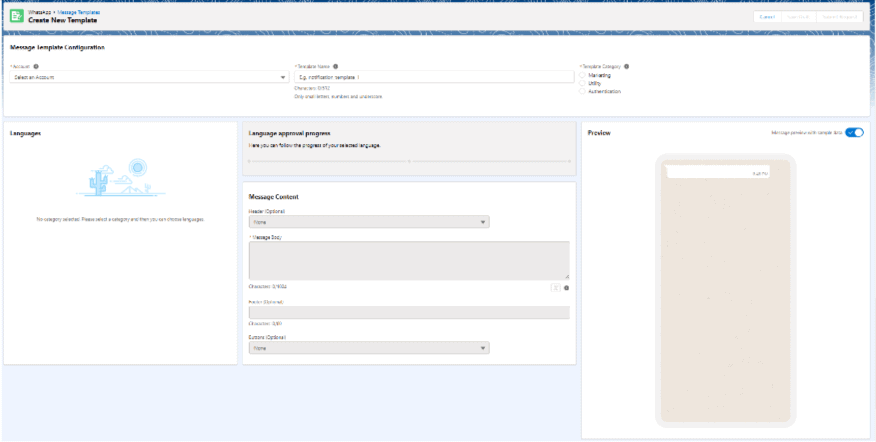
Sources: WhatsApp message types and use cases, creating a template for approval, template elements and media attachments in Salesforce Help, and Meta's template categorization rules.
How Do WhatsApp Opt-In and Audiences Work in Marketing Cloud?
You need recorded opt-in before sending any template, and Marketing Cloud only sends to contacts imported into a WhatsApp audience in Contact Builder. One opt-in to your WhatsApp channel covers every template you send. Since Meta's November 2024 policy update, the opt-in can be general rather than WhatsApp-specific, provided it names your business and you comply with local law.
What a valid opt-in looks like
- It says what the person is agreeing to and names your business, according to Meta's opt-in guidance. It can be collected by SMS, on a website, through an IVR, in person or on paper.
- It is stored where Marketing Cloud can use it. Collect opt-ins in a data extension, for example through an email or SMS journey that invites customers to join WhatsApp, then import them into the WhatsApp audience.
- Opt-outs are flagged. Salesforce tells you to flag opted-out contacts so Journey Builder does not message them. Meta also recommends separate opt-ins by message category and a clear way to opt out.
- Local law still applies. Meta's general opt-in does not override GDPR, TCPA or other rules in your markets. Consent design per channel and per market is usually the real project.

Opt-out handling needs particular care because, as Salesforce Help notes, WhatsApp does not return opt-out information to brands. Blocks and reports also lower your number's quality, and Meta limits a business whose quality stays low. Salesforce's guide to creating WhatsApp audiences covers the import itself. Our Marketing Cloud SMS and WhatsApp service starts with this consent design before the first message is sent.
How Do You Send WhatsApp Messages with Journey Builder?
Add a WhatsApp Message activity to a journey, choose the channel and an approved template, and enter contacts from a Data Extension or API Event. For conversations that the customer starts, use the Inbound Chat entry source with keywords. Wait Until Chat Response steps let a journey pause for a reply and branch on it, and Session Transfer hands the thread to Service Cloud.
| Building block | What it does | Example use |
|---|---|---|
| WhatsApp Message activity | Sends a template or session message on a chosen channel | Shipping confirmation after an order event |
| Data Extension or API Event entry | Starts template journeys from a list or a real-time event | Abandoned-cart reminder triggered from commerce data |
| Inbound Chat entry source | Admits contacts who send a chosen keyword; up to 10 keywords per journey, and a keyword can't be live in two journeys at once | A customer sends "OFFERS" and receives the current catalogue |
| Wait Until Chat Response | Pauses until the contact replies; a keyword sent during the wait advances them instead of starting a new journey | Ask for a preferred delivery slot, then branch on the answer |
| Interaction events | Button, list and Flow responses generate events you can use for branches or triggers | Route "Talk to an advisor" replies differently from "Not now" |
| Session Transfer | Passes history, journey data and the number to Service Cloud after a reply | A campaign reply becomes a service conversation with an agent |
Two limitations to plan around: Journey Builder Engagement Splits and Campaigns can't be used with WhatsApp messages, so branch on interaction events or reply data instead. And if you don't answer a session within 24 hours, you must wait for the customer to write again or send an approved template. Salesforce Help covers sending template messages in Journey Builder and the Inbound Chat Message entry source. If you are designing several of these journeys, our Journey Builder practice builds them against one framework rather than one at a time.
How Much Does WhatsApp Cost in Salesforce Marketing Cloud in 2026?
You pay twice: Salesforce for the WhatsApp channel, and Meta for each delivered message, charged by template category and country. Meta moved to per-message pricing on July 1, 2025. From October 1, 2026, it charges again for service messages and for utility messages inside the customer service window, after 1,000 free service messages per number each month. Salesforce's own updated WhatsApp pricing follows on November 1, 2026.
| Message type | How Meta charges (from October 1, 2026) |
|---|---|
| Marketing template | Charged per delivered message, at a rate set by the recipient's country calling code |
| Utility template | Charged per delivered message, with volume tiers; now also charged inside an open customer service window (free there from July 2025 to September 2026) |
| Authentication template | Charged per delivered message, with volume tiers |
| Service (session) message | First 1,000 per business phone number each month are free, with no roll-over; charged beyond that (free from November 2024 to September 2026) |
| Click-to-WhatsApp ad entry | A free entry point window makes every category free for that conversation |
Meta only changes its rates on January 1, April 1, July 1 and October 1, and charges only for messages that are delivered. Check the current rate card on Meta's WhatsApp pricing page, and Salesforce's Winter '27 release note on WhatsApp pricing, which says overage billing can apply once you pass your entitlement. Ask your account executive how your contract converts Meta's charges.
Messaging limits and quality
- Daily reach is capped. Messaging limits count the unique users you message outside a customer service window in a rolling 24 hours. Since October 7, 2025 they are set at the business portfolio level, not per number.
- The tiers. New portfolios start at 250, then move to 2,000 (after business verification or 2,000 high-quality sends in 30 days), 10,000, 100,000 and unlimited. Meta scales a portfolio up automatically when quality is good and it uses half its limit within seven days.
- Per-user marketing caps. WhatsApp may limit how many marketing templates one person receives, based on their engagement; those sends fail with error 131049.
- United States numbers. Meta's documentation states that WhatsApp does not currently deliver marketing template messages to users with US phone numbers. The statement covers the marketing category, so plan US campaigns around utility, authentication and other channels.
Sources: Meta's WhatsApp Business Platform documentation on messaging limits and per-user marketing template limits.
How Do You Report on WhatsApp Campaigns in Marketing Cloud?
Use the Journeys Dashboard and Marketing Cloud Intelligence reports for aggregate results, and a Chat Messaging Data Extract in Automation Studio for subscriber-level detail. Sends, deliveries, reads and failures are tracked. Because WhatsApp returns no opt-out data, Salesforce suggests reading failed sends and bounces as the signal that someone has stopped receiving your messages.
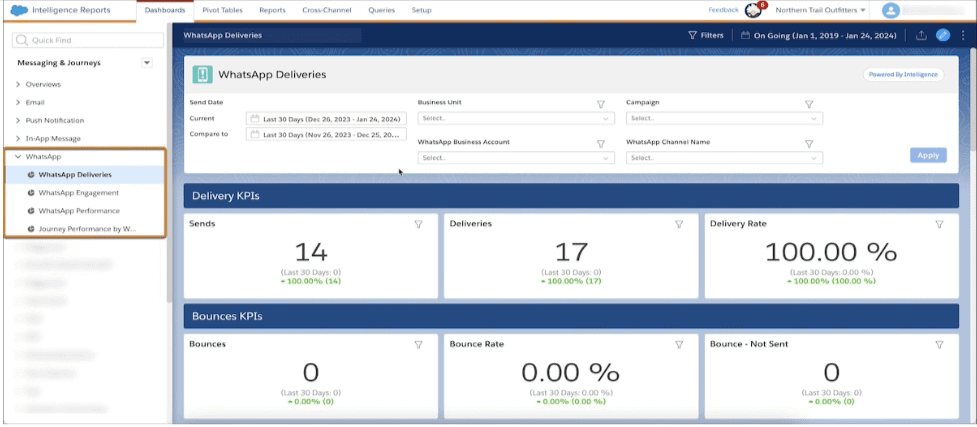
ChatMessagingDetailExtract with channel type WHATSAPP. Options add inbound message logs, tracking detail and potential unsubscribes.
Salesforce documents the steps in creating a Chat Messaging data extract and WhatsApp analytics and reporting. WhatsApp contact and tracking data can also be ingested into Data 360 for unified profiles. Our Marketing Cloud reporting and analytics work joins these extracts with email and SMS results.
What Is Changing for WhatsApp in Marketing Cloud in 2026 and 2027?
The biggest change is that Meta's Cloud API stops carrying marketing messages on October 13, 2027. Marketing sends move to Meta's Marketing Messages API, which Salesforce supports as MM Lite in both Unified Messaging and WhatsApp Direct. Pricing, number sharing and user identity are also changing, so any WhatsApp design made before 2026 deserves a review.
| Date | Change | What to do |
|---|---|---|
| October 1, 2026 | Meta charges again for service messages and in-window utility messages (1,000 free service messages per number each month) | Re-forecast WhatsApp costs, especially for heavy reply volumes |
| October 15, 2026 | One WhatsApp number can be used with Salesforce and another provider at the same time; consent doesn't sync between providers | Decide which system owns consent before sharing a number |
| November 1, 2026 | Salesforce's updated WhatsApp pricing takes effect | Check entitlements and overage terms |
| Winter '27 | Support for Meta's business-scoped user IDs, to reach users who hide their phone number behind a username | Review identity matching in Contact Builder |
| After November 2026 (planned) | Direct Send for utility messages, which matches content to a template so you skip pre-approval | Treat as planned until it reaches your org |
| April 13, 2027 | New messaging accounts can't send marketing messages through the Cloud API | Enable MM Lite for new WhatsApp accounts |
| October 13, 2027 | Cloud API stops supporting marketing messages for everyone | Move marketing sends to MM Lite before this date |
Sources: Meta's Marketing Messages API documentation for WhatsApp, and Salesforce Help on enabling the Marketing Messages Lite API, which is switched on per business portfolio from the WhatsApp dashboard with Meta's consent.
Which WhatsApp Use Cases Work Best in Marketing Cloud?
Messages a customer is glad to get on their phone: updates they are waiting for, reminders, verification and offers they asked for. WhatsApp suits time-sensitive and conversational moments better than broadcast newsletters, and its template categories and per-user marketing caps reward that discipline. Choose the template category first, because it decides the price and the rules.
Order and delivery updates
Utility templates triggered by API Event when an order ships, is delayed or is delivered, with a quick reply to change the slot.
Appointments and renewals
Reminders with confirm and reschedule buttons, branching in Journey Builder on the interaction event.
Verification codes
One-time passcodes, which Meta allows only in authentication templates.
Abandoned carts and offers
Marketing templates, including carousels of up to 10 products, to contacts who opted in, outside the US where Meta does not deliver them.
Keyword-led conversations
Inbound Chat journeys for keywords such as a store-locator or catalogue request, answered with session messages.
Campaign-to-service hand-off
A reply that needs a person moves to Service Cloud through Session Transfer or Unified WhatsApp, with the history attached.
For the service side, our Service Cloud Digital Engagement team sets up the WhatsApp channel, routing and bots that receive those hand-offs. If SMS is part of the mix, our guide to MobileConnect in Marketing Cloud covers that channel.
Where Do Marketing Cloud WhatsApp Implementations Usually Go Wrong?
Most problems are decided before the first message: the wrong number, the wrong account structure, missing consent data, or templates that don't match their category. The platform side is mostly configuration. The rules that Meta enforces, and the way they interact with business units and live journeys, are where projects lose weeks.
Should You Add WhatsApp to Salesforce Marketing Cloud?
Add it when your customers already use WhatsApp, you have messages worth a phone notification, and someone will answer when customers reply. Hold off when your audience is mainly in the United States and your plan is marketing broadcasts, when you have no consent data for the channel, or when nobody owns the replies.
Good fit. Your customers are in markets where WhatsApp is the everyday messaging app, such as the UAE, the UK, Australia or New Zealand. You send transactional updates, reminders or verification codes. You can collect and store opt-in. Service Cloud or a team is ready to pick up replies, ideally through Unified WhatsApp.
Think twice. Your list is mostly US numbers and the goal is promotions. You have no WhatsApp-ready consent data. You expect to reuse email-style newsletters. No one will answer inbound messages, or reply costs after October 2026 have not been budgeted.
The Bottom Line
The Salesforce Marketing Cloud WhatsApp integration is mature, but Meta's rules shape every part of it: who you can message, what you can say first, what it costs and how long a conversation stays open. Twopir Consulting implements Marketing Cloud SMS and WhatsApp with consent designed first, then connects the channel to Journey Builder, reporting and Service Cloud.
- 1
Choose WhatsApp-First or Unified WhatsApp for new builds, and plan any Sinch migration as a rebuild.
- 2
Source a fresh number and map one WhatsApp Business Account to each business unit.
- 3
Design opt-in, opt-out and suppression before writing templates.
- 4
Pick the template category deliberately; it sets the price and the rules.
- 5
Budget for Meta's October 2026 pricing and move marketing sends to MM Lite before October 2027.
Launch WhatsApp in Marketing Cloud the Right Way
Tell us your markets, your current Marketing Cloud setup and what you want customers to receive. We will map the connection option, consent model, templates and journeys you need.
Schedule a Discovery CallFrequently Asked Questions
Yes. Marketing Cloud Engagement supports WhatsApp through WhatsApp-First Business Messaging, a direct connection to Meta, or the older WhatsApp Chat Messaging through Sinch. Messages are sent from Journey Builder to contacts in a WhatsApp audience in Contact Builder. Marketing Cloud Next also lists WhatsApp as a channel, and Unified WhatsApp shares one number with Service Cloud.
Usually not. Salesforce requires a number that is new to the WhatsApp Business API and not linked to an existing personal or business WhatsApp account. It can't be a short code, a toll-free number or an IVR line, and it must be reachable internationally. From October 15, 2026, a number already connected through Salesforce can be shared with another provider.
Approval decisions can take up to 24 hours. You can send session messages while you wait. On WhatsApp-First, an approved template can be edited once every 24 hours. Rejected templates can be edited and resubmitted or appealed. If an active template returns to In Review or is rejected, journeys using it stop sending.
There are two costs: the Salesforce WhatsApp entitlement and Meta's per-message charges, which depend on template category and country. From October 1, 2026, Meta charges for service messages beyond 1,000 free per number each month and for utility messages inside the service window. Salesforce's updated WhatsApp pricing takes effect November 1, 2026.
Yes. You need opt-in before sending template messages, and you must store and manage it in Marketing Cloud. One opt-in to your WhatsApp channel covers every template. Meta allows a general opt-in that names your business, as long as you follow local law, and recommends a clear way to opt out.
Not at the moment. Meta's documentation states that WhatsApp does not currently deliver marketing template messages to users with United States phone numbers. Utility and authentication templates, such as order updates and verification codes, are a different category. For US promotional campaigns, use email, SMS or push alongside WhatsApp.
Yes. The WhatsApp Session Transfer activity passes conversation history, journey data and the customer's number to Service Cloud after a reply. Unified WhatsApp goes further, with one WhatsApp Business Account and one thread for marketing and service, built on Data Cloud and available on specific Marketing Cloud and Service Cloud editions.
