
Introduction
In the ever-evolving landscape of digital marketing, managing prospect data efficiently is paramount. Pardot, Salesforce’s powerful marketing automation tool, enables organizations to streamline their marketing efforts. However, the process of deleting prospects—those valuable leads that may no longer serve your business goals—requires careful consideration. This guide delves into the nuances of safely and efficiently deleting prospects from Pardot, ensuring data integrity and compliance.
Understanding Prospects in Pardot
Definition and Role of a Prospect in Pardot:
A prospect in Pardot represents a potential customer who has interacted with your marketing efforts and whose behavior and attributes are tracked.
Lifecycle of a Prospect: From Creation to Deletion:
Prospects go through a lifecycle from their creation, interaction with campaigns, and, if necessary, to their eventual deletion.
Data Points and Attributes of a Prospect:
Prospects have various data points, including contact details and behavioral data like email opens and website visits, which help in assessing their value.
How to Remove Prospects in Pardot
First, it’s important to note that you cannot permanently delete Prospect records directly from Pardot. When people refer to ‘deleting’ Prospects in Pardot, they’re actually talking about moving these records to the recycle bin. Deleted Prospect records reside in the recycle bin, separate from the main Prospect list, and can be restored if the Prospect reactivates.
This practice poses a problem under GDPR regulations.
Note: Only Admin users in Pardot can access the recycle bin.
Pardot Deletion Methods
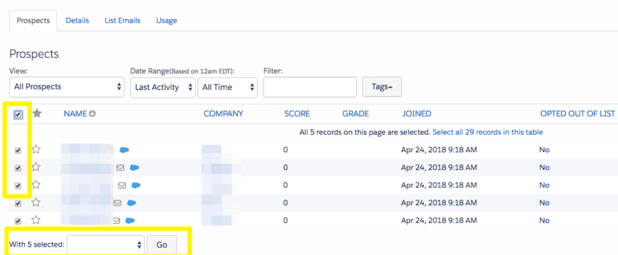
Mass Deletion In the Prospect list view or any list, use the checkboxes next to Prospect records. Scroll to the bottom of the list and select ‘Delete’ from the dropdown menu.
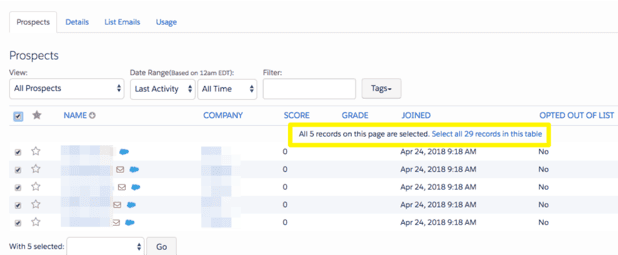
Note: Checking the box in the header will only select the Prospects visible on the screen. To select all records, click the hyperlinked text.
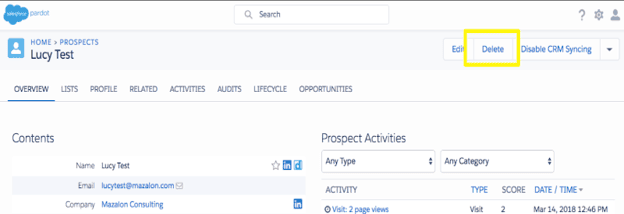
Individual Deletion Navigate to the Prospect record and click the delete button.
How to Permanently Remove an Individual from Pardot
To completely delete Prospects, Pardot Support must clear them from the recycle bin, effectively performing a ‘hard delete’. You will need to submit a support case for this process.
Salesforce Case Checklist Based on a quick guide from Salesforce, include the following details in your case:
- Reason: Clearly state why you need to delete the record (e.g., GDPR compliance, accidental import, data cleanup).
- Description: Optionally, provide additional context if it helps address a broader issue.
- Customer Impact: Explain how permanently removing these Prospects affects your business and the consequences of leaving them in the recycle bin.
- CSV Attachment: Include a file with the data to be modified, granting approval for the changes.
Providing comprehensive information upfront will streamline the process and avoid delays. Consider preparing case templates for efficiency.
Note: Grant Pardot Support remote access by clicking the person icon and selecting ‘Grant Access’.
Reasons for Deleting Prospects
- Data Hygiene and Compliance: Deleting irrelevant or outdated prospects ensures your database remains clean and compliant with data protection regulations.
- Reducing Unnecessary Data Clutter: Removing inactive or unnecessary prospects declutters your database, making it easier to manage.
- Enhancing System Performance: A smaller, well-maintained database improves the performance of your Pardot instance.
- Compliance with GDPR and CCPA: Deleting prospects in compliance with GDPR and CCPA helps avoid legal penalties and maintain customer trust.
Pre-Deletion Considerations
- Evaluating the Necessity of Deletion: Assess whether a prospect truly needs to be deleted based on their engagement history and future potential.
- Reviewing Prospect Activity and Engagement: Before deletion, review a prospect’s activity to ensure that you’re not discarding a potentially valuable lead.
- Identifying Prospects for Deletion vs. Archiving: Some prospects might be better off archived rather than deleted, preserving their data for future use.
- Implications of Deleting a Prospect: Understand that deleting a prospect is irreversible and leads to the permanent loss of their data.
Backing Up Prospect Data
- Methods for Exporting Prospect Data: Explore different methods to back up prospect data, such as exporting to a CSV file or using third-party tools.
- Importance of Data Backup Before Deletion: Backing up data ensures that you can recover information if a deletion is later deemed unnecessary.
- Tools and Integrations for Data Backup: Use tools like Salesforce CRM, Google Drive, or Dropbox to securely store backed-up data.
Troubleshooting Common Issues
Common Errors During Deletion:
Be aware of common errors that may occur during the deletion process, such as data inconsistencies or system glitches.
Solutions and Workarounds:
Implement solutions and workarounds to address these issues and ensure a smooth deletion process.
Summary:
In summary, the process of deleting prospects from Pardot involves a nuanced approach that balances efficiency with compliance. By following the outlined steps and best practices, you can effectively manage your data while maintaining system performance and adhering to legal standards.

