
Introduction
Salesforce is the backbone of many enterprises, helping businesses manage customer relationships, sales pipelines, and marketing automation. However, its true power is unlocked when integrated with other enterprise applications. Workato, a leading Integration Platform as a Service (iPaaS), enables seamless automation between Salesforce and various business applications, including ERP, finance, HR, and customer support tools.
For example, studies show that businesses using integration tools like Workato experience a 40% increase in workflow efficiency and a 30% reduction in manual data entry errors. By connecting Salesforce with Workato, organizations can eliminate silos, ensure real-time data synchronization, and improve overall business agility.
In this guide, we’ll dive into the architecture, benefits, and practical implementation of integrating Salesforce with Workato, ensuring that your business harnesses the full potential of automation.
What is Workato?
Workato is an integration platform as a service (iPaaS) that enables businesses to automate workflows between Salesforce and other applications. It provides pre-built connectors and allows users to create recipes (automation workflows) without requiring deep technical expertise.
Here are three core components of Workato and their roles in Salesforce integration:
1. Connectors: Workato provides Salesforce connectors that allow users to establish seamless connections between Salesforce and external applications such as Slack, QuickBooks, HubSpot, and SAP. These connectors handle authentication, API calls, and data transfer.
2. Recipes: Recipes are automation workflows that define trigger conditions and actions. For instance, a recipe can be set to automatically create a new opportunity in Salesforce when a deal is won in HubSpot.
3. Data Mapping & Transformation: Workato enables data transformation to ensure that information exchanged between Salesforce and other systems follows the correct format. This is crucial for handling multi-source data synchronization.
Why Use Workato for Salesforce Integrations?
1. Complex Manual Data Transfers: Businesses often struggle with data silos, requiring employees to manually enter and sync data. Workato automates these tasks, reducing human error and saving time.
2. Lack of Real-Time Synchronization: Traditional ETL-based solutions introduce delays. Workato enables real-time bi-directional data synchronization between Salesforce and other platforms.
Supported Editions and Versions
The Salesforce connector in Workato is compatible with all Salesforce cloud instances, including:
- Professional
- Enterprise
- Unlimited
- Developer
It also supports specialized editions like:
- Salesforce Sales Cloud
- Salesforce Service Cloud
- Salesforce Partner Community (requires custom domain for login)
- Salesforce Commerce Cloud
- Salesforce Consumer Goods Cloud
- Salesforce Marketing Cloud (with a separate connector)
For editions not listed, contacting a Workato representative is recommended for compatibility confirmation.
Connecting to Salesforce on Workato
OAuth 2.0 Connection

OAuth 2.0 is a widely used authorization framework that allows applications to access resources without exposing user credentials. To set up an OAuth 2.0 connection between Salesforce and Workato:
- Connection Name: Assign a unique name to your Salesforce connection to easily identify it.
- Sandbox: If connecting to a sandbox instance, use sandbox credentials and select “yes.”
- Advanced Settings: Provide the custom domain URL of your Salesforce community if applicable. Specify the permissions required for the connection, which default to full if left blank.
Upon setup, a Salesforce login prompt will appear, requiring your credentials to authorize the connection. Additional configurations can enforce custom authentication settings and restrict connection scopes using a custom OAuth profile.
JWT Bearer Authentication
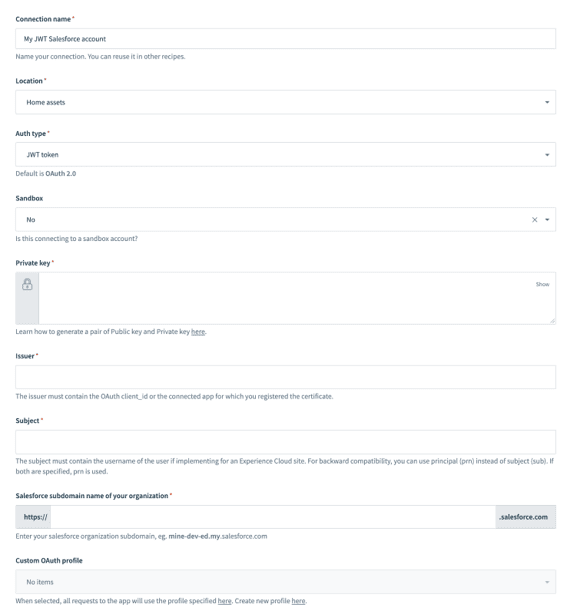

JWT Bearer Authentication is an alternative method that doesn’t require linking to a specific user account. Instead, it uses a digital certificate to sign the JWT request. To configure JWT Bearer Authentication:
- Private Key: Generate a private key and digital certificate, then upload the certificate to Salesforce.
- Issuer: Include the OAuth client ID or the connected app for which the certificate was registered.
- Subject: Specify the username of the user for Experience Cloud sites.
- Salesforce Subdomain: Enter your Salesforce organization subdomain, e.g., yourInstance.salesforce.com.
Roles and Permissions Required
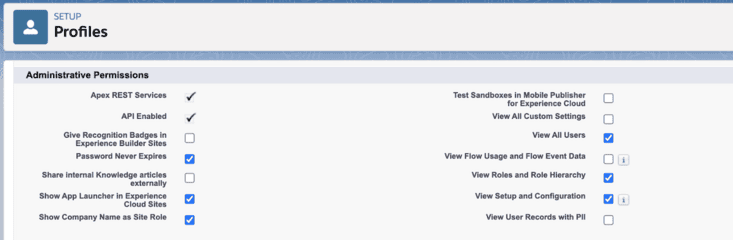

To ensure smooth integration, it is recommended to create a dedicated user for Workato integrations. The connected user will inherit the same permissions in Workato as in Salesforce. Here are some key permissions and settings to configure:
- API Enabled: Ensure the connected user’s profile has the API enabled permission.
- Object Permissions: Assign read, write, edit, delete, view all, and modify all permissions for necessary objects.


- Platform Event Permissions: Enable platform events and assign read and create permissions.


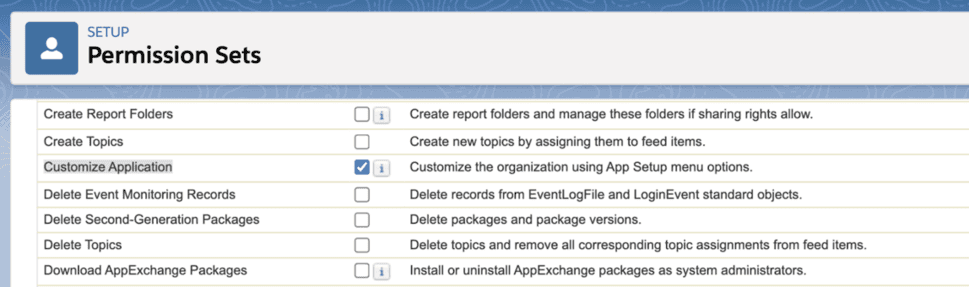
- Real-time Trigger Permissions: Set up workflow rules in Salesforce, requiring the Customize Application permission.

How Workato Works
1. Connection Setup:


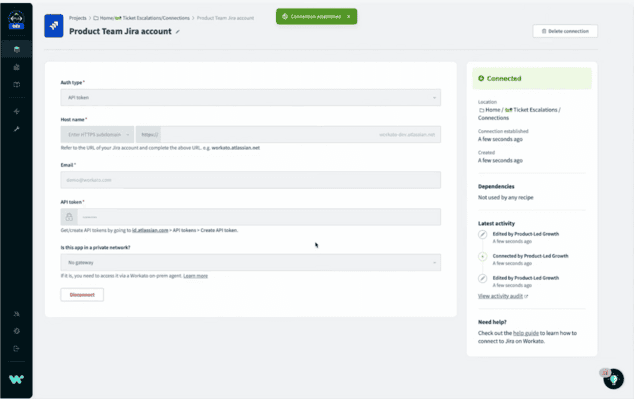
The first step in using Workato is to connect your various applications and systems. Workato provides pre-built connectors for a wide range of popular applications, making it easy to integrate tools such as Salesforce, Slack, QuickBooks, and many others. These connectors enable seamless communication between different platforms, allowing for a unified workflow.
2. Recipe Creation:


In Workato, workflows are known as “recipes.” Crafting a recipe entails specifying the data flow and actions between integrated applications. Workato’s user-friendly visual interface allows users to design workflows without extensive coding knowledge. By dragging and dropping components, users can outline the steps of their automated processes, making it accessible to both technical and non-technical users.
3. Triggers:


Every recipe starts with a trigger—an event that initiates the workflow. Triggers can be various actions such as receiving a new email, submitting a form, or updating a record in a database. These triggers act as the starting point for the workflow, ensuring that the automation kicks off at the right moment.
4. Actions and Conditions:
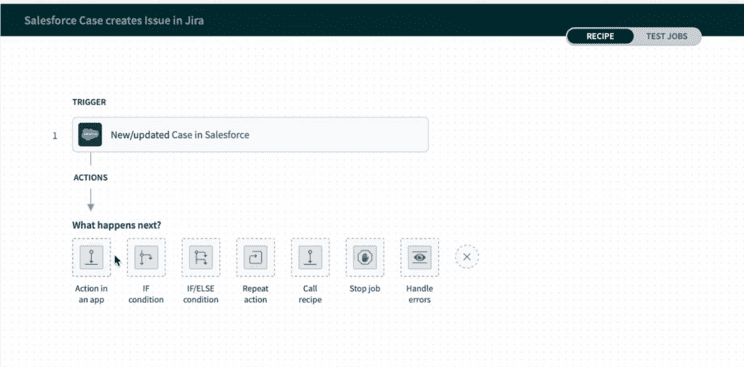

Once triggered, the recipe moves through a series of actions and conditions. Actions are the tasks that Workato performs, such as creating a new record, updating data, or sending notifications. Conditions enable users to establish criteria that guide the workflow’s direction depending on the data being handled. This conditional logic ensures that workflows are dynamic and can handle different scenarios effectively.
5. Data Mapping:


Mapping data is an essential component of any integration process. Workato enables users to map data fields between different applications, ensuring accurate and meaningful data transfer. This step involves specifying how data from one application corresponds to data in another, allowing for seamless and precise integration.
6. Bots:
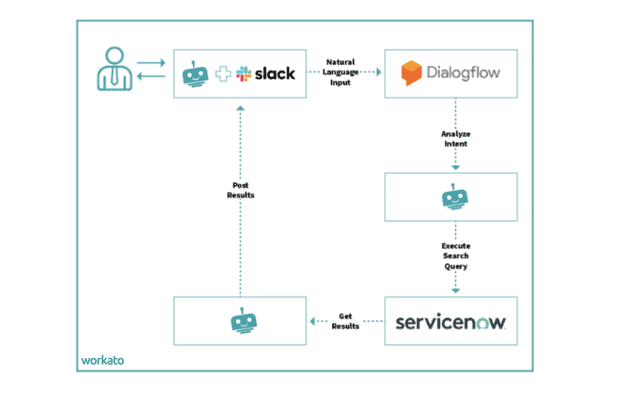

Intelligent bots in Workato execute the defined actions within the workflow. These bots carry out tasks specified in the recipe, ensuring that the workflow operates smoothly and efficiently. Bots are designed to handle various tasks autonomously, reducing the need for manual intervention.
7. Monitoring and Troubleshooting:
Workato provides robust monitoring and troubleshooting tools to ensure workflows run smoothly. Users can track the performance of their recipes, view logs, and access dashboards that offer insights into the execution of workflows. This visibility helps identify and resolve issues promptly, ensuring minimal disruption to operations.
8. Real-Time Sync:
One of the key benefits of Workato is real-time synchronization of data between connected applications. This ensures that information is always up-to-date across systems, reducing discrepancies and improving data accuracy.
9. Collaboration:
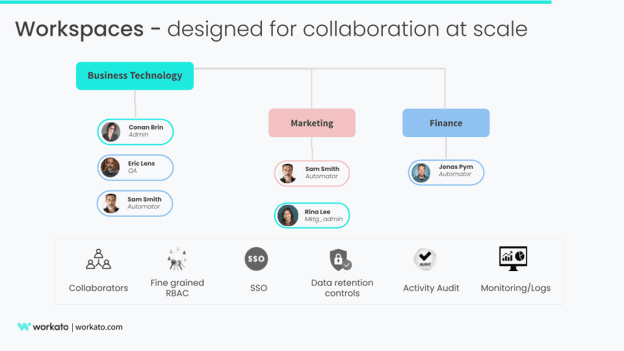

Workato supports collaboration among team members, allowing multiple users to work on the same recipe. This collaborative environment fosters teamwork and ensures that integrations are built and managed effectively, leveraging the collective expertise of the team.
Key Features
1. Ease of Use:
Workato provides an intuitive, drag-and-drop interface that allows both technical and non-technical users to create and automate workflows without coding. This makes it easy to set up integrations quickly, reducing dependency on IT teams.
2. Pre-Built Connectors:
Workato offers a vast library of pre-configured connectors for widely used applications such as Salesforce, Slack, HubSpot, and QuickBooks. These connectors eliminate the need for custom API development, making integration faster and more efficient.
3. Real-Time Automation:
Workato ensures instant data synchronization between systems, reducing delays and errors caused by manual data entry. This enhances business efficiency by enabling real-time updates for customer records, sales transactions, and reporting.
4. Flexible and Scalable :
Workato can manage simple automation as well as complex workflows that involve multiple applications and large datasets. It scales seamlessly with your business needs, ensuring that automation remains efficient as your company grows.
5. Collaboration:
Workato enables teams to work together on automation projects by providing role-based access and shared workspace features. This improves efficiency by allowing multiple team members to contribute to workflow development and management.
Key Benefits of Salesforce-Workato Integration
1. Faster Process Automation: Workato recipes automate repetitive tasks, significantly reducing the time required to execute workflows. Businesses can cut down process execution time by up to 50%, ensuring quicker lead management, data updates, and customer onboarding.
2. Enhanced Data Accuracy: By eliminating manual data entry, Workato prevents common human errors such as duplicate records, incorrect formatting, or missing information. This ensures that Salesforce data remains accurate and consistent, improving overall decision-making and reporting.
3. Improved Customer Experience: Automated workflows enable faster response times by instantly processing and updating customer interactions. Personalized communication and timely follow-ups enhance customer satisfaction, leading to stronger relationships and improved retention rates.
4. Scalability: Workato provides a flexible and scalable integration framework that grows with your business needs. Whether adding new applications, handling increased data volumes, or expanding automation, Workato ensures seamless operations without requiring additional IT resources.
5. Real-Time Updates: Workato synchronizes data between Salesforce and other applications instantly, keeping teams updated with the latest customer and business information. This prevents data silos and ensures that sales, marketing, and support teams have real-time access to critical insights.
6. Cost Savings: By reducing the need for custom-coded integrations and IT support, Workato helps businesses save on development and maintenance costs. Its user-friendly, no-code automation tools allow non-technical users to create integrations, further lowering operational expenses.
7. Pre-Built Integration Templates: Workato offers hundreds of pre-configured recipes for common Salesforce workflows, such as lead conversion, order processing, and reporting automation. These templates enable businesses to implement integrations quickly, without requiring deep technical expertise.
Real-World Use Cases
1.Retail Company Streamlining Order Fulfillment:
- Challenge: A retail company struggled with manual order updates between Salesforce and their ERP system, leading to inventory mismatches and delayed shipments.
- Solution: Workato automated order processing and inventory updates. Real-time sync between Salesforce, Shopify, and SAP ensured stock accuracy.
- Results: 60% reduction in order processing time. Elimination of stock shortages and fulfillment errors.
2. Financial Services Firm Automating Client Onboarding:
- Challenge: Manual entry of new client data into Salesforce and compliance systems caused delays and errors.
- Solution: Workato connected Salesforce with DocuSign and NetSuite. Automated document validation and financial approvals reduced manual work.
- Results: Client onboarding time reduced by 50% and 30% fewer compliance-related errors.
Conclusion
Integrating Salesforce with Workato unlocks new levels of automation, efficiency, and scalability. By leveraging Workato’s powerful connectors, workflows, and real-time data synchronization, businesses can eliminate manual processes, enhance data accuracy, and improve customer experiences.
Next Steps:
- Test a simple Salesforce-Workato automation in a sandbox.
- Identify key workflows that can benefit from automation.
- Scale the integration by adding more applications over time.
For organizations looking to optimize their Salesforce operations, Workato is an indispensable tool that drives efficiency and innovation. Ready to automate? Start building your first Workato recipe today!

