
Salesforce's 5 Free Integration User Licenses: Setup, Limits and Best Practices
Most Salesforce orgs already own five API-only licences built for system-to-system integrations, and many still run their integrations on full user licences. Here is what the Salesforce Integration User license includes, which editions get it, how to set one up, and the limits and security rules that matter.
Key Takeaways
- The Salesforce Integration User license is an API-only user licence for system-to-system integrations. Users on it cannot log in to Salesforce through any user interface.
- Enterprise, Unlimited and Performance Edition orgs include five of these licences at no extra cost; Developer Edition includes one. Professional Edition is not on Salesforce's list. More can be bought through your Salesforce account executive.
- The licence works with the Minimum Access - API Only Integrations profile and the Salesforce API Integration permission set licence. Object and field access is granted with a dedicated permission set for each integration.
- Salesforce recommends one integration user per integration, authenticated with an OAuth flow through an External Client App, such as client credentials or JWT bearer.
- API request allocations are shared across the whole org over 24 hours. They are not set per user, so separate integration users improve traceability and security, not API capacity.
What is the Salesforce Integration User license? It is a user licence called "Salesforce Integration" that grants access to Salesforce data and features only through the API. Salesforce designed it for system-to-system integrations, such as an ERP, a marketing platform or a contact centre writing to your CRM. It cannot be used by people who need any Salesforce screen, and in most paid editions five come free.
We first published this guide in 2023, soon after Salesforce introduced the licence. This version is rebuilt from Salesforce Help, the Spring '23 release note, the Salesforce Developers blog and Salesforce's API limits documentation, checked in November 2026. It corrects points the earlier version got wrong, adds the setup steps and the OAuth changes since 2025, and is written for Salesforce admins, architects and RevOps leaders at growing and mid-market companies, as well as enterprise teams tidying up many integrations.
What Is the Salesforce Integration User License?
It is an API-only user licence that gives an external system its own Salesforce identity without using a full user licence. Salesforce announced it at TrailblazerDX in March 2023 and made it available after March 14, 2023. An integration user on this licence can read and write data through Salesforce's APIs, within the permissions you grant, but cannot open Salesforce in a browser or the mobile app.
Before this licence existed, most teams ran integrations under a full Salesforce licence, often a shared "integration" login or, worse, an admin's own account. That used up a licence a person could have had, and it usually came with far more access than the integration needed. The Spring '23 release note describes the licence as designed for system-to-system integrations and states that it may not be used for human users through any user interface.

API access only
REST, SOAP and Bulk API access for the integration, with no user-interface login. This restriction cannot be switched off, even on a cloned profile.
Least privilege by default
The profile starts with minimal access. You add exactly the objects and fields each integration needs through permission sets.
Frees full licences
Integrations that move off full Salesforce licences return those seats to people who actually log in and use Salesforce.
Which Salesforce Editions Include Free Integration User Licenses?
Enterprise, Unlimited and Performance Edition orgs each include five Salesforce Integration user licences, and Developer Edition orgs include one. Salesforce's user licence types page states these counts. Professional Edition is not among the editions Salesforce lists for this licence. Additional licences are sold as add-ons through your Salesforce account executive.
| Edition | Free | What to know |
|---|---|---|
| Enterprise | 5 | The most common case for growing and mid-market companies. Use all five before buying more. |
| Unlimited | 5 | Same licence, profile and permission set licence as Enterprise. |
| Performance | 5 | Same as Unlimited. |
| Developer | 1 | Enough to build and test one integration pattern before you roll it out. |
| Others | None | Professional, Essentials and other editions are not listed for the licence. Ask your account executive what applies to your contract. |
The earlier version of this post said the licences were available to every customer whatever their edition. That was wrong, and it also quoted a monthly price for extra licences. Salesforce does not publish a list price for add-on Integration licences: its Help article on integration users says to contact a Salesforce account executive, so check the price for your own contract.
How Do the License, Profile and Permission Set License Work Together?
The licence makes an API-only profile and a permission set licence available; a permission set you build then grants the actual access. Think of three layers. The "Salesforce Integration" licence decides that the user is API-only. The "Minimum Access - API Only Integrations" profile carries almost no permissions. The "Salesforce API Integration" permission set licence sets the ceiling on what you are allowed to grant.
Salesforce Integration
Grants access to Salesforce data and features only through the API. It makes the API-only profile and the API Integration permission set licence available for assignment.
Minimum Access - API Only Integrations
Based on Minimum Access - Salesforce, with API Enabled and API Only User locked on. The Salesforce Developers blog recommends using it only for defaults such as record types, page layout assignments, login hours and login IP ranges. Since Spring '24 it replaces the older "Salesforce API Only System Integrations" profile, which Salesforce says had a known issue that incorrectly granted access to custom objects. Orgs that still use the old profile should move their integration users to the new one.
Salesforce API Integration, plus one permission set per integration
The permission set licence entitles many of the user and object permissions usually found on the System Administrator profile, but grants nothing by itself. You create a permission set tied to it, switch on only what the integration needs, and assign it, or a permission set group, to the integration user.
Good fit. Headless system-to-system integrations: middleware such as MuleSoft, Workato or Celigo, ERP and finance syncs, data pipelines, and vendor connectors whose documentation supports an API-only user. Anything that always runs as the same identity and never needs a Salesforce screen.
Not a fit. Any person who logs in, including "service accounts" that someone opens in a browser to fix data, robotic process automation that drives the user interface, and connectors that need an interactive OAuth login and do not document support for the licence. The permission set licence also does not cover every object or permission, so test your integration's objects in a sandbox first.
How Do You Set Up a Salesforce Integration User Step by Step?
Create a user on the Salesforce Integration licence and API-only profile, give it a permission set built on the API Integration permission set licence, then connect it through an External Client App. The whole setup takes minutes in Setup. Most of the work is deciding the exact objects and fields the integration needs, which you should list before you start.
Salesforce's Give Integration Users API Only Access article covers the licence and profile, and the Salesforce Developers walkthrough covers the permission set and the client credentials flow. If permission sets are new to your team, our guide to Salesforce profiles and permission sets explains the model.
How Should an Integration User Authenticate in 2026?
Through an External Client App with a server-to-server OAuth flow: client credentials or JWT bearer for REST, and the SOAP login() call only where an older SOAP or Bulk integration still needs it. Salesforce restricted the creation of new connected apps in Spring '26 and recommends External Client Apps instead. Existing connected apps keep working.
| Method | How it works | Best for | Watch out for |
|---|---|---|---|
| Client credentials | An OAuth 2.0 flow. The app exchanges its consumer key and secret for an access token, and every call runs as the assigned Run As integration user. | Headless integrations that always act as one identity and can store a secret securely. | No refresh token. Call your My Domain URL, not login.salesforce.com. Anyone holding the key and secret can get a token, so rotate the secret. |
| JWT bearer | An OAuth 2.0 flow. The client signs a JSON Web Token with a certificate you upload, and Salesforce returns an access token with no interactive login. | Server-to-server integrations where certificates are preferred to shared secrets. | The app must be pre-approved for the user. Certificates expire and need renewal. |
| SOAP login() | Username and password login for SOAP-based APIs, including the Bulk API. | Legacy integrations not yet moved to OAuth. | Disabled by default in new orgs from Spring '26. Salesforce says login() in API versions 31.0 to 64.0 will no longer be supported in Summer '27. Plan the move. |
Two further changes affect integrations. Since early September 2025, uninstalled connected apps are blocked for most users, as the Salesforce Admins blog explains, so review Connected Apps OAuth Usage in Setup. And Salesforce recommends blocking the user-agent and username-password flows, which are blocked by default in orgs created in Summer '23 or later. Salesforce's pages on the client credentials flow, the JWT bearer flow and External Client Apps give the configuration details, and the Spring '26 architect highlights summarise the connected app and SOAP changes.
Which Integrations Should Get Their Own Integration User First?
Start with the integrations that would hurt most if they broke or were misused: the ones that write customer, order or financial data. Salesforce recommends a separate user for every integration, so with five free licences most growing and mid-market companies can cover their main systems. The five integration types below were in the original version of this post, and they remain the usual priorities.
| Type and examples | What breaks if it fails | Access to scope |
|---|---|---|
| Marketing and sales tools HubSpot, Chili Piper, Salesloft, Outreach | Lead routing, campaign attribution and activity history drift apart. | Leads, contacts, campaigns, tasks |
| Commerce and payments Shopify, WooCommerce, Stripe | Orders, inventory and revenue reporting stop matching. | Accounts, orders, products, custom payment objects |
| Customer support Zendesk, Freshdesk, Help Scout | Agents lose customer context and service levels slip. | Cases, contacts, accounts |
| Contact centre Five9, Talkdesk, NICE, Microsoft Teams | Calls are not logged and response times rise. | Tasks, contacts, cases |
| Finance and tax NetSuite, QuickBooks, Avalara | Invoices, tax and revenue reconciliation fail. | Accounts, opportunities, orders, invoices |
Check each vendor's documentation before you switch. Support for this licence varies. Qlik's Salesforce connection guide is built around an Integration licence user and an External Client App. Chili Piper's Salesforce configuration guide supports the licence only after you first connect with a standard admin, because its OAuth login needs a user interface. Outreach's documentation asks for a Salesforce-type licence and does not mention the Integration licence, as covered in our Outreach Salesforce integration guide. Where a vendor is silent, test in a sandbox or ask the vendor.
Middleware makes this simpler. When an iPaaS such as MuleSoft, Workato or Celigo connects through your own External Client App, you control the authentication. You can still give each business flow its own integration user, so one compromised or misbehaving flow cannot touch the others.
Do Integration Users Change Salesforce API Limits?
No. Salesforce API request allocations apply to the whole org over a rolling 24 hours, not to individual users, so creating more integration users does not create more API capacity. What separate users give you is visibility: you can see which integration made which calls and changes, and switch one off without touching the rest.
Salesforce's API Request Limits and Allocations page states that limits "are not on a per-user basis". In Enterprise Edition the daily allocation is 100,000 plus 1,000 calls for each Salesforce or Salesforce Platform licence, plus any API call add-ons purchased. Unlimited and Performance editions get 5,000 per licence of those types, and Developer Edition has 15,000 in total. The Integration licence is not listed in that table, so do not count on it adding capacity. The original version of this post suggested setting API limits per integration user, which Salesforce does not offer.
| What to watch | Where in Salesforce | What it tells you |
|---|---|---|
| Daily API usage | Setup › System Overview (API Requests, Last 24 Hours) and Company Information | How close the org is to its 24-hour allocation. |
| Integration logins | Login History (6 months; the download includes API logins) | Which integration user logged in, from where, and by which OAuth flow. |
| Permission changes | Setup Audit Trail (180 days by download) | Who changed an integration user's profile, permission sets or settings. |
| API events | Event Monitoring | All customers get free daily logs, including API Total Usage, kept for one day. Shield or an Event Monitoring licence adds 70+ event types, hourly logs and longer storage. |
| Record changes | Created By and Last Modified By on records and reports | With one user per integration, every change names its source system. |
What Are the Most Common Integration User Mistakes?
Sharing one user across several integrations, granting admin-level access "to be safe", and leaving old full-licence logins active after the switch. Each of these removes the benefit the licence was meant to deliver. The list below covers the problems we see most often when reviewing Salesforce orgs.
How Do You Move Existing Integrations to Integration User Licenses?
Inventory every login used by a system, rank them by risk, then move them one at a time through a sandbox, switching credentials in a planned window. For a typical growing or mid-market org with five to ten integrations, this is a short, well-contained piece of work. The table shows the sequence we follow.
| Phase | What happens | Output |
|---|---|---|
| 1. Inventory | Use Login History and the Connected Apps OAuth Usage page to find every user that logs in through the API, and which system it belongs to. | A list of integrations, their current users and licences. |
| 2. Vendor check | Confirm in each vendor's documentation whether it supports an API-only user and which OAuth flow it uses. | A "move now / move later / keep" decision per integration. |
| 3. Access design | List objects, fields and operations for each integration and build its permission set. | One permission set per integration. |
| 4. Sandbox test | Create the integration user and External Client App in a full or partial sandbox and run real scenarios, including errors and bulk loads. | Evidence that the integration works on the new user. |
| 5. Cutover | Switch production credentials in a quiet window, watch the first runs, then deactivate or reassign the old login. | Freed full licences and a cleaner audit trail. |
| 6. Govern | Review integration users, permission sets and secret rotation every quarter, and add new integrations the same way. | A repeatable standard for every future integration. |
If the inventory shows broken syncs, over-permissioned users or integrations nobody owns, that is a wider org-health issue. Our Salesforce health check reviews integrations, security and data together.
The Bottom Line on Free Integration User Licenses
Salesforce's free Integration User licences are among the simplest security and cost improvements an org can make: five API-only identities in most paid editions, ready to replace shared or admin logins. They do not add API capacity, and not every vendor supports them yet, so plan the move one integration at a time. Twopir Consulting designs and builds Salesforce integrations, including HubSpot and Salesforce syncs, and sets up integration users, permission sets and OAuth apps as part of that work.
- 1
Check Company Information for your Salesforce Integration licence count.
- 2
Give each integration its own user on the Minimum Access - API Only Integrations profile.
- 3
Grant access with one permission set per integration, built on the API Integration licence.
- 4
Authenticate through an External Client App with client credentials or JWT bearer.
- 5
Monitor org-wide API usage and Login History, then retire the old full-licence logins.
Put Every Integration on the Right Licence
Tell us which systems connect to your Salesforce org today. We will map each one to an integration user, a permission set and an OAuth flow, and plan the switch without downtime.
Schedule a Discovery CallFrequently Asked Questions
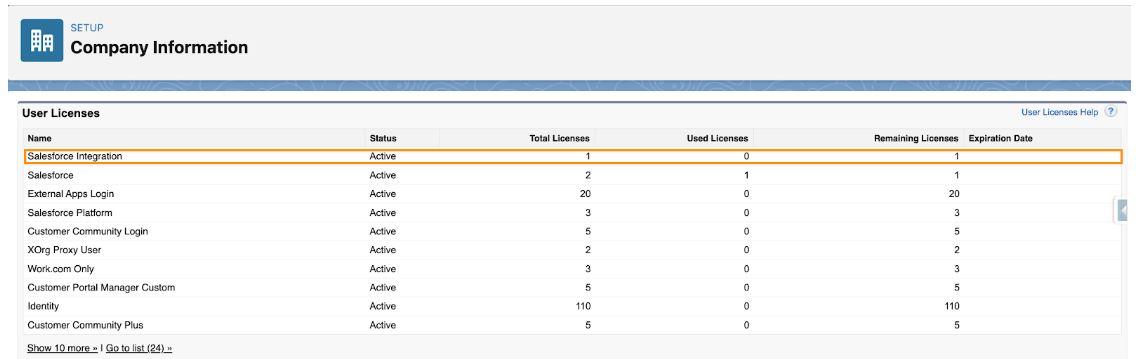
Five per org in Enterprise, Unlimited and Performance editions, and one in Developer Edition. Professional Edition is not listed by Salesforce for this licence. You can see your count under Setup, Company Information, User Licenses, where the licence is called Salesforce Integration.
Salesforce does not publish a list price. Its documentation says additional Integration user licences can be purchased as add-ons and tells customers to contact their Salesforce account executive. Use the five included licences first, and treat any figure you see on third-party sites as unconfirmed until your account executive quotes it.
No. The Salesforce Integration licence grants access only through the API, and the API-only setting on the Minimum Access - API Only Integrations profile cannot be turned off, even on a cloned profile. Salesforce also states the licence may not be used by people to access Salesforce through any user interface.
The profile is Minimum Access - API Only Integrations, which replaced the older Salesforce API Only System Integrations profile in Spring '24. The permission set licence is Salesforce API Integration. It only entitles permissions, so you grant access with a permission set built on it and assigned to the user.
No. Salesforce enforces API request allocations against all calls made to the org in a rolling 24-hour period, not per user. Separate integration users make each integration's usage and changes traceable, but they share the same org-wide allocation, so monitor total usage in System Overview.
Salesforce does not require MFA for integration logins through the API, although an optional Multi-Factor Authentication for API Logins permission exists. Protect integration users with OAuth flows that use certificates or rotated secrets, login IP ranges and least-privilege permission sets instead.
No. Some vendors document it, such as Qlik, while others need an interactive admin login first, as Chili Piper does, or ask for a full Salesforce licence, as Outreach does. Check each vendor's Salesforce setup guide, and test the integration on an API-only user in a sandbox before switching production.
