
Marketing Cloud Personalization Explained: Features, Pricing and What Comes Next
Marketing Cloud Personalization, formerly Interaction Studio, changes what a visitor sees on your website, in your app and in your emails while they are still engaged. This guide explains how it works, what it costs today, how it differs from Salesforce's newer Data 360-native Personalization, and how to implement it without buying a license you can't yet use.
Key Takeaways
- Marketing Cloud Personalization (MCP) is Salesforce's real-time personalization engine for web, email and mobile. Salesforce says MCP, Interaction Studio and Evergage are "one and the same" product.
- Salesforce now also sells Salesforce Personalization, built natively on Data 360. Both are supported, and Salesforce calls the newer product "the recommended path forward" for anyone starting fresh.
- The US pricing page now lists Salesforce Personalization at $8,000 and Marketing Cloud Personalization+ at $15,000 per org per month, billed annually. The older $108,000 and $300,000 a year Growth and Premium prices appear only on a regional page.
- Both new options need Data 360 provisioned. Existing MCP customers can keep their current setup and add the new product through MCP+.
- Results depend on the foundation: recognizing returning visitors, a structured catalog, complete behavioral tracking, consent, and a control group from day one.
Marketing Cloud Personalization is the Salesforce product that recognizes a visitor, decides what to show them while the page loads, and learns from what they do next. It is how a homepage banner, a product carousel or an email's recommendations can change for each person, rather than for each segment.
This guide is for marketing, e-commerce and CRM leaders at growing and mid-market companies who are evaluating MCP, renewing it, or trying to get more from a license they already have. It replaces our 2024 overview of Interaction Studio. Since then, Data Cloud has become Data 360, Salesforce has launched a second personalization product, and the pricing page has changed.
What Is Marketing Cloud Personalization?
Marketing Cloud Personalization is a real-time interaction management platform. In Salesforce's words, it is "a standalone, real-time interaction management platform that delivers personalized experiences across web, email, and mobile using rules-based campaigns and A/B testing." It builds a live profile for each visitor, known or anonymous, and uses it to decide what content, product or offer to show.

The product has had three names. Salesforce acquired Evergage, a personalization and customer data platform company, in early 2020 (MediaPost reported the deal closing on February 4, 2020). Evergage then became Interaction Studio, and on April 6, 2022 Salesforce renamed it Marketing Cloud Personalization, in the same wave that turned Pardot into Account Engagement and Datorama into Intelligence. Salesforce's personalization page confirms that "Marketing Cloud Personalization, Evergage, and Interaction Studio are one and the same."
| Name you may see | What it refers to today |
|---|---|
| Evergage | The original product, acquired by Salesforce in 2020. The Evergage JavaScript namespace still works for existing implementations |
| Interaction Studio | The same product under its 2020–2022 name. Older articles, screenshots and Trailhead URLs still use it |
| Marketing Cloud Personalization (MCP) | The current name of that product, with its own Help and developer documentation |
| Salesforce Personalization | A different, newer product built natively on Data 360 and sold with Marketing Cloud Next. Section 06 compares the two |
| Data 360 | The new name, from October 14, 2025, for Data Cloud (earlier Salesforce CDP). Salesforce says the functionality is unchanged |
Do You Need Marketing Cloud Personalization to Personalize?
Not for most email personalization. First names, dynamic content blocks and journey branching already come with Marketing Cloud's email and journey tools, with no extra license. MCP earns its license when you need decisions made in real time, while someone is browsing your site or app, with models that keep learning from behavior.
The demand is real. In Salesforce's State of the Connected Customer research (sixth edition, 14,300 consumers and business buyers), 73% of customers expect better personalization as technology advances, and 61% say most companies treat them as a number. The question is which kind of personalization closes that gap for you. Teams often say "personalization" and mean four different things:
| What the team asks for | What it actually is | Where it lives |
|---|---|---|
| "Use their first name" | Merge fields and personalization strings at send time | Native in email tools |
| "Different content for different segments" | Dynamic content blocks chosen by rules at send time | Native in email tools |
| "React to what they did" | Journey decisions based on behavior and engagement events | Journey Builder plus integration |
| "Change the website as they browse" | Real-time decisions as the page renders, with continuously learning models | MCP or Salesforce Personalization |
Only the last row needs a personalization license, and with it a foundation of identity, catalog and tracking data. If your requirement fits the first three rows, start there. Our Marketing Cloud Personalization services page covers the readiness questions in more depth.
How Does Marketing Cloud Personalization Work?
It runs a loop: capture behavior, update the profile, decide, deliver and measure. A JavaScript beacon on your site, mobile SDKs and APIs send events into MCP. MCP updates a unified profile in real time, campaigns and AI models pick the best experience, and the result is rendered in a page zone, an app screen or an email at open time.
Web SDK and sitemap. Web campaigns need the Salesforce Interactions SDK on the site and a sitemap: the JavaScript configuration that defines user identities, page types, catalog attributes, content zones and events. Pages without the beacon can't be tracked or personalized.
APIs, mobile and batch data. The Event API accepts events from servers and other systems, the Personalization Mobile SDK handles native iOS and Android apps, and ETL feeds bring in batch data such as orders or CRM attributes.
Unified Customer Profile. MCP builds a profile in real time for known and anonymous users, from every one of those sources. It also keeps the catalog of products, articles or offers that the engine is allowed to recommend.
Campaigns, segments and AI. Rules, segments, A/B tests, Einstein Recipes and (on the Premium edition) Einstein Decisions choose what each visitor gets.
Templates and channels. Developers build reusable web templates once. Marketers then launch campaigns in the Personalization interface, and the output reaches web zones, server-side payloads, apps and emails.
Reports and tests. Campaign, goal and A/B results feed back into the next decision, and profile, event and catalog data can be shared with Data 360 through a connector.

One detail matters for new projects. The SDK has a base layer plus modules for Personalization and for Data 360, with one event model. New customers use the SalesforceInteractions namespace, and existing customers can keep Evergage. Consent is built in: when the SDK receives an opt-out for the Personalization purpose, it stops sending events.
What Can You Personalize With Marketing Cloud Personalization?
Website content and recommendations, server-side experiences, emails at the moment they are opened, mobile apps, and the context sales and service teams see. Salesforce's developer guide lists web, email and mobile campaigns, plus integrations with CRM and external data systems.
Website
Hero banners, modules, messages and product or content carousels that change by affinity, segment or behavior, rendered into content zones defined in the sitemap.
Server-side
Server-side campaigns return a data payload that your site or app renders itself. Content zones are optional for them.
Email at open time
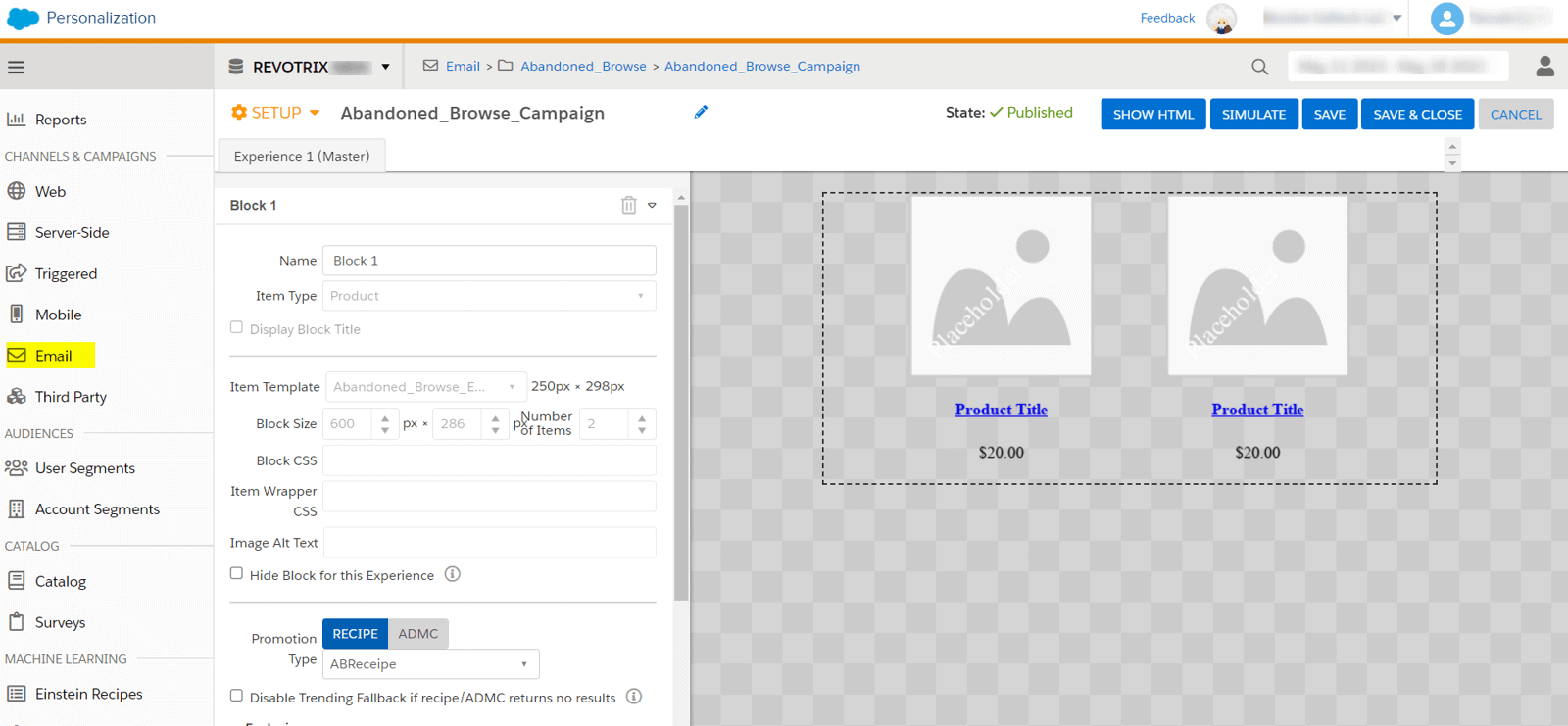
Open-time email fills content and product recommendations when the email is opened, not when it is sent. The HTML drops into emails from your existing platform. It doesn't support localization yet.
Mobile apps
Responsive HTML5 through web templates, or native iOS and Android integration through the Personalization Mobile SDK.
Sales and service
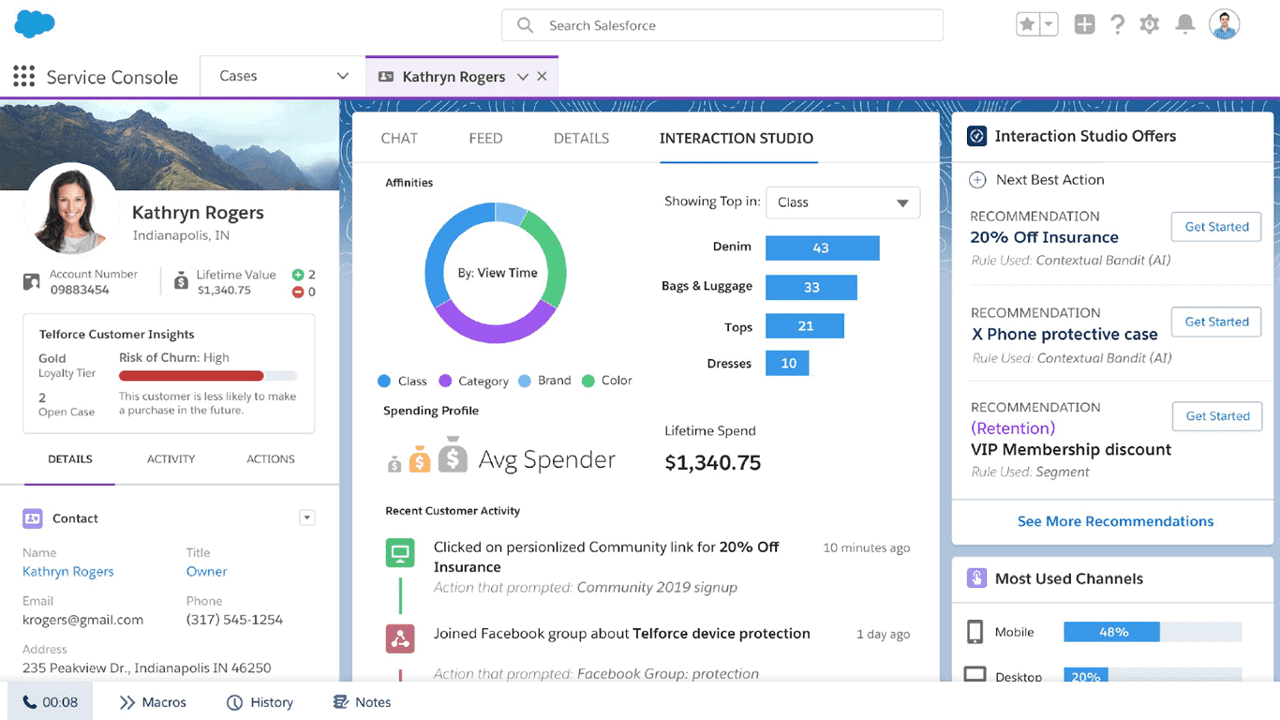
Salesforce documents integrations with Sales and Service Cloud, Commerce Cloud and Experience Cloud. The Service Console screenshot below shows the idea.
Testing and reporting
A/B tests and campaign reports show impressions, click-throughs and goal completions by channel, so every experience can be measured against a control.
What Are Einstein Recipes and Einstein Decisions?
They are the two main AI components in MCP. Einstein Recipes decide which products or content to recommend. Einstein Decisions decide which single offer or next action to show, using a contextual bandit algorithm that keeps learning. According to Trailhead, Einstein Decisions is available on the Premium edition only.
| Einstein Recipes | Einstein Decisions | |
|---|---|---|
| Answers | "Which items should this visitor see?" | "Which offer or action should this visitor get next?" |
| Built from | Ingredients, inclusions and exclusions, affinity boosters and variations | Offers and actions, scored by predicted likelihood of completion and business value |
| Typical use | Cross-sells, content promotions, trending products | Choosing among competing banners, discounts or calls to action |
| Context used | Behavior, affinities and catalog attributes | Context such as referral source, device, location and weather, even for anonymous first-time visitors |
| Edition | Included | Premium edition only |
Both are only as good as the catalog behind them. A recipe can't recommend sensibly across products that lack categories, attributes or availability, and it falls back to popularity. Our guide to Einstein Recipes goes deeper into building them.
Marketing Cloud Personalization vs Salesforce Personalization: What Changed
The difference is architecture. Salesforce says MCP "works independently of other Salesforce products", while Salesforce Personalization "is deeply integrated with the broader Salesforce platform", built natively on Data 360 and powered by Agentforce. Both are actively supported, and for teams starting fresh Salesforce calls Salesforce Personalization "the recommended path forward."
| Marketing Cloud Personalization | Salesforce Personalization | |
|---|---|---|
| Built on | Its own standalone platform (the former Interaction Studio) | Data 360, on the core Salesforce platform; sold with Marketing Cloud Next |
| Profile and identity | Its own Unified Customer Profile, shareable with Data 360 through a connector | Data 360 profile and item data graphs, with real-time identity resolution |
| Decisions | Rules, segments, A/B tests, Einstein Recipes and Einstein Decisions | Rule-based or objective-based recommenders (such as Maximize Revenue or Maximize Clicks), personalization points, experiments, and a Decisioning API |
| Channels | Web, server-side, open-time email, mobile apps | Web, mobile apps, Marketing Cloud Advanced email, batch decisions for Marketing Cloud Engagement, and Agentforce agents |
| Setup prerequisite | Web SDK, sitemap, catalog and templates | Data 360 provisioned, data graphs deployed to a data space, and the Interactions SDK with the Personalization module |
| Salesforce's guidance | Supported; existing customers can keep their instance | "The recommended path forward" when starting fresh |
In Salesforce Personalization, a personalization point ties a data space, a profile data graph, a personalization type and a response template together. Salesforce's Trailhead module describes one point serving web, app, email and batch decisions: "build the logic once, deploy it everywhere." Agentforce can feed conversation intent into the same decisioning engine through a "Get User Intent" action. Objective-based recommenders need a real-time profile data graph with engagement history, and at least three recorded engagement activities before their first training.
What existing MCP customers should know
Salesforce offers Marketing Cloud Personalization+ (MCP+), an edition that includes both products and 50 million personalization credits. Existing customers reach it by renewing or swapping to MCP+. According to the pricing page, you can run the MCP and Data 360 web SDKs side by side on the same site and reuse your existing MCP sitemap to define event collection for the Data 360 SDK. Data 360 must be provisioned for both Salesforce Personalization and MCP+, for new and existing customers alike.
How Much Does Marketing Cloud Personalization Cost?
On Salesforce's US pricing page, Salesforce Personalization costs $8,000 per org per month and Marketing Cloud Personalization+ costs $15,000 per org per month, both billed annually. The older Growth and Premium editions, at $108,000 and $300,000 per org per year, now appear only on Salesforce's India pricing page. Confirm current pricing with Salesforce before you budget.
| Option | Listed price | What the listing includes |
|---|---|---|
| Salesforce Personalization | $8,000 USD/org/month, billed annually | Agentforce personalization decisioning; web, mobile app and email personalization; product and content recommendations; 50M personalization credits |
| Marketing Cloud Personalization+ | $15,000 USD/org/month, billed annually | Everything in MCP plus Salesforce Personalization, including objective-based recommenders and custom attribution; 50M personalization credits |
| MCP Growth (legacy, India page) | $108,000 USD/org/year | Web and email personalization, product and content recommendations, experimentation |
| MCP Premium (legacy, India page) | $300,000 USD/org/year | Adds mobile app personalization |
Sources: Salesforce Personalization pricing (US) and pricing (India), checked October 22, 2026. Salesforce notes that its pricing pages are for information only and subject to change.
Three budget lines are easy to miss:
- Data 360. Both current options require Data 360 to be provisioned. Data 360 pricing is consumption-based, built on consumption credits, data storage and premium add-ons. The pricing page doesn't say whether the personalization price covers that provisioning, so ask.
- The marketing platform. Salesforce Personalization is listed as an add-on to Marketing Cloud Next, whose Growth and Advanced editions list at $1,500 and $3,250 per org per month.
- Support and implementation. Salesforce lists its Premier Success Plan at 30% of net license fees. Implementation, catalog work and ongoing campaign ownership sit on top.
Should You Choose Marketing Cloud Personalization or Salesforce Personalization?
New buyers should start with Salesforce Personalization, as Salesforce recommends, if they have Data 360 or plan to adopt it. Existing MCP customers rarely need to rip anything out: keep the working instance, and use MCP+ to add the new product where its Data 360 profiles, recommenders or Agentforce features matter. Answer these questions in order.
Personalization pays off when you have meaningful web or app traffic, a structured catalog of products or content, a way to tie anonymous sessions to known customers, and a team that will test against a control.
Wait when the real need is segmented email, when identity lives in disconnected systems, or when nobody owns the catalog. Fix those first; they are cheaper to fix before the license than after it.
How Do You Implement Marketing Cloud Personalization?
Start with goals and a control group, then identity, catalog and tracking, and only then campaigns. Salesforce's own sitemap guidance begins with a discovery phase that produces a sitemap blueprint: site catalog, site architecture, attribute model, use cases and events. Build in phases, launching a few well-measured experiences before scaling.
- 1
Set goals, KPIs and a control group. Decide what success means (revenue per visit, conversion, content engagement) and hold back a share of traffic from day one. It is the one decision you can't make afterwards.
- 2
Form the team. Marketing owns the use cases, the web team deploys the SDK, a developer configures the sitemap and templates, and CRM and data owners supply identity and catalog data.
- 3
Design identity. Decide how an anonymous visitor becomes a known one (sign-in, email click, form) and where identity is resolved. Where it must span web, app, commerce and CRM, that usually belongs in Data 360.
- 4
Model the catalog. Give products or content the categories, attributes, availability and relationships the engine needs, and load them through the sitemap or ETL feeds.
- 5
Deploy the SDK and sitemap. Instrument page types, content zones and events across the whole journey, not only the easy pages, and wire consent so opt-outs stop tracking. Our post on optimizing your sitemap covers this step.
- 6
Build templates, then campaigns. Developers build reusable web templates, and marketers launch a first set of experiences: a returning-visitor banner, product recommendations and an open-time email block.
- 7
Connect the rest of Salesforce. Send behavior into journeys and CRM, and share profile and event data with Data 360 through the connector if you use it.
- 8
Measure, review and expand. Read results against the control, retire experiences that don't win, and add channels and AI only once the basics prove their value.

Why Do Marketing Cloud Personalization Projects Underperform?
Usually because the engine is given too little to work with, not because the product fails. When identity, catalog and tracking data are weak, recommendations fall back to popularity, and the license ends up doing what a bestseller list would. These are the patterns we see most often.
How Does Twopir Approach Marketing Cloud Personalization?
Foundation first: identity resolution and the catalog come before any experience is built, and every experience is measured against a control rather than against last month. That is the order we follow on Marketing Cloud Personalization projects, because recommendations are only as good as those two inputs.
- Readiness before licensing. We check five things first: whether you can recognize a returning visitor, whether the catalog is structured, whether tracking covers the journey, who will own experiences, and how success will be measured.
- Connected to the rest of Marketing Cloud. For an e-commerce company, we set up Journey Builder automation across multiple paths, Mobile Studio, personalization to the individual customer, and web and mobile analytics in one environment. Read the Marketing Cloud case study.
- The right product for the stack. We help existing MCP customers weigh MCP+ against staying put, and help new buyers plan Salesforce Personalization alongside Data 360.
The Bottom Line
Marketing Cloud Personalization is still a capable, supported real-time personalization engine. In 2026, however, it sits next to Salesforce Personalization, which Salesforce recommends for new buyers and which runs on Data 360. Whichever product you choose, the results come from the foundation underneath it.
- 1
Confirm you need real-time web or app decisions, not segmented email you already have.
- 2
Starting fresh: plan for Salesforce Personalization and Data 360. Already on MCP: keep it, and review MCP+ at renewal.
- 3
Budget from current Salesforce pricing, not the legacy $108,000 and $300,000 figures, and include Data 360.
- 4
Fix identity, catalog and tracking before you build experiences.
- 5
Set up a control group on day one, and name an owner for every experience.
Check Your Personalization Foundation
On a 30-minute discovery call, a Twopir Marketing Cloud consultant will review how you recognize returning visitors, the state of your catalog and tracking, and whether MCP, MCP+ or Salesforce Personalization fits your stack.
Schedule a Discovery CallFrequently Asked Questions
Yes. Salesforce says Marketing Cloud Personalization, Interaction Studio and Evergage are one and the same product. Salesforce acquired Evergage in 2020, renamed it Interaction Studio, and renamed it again to Marketing Cloud Personalization in April 2022. Older articles, screenshots and code may still use the earlier names.
No retirement has been announced. Salesforce states that both Marketing Cloud Personalization and the newer Salesforce Personalization are actively supported. It does recommend Salesforce Personalization for anyone starting fresh, and existing customers can add it through the MCP+ edition while keeping their current setup.
Salesforce's US pricing page lists Salesforce Personalization at $8,000 and Marketing Cloud Personalization+ at $15,000 per org per month, billed annually. The legacy Growth and Premium editions, at $108,000 and $300,000 per org per year, appear only on the India page. Data 360 must also be provisioned, so confirm the full quote with Salesforce.
Architecture. Marketing Cloud Personalization is a standalone real-time platform with its own profiles, sitemap and Einstein Recipes. Salesforce Personalization is built natively on Data 360, uses its profile and item data graphs and objective-based recommenders, and serves web, apps, email and Agentforce from shared personalization points.
Not for a classic MCP instance, which runs on its own and can optionally share data with Data 360 through a connector. Salesforce Personalization and the MCP+ edition both require Data 360 to be provisioned, for new and existing customers alike.
Usually not. Merge fields, dynamic content blocks and journey decisions are native to Marketing Cloud's email and journey tools. Marketing Cloud Personalization adds real-time decisions on websites and apps, and open-time email recommendations that reflect what a person did right before opening the email.
Einstein Recipes choose which products or content to recommend, built from ingredients, filters, affinity boosters and variations. Einstein Decisions choose the single best offer or action using a continuously learning contextual bandit algorithm. According to Trailhead, Einstein Decisions is available on the Premium edition only.
