
HubSpot Content Hub: Features, Editions, Pricing, And How To Implement It
HubSpot Content Hub combines a CMS, AI content tools, personalization and SEO on top of HubSpot's CRM. This guide explains what each edition includes, how the AI and CRM pieces actually work, and how growing and mid-market companies implement it so content shows up in pipeline, not just in traffic reports.
Key Takeaways
- HubSpot Content Hub is HubSpot's content marketing software: a CMS for websites, landing pages and blogs, plus AI writing, content repurposing, podcasts, video, gated content and SEO tools, all running on HubSpot's Smart CRM.
- It replaced CMS Hub in spring 2024. The website builder is still there; the AI, Content Remix, Brand Voice and podcast tools were added around it.
- Four editions: Free and Starter are for simple sites; Professional unlocks smart content, A/B testing, memberships, Content Remix and the full SEO tool; Enterprise adds multisite, content approvals and team-level access control.
- AI features run on HubSpot Credits, and some headline AI tools (the Content agent and HubSpot AEO) belong to Marketing Hub, not Content Hub.
- The licence gives you the tooling. Results depend on implementation: a redirect map before migration, CRM data mapped to personalization, a named owner for governance, and reporting that joins content to deals.
Most marketing teams don't struggle to publish. They struggle to connect what they publish to revenue. HubSpot Content Hub is built to close that gap: the same platform that hosts your website and blog also holds your contacts, lifecycle stages and deals, so a page can change for a known visitor and a report can show which content created the leads.
This guide is for marketing leaders, RevOps teams and website owners evaluating Content Hub or trying to get more from a portal they already pay for. It covers what the product includes today, what each edition costs, how the AI and CRM features really work, where implementations go wrong, and how we roll it out for clients.
What Is HubSpot Content Hub, And Who Is It For?
HubSpot Content Hub is HubSpot's AI-powered content marketing software and CMS. It lets a team build and host a website, landing pages and blogs, create and repurpose content with AI, publish podcasts and video, gate content behind a login, and personalize pages using CRM data. It comes in Free, Starter, Professional and Enterprise editions.
The difference from a standalone CMS such as WordPress is where the data lives. Content Hub sits on HubSpot's Smart CRM, so forms, contacts, lists and lifecycle stages are native to the page builder instead of being bolted on with plugins. That is what makes smart content, gated memberships and content attribution possible without a separate integration project.
Content Hub fits you if your marketing already runs on HubSpot (or is moving there), your website is a lead source rather than a brochure, and you want personalization, testing and attribution without stitching a CMS, an SEO tool, a podcast host and a CRM together by hand. It suits growing and mid-market companies with a small web team and a revenue team that wants to see what content produced.
Think twice if your CRM and marketing automation live elsewhere and will stay there, your site depends on a large plugin ecosystem or a headless front end your developers already maintain, or you mainly need a knowledge base (that is a Service Hub feature). In those cases Content Hub's biggest advantage, native CRM data, is the part you would not use.
CMS Hub vs. Content Hub: What Changed?
Content Hub is the successor to CMS Hub. HubSpot introduced it at its Spring 2024 Spotlight, keeping the website, landing page and blog tools of CMS Hub and adding AI content creation, Content Remix, Brand Voice, podcasts, blog post narration, and a members-only blog with a gated content library.
Two practical consequences follow. First, older documentation, agency proposals and job descriptions still say "CMS Hub", and some accounts still hold legacy CMS Hub Professional subscriptions. HubSpot's documentation notes that those legacy subscriptions do not support memberships, which need Content Hub Professional or Enterprise. Second, the scope of the product moved from "build the website" to "run the content operation", which changes who should own it: marketing operations and content leads, with developers supporting rather than owning.
| Area | CMS Hub (before 2024) | Content Hub (today) |
|---|---|---|
| Core purpose | Website, landing pages, blog | The full content lifecycle: create, repurpose, publish, personalize, measure |
| Content creation | Editors and templates | Editors plus AI drafting with Breeze Assistant, Brand Voice and AI translation |
| Formats | Pages and blog posts | Pages, blogs, podcasts, video, blog narration, case studies |
| Gated content | Memberships | Memberships plus a members blog and gated content library |
| Pricing model | Portal-based | Seat-based for new customers since 5 March 2024 |
What Are The Key Features Of HubSpot Content Hub?
Content Hub's features fall into six jobs: create, repurpose, publish, personalize, optimize and govern. The website builder, blog, SEO tips and AI blog drafting start in the free edition. Smart content, testing, Content Remix, podcasts, video and memberships start at Professional. Multisite and approvals are Enterprise.
Create
A drag-and-drop editor, themes and the design manager for pages, plus Breeze Assistant to draft blog posts from a topic, a brief or an existing URL, guided by your Brand Voice.
Repurpose
Content Remix turns one piece into many: a blog post into social posts and ads, a podcast into a blog post and email. Post narration creates an audio version of a blog post.
Publish
Hosted websites, landing pages, blogs, podcasts and video, with SSL, a CDN, a web application firewall and 24/7 security monitoring included, plus Content Embed for WordPress sites.
Personalize
Smart content rules, personalization tokens, memberships and HubDB-driven dynamic pages show the right version of a page to the right visitor, using CRM data.
Optimize
SEO recommendations and site audits, Google Search Console data, A/B and adaptive testing, and contact-create attribution reports that tie content to the leads it produced.
Govern
Version history on every plan; content approvals, team-based access limits, activity logging and multisite management on Enterprise.
Content Remix and AI content creation
Content Remix (in beta, Professional and Enterprise) starts from up to six pieces of content (existing HubSpot content, text, files, or an external URL) and generates new assets for other channels. Professional allows up to 20 remixed pieces a day and Enterprise up to 50. Social post output also needs Marketing Hub Professional or Enterprise, so check what the rest of your HubSpot stack includes before you plan a remix workflow around it.

SEO recommendations and testing
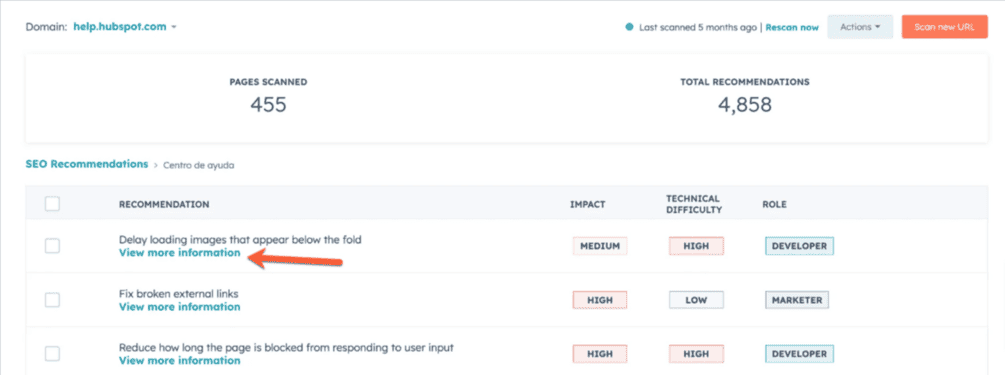
Every account gets SEO suggestions in the editor. The full SEO tool, which scans a whole domain (including pages not hosted on HubSpot) and ranks issues by impact, needs Content Hub or Marketing Hub Professional or Enterprise. The same tiers add A/B testing, which splits traffic 50/50 between two versions at the same URL, and adaptive testing, which serves up to five variations and shifts traffic toward the best performer over time.

Dynamic pages, video and version history
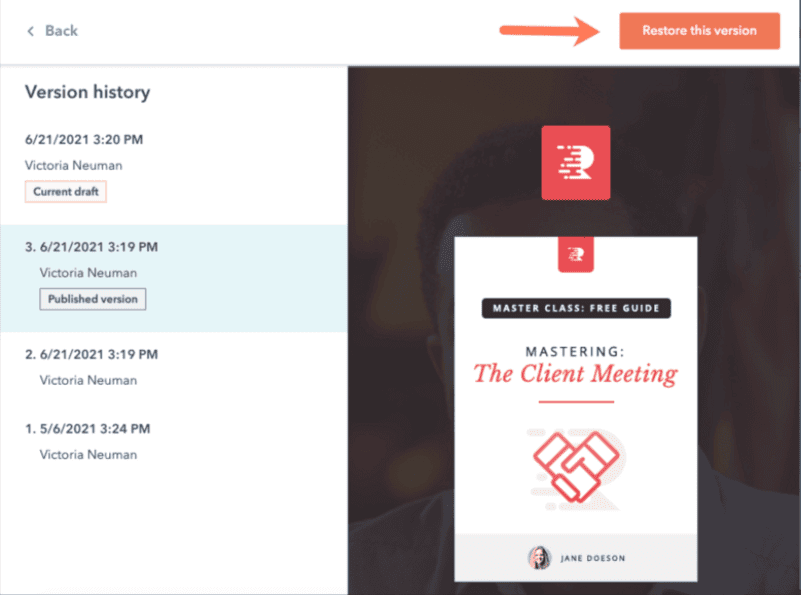
HubDB stores structured data in tables so one template can generate many pages, which suits directories, event listings, locations and product catalogs. Video hosting holds up to 150 videos on Professional and 500 on Enterprise, with forms and CTAs inside the player. Version history is available on all plans and restores an earlier version of a page, blog post or embed as a draft for review.


How Much Does Content Hub Cost? Editions Compared
Content Hub is free for up to two users. Starter is listed at $20 per seat per month, Professional starts at $500 per month with three seats included, and Enterprise starts at $1,500 per month with five seats, billed annually. Professional is where most growing and mid-market companies land, because smart content, testing, memberships and the full SEO tool all start there.
| Capability | Free | Starter | Professional | Enterprise |
|---|---|---|---|---|
| List price | $0, up to 2 users | From $20 per seat / month | From $500 / month, 3 seats | From $1,500 / month, 5 seats, billed annually |
| Website & landing pages | Up to 30 total, HubSpot branding | Up to 30 total, no branding | Up to 10,000 | Up to 10,000 |
| Blogs | 1 blog, 100 posts | 1 blog, 10,000 posts | Up to 100 blogs | Up to 100 blogs |
| Personalization & testing | No smart content or testing | No smart content or testing | Smart content, A/B and adaptive testing | Same as Professional |
| SEO | Basic recommendations | Basic recommendations | Advanced recommendations, full site audit | Same as Professional |
| AI & repurposing | AI blog drafting | AI tools, content library | Content Remix (20 a day), Brand Voice, AI translation | Content Remix (50 a day) |
| Podcasts & video | No | No | 5 podcasts, 150 videos | 50 podcasts, 500 videos |
| Gated content | No | Content library | Memberships, 2 access groups | Memberships, 100 access groups |
| Languages | Up to 3 | Up to 50 | All supported languages | All supported languages |
| Governance | Version history | Version history | Version history | Approvals, access limits, activity logs, multisite |
| HubSpot Credits / month | None listed | 500 | 3,000 | 5,000 |
Source: HubSpot's Content Hub pricing page and product and services catalog, as shown on 14 October 2026, in USD. HubSpot runs promotions (Starter was discounted for new customers at the time) and offers a lower Professional rate with an annual commitment. Confirm current pricing on HubSpot's pricing page before budgeting.
Two cost details catch buyers out. Extra seats are priced separately on every paid tier, so the "starts at" price assumes the included seat count. And customers who bought before 5 March 2024 may still be on the older pricing model, so a renewal quote can look different from the pricing page.
How Do Content Hub's AI Tools Work, And What Do They Cost?
Content Hub's AI drafts, rewrites, repurposes and translates content inside the editors, guided by a Brand Voice you define. Most AI work runs on HubSpot Credits, a monthly allowance included with each paid edition. Credits reset every month and don't roll over, so heavy AI use needs a budget and limits set by an admin.
- Breeze Assistant blog drafting: generates a full blog draft from a topic, a brief or the URL of existing content (Content Hub or Marketing Hub Professional and Enterprise). A Super Admin has to enable generative AI first. HubSpot's guide covers the steps.
- Brand Voice: built from your writing samples and website, with approved phrases, terms to avoid and per-channel voices. It works in English, Spanish, Portuguese, French, German and Japanese, and isn't applied retroactively to existing content. See setting up Brand Voice.
- AI translation: powered by DeepL, it creates a new language variant of a page or blog post for review before publishing (Professional and Enterprise).
- Podcasts: episodes can be uploaded, imported by RSS, or generated as AI audio, then distributed by RSS to the major podcast directories.
Two AI products that are often presented as Content Hub features belong elsewhere. The Content agent (in beta), which writes content without a brief, is listed under Marketing Hub Professional and Enterprise and uses 1,000 credits per piece of content. HubSpot AEO, which tracks how ChatGPT, Gemini and Perplexity mention and cite your brand, is part of Marketing Hub Professional and Enterprise or sold on its own. If AI search visibility is part of your plan, scope the Marketing Hub side too. Our Marketing Hub implementation page explains how the two hubs fit together.
How Does Content Hub Use CRM Data, Including Salesforce?
Content Hub reads HubSpot CRM data to change what visitors see and to report on what content produced. Smart content can switch a page section by list membership or lifecycle stage. Personalization tokens insert CRM properties into a page. Attribution reports show which content created contacts. With the HubSpot–Salesforce connector, that CRM data can sync with Salesforce.
Contacts, lists, lifecycle stages, HubDB tables
The HubSpot CRM (synced with Salesforce where you run both) holds who the visitor is and where they are in the funnel.
Smart content, tokens, memberships, dynamic pages
Pages change by ad source, country, device, referral source, language, list membership, lifecycle stage or query parameter. The first matching rule wins.
Contact-create attribution and dashboards
First Touch, Last Touch, Linear, Time Decay and Empirical models show which pages, posts and campaigns created contacts.
Three details matter in practice. List-membership and lifecycle-stage rules recognize known contacts through cookies, so smart content only reaches people who have converted before and accepted cookies. Content Hub's attribution reports measure contact creation; deal-create attribution, which ties content to revenue, needs Marketing Hub Enterprise. And the HubSpot–Salesforce integration is available with Content Hub Professional and Enterprise. It syncs contacts, companies, deals and activities both ways, connects one Salesforce org per HubSpot account, and needs a Salesforce edition with API access (or Salesforce Professional). Group Edition isn't supported.
For companies running Salesforce as the system of record and HubSpot for marketing and the website, field mapping and sync rules decide whether personalization has trustworthy data. That design work is covered on our Salesforce and HubSpot integration services page.
Where Content Hub Implementations Fall Short
Most Content Hub portals don't fail outright. They underperform quietly: live and publishing, but disconnected from the funnel underneath. These are the patterns we see most often when teams bring us in.
Which Content Hub Edition Do You Need?
Choose by the features you will actually configure, not by page count. Starter covers a small site without branding. Professional is the minimum for personalization, testing, gated content and the full SEO tool. Enterprise is justified by multiple brands or domains, approval workflows, or teams that must only see their own content.
How Do You Implement HubSpot Content Hub?
Implement Content Hub in four phases: audit, migrate, configure, enable. Audit your content, URLs and CRM data first. Migrate with a complete redirect map. Configure themes, Brand Voice, personalization and reporting around your funnel. Then train the owners who will run it, and give each workflow a named owner.
- 1
Audit. Inventory every live URL, its traffic and rankings, and the forms on it. Review CRM lifecycle stages and lists, because personalization can only use data you trust. Decide which content stays, merges or retires.
- 2
Migrate. Treat the URL map as the first deliverable, not a launch-week task: rankings drop when URLs change without redirects. Use content staging to build the new site without touching the live one, and configure URL mappings before launch.
- 3
Configure. Build the theme and modules, set up Brand Voice, connect domains (SSL is provisioned automatically), and map smart content rules and membership access groups to lifecycle stages and lists. Set up attribution reports and dashboards, and the Salesforce sync if you run both platforms.
- 4
Enable. Document every workflow, approval chain and smart content rule with a named internal owner. Set credit limits for AI features. Agree a weekly routine for SEO recommendations and test results, so the tooling turns into decisions.
The common failure is treating the project as a website rebuild rather than a content operation. A site that looks right on launch day but has no owner for governance, no personalization rules and no reporting tied to the CRM ends up as an expensive WordPress replacement.
Why The Implementation Matters More Than The Licence Tier
Content Hub ships with sensible defaults. What separates a portal that drives pipeline from one that just publishes is almost never the edition. It is whether someone designed the governance, the personalization, the reporting and the migration before go-live.
That is the work Twopir Consulting does. We implement, rescue, optimize, and integrate complex CRM and revenue systems, and we help growing and mid-market companies solve complex CRM, integration, and business system challenges. On Content Hub that means configuring modules around your lifecycle stages and lead scoring rather than the default setup, making the redirect map the first deliverable of any migration, connecting Content Hub to a Salesforce-connected revenue stack where you run both, and documenting ownership before we step back. We have been delivering HubSpot and Salesforce projects for 12+ years. See our HubSpot Content Hub implementation services for the full scope.
Get Content Hub Working For Your Pipeline
A 30-minute discovery call with a Twopir HubSpot consultant will review your current site, CRM data and content workflow, and tell you plainly which Content Hub edition you need and what it will take to implement it well.
Schedule a Discovery CallThe Bottom Line
HubSpot Content Hub is a strong choice when your website is meant to generate pipeline and your marketing already runs on HubSpot. The CMS, AI tools, personalization and attribution share one CRM, which removes most of the integration work a WordPress-plus-plugins stack needs. Value depends on configuration: the edition unlocks features, and the implementation decides whether anyone uses them.
- 1
Content Hub is the successor to CMS Hub: the same website tools, plus AI creation, Content Remix, Brand Voice, podcasts, video and gated content.
- 2
Professional is the practical starting point for personalization, testing, memberships and the full SEO tool. Enterprise is for multisite, approvals and team-level access.
- 3
Budget for HubSpot Credits, and check which AI tools (the Content agent, AEO) actually sit in Marketing Hub.
- 4
Personalization is only as good as your CRM data: map lifecycle stages, lists and the Salesforce sync before building smart content.
- 5
Audit, migrate with a redirect map, configure around the funnel, and hand over with named owners.
Frequently Asked Questions
HubSpot Content Hub is used to build and host websites, landing pages and blogs, create and repurpose content with AI, publish podcasts and video, gate content for members, and personalize pages using HubSpot CRM data. It combines a CMS and content marketing tools in one platform.
Content Hub replaced CMS Hub in spring 2024. It keeps the CMS Hub website, landing page and blog tools and adds AI content creation, Content Remix, Brand Voice, podcasts, blog narration and a gated content library. Some accounts still hold legacy CMS Hub subscriptions.
As listed by HubSpot in October 2026: Free for up to two users, Starter from $20 per seat per month, Professional from $500 per month with three seats, and Enterprise from $1,500 per month with five seats, billed annually. Extra seats and promotions change the total, so confirm current pricing with HubSpot.
Content Hub Professional. Smart content, A/B testing, adaptive testing, memberships and the full SEO tool all start at Professional. Starter does not include them.
Yes. Content Hub includes AI blog drafting with Breeze Assistant, Brand Voice, Content Remix, AI translation powered by DeepL, and AI-generated podcast audio, depending on edition. Most AI work uses HubSpot Credits. The Content agent and HubSpot AEO are Marketing Hub features.
Yes. The HubSpot–Salesforce integration is available with Content Hub Professional and Enterprise. It syncs contacts, companies, deals and activities both ways, connects one Salesforce org per HubSpot account, and needs a Salesforce edition with API access or Salesforce Professional.
Partly. Content Embed in Content Hub Professional and Enterprise lets you build sections in HubSpot, including smart content, and embed them on a WordPress site through the Gutenberg editor. Full personalization, memberships and hosting benefits need the site on HubSpot.
