
7 HubSpot Workflows For SaaS Growth: Trial, Churn, Renewal And Expansion
The seven HubSpot workflows that cover the SaaS lifecycle, from trial conversion to renewal and expansion: what triggers each one, the logic to build, the subscription it needs, and the product data it depends on.
Key Takeaways
- HubSpot workflows for SaaS turn product signals (sign-ups, logins, feature use, renewal dates) into timely emails, tasks, owner assignments and property updates, so no trial, at-risk account or renewal depends on someone remembering it.
- The seven workflows that cover the SaaS lifecycle are trial-to-paid conversion, onboarding, lead scoring and sales handoff, churn-risk alerts, renewal reminders, expansion offers, and NPS follow-up.
- Workflows need a Professional or Enterprise subscription. Several SaaS-critical actions sit on specific tiers: rotating owners needs Sales or Service Hub Pro, health scores and NPS surveys need Service Hub Pro, and webhooks and custom code need Data Hub Pro.
- Most SaaS workflow failures are data failures. Product usage has to reach HubSpot first, as custom events or synced properties, before any trial or churn workflow can react to it.
- Build in order of revenue at risk: usually trial conversion and lead handoff first, then renewals and churn alerts, then expansion and feedback loops.
HubSpot workflows for SaaS are the automation layer between what customers do in your product and what your revenue team does next. A trial user who never activates, a customer whose logins drop off, a contract 60 days from its end date: each is a signal that should trigger the right email, task or alert automatically. When those handoffs depend on a rep checking a report, growing and mid-market SaaS companies lose conversions and renewals they never see slipping.
This guide explains how HubSpot workflows work, which subscription each SaaS use case needs, the data you have to bring in first, and seven workflows covering the lifecycle from trial to renewal and expansion. Each one comes with its trigger, its logic and what to measure. Every product capability below is checked against HubSpot's own Knowledge Base, and the tier requirements are stated as HubSpot publishes them.
What Is A HubSpot Workflow, And How Does It Work For SaaS?
A HubSpot workflow is an automation that enrolls records (contacts, companies, deals, tickets, subscriptions and more) when they meet trigger criteria, then runs a series of actions: delays, if/then branches, emails, tasks, notifications and property updates. For SaaS, the triggers are usually product and billing signals, such as a trial starting or a renewal date approaching.
Every workflow is built from the same five parts. Get these right and the seven SaaS workflows below are variations on one pattern.
Enrollment triggers
HubSpot offers five trigger types: an event occurs (including custom events), filter criteria are met, a webhook is received, a schedule, or manual enrollment. Records enroll only once unless you turn on re-enrollment.
Delays
Six delay types, including a set amount of time, a calendar date, and "delay until a date property", which can fire a set number of days before a date such as a contract end date.
Branches
If/then branches with AND/OR logic (up to 20 paths) or value-equals branches on one property (up to 250 paths). Records that match nothing follow the "None met" path.
Actions
Edit record, create task, rotate record to owner, send internal or in-app notifications, send marketing email, create records and associations, and, on higher tiers, webhooks, custom code and AI actions.
Goals and unenrollment
In contact workflows, a goal (for example, lifecycle stage becomes Customer) removes contacts automatically. Other object types use unenrollment triggers, so nobody gets a trial nudge after they have paid.
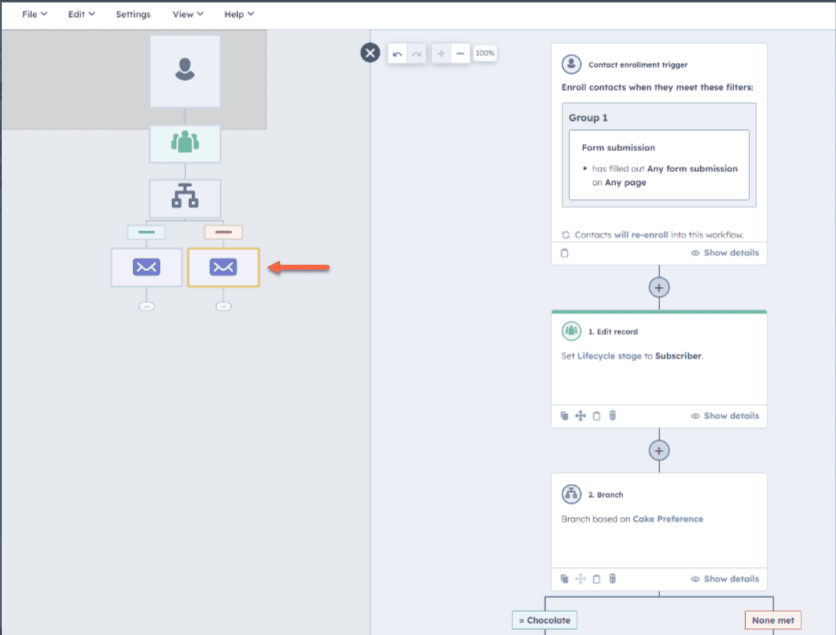
Workflows are different from sequences. A sequence sends timed one-to-one emails from a rep's own inbox and needs a Sales or Service seat. A workflow automates anything across records and teams. In SaaS, a workflow usually decides who needs attention and when, and a sequence handles the rep's personal follow-up. For setup rules that apply to every workflow, see our guide to HubSpot workflow best practices.
Which HubSpot Subscription Do You Need For SaaS Workflows?
You need a Professional or Enterprise subscription of Marketing Hub, Sales Hub, Service Hub, Data Hub, Smart CRM or Revenue Hub to build workflows at all. The SaaS-specific pieces then depend on the hub: owner rotation and leads come with Sales Hub, health scores and NPS surveys with Service Hub, and webhooks and custom code with Data Hub.
| Capability a SaaS workflow uses | What HubSpot requires |
|---|---|
| Any workflow (contacts, companies, deals, subscriptions) | Professional or Enterprise of Marketing, Sales, Service, Data Hub, Smart CRM or Revenue Hub |
| Custom events (logins, feature use) as triggers | Any Professional or Enterprise hub; events sent by webhook need Data Hub Pro or Ent |
| Lead scoring tool | Marketing Hub or Sales Hub Professional or Enterprise |
| Rotate record to owner | Sales Hub or Service Hub Professional or Enterprise |
| Send marketing email from a workflow | Marketing Hub or Service Hub Professional or Enterprise |
| Enroll in a sequence from a workflow | Sales Hub or Service Hub Enterprise |
| Health scores, NPS and CSAT surveys | Service Hub Professional or Enterprise, with a Service seat |
| Webhook trigger, Send a webhook, Custom code, Format data | Data Hub Professional or Enterprise |
| Daily, weekly or monthly scheduled triggers | Data Hub Professional or Enterprise (once or yearly schedules work on any workflow tier) |
| Custom objects in workflows | Enterprise |
| Workflow limit | 300 on Marketing, Sales or Service Hub Pro; 1,000 on Enterprise; 400 on Data Hub Pro; 1,100 on Data Hub Ent. With several subscriptions, the highest single limit applies. |
Sources: HubSpot Knowledge Base articles on creating workflows, workflow object types, workflow actions and the workflows FAQ, checked October 2026. HubSpot changes tiers regularly: confirm against your own account before you plan a build.
What Data Do SaaS Workflows Need Before You Build Them?
SaaS workflows need product usage, billing dates and lifecycle status inside HubSpot before they can react to anything. In practice that means custom events for in-app behavior, a few calculated properties such as last login date and usage score, subscription or renewal dates on the right record, and lifecycle stages that reflect trial and customer status.
This is the step most "top workflows" lists skip, and it is where most SaaS automation fails. HubSpot cannot nudge a trial user who has not activated if it never learns whether they activated. The foundation has four layers:
Custom events for logins, activation milestones and feature use
Your app sends each occurrence to HubSpot's custom event API, linked to the contact by email or record ID. Custom events can trigger workflows or power a "delay until event happens" step. Design a short event taxonomy first: HubSpot allows 500 event definitions per account.
Trial start and end, plan, seats used, last login, renewal date
Workflows branch on properties, so the signals that matter should land on the contact, company or subscription record. Your billing system's dates belong here too, through an integration or HubSpot's own subscriptions object.
Lead score, product-qualified lead flag, health score, lifecycle stage
HubSpot's lead scoring tool builds engagement, fit or combined scores. Service Hub health scores create Health score and Health status properties that workflows can read.
The seven lifecycle workflows below
Only now do the triggers, branches and actions have something reliable to work with.
One rule to design around: HubSpot's tools, including workflows, only move the default lifecycle stage forward. If a churned customer can come back as a new trial, plan for it, either with a custom "customer status" property or a workflow step that clears the stage before setting it again.
The 7 HubSpot Workflows For SaaS Growth At A Glance
The seven workflows map to the SaaS revenue lifecycle: convert trials, activate new customers, route qualified leads, catch churn early, protect renewals, grow existing accounts, and learn from feedback. Each one has a different trigger, owner and object, so they work as a set rather than one oversized workflow.
| Workflow | Enrolls on | Core actions | Owner |
|---|---|---|---|
| 1. Trial-to-paid conversion | Trial start date is known | Usage-based branches, nurture emails, sales task for active trials | Marketing + Sales |
| 2. Onboarding and activation | Lifecycle stage becomes Customer | Milestone checks, guide emails, CSM task if stalled | Customer success |
| 3. Lead scoring and sales handoff | Score label reaches the threshold | Owner rotation, lead record, task, notification | Sales / RevOps |
| 4. Churn-risk alert | Health status turns at-risk, or logins stop | CSM task, owner alert, re-engagement email | Customer success |
| 5. Renewal reminder | Days before a renewal or end date | Staged tasks, renewal deal, escalation | Account management |
| 6. Expansion (upsell and cross-sell) | Usage near plan limit, or feature interest | Expansion deal, owner task, upgrade content | Account management |
| 7. NPS and feedback loop | Survey response submitted | Detractor recovery, promoter asks, product tags | Customer success + Product |
The 7 Workflows, Step By Step
Each workflow below lists its purpose, the trigger, the logic to build and the guardrail that keeps it from misfiring. The thresholds (days, login counts, percentages) are starting points to calibrate against your own conversion and churn data, not benchmarks.
1. Trial-to-Paid Conversion Workflow
AcquisitionBest for: product-led and hybrid SaaS companies running free trials, where most trial users never reach the feature that shows the product's value.
Trigger: a contact-based workflow that enrolls when Trial start date is known (a property your app sets on sign-up). Logic: send a welcome email, then use "delay until event happens" to wait up to three days for your activation event, such as a first project created. Branch on the result. Activated users get a feature email and, if they match your fit criteria, a task for sales. Users who never activated get a short how-to series. A final branch, a few days before Trial end date, decides between an upgrade offer and a trial-extension task.
Guardrail: set the workflow goal to "Lifecycle stage is Customer", so paying users leave the workflow straight away and never get another trial nudge. This is the workflow Twopir built the event foundation for in our AI SaaS trial-conversion case study: a US-based SaaS platform that, as the published case study reports, saw a 3x improvement in trial-to-paid conversion after behavioral scoring was turned on.
2. Onboarding and Activation Workflow
ActivationBest for: SaaS teams whose early churn traces back to customers who paid but never set the product up properly.
Trigger: Lifecycle stage becomes Customer (a "property value changed" event), or the deal moves to Closed Won in a deal-based version. Logic: deliver onboarding content in order of setup milestones, not on a fixed calendar. After each step, check the matching custom event or property, such as integration connected or teammates invited. If a milestone is still missing after the delay, branch to a task for the customer success manager instead of sending another email.
Guardrail: when sales-assisted accounts already have a named CSM, use internal notifications and tasks rather than marketing email, so customers hear from a person and not from two systems at once.
3. Lead Scoring and Sales Handoff Workflow
PipelineBest for: sales-assisted SaaS where reps need to know which sign-ups and inbound leads are worth a call today.
Trigger: the score label property created by HubSpot's lead scoring tool reaches your threshold, for example a combined score of A1 or A2. Product signals can sit inside the engagement score, or in a separate product-qualified lead (PQL) property. Logic: rotate the record to an owner across the sales team (Sales Hub Pro), create a lead record and a call task, set lead status, and send an in-app or Slack notification. HubSpot's own example workflow assigns an owner to unworked contacts whose score passes 50.
Guardrail: a "None met" branch for records that already have an owner or an open deal, so active opportunities are never re-rotated. Turn on score decay so stale engagement stops counting. Our HubSpot lead scoring guide covers how to build the score itself.
4. Churn-Risk Detection Workflow
RetentionBest for: subscription businesses where churn shows up first as falling usage, weeks before a cancellation notice.
Trigger: a company-based workflow that enrolls when Health status changes to your at-risk value (Service Hub Pro health scores), or when Last login date is more than a set number of days ago. Combine usage, support tickets and survey scores in the health score rather than relying on one signal. Logic: create a high-priority task for the CSM, notify the account owner, and log the reason on the record. Branch by plan or contract value, so strategic accounts go to a person and lower tiers get an automated re-engagement email with help content.
Guardrail: turn on re-enrollment carefully. A re-enrolled record starts from the beginning and repeats every action, including emails. Re-enroll only when health status changes again, never on every property update. Our article on HubSpot customer success and health scores goes deeper on the score design.
5. Renewal Reminder Workflow
RetentionBest for: SaaS companies with annual or multi-year contracts, where renewals are tracked in a spreadsheet or in a single rep's calendar.
Trigger: a "based on a schedule" trigger relative to the renewal or contract end date (once or yearly schedules work on any workflow tier), or a "delay until a date property" step set to fire, for example, 90, 60 and 30 days before the date. Logic: at 90 days, create a renewal deal and a review task for the account owner. At 60 days, branch on health status, so at-risk accounts escalate to a manager. At 30 days, check whether the renewal deal has moved and notify leadership if it has not. HubSpot's own subscription workflow examples include alerting the team when a subscription goes past due.
Guardrail: line items set to auto-renew until cancelled have no end date in HubSpot, so define which property holds the true renewal date and handle the "date property unknown" branch the delay step offers.
6. Expansion (Upsell and Cross-Sell) Workflow
ExpansionBest for: usage- or seat-based pricing, where accounts approaching a plan limit are your warmest pipeline.
Trigger: a usage property your app syncs, such as Seats used percentage, crosses a threshold you choose, or a custom event fires when a user hits a paywalled feature. Logic: branch on health status first. Only healthy accounts get an expansion motion. Then create an expansion deal in a separate pipeline, assign a task to the account owner, and, for self-serve plans, send upgrade content that explains the next tier.
Guardrail: add an unenrollment or suppression rule for accounts with an open support escalation or an open renewal deal, so you never pitch an upgrade to a frustrated customer.
7. NPS and Feedback Loop Workflow
AdvocacyBest for: teams that collect NPS or CSAT but never act on the answers in time to change the outcome.
Trigger: a survey response. In HubSpot's customer loyalty (NPS) survey setup (Service Hub Pro), you can create follow-up workflows for Detractors, Passives and Promoters, and survey response properties can trigger other workflows. Logic: Detractors (0–6) get a CSM task within one business day and feed the churn-risk health score. Passives get a check-in. Promoters get a review or referral request, and their accounts are flagged for case-study outreach.
Guardrail: route written feedback to product as well as customer success, by tagging it on the record or notifying a product channel, or the loop closes for the customer but not for the roadmap.
Once these seven run reliably, HubSpot's newer AI actions can extend them. Workflows can call Data Agent actions to summarize or categorize a record, or run an installed agent and branch on its output. These actions use HubSpot Credits (10 credits per AI action, per HubSpot's product catalog), and several are still in beta, so add them to proven workflows rather than building on them first.
Which SaaS Workflow Should You Build First?
Build first wherever the most revenue is leaking today. For trial-heavy, product-led companies that is usually trial conversion. For sales-led companies it is lead handoff. For businesses with a large installed base it is renewals and churn alerts. Answer these questions in order:
What Mistakes Break HubSpot Workflows For SaaS?
The most common failures are not bad email copy. They are structural: workflows that act on missing data, enroll the wrong records, repeat themselves, or quietly error with nobody watching. These five come up again and again in the HubSpot portals we audit and rebuild.
How Do You Measure Whether SaaS Workflows Are Working?
Measure each workflow against the revenue metric it exists to move, not against email opens. Record a baseline before turning it on, compare enrolled and non-enrolled cohorts where you can, and review monthly. If the metric does not move within a quarter, change the trigger or the threshold before you change the copy.
| Workflow | Primary metric | Leading indicator |
|---|---|---|
| Trial-to-paid conversion | Trial-to-paid conversion rate | Share of trials reaching the activation event |
| Onboarding | Churn in the first 90 days | Time to complete setup milestones |
| Lead scoring and handoff | Lead-to-opportunity rate | Time from threshold to first rep touch |
| Churn-risk detection | Gross revenue churn | At-risk accounts recovered to healthy |
| Renewal reminder | Gross revenue retention | Renewal deals opened 90 days out |
| Expansion | Net revenue retention | Expansion pipeline created |
| NPS and feedback | NPS trend and detractor churn | Detractors contacted within one business day |
Most of these numbers live partly in HubSpot and partly in your billing system. Connecting the two cleanly is often the larger project. If your revenue data also lives in Salesforce, see how we approach Salesforce and HubSpot integration.
How Twopir Consulting Helps SaaS Teams Build HubSpot Workflows
Twopir Consulting is a Salesforce Partner and HubSpot Partner. We implement, rescue, optimize, and integrate complex CRM and revenue systems, and we help growing and mid-market companies solve complex CRM, integration, and business system challenges. For SaaS teams on HubSpot, that means designing the event and property foundation, building the lifecycle workflows on it, and connecting HubSpot to the product, billing and finance systems the workflows depend on.
Two published examples show the pattern. For a US-based AI SaaS platform, we defined the custom event framework, the trial-to-paid funnel and a product-qualified lead score behind its trial-conversion results. For a mid-market B2B services company, we built HubSpot workflows that qualify leads on booking and payment status, create deals, assign follow-ups and exclude no-shows automatically. Our Sales Hub, Service Hub and Marketing Hub practices cover each part of the lifecycle above.
Map Your SaaS Lifecycle Workflows With A HubSpot Architect
In a 30-minute discovery call, we review where trials, renewals and expansion revenue are slipping in your current HubSpot setup, check whether your product data supports the workflows you need, and tell you which ones to build first.
Schedule a Discovery CallThe Bottom Line
HubSpot workflows earn their place in a SaaS revenue stack when they act on real product and billing signals: a trial that has not activated, an account whose usage is falling, a renewal 90 days out. The seven workflows in this guide cover that lifecycle end to end. What decides whether they work is the foundation underneath them (events, properties, scores and exit rules) and the discipline to measure each one against the revenue metric it exists to move.
- 1
Get product usage into HubSpot first, as custom events and calculated properties. Every trial, onboarding, churn and expansion workflow depends on it.
- 2
Check tier requirements before you design anything. Owner rotation, health scores, NPS surveys, webhooks and custom code each need a specific hub.
- 3
Give every workflow exit criteria (a goal, a suppression segment or an unenrollment trigger) and re-enroll only on meaningful changes.
- 4
Build in order of revenue at risk, and keep one workflow per lifecycle job rather than one workflow for everything.
- 5
Measure against conversion, retention and expansion metrics, and review action logs and automation issues every month.
Frequently Asked Questions
HubSpot workflows for SaaS are automations that enroll contacts, companies, deals or subscriptions when product or billing signals occur, such as a trial starting, logins dropping or a renewal date approaching, and then run actions like emails, tasks, owner assignments and property updates so no conversion or renewal depends on manual follow-up.
Workflows need a Professional or Enterprise subscription of Marketing Hub, Sales Hub, Service Hub, Data Hub, Smart CRM or Revenue Hub. Some actions need specific hubs: rotating owners needs Sales or Service Hub Professional, health scores and NPS surveys need Service Hub Professional, and webhooks and custom code need Data Hub Professional.
Send in-app activity such as logins and feature use to HubSpot as custom events through its event API, and sync key values like last login date, plan and seats used to CRM properties. Custom events can trigger workflows directly or hold a record in a delay until the event happens.
Workflows automate actions across records and teams, such as tasks, property updates, notifications and marketing email. Sequences send timed one-to-one emails from a rep's own inbox and need a Sales or Service seat. In SaaS, workflows usually decide who needs attention and when, and sequences handle the rep's personal follow-up.
Give the workflow exit criteria. In contact-based workflows, set a goal such as lifecycle stage becomes Customer, which unenrolls contacts automatically, or use a suppression segment. In company, deal and other workflow types, add unenrollment triggers that remove records as soon as they convert.
Start where the most revenue is leaking. Product-led companies with free trials usually start with trial-to-paid conversion, sales-led companies with lead scoring and sales handoff, and companies whose revenue sits in annual contracts with renewal reminders and churn-risk alerts. If product usage does not reach HubSpot yet, build that data foundation first.
