
Implementing Revenue Operations (RevOps) with HubSpot: A Step-by-Step Guide
RevOps with HubSpot works when marketing, sales and customer success share one funnel, one data model and one set of numbers. This guide walks through the build in eight steps, from lifecycle stages to forecasting and renewals, and shows which HubSpot hub and plan each step actually needs.
Key Takeaways
- RevOps is an operating model, not a HubSpot product. HubSpot provides the shared CRM, automation and reporting; you supply the definitions, owners and rules.
- Build in order: audit, define the funnel, set scoring and routing, structure pipelines, clean and connect data, then report, forecast and manage renewals.
- Most RevOps automation needs Professional plans. Revenue attribution needs Marketing Hub Enterprise, and custom code, bulk deduplication and custom duplicate rules need Data Hub (formerly Operations Hub) Professional or above.
- Lifecycle stage, lead status and the lead object do different jobs. Mixing them up is the most common reason HubSpot funnel reports don't add up.
- AI agents only work as well as the data model under them, so clean data and clear stage definitions come before Breeze.
Implementing RevOps with HubSpot means putting marketing, sales and customer success on one funnel, one data model and one set of metrics inside HubSpot, then automating the handoffs between them. The software is the easy part. The hard part is agreeing what a qualified lead is, who owns it next, which fields must be filled before a deal moves, and which number leadership trusts.
This guide is for revenue, marketing and operations leaders at growing and mid-market companies that run, or plan to run, their revenue process on HubSpot. Enterprise teams will find the same steps apply at a larger scale. Every product capability below links to HubSpot's own documentation, with the plan it needs, so you can check what your portal supports before you plan the work.
What Does Implementing RevOps with HubSpot Mean?
Revenue operations (RevOps) unifies the data, systems and processes of marketing, sales and customer success so the whole customer journey runs as one motion. Implementing it with HubSpot means using HubSpot's shared CRM as the single record for that journey, with common lifecycle definitions, automated handoffs, clean data and reporting every team reads the same way.
HubSpot Academy's free Introduction to Revenue Operations lesson frames it the same way: each customer-facing team has operational needs, and RevOps brings them together so customers get one experience from first contact to closed deal and beyond. HubSpot's RevOps guide for startups lists the warning signs that you need it: teams working in silos, each team reporting its own metric (marketing counts MQLs, sales counts SQLs), different tools per team, and a CRM with no standards and plenty of duplicates.
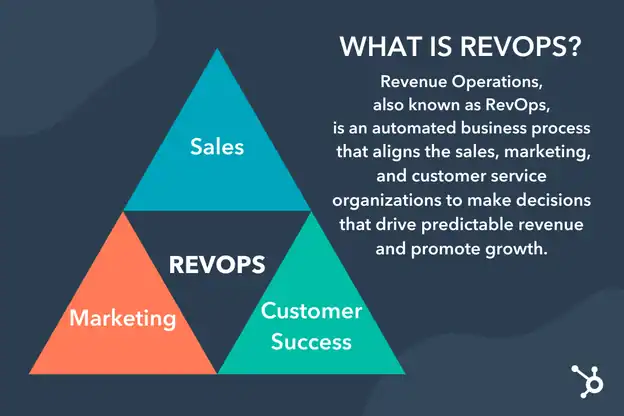
In practice, a HubSpot RevOps build delivers four things:
One Funnel
Lifecycle stages, lead stages and deal stages with written entry and exit rules that marketing, sales and success all use.
One Data Model
Contacts, companies, leads, deals and tickets with required properties, validation, deduplication and clear sync ownership.
Automated Handoffs
Scoring, routing, tasks and SLAs that move a record to the next owner without anyone chasing it in Slack.
One Set of Numbers
Funnel, pipeline, forecast, attribution and retention reports built on shared definitions, so meetings argue about actions, not data.
Is HubSpot the Right Platform for Your RevOps?
HubSpot is a strong RevOps platform when marketing, sales and service can share one CRM and your processes fit standard objects plus a few custom ones. It is a weaker fit when deal structures, approvals or data volumes demand heavy custom logic, or when another CRM must stay the system of record for sales.
Its main advantage is that every hub writes to the same records, so a marketing touch, a sales call and a support ticket appear on one timeline without an integration in between. Its main constraint is that the most useful RevOps features are tied to Professional and Enterprise plans, so the plan you own shapes the design.
Good fit: marketing already runs on HubSpot; one sales process or a few with distinct stages; teams that want reporting and automation without a large admin team; post-sale work (tickets, health, renewals) you want on the same record; Professional plans in place or in budget.
Plan carefully: sales already lives in Salesforce and must stay there; complex territory, approval or CPQ logic; strict data-residency or audit needs; Starter-only plans (most workflow, scoring and forecasting tools need Professional); many business units that each want their own pipeline and reports.
Which HubSpot Hubs and Tools Does RevOps Need?
Most HubSpot RevOps builds use Sales Hub and Marketing Hub at Professional for workflows, scoring, lead routing and forecasting; Service Hub Professional for the customer success workspace and health scores; and Data Hub, formerly Operations Hub, for data quality, custom code and integrations. Revenue Hub, formerly Commerce Hub, adds quotes, contracts and billing.
HubSpot replaced Operations Hub with Data Hub in September 2025, and Revenue Hub is the evolution of Commerce Hub. Older guides still use the old names. The table maps each RevOps job to the HubSpot feature and the plan HubSpot's documentation lists for it.
| RevOps job | HubSpot feature | Plan needed (per HubSpot docs) |
|---|---|---|
| Shared funnel | Lifecycle stages and lead status | All plans Setting lifecycle by workflow and time-in-stage properties need Professional |
| Prospecting and qualification | Leads (lead object) | Sales Hub Pro+ |
| Prioritization | Lead scoring tool (fit, engagement, combined) | Marketing or Sales Hub Pro+ AI-built contact scores need Marketing Hub Enterprise |
| Routing and handoffs | Workflows, including "Rotate record to owner" | Pro+ Rotation is Sales or Service Hub Pro+ |
| Pipeline structure | Pipelines and stage properties | Starter+ for custom pipelines; team restrictions need Pro |
| Forecasting | Forecast tool | Sales or Service Hub Pro+ |
| Cross-team reporting | Custom report builder | Pro+ of any hub |
| Revenue attribution | Attribution reports | Marketing Hub Enterprise for deal create and deal revenue attribution |
| Data quality | Duplicates, validation rules, data quality tools | Data Hub Pro+ for bulk dedupe, custom duplicate rules and auto-fixes |
| Integration logic | Custom code actions, webhooks, data sync | Data Hub Pro+ for code and webhooks; data sync on all plans |
| Retention | Customer success workspace and health scores | Service Hub Pro+ with a Service seat |
| Quote to cash | Quotes, contracts, billing in Revenue Hub | Revenue Hub Pro+ for quotes and contracts |
Plans and features change often, so confirm against HubSpot's product and services catalog before you buy or design around a feature.
How Do You Implement RevOps in HubSpot, Step by Step?
Implement RevOps in HubSpot in eight steps: audit what exists, define one funnel, set scoring and routing, structure pipelines, clean and connect the data, build reporting and forecasting, extend the model to customer success and renewals, then govern and iterate. Each step depends on the one before it, so skipping ahead usually means rebuilding later.
1. Audit the current state and write a metric dictionary
Any planOutcome: one document that defines every stage and metric, with an owner for each.
Start with what is already in the portal: lifecycle stages in use, pipelines and their stages, active and unused workflows, properties nobody fills, integrations and their sync direction, and the reports leadership actually opens. Then interview each team about how a lead really moves. Write down the definitions you agree on, such as what makes a lead marketing qualified, when a deal is created, and what counts as churn. HubSpot's data quality tools (in beta, Starter and above) help here by listing duplicates, formatting issues and unused workflows.
2. Define one funnel: lifecycle stage, lead status and leads
All plans / Sales Hub ProOutcome: a funnel where each field answers one question.
HubSpot gives you three related tools, and RevOps works best when each has one job:
- Lifecycle stage says where the relationship is: Subscriber, Lead, Marketing Qualified Lead, Sales Qualified Lead, Opportunity, Customer, Evangelist or Other. HubSpot's tools only move the default lifecycle stage forward, and each stage gets "date entered" and "date exited" properties you can report on.
- Lead status holds the sub-stages of sales qualification, such as New, Attempted to Contact, Connected or Bad Timing.
- Leads, the lead object in Sales Hub Professional and Enterprise, track each prospecting attempt separately, with stages New, Attempting, Connected, Qualified and Disqualified. One contact can have several leads, for example one per product line.
Use lifecycle settings to set a default stage for new records and for records synced from each connected app, so nothing enters the CRM without a stage.
3. Set scoring, routing and the handoff SLA
Pro+Outcome: qualified leads reach the right rep quickly, and a missed follow-up becomes visible.
Build a fit score from properties such as job title, company size and annual revenue, and an engagement score from actions such as page visits and email clicks, using HubSpot's lead scoring tool. Set engagement scores to decay (every 1, 3, 6 or 12 months) so old activity stops inflating them. When a score crosses the agreed threshold, a workflow can set the lifecycle stage, create the lead and assign an owner with the "Rotate record to owner" action. Then use the "date entered" properties to flag leads nobody has worked: HubSpot's own example is a workflow that creates a follow-up task when a contact has been a Sales Qualified Lead for more than five days. For more on scoring design, see our guide to lead scoring in HubSpot.
4. Structure pipelines with exit criteria
Starter+Outcome: deal stages that mean the same thing for every rep, so the forecast can be trusted.
HubSpot recommends separate pipelines only when processes have unique stages; otherwise keep one pipeline and use team permissions. For each stage:
- Write the exit criterion as an event the buyer completes, not an activity the rep performs.
- Mark the properties that must have a value before a deal can enter the stage, such as amount, close date or decision maker. Required stage properties block the move until they are filled.
- Set a stage probability that reflects your real win rates. HubSpot's weighted amount is the deal amount times the stage probability, and its defaults (20% to 90%) are placeholders, not benchmarks.
- Keep both a Closed Won and a Closed Lost stage. HubSpot's sales reports and sales analytics need both to process deals correctly.
5. Clean and connect the data
Data HubOutcome: one trusted record per person, company and deal, with known sync rules.
Review duplicates with the duplicates tool before you automate anything, because merged records cannot be unmerged. Bulk deduplication and custom duplicate rules need Data Hub Professional or Enterprise. Add validation rules to key properties, keeping in mind that they apply to edits in the HubSpot interface and imports, not to workflows or legacy-editor forms. Connect the other systems in your revenue stack with HubSpot data sync, which supports one-way or two-way sync on all plans and checks for changes every five minutes; custom field mappings need a paid Data Hub plan. For logic the standard actions can't handle, Data Hub Professional adds custom code actions in JavaScript or Python. Our guide to clean HubSpot data imports covers the import side.
6. Build reporting, forecasting and attribution
Pro+ / EnterpriseOutcome: one revenue dashboard that every team reads the same way.
Use the custom report builder (Professional or Enterprise) to combine marketing activity, contacts, deals and tickets in one report. Set up the forecast tool (Sales or Service Hub Professional or Enterprise), which uses the weighted amount by default and lets you group deal stages into four forecast categories per pipeline, such as Commit and Best case. For attribution, HubSpot's attribution reports cover contact creation on Marketing Hub or Content Hub Professional, while deal create and deal revenue attribution need Marketing Hub Enterprise. Current models are first touch, last touch, linear, time decay and empirical.
7. Extend the model to customer success and renewals
Service Hub Pro+Outcome: retention and expansion run on the same record as the original sale.
RevOps that stops at Closed Won misses most of the lifetime value. Service Hub Professional adds the customer success workspace and health scores, which create Health score and Health status properties you can use in workflows. Use them to alert the account owner when health drops, open an expansion deal when usage grows, and start renewal work on time. Revenue Hub keeps contracts and renewals in HubSpot too. Our post on HubSpot customer success and health scores goes deeper.
8. Govern, train and iterate
Any planOutcome: a system that stays clean after launch, with a named owner.
Name one RevOps owner who approves new properties, pipelines and workflows. Document every automation with its purpose and owner, review the data quality overview on a set schedule, and retire workflows that no longer fire. Train each team on the definitions, not just the clicks. Then improve one handoff or one report at a time: RevOps is an ongoing discipline, not a one-off project.
Which RevOps Metrics Should Your HubSpot Dashboards Track?
A HubSpot RevOps dashboard should track the whole journey: funnel conversion by lifecycle stage, speed to lead, time in stage, pipeline coverage and weighted pipeline, forecast against goal, win rate, sources of revenue, and retention signals such as health status and renewals. Each metric needs one written definition and one HubSpot source.
| Metric | What it tells you | Where it comes from in HubSpot |
|---|---|---|
| Stage-to-stage conversion | Where the funnel leaks between lead, MQL, SQL, opportunity and customer | Lifecycle stage "date entered" properties |
| Speed to lead | How fast a qualified lead gets a first touch | Lead stages, owner assignment date, first activity |
| Time in stage | Where deals and leads stall | Lifecycle time-in-stage properties (Pro+); deal stage history |
| Weighted pipeline | Expected value of open deals | Weighted amount (amount × stage probability) |
| Forecast vs goal | Whether the team will hit the number, and who hasn't updated | Forecast tool categories and submissions |
| Win rate and loss reasons | Which segments and reasons win or lose | Closed Won/Lost stages; required loss reason property |
| Revenue by source | Which channels and campaigns create revenue | Attribution reports (deal revenue needs Marketing Hub Enterprise) |
| Customer health and renewals | Which accounts are at risk or ready to expand | Health status, tickets, renewal deals or contracts |
Keep the first dashboard short. A few metrics everyone trusts are worth more than a wall of reports nobody can explain.
Can You Run RevOps in HubSpot Alongside Salesforce?
Yes. Many companies run marketing and service in HubSpot while sales stays in Salesforce. It works when you decide which system owns each field, which records sync, and how HubSpot lifecycle stages translate into Salesforce lead and opportunity stages. Without those rules, the two systems overwrite each other and RevOps reports disagree.
HubSpot's Salesforce integration needs a Professional or Enterprise HubSpot plan, connects one Salesforce instance per HubSpot account, and can use up to four Salesforce API calls to sync a single contact, so API capacity is part of the design. Records do not sync automatically after installation; they move when you import them or when sync triggers fire. Settle these decisions before you switch the sync on:
- Source of truth per field: which system wins when both change the same property.
- Inclusion rules: which contacts belong in Salesforce at all, so reps don't see every subscriber.
- Stage mapping: how MQL and SQL in HubSpot relate to Salesforce lead status and opportunity creation.
- Sync monitoring: who reviews sync errors, and how often.
Our Salesforce HubSpot integration service is built around exactly these governance decisions.
Where Do Breeze AI Agents Fit in HubSpot RevOps?
Breeze agents can enrich records, research accounts, suggest the next step on deals and answer support conversations, but they act on the data and definitions you already have. Add them after the funnel, pipelines and data quality are in place, and treat their output like any other process: owned, measured and reviewed.
HubSpot's Agent Hub, in public beta for Professional and Enterprise customers since July 2026, is one place to switch on and monitor agents. It lists a Data agent for enriching and maintaining CRM data, a Prospecting agent for account research and personalized outreach, Deal progression recommendations, and a Customer agent for support conversations. Agents use HubSpot Credits, so budget for them. Two limits matter for RevOps design: HubSpot's documentation says Breeze Assistant cannot change lifecycle stages or create pipeline rules, so those stay under human ownership. Read more in our guide to HubSpot Breeze AI.
What Are the Most Common HubSpot RevOps Mistakes?
Most HubSpot RevOps problems come from definitions, not software: fields used for the wrong job, rules that aren't enforced where people assume, and features planned on a plan that doesn't include them. These seven mistakes cause most of the rework we see.
How Long Does a HubSpot RevOps Implementation Take?
Expect phases rather than a single go-live. HubSpot's startup RevOps guide describes a foundation phase in the first three months, optimization from months four to eight, and scaling from month nine onward. The real timeline depends on your data quality, number of integrations and how quickly teams agree on definitions.
Phases are from HubSpot's RevOps for startups guide. A focused fix, such as one broken handoff or one dashboard, can land much sooner.
How Does Twopir Consulting Implement RevOps with HubSpot?
We follow the order in this guide: diagnose first, define the funnel and data model, then automate, measure and hand over a system your team can run. Twopir Consulting is a Salesforce Partner and HubSpot Partner. We implement, rescue, optimize, and integrate complex CRM and revenue systems, and we have worked with 500+ clients, from growing and mid-market companies to enterprise teams.
One example: a mid-market B2B services company in North America was losing speed because consultation bookings, payments and follow-ups lived outside its CRM. We ran a diagnostic audit of the lead-to-revenue journey, then built HubSpot workflows that set lifecycle stage and lead status from form submissions, created a deal automatically when a consultation was paid, sent timed reminders for unpaid bookings and closed stale ones as lost, with Zapier connecting the scheduling tool to HubSpot. Read the HubSpot RevOps case study.
Our revenue operations service covers stack architecture, data, process and forecasting. Our HubSpot services cover each hub, including Sales Hub implementation and Service Hub for retention. If you want the bigger picture first, read why HubSpot is a revenue platform, not just a marketing tool.
The Bottom Line
RevOps with HubSpot is an agreement between teams that HubSpot then enforces. Get the definitions right and the platform does the rest.
- 1
Audit the portal and write a metric dictionary before you build.
- 2
Give lifecycle stage, lead status and leads one job each.
- 3
Automate scoring, routing and follow-up SLAs, and make misses visible.
- 4
Fix duplicates and sync rules before forecasting and attribution.
- 5
Carry the model past Closed Won into health scores and renewals.
Find Where Your HubSpot Funnel Leaks
In a 30-minute discovery call we look at your lifecycle stages, pipelines, data quality and reports, and tell you which RevOps step to fix first.
Schedule a Discovery CallFrequently Asked Questions
No. RevOps is an operating model that aligns marketing, sales and customer success on shared data, processes and metrics. HubSpot supplies the tools to run it, mainly the shared CRM, workflows, scoring, pipelines, forecasting and reporting across Marketing, Sales, Service and Data Hub.
Not to start. Lifecycle stages, pipelines and basic data sync work without it. You need Data Hub Professional or Enterprise for custom code and webhook workflow actions, bulk duplicate management, custom duplicate rules and automatic formatting fixes, and a paid Data Hub plan for custom data sync field mappings.
Professional is the practical minimum. Workflows, the lead scoring tool, lead rotation, the lead object, the forecast tool and the custom report builder all need Professional or Enterprise. Deal and revenue attribution need Marketing Hub Enterprise, and multiple health scores need Service Hub Enterprise.
Lifecycle stage shows where the overall relationship is, from subscriber to customer. Lead status holds the sub-stages of sales qualification, such as attempted to contact or connected. The lead object, in Sales Hub Professional and Enterprise, tracks each prospecting attempt as its own record with its own stages.
Define each deal stage by a buyer event, require key properties such as amount and close date before deals move, set stage probabilities from your own win rates, and keep Closed Won and Closed Lost stages. Then use the forecast tool's categories and submission tracking so reps review their deals regularly.
Yes. HubSpot's Salesforce integration, on Professional or Enterprise plans, syncs contacts, companies, deals and activities with one Salesforce instance. Decide the source of truth for each field, which records sync, how lifecycle stages map to Salesforce stages, and who monitors sync errors before you turn it on.
Plan in phases. HubSpot's startup RevOps guide describes a foundation phase in months zero to three, optimization in months four to eight, and scaling from month nine. A single focused fix, such as one handoff or one dashboard, can be delivered much sooner.
