
AdvoLogix (Now Mitratech CaseCloud): Streamlining Legal Operations and Case Management
AdvoLogix is legal matter and case management built inside Salesforce, and it is now sold as Mitratech CaseCloud. This guide explains what the platform does at each stage of a matter, how matter management differs from case management, and what to get right when you implement it.
Key Takeaways
- AdvoLogix is a legal matter and case management application that runs inside Salesforce. Mitratech acquired it and launched it as CaseCloud on November 20, 2024.
- Every stage of a matter lives on one Salesforce record: conflict check, participants, key dates, activity plans, AdvoDoc documents, UTBMS time entries, fee arrangements and legal hold.
- Matter management covers all legal work; case management is the litigation subset. AdvoLogix runs both on the same Matter object.
- The licence includes a Salesforce Enterprise platform licence, but not Sales Cloud objects such as leads and opportunities, so intake runs on CaseCloud's own Intake object.
- Most of the value comes from the implementation: standard matter types, a deliberate sharing model, owned integrations and role-based training.
AdvoLogix matter management puts a law firm's or legal department's matters, parties, deadlines, documents and time on one Salesforce record per matter. The product is now sold as Mitratech CaseCloud, though many teams still call it AdvoLogix and its documentation still lives at help.advologix.com. Because it is built on Salesforce, it gets the platform's security model, reporting, automation and AppExchange ecosystem.
This guide is written for managing partners, legal operations leads and Salesforce admins at growing and mid-market companies and firms, as well as government legal teams, who are evaluating AdvoLogix or already run it. It explains what the platform does at each stage of a matter, where it fits and where it does not, and the implementation mistakes we see most often.
What Is AdvoLogix, and How Does It Relate to Mitratech CaseCloud?
AdvoLogix and CaseCloud are the same product line. On November 20, 2024, Mitratech announced CaseCloud, a case and spend management solution built on Salesforce and developed from AdvoLogix technology, for law firms and public-sector legal teams. Existing AdvoLogix orgs run the same matter management package under the new name.
| Question | Answer |
|---|---|
| Current name | Mitratech CaseCloud |
| Former name | AdvoLogix (AdvoLogix Matter Management) |
| Platform | Salesforce. It installs as a managed package in a Salesforce org. |
| Built for | Law firms, corporate legal departments, and government and public-sector legal teams |
| Licence | Each user licence includes a Salesforce Enterprise platform licence. Sales Cloud and Service Cloud objects, such as leads and opportunities, need separate Salesforce licences. |
| Documentation | CaseCloud Help, still hosted on help.advologix.com |
The licence point matters more than it looks. Many firms assume that "built on Salesforce" means they also get Salesforce's sales tools for business development. They don't, unless those licences are bought separately. CaseCloud has its own intake process instead, which we cover below.
What Problems Does AdvoLogix Solve for Legal Teams?
It replaces scattered matter information with one shared record per matter. Legal teams usually look at AdvoLogix when email, shared drives, personal calendars and a separate billing tool can no longer keep up with the number of matters, attorneys and outside parties involved.
How Does a Matter Move Through AdvoLogix?
A matter moves from intake and conflict check, through engagement and opening, to the work itself, time and billing, and finally closing or legal hold. Each stage writes to the same Salesforce matter record, so reports and dashboards cover the whole lifecycle without exports.
New Client, New Matter, Screened Parties
A request arrives as an Intake record, from a form or entered by staff. Its parties are conflict-checked, the request is approved or rejected, and an approved intake converts to a matter.
Team, Participants and Fee Arrangement
The matter is created, assignment rules set the owner and team, participants are added with their roles, and the fee arrangement is recorded.
Tasks, Key Dates and Documents
Activity plans create the standard tasks, key dates feed the Matter Calendar, and AdvoDoc assembles letters and pleadings from matter data.
UTBMS Time, Budgets and Billing Preview
Time and expenses are coded against the matter and reviewed in the Billing Preview before invoicing.
Closing, Retention and Legal Hold
The matter closes, or a legal hold stops its records from being deleted and collects acknowledgements from the people involved.
What Are the Key Features of AdvoLogix Matter Management?
The features below come from the vendor's setup and technical documentation, linked for each one, so you can check the details against your package version. Each one follows the same pattern: what it does, and what to plan for.
1. The matter record and data model
CoreBest for: one place for everything about a matter.
The Matter is the core record. Participants, key dates, tasks, documents, time entries, budgets and fee arrangements all relate back to it. The vendor publishes a matter management data model that shows the core objects.
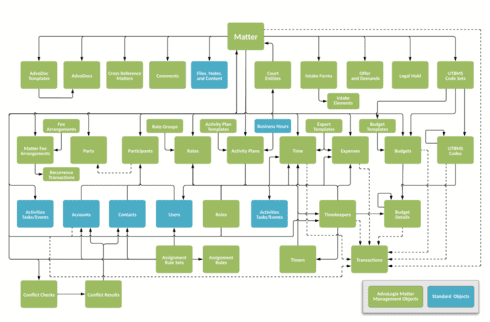
The catch: the vendor's diagram leaves some relationships out. For a complete view of your own org, including fields you have added, open Salesforce's Schema Builder.
2. Intake and conflict check
IntakeBest for: screening new requests before they become matters.
Intakes are a staging area for new legal requests. An Intake record is created by staff or through intake forms, which internal, community or external users can complete. The parties are conflict-checked automatically, the request goes through approval, and a "Convert to Matter" flow creates the matter. The conflict check searches accounts, contacts and participants by default. Admins can add other standard or custom objects to the search, and choose whether it looks at primary name fields only or at all searchable fields.
The catch: approval processes cannot ship in a managed package, so an admin must build the intake approval process after installation. And a conflict check is only as good as the data behind it: if historic matters and parties were never migrated, the search will miss them.
3. Participants and relationship maps
PeopleBest for: recording everyone involved in a matter, and in what role.
A participant is an account, contact, user or other party related to a matter: the client, opposing party, opposing counsel, experts or the court. Participants can be created automatically from lookup fields on the matter, with the field label used as the role. Relationship maps then show how those people and organisations connect.
The catch: decide early which lookups create participants automatically. Switching it on for every lookup can flood matters with participants nobody needs.
4. Key dates, activity plans and assignment rules
WorkflowBest for: turning the firm's checklists and deadlines into repeatable workflows.
Key dates are matter date fields the firm marks as important, and they appear on the Matter Calendar and Matter Gantt. Activity plans apply a standard set of tasks and events to a matter, and can count business days using the court's business hours. Assignment rule sets assign new or changed matters to the right people and can email them.
The catch: automation multiplies whatever process you give it. Agree the matter types and their standard steps before you build activity plans.
5. AdvoDoc document assembly and document storage
DocumentsBest for: engagement letters, correspondence and pleadings filled from matter data.
AdvoDoc is the built-in document assembly tool. Its template designer supports merge fields, tables of related records, conditional blocks and reusable templates such as signature blocks. For storage, Mitratech lists integrations with iManage, Google Drive and Microsoft SharePoint.
The catch: the vendor says AdvoDoc templates must be set up and maintained by someone proficient in HTML. Budget for that skill, or use a document generation tool your team can maintain.
6. Timekeeping, UTBMS codes and fee arrangements
BillingBest for: capturing time against the matter and billing it the way each client expects.
The timekeeping module supports time rounding, timers, UTBMS task and activity codes, and a Billing Preview that gathers fees and expenses before invoicing. A fee arrangement data model records how each matter is billed. For full accounting, firms often pair the platform with Accounting Seed, which also runs on Salesforce.
The catch: firms upgrading older orgs may need the UTBMS Migration Assistant to move existing codes, time, expenses, budgets and invoices to the new coding system. Plan and test it like a data migration.
7. Client and co-counsel access
CollaborationBest for: sharing selected matters with clients, co-counsel or agencies.
Through Salesforce Experience Cloud, external users can see the matters they are involved in. With participant-based sharing, an external user must be a participant on a matter before it is shared, and access is set to Read, Write or No Access at account, contact or participant level.
The catch: the more specific level overrides the broader one, so a contact setting can quietly replace an account-level setting. Test the sharing with real users before go-live.
8. Legal hold, security and encryption
GovernanceBest for: preservation obligations and sensitive client data.
When a matter is placed on legal hold, the records you choose cannot be deleted, and the people involved are asked to acknowledge the hold, with reminders until they do. Security comes from the Salesforce platform: profiles, permission sets and sharing rules. Shield Platform Encryption is an optional add-on for encrypting data at rest.
The catch: encrypting the wrong fields breaks features. The vendor notes that encrypting key date fields or the time entry date stops them from appearing on the Matter Calendar or in the Billing Preview. Encrypt as few fields as possible. Whether a setup meets a regulation or a client's security terms depends on how the org is configured; installing the package alone does not make a firm compliant.
What Is the Difference Between Matter Management and Case Management?
Matter management covers every piece of legal work a team handles. Case management is the subset that deals with disputes and litigation. Every case is a matter, but many matters, such as a contract review, a regulatory filing or a property closing, never become cases.
| Matter management | Case management | |
|---|---|---|
| Scope | All legal work: transactional, advisory, regulatory and litigation | Disputes and litigation: claims, lawsuits, hearings and appeals |
| Typical users | Corporate legal departments, full-service firms, government counsel | Litigation firms, plaintiff and defence practices, prosecutors and public defenders |
| Key records | Matters, contracts, budgets, outside counsel spend | Cases, parties, court dates, filings, evidence, outcomes |
| Key measures | Matter volume, spend against budget, cycle time | Deadlines met, case stage, time to resolution |
In AdvoLogix both run on the same Matter object. A litigation matter is simply a matter type with its own key dates, participants and activity plans, so a firm with transactional and litigation practices can use one system.
Is AdvoLogix Right for Your Legal Team?
AdvoLogix fits teams that want their matter system on Salesforce and are willing to run Salesforce as a platform. It is a weaker fit for small practices that want a fixed, all-in-one tool with no configuration or integration work.
It fits if you need configurable matter types, fee arrangements and workflows; outside parties need controlled access to matters; you want matter data connected to accounting, documents, e-signature or intake; or you already run Salesforce and have, or will hire, an admin.
It may not fit if you are a solo or very small practice with simple billing, no plans to customise or integrate, and no one to own a Salesforce org. A lightweight all-in-one practice management tool will usually be simpler.
If you are choosing between Salesforce-based legal applications, the alternatives are usually Litify, NuLaw or a custom build. Our guide to Salesforce for law firms compares them side by side.
What Does an AdvoLogix Implementation Involve?
A typical AdvoLogix or CaseCloud implementation runs in six phases: discovery, design, configuration, data migration, integrations, and testing with go-live. The timeline depends mostly on how much historic data you migrate and how many systems you connect.
Plan intake around your licences. The CaseCloud licence does not include Sales Cloud leads and opportunities, so design intake on CaseCloud's Intake object and intake forms, and map each intake type to a matter record type. Add Sales Cloud only if business development needs its own pipeline.
For a deeper look at integration patterns, read our CaseCloud Salesforce integration guide. If you are moving from another legal system, see our CaseCloud migration services.
What Mistakes Should You Avoid With AdvoLogix?
Most problems come from configuring before agreeing the process, and from treating package upgrades and integrations as one-off work. These are the patterns we see most often when we review AdvoLogix orgs.
What Does an AdvoLogix Rollout Look Like in a Real Firm?
In our own projects, the biggest gains come from automating the handoff from intake to matter and from connecting the tools the firm already uses. Two published Twopir case studies show the pattern.
- Intake to settlement for a personal injury firm. For a US personal injury firm, we configured AdvoLogix with custom matter stages from intake to closing, automatic lead-to-matter conversion on attorney sign-off, and 90/60/30-day statute-of-limitations alerts. An AWS pipeline extracts medical-record data from PDFs into the matter. The case study reports 40% faster case processing and 60% less intake admin. Read the case automation case study.
- Connected intake and communications. For another law firm, we set up AdvoLogix matter management with Formstack intake, a custom lead-to-matter conversion, CallRail and RingCentral call tracking, Egnyte document storage, Conga Composer documents and SMS appointment reminders. Read the AdvoLogix case study.
Results depend on each firm's data, team and process, so treat these as examples of the pattern, not benchmarks. Our Mitratech CaseCloud services cover implementation, customisation, integration, migration and support.
The Bottom Line
AdvoLogix, now Mitratech CaseCloud, gives legal teams one Salesforce record per matter from intake to closing. How much value a firm gets depends less on the package than on how it is implemented.
- 1
Know what you are buying: CaseCloud is the current name, and the licence includes the Salesforce platform but not Sales Cloud objects.
- 2
Agree matter types, key dates and activity plans before you configure them.
- 3
Design sharing, participant access and encryption deliberately, and test them with real users.
- 4
Give every integration an owner, and retest it after each package release.
- 5
Train each role on its own tasks: attorneys, paralegals, intake and billing.
Planning a CaseCloud Rollout or Fixing an AdvoLogix Org?
On a 30-minute discovery call, a Twopir Salesforce architect will review how matters move through your firm today and tell you where AdvoLogix configuration, migration or integration would make the biggest difference first.
Schedule a Discovery CallFrequently Asked Questions
Yes. Mitratech announced CaseCloud on November 20, 2024, as a case and spend management solution built on Salesforce and developed from AdvoLogix technology. Existing AdvoLogix customers run the same matter management package, and its documentation is still hosted at help.advologix.com.
Yes. AdvoLogix is a managed package that runs inside a Salesforce org, and each licence includes a Salesforce Enterprise platform licence. Products sold separately by Salesforce, such as Sales Cloud leads and opportunities, need their own licences.
Matter management covers all legal work, including transactional, advisory, regulatory and litigation matters. Case management is the litigation subset: claims, lawsuits, hearings and appeals. In AdvoLogix both run on the same Matter object, with different matter types.
Yes. The conflict check searches accounts, contacts and participants, and admins can add other objects to it. The timekeeping module supports timers, time rounding, UTBMS codes and a Billing Preview, and a fee arrangement data model records how each matter is billed.
Yes, through Salesforce Experience Cloud. With participant-based sharing, an external user must be a participant on a matter before it is shared, and access is set to Read, Write or No Access at account, contact or participant level.
It depends mostly on how much historic data you migrate and how many systems you connect. Every project runs through discovery, design, configuration, data migration, integrations, and testing with go-live, and the migration and integration phases usually take the longest.
