
AdvoLogix vs Salesforce: What CaseCloud Adds to Standard Salesforce
AdvoLogix, now Mitratech CaseCloud, is not an alternative to Salesforce. It is a legal application that runs inside it. This guide maps what a standard Salesforce org does for a law firm or legal department on its own, what AdvoLogix adds on top, and when the extra layer is worth it.
Key Takeaways
- AdvoLogix is now Mitratech CaseCloud. Mitratech announced the product on November 20, 2024, built from Salesforce and AdvoLogix technologies.
- "AdvoLogix vs Salesforce" is not a choice between two platforms. CaseCloud installs inside a Salesforce org, so the real question is which legal capabilities you buy pre-built and which you build yourself.
- Standard Salesforce already covers clients, contacts, intake, security, reporting and automation. It has no legal matter model, legal billing, court-rules calendaring or legal document integrations out of the box.
- Trust and general ledger accounting are not built into either option. With AdvoLogix they usually run through Accounting Seed, a Salesforce-native accounting app.
- Test both options against your own workflows in a sandbox before you decide.
Most firms searching AdvoLogix vs Salesforce are trying to decide whether a legal application is worth adding on top of the Salesforce licences they already pay for, or would pay for anyway. The question has changed since this article was first published. AdvoLogix has become Mitratech CaseCloud, and the legal layer it provides is broader than a matter object and a billing screen.
This guide is written for managing partners, legal operations leaders and IT directors at growing and mid-market companies in legal services, and at corporate and public-sector legal teams. It explains what changed with the rename, maps standard Salesforce against AdvoLogix capability by capability, and closes with a checklist for testing both. If you have already narrowed the decision to "buy the package or build our own", our CaseCloud vs custom Salesforce decision guide covers that choice in depth.
Is AdvoLogix Better Than Standard Salesforce for Legal Work?
For most legal teams with conventional matter, billing and document workflows, yes: AdvoLogix (CaseCloud) supplies a legal data model and legal integrations that a standard Salesforce org does not have. Standard Salesforce wins when the main problem is intake, business development or reporting, or when your operating model is unusual enough that a packaged matter model would get in the way.
Add AdvoLogix (CaseCloud) if matters, time and billing, legal spend, court deadlines and documents in iManage, NetDocuments or SharePoint are the daily work. You also want those capabilities maintained by a vendor rather than by your own developers.
Stay on standard Salesforce if what you need most is intake, referral tracking, client development and firm reporting. Also stay if you already run a mature custom legal org that works, or if your process does not resemble a typical law firm or legal department.
What Happened to AdvoLogix?
AdvoLogix continues as Mitratech CaseCloud. Mitratech announced CaseCloud on November 20, 2024 as a case and spend management solution for law firms and the public sector. Mitratech says it was "developed through a combination of Salesforce and AdvoLogix technologies." Articles, reviews and comparisons that still use the AdvoLogix name describe the same Salesforce-based product line.
For firms already running AdvoLogix, the rename did not require any data movement. The changes that matter are commercial and product-related: Mitratech is now the vendor, and the product sits alongside Mitratech's legal, compliance and spend tools. The CaseCloud help center still includes an "AdvoLogix Setup Tab" article, which is a useful reminder that the package underneath is the same lineage. If your firm is consolidating orgs or rethinking an older AdvoLogix data model, see our CaseCloud migration services.
Is AdvoLogix a Replacement for Salesforce?
No. AdvoLogix (CaseCloud) is a managed package that installs into a Salesforce org, so every CaseCloud customer is also running Salesforce. The comparison is really between two stacks on the same platform: Salesforce plus a vendor-maintained legal layer, or Salesforce plus a legal layer your own team designs and maintains.
Shared by Both Options
Accounts and contacts, leads, the security and sharing model, Flow automation, reports and dashboards, the mobile app, APIs and the AppExchange.
Bought From Mitratech or Built In-House
Matter management, legal time and billing, spend management, legal access control and legal analytics. With AdvoLogix this layer comes from the CaseCloud package; with standard Salesforce your team designs it with custom objects, Flow and Apex.
Accounting, Documents, Courts and Payments
Accounting Seed or QuickBooks for the ledger, a document management system, court-rules calendaring, e-signature and payment tools. Both options need these; AdvoLogix ships several of them as documented integrations.
What Does AdvoLogix Add to Standard Salesforce?
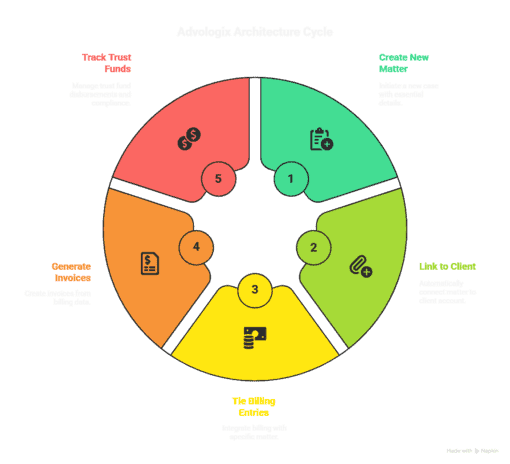
AdvoLogix adds the legal-specific layer: a matter model, legal billing and spend management, legal access control, legal analytics, and documented integrations for documents, court rules and accounting. Standard Salesforce supplies everything underneath. The table shows where each capability comes from.
| Capability | Standard Salesforce on its own | AdvoLogix / CaseCloud |
|---|---|---|
| Clients and contacts | Native Accounts, contacts and relationships | Uses the same Salesforce records |
| Intake | Native Leads, web forms and Flow screens you configure | Case intake, plus anything Salesforce provides |
| Matter record | Build Custom object, relationships, record types and layouts | Packaged Matter Management module |
| Conflict checking | Build Custom search across clients and parties, with an audit trail you design | Packaged Results retained on the matter |
| Court deadlines | Build Tasks and Flow, or an external rules provider | Integration CalendarRules for court rules-based calendaring |
| Time, billing and legal spend | Build An add-on app or an external billing system | Packaged Billing plus a Spend Management module |
| Trust and general ledger | Add-on Accounting Seed or an external system such as QuickBooks | Add-on Not a ledger; documented Accounting Seed integration |
| Documents | Build Salesforce Files, or AppExchange connectors | Integration iManage, NetDocuments, SharePoint, Google Drive, HotDocs |
| Court records and service of process | Build Custom integrations | Integration UniCourt and CT SOP |
| Record access and ethical walls | Native Permission sets, roles and sharing rules you design | Packaged Access Control module on top of the same model |
| Reporting | Native Reports and dashboards on whatever you build | Packaged Legal Analytics for Law Firms app |
| Upgrades | Your team retests every custom component at each Salesforce release | Mitratech ships package versions; you test them in a sandbox |
Sources: module and integration names from the CaseCloud help center, document integrations from the CaseCloud product page, and the Salesforce security model from Salesforce Help. Confirm the current module list and licensing with Mitratech before you decide, because product scope changes.
Matter management
The matter is the record every report, deadline, invoice and document hangs from. In AdvoLogix it already exists, with its relationships to clients, parties, tasks, time and documents. In a standard org your team designs it, and that design is the most expensive thing to get wrong, because every later automation and integration depends on it.
Billing, spend and trust accounting
AdvoLogix handles legal billing and offers Spend Management for firms and departments that manage outside counsel. Neither option is a general ledger. AdvoLogix has a published integration with Accounting Seed that puts invoices, receivables, cash receipts and time and expense in the same Salesforce interface as the matter. Firms that keep accounting outside Salesforce connect a system such as QuickBooks instead. Trust accounting rules vary by jurisdiction, so the accounting design should be agreed with the firm's accountant. See Accounting Seed for law firms.
Documents and storage
Salesforce splits storage into data storage and file storage, and storing pleadings and discovery as Salesforce Files uses the file allocation quickly. Most legal teams keep documents in a document management system and link them to the matter. That is why AdvoLogix's iManage, NetDocuments and SharePoint integrations matter more than they first appear.
Security, limits and AI
Both options use the same Salesforce sharing model. Teams with stricter data-protection requirements can add Shield Platform Encryption to either. Salesforce enforces Apex governor limits on every transaction. Certified managed packages have their own per-transaction allocation, while custom automation shares the org's limits. On AI, Mitratech markets AI-powered automation for billing, document creation and matter updates, and the help center lists an Agentforce for Corporate Legal module. Evaluate those features in a demo against your own use cases.
Which Terms Should You Know Before Comparing Them?
Five terms come up in every AdvoLogix vs Salesforce evaluation. Agreeing on them early keeps vendor demos, internal requirements and partner proposals talking about the same thing.
Matter
The central record for one legal engagement or case. Packaged in AdvoLogix; a custom object in standard Salesforce.
Managed package
A vendor-maintained application installed into your org. You extend around it; the vendor upgrades it.
Trust accounting
Holding and recording client funds separately from firm funds, under the rules of each jurisdiction.
Legal spend management
Controlling what a legal team pays outside counsel: invoice review, rates and budgets.
Governor limits
Salesforce's per-transaction limits on code and automation, which every custom legal build must be designed around.
Rules-based calendaring
Calculating court deadlines automatically from a triggering date and the court's rules.
When Should You Choose AdvoLogix, and When Standard Salesforce?
Choose by the problem you are solving first. AdvoLogix pays off when matter operations are the bottleneck. Standard Salesforce is enough when the bottleneck is growth: getting clients in, tracking referrals and reporting on the firm.
Choose AdvoLogix (CaseCloud)
Packaged legal layerBest for: law firms, legal departments and public-sector legal teams whose daily work is matters, deadlines, billing and documents.
- You want a matter model, legal billing and spend management without designing them.
- Your documents live in iManage, NetDocuments or SharePoint and need to appear on the matter.
- Court deadlines and court records need dependable integrations (CalendarRules, UniCourt).
- You have limited in-house Salesforce development capacity and prefer vendor upgrades.
- You are a public-sector team. Mitratech targets this segment and states FedRAMP certification for CaseCloud.
Stay on Standard Salesforce
Configure or buildBest for: firms whose priority is intake, business development and firm-level reporting.
- Intake, referral sources and client development matter more than matter administration.
- Your operating model is unusual: legal work inside a wider service business, high-volume consumer intake, or unusual fee structures.
- You already run a working custom legal org, and migrating would cost more than it returns.
- You have an admin and developer team that can own the legal layer for the long term.
Firms in between often combine the two: AdvoLogix for matters and billing, with Salesforce Flow, Experience Cloud portals and custom integrations around it. Other Salesforce-based legal apps such as Litify are worth shortlisting too, especially for plaintiff and personal injury firms.
What Mistakes Do Firms Make When Comparing AdvoLogix and Salesforce?
Most bad decisions come from comparing a polished demo with a blank org, or from assuming a capability is included when it is an integration. These are the five we see most often.
What Does AdvoLogix Look Like in a Real Firm?
In our projects, the gains come from connecting the AdvoLogix matter to the systems around it: documents, accounting and the firm's own intake process. Three published Twopir case studies show the pattern.
- Case lifecycle automation. For a US personal injury firm, we configured Salesforce AdvoLogix with a matter-stage model from intake to closure. We automated lead-to-matter conversion and 90/60/30-day statute alerts, and added AWS document processing for medical records. The case study reports 40% faster case processing and 60% less intake admin. Read the case automation case study.
- Matter-to-finance connection. For a multi-state US personal injury firm, we connected Salesforce AdvoLogix to QuickBooks Online for settlements and trust accounting. The case study reports 45% less accounting workload and a 40% faster case-to-cash cycle. Read the legal finance case study.
- Documents on the matter. For a law firm using iManage, we mapped Salesforce records, including AdvoLogix matters, to iManage workspaces. The case study reports 85% faster document retrieval. Read the iManage integration case study.
Results depend on each firm's data, team and process, so treat these as examples of the pattern, not benchmarks.
How Should You Evaluate AdvoLogix Against Standard Salesforce?
Test both against your own workflows, in a sandbox, before you sign anything. A short, structured evaluation of your own workflows surfaces more than a feature list, and it gives you a requirements document you will need for implementation either way.
Our Mitratech CaseCloud implementation services cover the packaged route, and our legal Salesforce consulting covers custom builds and hybrids. For integration patterns, read our CaseCloud integrations guide.
The Bottom Line
AdvoLogix, now Mitratech CaseCloud, and standard Salesforce are not competitors. One is a legal layer that runs on the other. The decision is how much of that legal layer you buy and how much you build. For most teams whose daily work is matters, billing, deadlines and documents, the packaged layer reaches value sooner. For firms focused on intake and growth, or with an unusual operating model, standard Salesforce with a targeted build can be the better fit.
- 1
Read "AdvoLogix" as "Mitratech CaseCloud" in every comparison you find.
- 2
Compare a packaged legal layer with a custom one, on the same Salesforce platform.
- 3
Plan the accounting and trust layer separately; neither option is a ledger.
- 4
Keep documents in a document management system and link them to the matter.
- 5
Decide with a sandbox pilot of your own workflows, not a feature checklist.
Get a Clear Answer for Your Firm
On a 30-minute discovery call, a Twopir Salesforce architect will review your matters, billing and document workflows. We will tell you whether AdvoLogix (CaseCloud), standard Salesforce or a hybrid fits best, and what the first phase should cover.
Schedule a Discovery CallFrequently Asked Questions
AdvoLogix continues as Mitratech CaseCloud. Mitratech announced CaseCloud on November 20, 2024, as a case and spend management solution for law firms and the public sector, developed from Salesforce and AdvoLogix technologies. Firms already on AdvoLogix did not need to move their data for the rename.
Yes. AdvoLogix, now Mitratech CaseCloud, is a managed package built on the Salesforce platform and installed into a Salesforce org. It adds legal objects and modules, such as matter management and spend management, and uses Salesforce's security, reporting, automation and AppExchange integrations.
Yes. CaseCloud runs inside a Salesforce org, so the cost is Salesforce licences plus a quote-based CaseCloud subscription from Mitratech. Confirm with Mitratech how licences are bundled for your users before you compare it with a custom Salesforce build.
Not as a ledger. AdvoLogix handles matters and billing, and it integrates with Accounting Seed, a Salesforce-native accounting app, for invoices, receivables and cash receipts at matter level. Firms that keep accounting elsewhere connect a system such as QuickBooks. Design trust accounting with your accountant for your jurisdiction.
Usually, yes, because CaseCloud is a managed package installed into a Salesforce org. Review your existing custom objects, automation and integrations first. A custom matter object or legacy flows may overlap with the package and need to be migrated or retired before go-live.
No. Both are legal applications built on Salesforce, from different vendors. CaseCloud, formerly AdvoLogix, is Mitratech's case and spend management product for law firms and the public sector; Litify is a separate legal platform often shortlisted by plaintiff and personal injury firms. Compare them on your own workflows.
