
Boost Salesforce Data Quality with Validity: DemandTools, BriteVerify and Native Tools
Validity reorganized its products in 2026, and most guides still list tools that no longer exist on their own. This guide explains what DemandTools and BriteVerify do for Salesforce today, what Salesforce's own duplicate management handles without them, and how to run a data quality program that stays clean.
Key Takeaways
- For Salesforce, Validity's data quality product is DemandTools: deduplication, data loading, mass updates, quality monitoring and email verification, connected to your org through the Salesforce API.
- BriteVerify is now Contact Data Quality powered by BriteVerify, part of the Validity Engage platform launched in February 2026. It checks emails, phone numbers and US mailing addresses.
- GridBuddy Connect, Everest Elements and Sender Domain Monitoring no longer have product pages, so drop them from your shortlist.
- Salesforce's own matching and duplicate rules cover the basics. They stop at documented limits: five active matching rules per object, three records per merge, and duplicate jobs only in Performance and Unlimited editions.
- Tools don't keep data clean on their own. You also need standards, an owner, prevention at the point of entry, and a schedule.
Salesforce data quality decides whether a forecast can be trusted, whether a campaign reaches real inboxes, and whether an AI agent acts on the right customer. Most orgs do not fail all at once. They drift: a duplicate account from a web form, a typo in an email address, a list import that skipped the matching step, until reps stop trusting what they see.
This guide is for Salesforce admins, revenue operations and IT leaders at growing and mid-market companies. It replaces our earlier overview of Validity's product list with what is true in 2026: which Validity tools still serve Salesforce, what each one does, how far Salesforce's native features go on their own, and a practical sequence for cleaning an org and keeping it clean.
How Does Validity Improve Salesforce Data Quality?
Mainly through DemandTools, which finds and merges duplicates, loads and updates records in bulk, scores data quality and verifies email addresses inside Salesforce. Contact Data Quality, powered by BriteVerify, validates emails, phone numbers and addresses, and DupeBlocker blocks duplicates as they are created. Salesforce's native duplicate rules cover simpler needs without extra licences.
| Data quality problem | Validity option | Salesforce native option |
|---|---|---|
| Duplicate accounts, contacts and leads already in the org | DemandTools (Dedupe) | Duplicate jobs (Performance and Unlimited only) and three-record merges |
| New duplicates arriving from users, forms and integrations | DupeBlocker | Matching rules and duplicate rules that block or warn |
| Invalid or risky email addresses | Contact Data Quality (BriteVerify), shown in Salesforce through DemandTools | None for mailbox checks; validation rules can enforce format only |
| Inconsistent values across thousands of records | DemandTools (mass updates) | Data Loader exports and re-imports |
| Bulk imports that create duplicates | DemandTools (data loading with matching) | Data Import Wizard duplicate prevention on a few fields |
| Knowing where the problems are | DemandTools (data quality monitoring) | Data Quality Analysis Dashboards from Salesforce Labs |
What Does Poor Data Quality Cost a Salesforce Org?
Revenue, time and trust, and in 2026 increasingly AI readiness too. In Validity's survey of 500 marketers for The State of CRM Data Management in 2026, 62% of organizations reported losing revenue directly because of poor CRM data quality. Only 21% said their CRM data was "very well prepared" to support AI.
The same report found that nearly a third of teams spend six or more hours a week fixing and reconciling data, and only 41% of organizations have a dedicated data governance team or owner. These are Validity's survey figures for its sample of marketers in the US, UK, Brazil, Australia and New Zealand. They are not a universal benchmark, but they match what we see in Salesforce audits: the cost shows up in four places.
Forecasts and reports
Two accounts for one customer split pipeline and history, so revenue reports and territory plans are wrong before anyone opens them.
Campaigns and deliverability
Invalid addresses raise bounce rates and damage sender reputation, which hurts delivery to the valid addresses too.
Rep productivity and trust
Reps who find three versions of a contact start keeping their own spreadsheets, and adoption falls with every bad record they meet.
AI and automation
Agentforce, Einstein and every flow act on whatever the record says. Duplicates and stale fields become wrong answers at machine speed.
What Changed in Validity's Product Lineup in 2026?
Validity rebuilt itself around email. On February 11, 2026 it announced Validity Engage, an AI email platform for marketing teams. BriteVerify, Everest and Sender Certification now sit inside Engage, while DemandTools remains the one standalone product built for Salesforce data.

Validity also acquired Litmus, the email testing company, in April 2025. Here is where each product from older Validity lists stands now, based on Validity's own pages in October 2026.
| Product in older lists | Status in 2026 | Relevant to Salesforce data quality? |
|---|---|---|
| DemandTools | Standalone product Live product page and AppExchange listing | Yes: this is the core tool |
| BriteVerify | Inside Engage Now Contact Data Quality powered by BriteVerify | Yes, for email, phone and address checks |
| Everest | Inside Engage Now Inbox Placement and Deliverability | Indirectly: email marketing |
| Sender Certification | Engage upgrade Sold as an upgrade option | No: email deliverability |
| MailCharts | Live Competitive email and SMS intelligence | No: campaign research |
| GridBuddy Connect | No product page Product and pricing pages removed | Treat as legacy; don't plan new work on it |
| Everest Elements | No product page | No |
| Sender Domain Monitoring | No product page Old URL redirects to the homepage | No |
If your org still runs GridBuddy grids, keep them documented and plan their replacement with standard Lightning list views, related lists or a supported grid tool. Don't build new processes on them.
What Does Validity DemandTools Do in Salesforce?
DemandTools is a data quality platform for Salesforce that finds, fixes and prevents bad data across an org. Validity groups it into six capabilities: duplicate management, data loading, data quality monitoring, mass updates, email validation, and notifications with history tracking. It connects through the Salesforce Platform API rather than installing as a managed package.

Duplicate management
Clean upBest for: orgs with years of duplicate accounts, contacts and leads, including custom objects.
According to Validity's Dedupe documentation, Dedupe identifies and merges large numbers of duplicates in standard and custom objects. You choose pre-built or custom scenarios, set master rules to pick the winning record and field rules to decide which values survive, and can use the Bulk API for large jobs. Matching goes beyond exact values: a cleaned account name treats "The ABC Company" and "ABC Co." as a match, and there are acronym, first-letters, domain, address-cleanse, phonetic fuzzy and transposed-value options. A "reparented merge" lets you dedupe contacts after their accounts have been merged.
Data loading and mass updates
Change at scaleBest for: imports and bulk changes that must not create duplicates or break relationships.
The AppExchange listing describes inserting, updating, upserting, deleting and exporting records at scale, and checking incoming data against up to five objects with custom matching criteria. Mass updates apply formulas, fixed values or field-to-field copies across many records, without exporting to a spreadsheet first.
Monitoring, verification and governance
Keep it cleanBest for: admins who must show what changed, who changed it, and how to undo it.
The data quality assessment shows where problems sit in the org, so cleanup starts where it counts. Email verification logs the verification status and date on each lead and contact. Every run produces restore files with full undo, including undo merge. Alerts go to Slack, Microsoft Teams or email whenever a scenario runs, and usage tracking records who ran each scenario and how many records it touched.
Pricing and fit. The listing marks DemandTools as paid, with discounts for nonprofits, and says to contact Validity for pricing; there is no public price list. It also flags support for Lightning, multiple currencies, person accounts and Salesforce Shield. For real-time prevention, Validity sells a separate product, DupeBlocker, which blocks duplicates the moment they are created, imported or converted.
How Does BriteVerify Validate Emails, Phones and Addresses?
It checks each contact detail against external data before the record reaches your CRM or campaign list. Emails are tested for syntax, domain, MX records and mailbox existence, and come back valid, invalid or risky. Phone numbers are checked in real time for line type, and US mailing addresses against USPS CASS-certified databases.
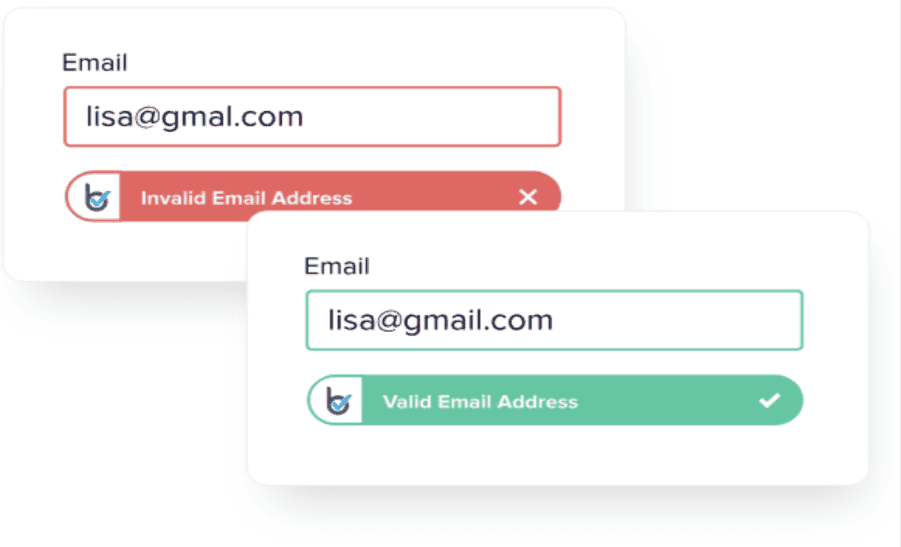
BriteVerify is now sold as Contact Data Quality powered by BriteVerify, a capability of Validity Engage. In Salesforce, the verification results show through DemandTools, which writes the status and date onto leads and contacts. That gives you a field to report on, filter campaigns by, and use in flows, for example routing a lead with a risky email to a rep for review instead of straight into a nurture program.
Where to verify
- At entry: web-to-lead forms, Experience Cloud sign-ups and integrations, so a bad address is caught before it creates a record.
- Before big sends: verify a list before a large campaign, and suppress invalid and risky addresses.
- On a schedule: re-verify older contacts periodically, because people change jobs and mailboxes close.
What Can Salesforce's Native Duplicate Management Do on Its Own?
More than many orgs use, within firm limits. Duplicate management pairs matching rules, which define what counts as a duplicate, with duplicate rules, which block or warn when one appears. Standard rules for accounts, contacts and leads are active by default, and validation rules enforce field standards.
| Native feature | What it does | Documented limit |
|---|---|---|
| Matching rules | Exact or fuzzy comparison of chosen fields | 5 active per object, 25 active per org, 100 in total; fuzzy and exact can't be mixed in one rule; fuzzy supports Latin characters only (source) |
| Duplicate rules | Block or warn on create and edit, with different behaviour by profile | Up to 3 matching rules per duplicate rule (Trailhead) |
| Duplicate jobs | Scan existing accounts, contacts or leads and list duplicate record sets | Performance and Unlimited editions only; no new jobs once completed jobs hold 1,000,000 duplicates; custom-object duplicates can be found but not merged (source) |
| Merge | Combine records and reparent related records | Up to 3 records at a time, in Lightning and in Apex (source) |
| Validation rules | Stop a save when data breaks a standard you define | Apply to API saves too, but not to Quick Create (source) |
| Data Import Wizard | In-browser import with basic duplicate prevention | Up to 50,000 records (source); matches on account name and site, or contact or lead email (Data Loader guide) |
| Data Loader | Desktop import and export for large volumes | Recommended for 5,000 to 5 million records; CSV files of up to 150 million records (source) |
Two more native details are worth knowing. The matching service returns at most 200 candidates, or 100 with Shield Platform Encryption, and duplicate jobs aren't supported with Shield. Salesforce also offers Data Quality Analysis Dashboards from Salesforce Labs, installed from AgentExchange, which give a reasonable first view of field completeness before you buy anything.
Do You Need DemandTools If Salesforce Has Duplicate Rules?
Not always. Native rules are the right first layer for preventing new duplicates in accounts, contacts and leads. DemandTools earns its licence when you must clean a large backlog, merge more than three records at once, dedupe custom objects, standardize data in bulk, or prove every change with undo and audit history. Answer these questions in order.
Native is enough when your org is young or recently cleaned, duplicates are occasional, they sit on standard objects, and an admin can review and merge them in small batches.
Add a tool when you are consolidating orgs or migrating, the backlog runs to thousands of records, custom objects hold duplicates, or international names need matching beyond Latin-only fuzzy rules.
DemandTools is not the only option on AppExchange. We also implement Duplicate Check for Salesforce. When you compare tools, look at matching options, custom-object support, undo and audit history, Shield support, and whether the tool runs inside the org or connects through the API.
How Do You Clean Salesforce Data and Keep It Clean?
Assess first, agree the rules, clean in dependency order, then prevent and monitor. Clean accounts before contacts, so contacts reparent onto the surviving account, and turn on prevention before announcing the cleanup is done. Skipping the prevention step is the main reason orgs need the same cleanup again a year later.
- 1
Measure the baseline. Run the Data Quality Analysis Dashboards or a DemandTools assessment to find duplicate rates, blank required fields and stale records by object and by source.
- 2
Write the standards. Define what a complete account, contact and lead looks like, the picklist values allowed, and the naming conventions. Enforce the critical ones with validation rules and required fields.
- 3
Agree survivorship rules. Decide which record wins a merge (oldest, most active, owned by the key-account team) and which field values survive. Get sales and marketing to sign off before any merge runs.
- 4
Clean in order. Dedupe accounts, then contacts and leads, then custom objects. Run each scenario on a sandbox or a small batch first, and keep the restore files.
- 5
Verify contact data. Verify emails on active leads and contacts, store the status on the record, and suppress invalid addresses from campaigns.
- 6
Block it at the door. Activate duplicate rules (or DupeBlocker), verify emails at entry, and route every import through a tool that matches against existing records. Use the Data Import Wizard for small imports and Data Loader or a matching-aware loader for large ones.
- 7
Name an owner and a schedule. Schedule recurring dedupe and verification jobs, review the dashboard monthly, and make one person accountable for data quality.
Data quality also depends on integrations. If marketing automation, an ERP or a web form writes to Salesforce, decide which system owns each field and how the integration matches records, or the integration will undo the cleanup. Our guide to loading data into Salesforce covers the import tools in more depth.
Where Do Everest, Sender Certification and MailCharts Fit?
They improve email marketing results, not the data inside Salesforce. Clean contact data is the input; these tools work on what happens after you press send: inbox placement, sender reputation and campaign benchmarking. They matter most to teams that send high volumes from Marketing Cloud, Account Engagement or another email platform.
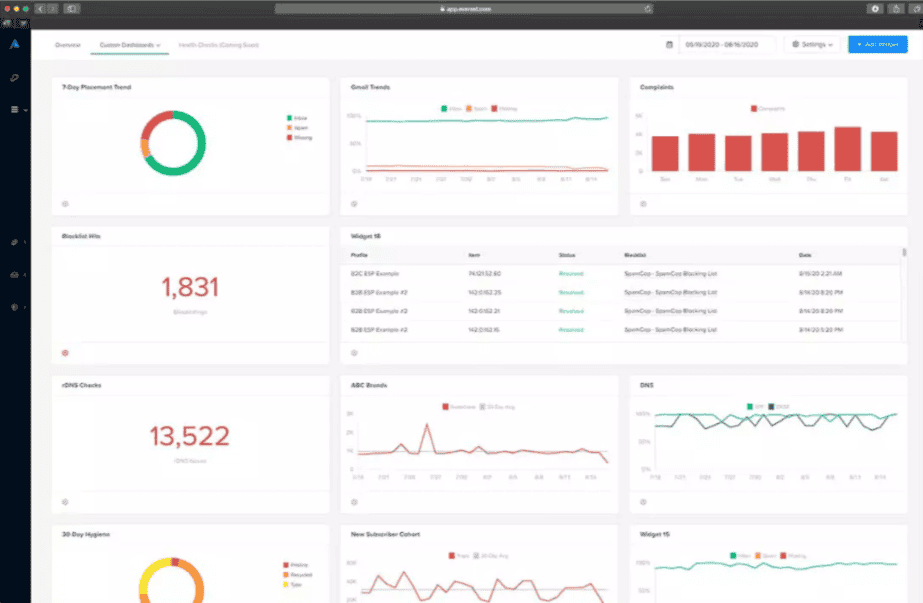
- Inbox Placement and Deliverability (formerly Everest) shows where emails land by mailbox provider and why.
- Sender Certification is an email allowlist that Validity says is backed by relationships with more than 75 mailbox and security providers. It is sold as an Engage upgrade.
- MailCharts gives competitive intelligence for email and SMS campaigns.
If your bounce rate is high, fix the contact data first. Deliverability tools can't rescue a list full of invalid addresses.
How Does Twopir Consulting Help With Salesforce Data Quality?
We start with an audit and finish with prevention, so the tool is chosen to fit the problem. Our fixed-scope Salesforce audit uses read-only access and includes a field-level data quality review covering completeness, validity, duplicates and orphan records, with findings ranked by severity and a prioritized fix sequence.
- Audit. CRM and AI audits find where bad data costs you, including data readiness for Agentforce and Einstein.
- Design. We write the matching, survivorship and validation rules with your sales and marketing leads, and decide what native features can do before recommending a licence.
- Implement. We configure native duplicate management or an AppExchange tool such as Duplicate Check, run the cleanup in stages, and train your admins.
- Integrate. Our integration services make sure connected systems match records correctly instead of creating new duplicates.
- Sustain. Clean data and adoption go together, so we build the monitoring and ownership that keep reps trusting the CRM. See our approach to CRM adoption after implementation.
The Bottom Line
Validity's contribution to Salesforce data quality in 2026 comes down to DemandTools for cleaning and governing records and Contact Data Quality for verifying them. Salesforce's native features handle prevention on standard objects well. The best results come from using both, in the right order, with clear rules and an owner.
- 1
Use native matching, duplicate and validation rules as the first layer.
- 2
Add DemandTools for large backlogs, custom objects, bulk standardization and auditable merges.
- 3
Verify emails at entry and before big sends, and store the status on the record.
- 4
Drop GridBuddy Connect, Everest Elements and Sender Domain Monitoring from your plans.
- 5
Schedule the cleanup, name an owner, and measure it monthly.
Find Out What Bad Data Is Costing Your Org
On a 30-minute discovery call, a Twopir Salesforce consultant will review how duplicates and incomplete records enter your org today, and recommend whether native rules, DemandTools or another tool fits your data and your edition.
Schedule a Discovery CallFrequently Asked Questions
DemandTools is Validity's data quality platform for Salesforce. It deduplicates standard and custom objects, loads and mass-updates records, assesses data quality, verifies email addresses and tracks every change with undo and restore. It connects to Salesforce through the Platform API and is listed on AppExchange.
Validity doesn't publish a price. The AppExchange listing marks DemandTools as a paid solution, offers discounts for nonprofits, and asks buyers to contact Validity for pricing. Treat prices quoted on third-party sites as out of date until Validity confirms them.
Not for basic prevention. Native matching and duplicate rules block or warn on new duplicates in accounts, contacts and leads. A tool like DemandTools helps when you have a large backlog, need to merge more than three records at once, work with custom objects, or need undo and audit history.
Three. Salesforce merges up to three accounts, contacts or leads at a time, in Lightning and in Apex. Duplicate jobs, which scan existing records, are available only in Performance and Unlimited editions, and they can find duplicates on custom objects but can't merge them.
BriteVerify is now Contact Data Quality powered by BriteVerify, part of the Validity Engage platform launched in February 2026. GridBuddy Connect no longer has a product or pricing page on Validity's site, so treat it as a legacy product and don't plan new work on it.
Only their format. Validation rules can reject an address that breaks a pattern you define, but Salesforce doesn't check whether the domain accepts mail or the mailbox exists. A verification service such as BriteVerify checks syntax, domain, MX records and mailbox existence.
With a baseline and agreed rules. Measure duplicates and blank fields by object, agree which record wins a merge, then dedupe accounts before contacts and leads, so related records move to the surviving account. Turn on prevention before you call the cleanup finished.
