
What Is Salesforce Financial Services Cloud? Features, Data Model, Editions and Implementation
Financial Services Cloud turns Salesforce into a CRM that understands households, financial accounts, policies, loans and goals. Here is what it includes in 2026, how its data model works, what the Core, Advanced and Max editions cost, which features are add-ons, and how to implement it without painting yourself into a corner.
Key Takeaways
- Salesforce Financial Services Cloud (now also called Agentforce Financial Services) adds financial data models, processes and AI agents to Sales Cloud and Service Cloud for banks, wealth and asset managers, insurers and lenders.
- New implementations should use the standard objects (such as
FinancialAccount), not the olderFinServ__managed package, which Salesforce documents as one API version behind core. - Households are business accounts linked to individual clients, who are modelled as Person Accounts. Person Accounts cannot be switched off once enabled, so test in a sandbox first.
- Official list prices start at US$325 per user per month (Core, Enterprise Edition, billed annually). Digital Insurance and Digital Origination are large add-ons included only in Max.
- Most of the value comes from integration with core banking, custodial and policy systems, and from a clean sharing model built on Compliant Data Sharing.
What is Salesforce Financial Services Cloud? It is Salesforce's industry product for financial institutions: a set of features, components and data models built on Sales Cloud and Service Cloud. It adds objects for households, financial accounts, holdings, goals, insurance policies, claims and loan applications, plus financial processes and AI agent templates, so advisors, bankers and service teams work from one client view instead of several systems.
We first published this overview in 2024. This version is rebuilt from Salesforce's current product pages, pricing page, Help, Trailhead and the Financial Services Cloud Developer Guide, checked in October 2026. It corrects retired product names, separates included features from paid add-ons, and adds the data model, editions, integration options and an implementation plan. It is written for operations, technology and client-service leaders at growing and mid-market companies in banking, wealth and asset management, insurance and lending, as well as larger institutions weighing the platform.
What Is Salesforce Financial Services Cloud, and Who Is It For?
Financial Services Cloud is Salesforce's CRM for financial institutions, now also branded Agentforce Financial Services. It extends Sales Cloud and Service Cloud with financial data models, sector processes and pre-built AI agents. Salesforce designs it for retail and commercial banks, wealth and asset managers, insurers and brokerages, and lenders, so each can see clients, accounts and relationships in one place.
The naming is worth clearing up first, because buyers meet three similar terms:
| Name | What it means | Where you see it |
|---|---|---|
| Financial Services Cloud | The product and its editions | Salesforce's product and pricing pages |
| Agentforce Financial Services | The same product under its newer name | Salesforce Help and Trailhead, which note that "Financial Services Cloud" still appears in the app and docs |
| Agentforce for Financial Services | The pre-built AI agent templates for the industry | Salesforce's financial services AI page |
Trailhead describes the architecture in layers: integrated data from Data 360, MuleSoft and APIs at the bottom, then sector data models, sector business processes, tools such as Action Plans and Financial Goals, and finally Agentforce templates and actions on top (Meet Financial Services Cloud). Salesforce lists retail banking, commercial banking, wealth management, insurance and lending as the sectors it serves (Explore Financial Services Cloud sectors).
How Is Financial Services Cloud Different from Sales Cloud?
Sales Cloud tracks leads, accounts and opportunities; Financial Services Cloud adds what a financial firm actually manages: households, financial accounts and their owners, holdings, goals, policies, claims, applications and regulated sharing. You could build these as custom objects in Sales Cloud, but FSC supplies them as maintained standard objects that its components, rollups and AI agents already understand.
Choose FSC when you serve individuals and families as households, hold client financial accounts or policies that come from a core, custodial or policy system, need advisors to see balances, goals and life events, or must restrict who sees which client records for compliance, such as ethical walls between teams.
Sales Cloud may be enough when you sell a financial product to businesses through a simple pipeline, keep no client account or policy data in the CRM, and have no household or regulated-sharing needs. A fintech selling software to banks is usually a Sales Cloud company, not an FSC one.
The price gap is real: FSC editions start at US$325 per user per month against much lower Sales Cloud list prices, so the decision should rest on the data model you need, not on the industry label. Section 08 sets out the editions.
How Does the Financial Services Cloud Data Model Work?
Individual clients are Person Accounts, a household is a business account that groups related people, and each client's money sits in Financial Account records linked to them through Financial Account Party roles such as owner or beneficiary. Holdings, transactions, balances, goals and life events hang off those records, and rollups total them up to the client and the household.
Standard objects or the managed package?
FSC exists in two technical forms, and this is the first design decision on any project. The original form is a managed package whose objects and fields carry the FinServ__ namespace. The newer form is standard objects built into the core platform. Salesforce's Developer Guide states that the package's objects, classes and triggers are one API version behind core, while the standard objects match core. Trailhead recommends that new users "use standard features and objects" (Financial Services Cloud data model).
| What it stores | Standard object | Managed package object |
|---|---|---|
| Bank, investment, card or loan account | FinancialAccount (API 61.0+) | FinServ__FinancialAccount__c |
| A person's role on an account | FinancialAccountParty (API 61.0+) | FinServ__FinancialAccountRole__c |
| Financial goal | FinancialGoal (API 59.0+) | FinServ__FinancialGoal__c |
| Holdings | SecuritiesHolding | FinServ__FinancialHolding__c |
| Life events | PersonLifeEvent | FinServ__LifeEvent__c |
The pairs above are the corresponding objects in each model, taken from the Developer Guide's two object lists; they are not an official migration map. The standard Financial Account objects appear only after an admin turns on the Financial Account Management Standard Objects setting. Salesforce still documents the package's settings and has not published a retirement date we could find, so an existing package org is supported, but moving it to standard objects should be planned as a project, not left to drift.
Households and Person Accounts
Trailhead explains that a household "is a type of business account that collects related individuals", linked through the Party Relationship Group object, while each individual is a Person Account that combines account and contact fields. Group membership also tracks family and professional connections such as lawyers and accountants. One warning from Salesforce Help: once Person Accounts are enabled, they cannot be disabled, so preview them in a sandbox, especially in an org that already has integrations, reports and code built on contacts.
What Are the Key Features of Financial Services Cloud?
The everyday features fall into three groups: seeing relationships (Actionable Relationship Center, households, rollups), running consistent client work (Action Plans, Interaction Summaries, Financial Goals and Plans), and spotting the next conversation (Interest Tags, Life Events, alerts). These come with every edition; the larger sector capabilities in Section 05 vary by edition and add-on.
Actionable Relationship Center
An interactive relationship graph on the client record. The customizable version, built with ARC Relationship Graph Builder, lets admins choose which records appear as cards and set different graphs by profile.
Action Plans
Templates of tasks with owners, priorities and days to complete, for repeatable work such as onboarding, annual reviews or financial plan meetings. They also work on custom objects that have activities enabled.
Interaction Summaries
Structured meeting notes with attendees, a confidentiality level and links to several records at once. Unlike activities, they carry their own sharing, so sensitive notes stay restricted.
Financial Goals and Plans
Goals such as retirement or education, linked to financial accounts, with tracking of how likely the client is to reach them. Plans group goals for review meetings.
Interest Tags
Tags for client interests and opportunities, grouped into categories and usable in reports and dashboards, so advisors and marketers can find "clients interested in ESG" without free-text searches.
Life Events and Alerts
Life Events and Business Milestones record moments such as marriage or retirement, and record alerts flag changes in client financial data, such as a low balance, so the next conversation is timely.
Feature descriptions come from Salesforce's Trailhead modules on the customizable Actionable Relationship Center, Interaction Summaries, Interest Tags and client relationships, and from Help on Action Plans. Rollups use the standard Record Rollup Definitions objects.
What Does FSC Offer Banks, Insurers and Lenders?
Each sector gets its own data model and processes on the same platform: branch and servicing tools for banks, planning and meeting tools for advisors, policy and claims objects for insurers, and application objects for lenders. Firms that span sectors, such as a bank with a wealth arm, keep one client record across all of them.
Retail and commercial banking
BankingBest for: branch networks, contact centres and relationship managers.
Retail banks get a 360-degree view of financial accounts, households and branches, a Branch Manager dashboard and branch objects (Branch Unit and Banker) that automatically associate records with branches. Service Process Studio ships prebuilt processes such as fee reversal, address change, transaction disputes and complaints. Commercial banks add a Commercial Banking Console, Financial Deal Management, Business Relationship Plans and onboarding and KYC data models. Our guide to Financial Services Cloud for retail banking goes deeper.
Wealth and asset management
WealthBest for: advisory teams, RIAs and asset managers serving investors and intermediaries.
Advisors get financial planning, interaction notes and contextual alerts, for example when a client is unlikely to reach a goal, plus Agentforce templates that Salesforce describes for meeting preparation and follow-up. Holdings and balances are stored in FSC but fed from custodial or portfolio systems through integration; FSC is not a portfolio performance engine. See our advisor workflow setup guide and our overview of FSC for wealth management.
Insurance carriers and brokerages
InsuranceBest for: carriers, agencies and brokerages with policy, quote and claims data.
The insurance data model makes the Insurance Policy the root object, with coverages, participants, quotes, producers and commissions around it. Claims are modelled with Claim, Claim Item, Claim Participant and Claim Coverage, which links back to the policy coverage holding limits and deductibles. Full policy administration and claims processing (intake, adjudication, reserves and payment) belong to the separately priced Digital Insurance add-on. Our guide to Financial Services Cloud for insurance covers carriers and brokers in detail.
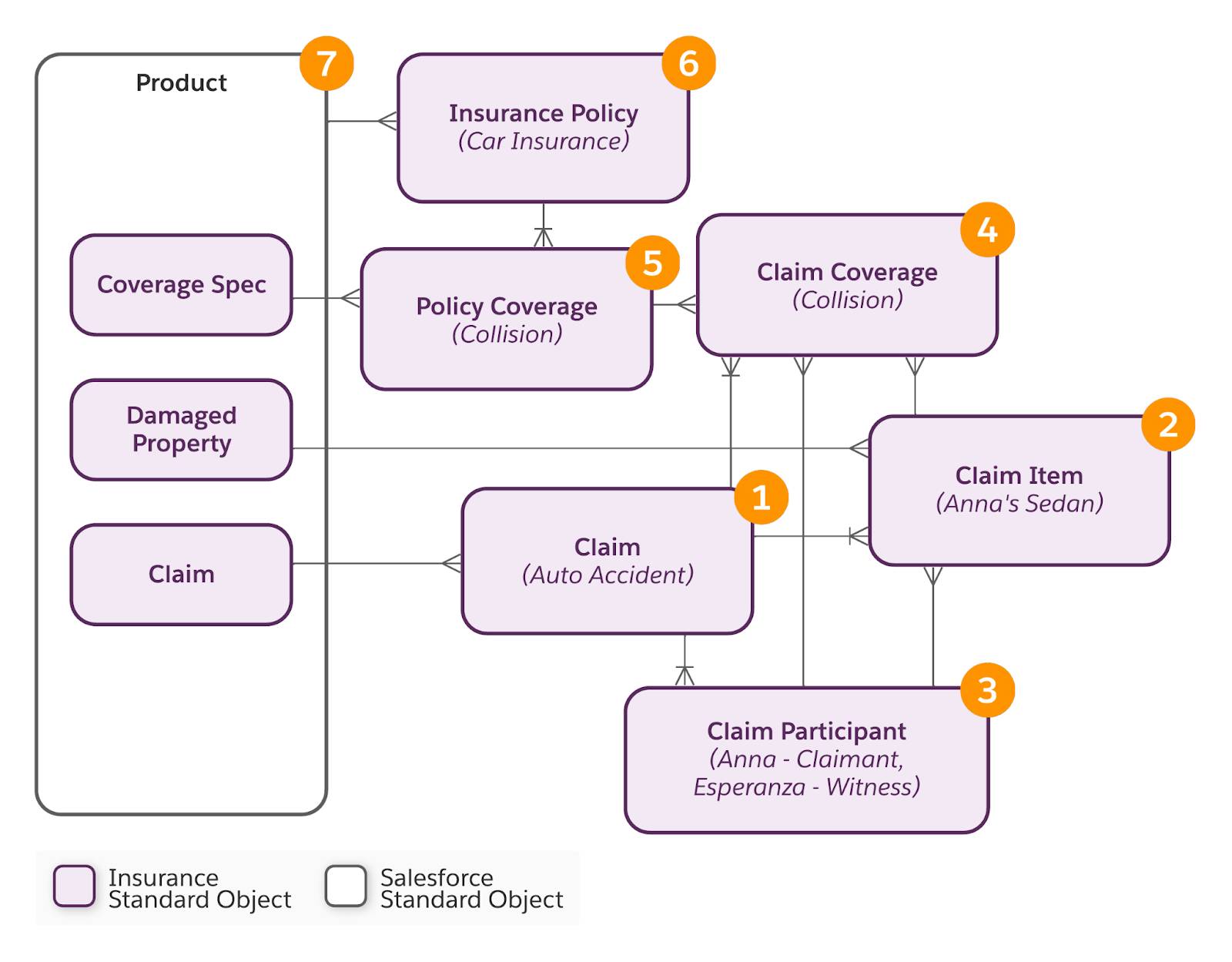
Lending and collections
LendingBest for: mortgage, auto and personal lenders, and recovery teams.
Lending uses the Application Form and Applicant objects, Omnistudio components and Experience Cloud templates. Digital Origination, a separately priced add-on, combines point-of-sale and loan origination with a loan calculator and product catalogue. Collections and Financial Recovery adds collection plans, actionable segmentation, promise-to-pay and secure payment links; Salesforce's pricing page lists it as included in Advanced and Max editions.
Sector details are drawn from Trailhead's units on specialized banking services, extending Financial Services Cloud and the Insurance Data Model.
How Do Agentforce and Data 360 Work with Financial Services Cloud?
Agentforce for Financial Services supplies pre-built AI agent templates for banking service, advisors, relationship managers, complaints, compliance, insurance service and claims, which teams customise in Agentforce Builder. Data 360, formerly Data Cloud, unifies interaction, behavioural and transactional data so those agents and advisors work from a complete client view.
| Agent template | What Salesforce describes it doing |
|---|---|
| Banking Service Assistance | Balance inquiries, transaction reviews, lost card reports, fee reversals, stop check payments and travel notifications |
| Financial Advisor and Relationship Assistance | Meeting preparation, client summaries and follow-up for advisors and relationship managers |
| Complaint and Compliance Management | Handling complaints and supporting compliance processes |
| Insurance Service and Claims Assistance | Policy service, and first notice of loss by voice, available 24/7 |
Source: Salesforce's Agentforce for Financial Services page, which notes that pre-built capabilities may not reflect actual product details and that purchases should be based on what is available now. Salesforce's Winter '27 release, generally available on October 12, 2026, added a voice-enabled claims agent template that captures incident details, validates policy data and creates claim and case records (Winter '27 announcement).
Two practical points. First, agents are only as good as the data under them: if balances, holdings and policies are not integrated into FSC, an agent cannot answer questions about them. Second, the full Agentforce for Industries suite and Data Cloud with FSC Intelligence are included in the Max editions; on Core and Advanced, plan AI usage against the Flex Credits each edition includes. Our post on how Agentforce works explains agents, reasoning and actions in general.
How Does Financial Services Cloud Handle Security and Compliance?
FSC's own compliance tool is Compliant Data Sharing, which grants record access by role and participant group beyond org-wide defaults and lets compliance teams audit who can see a record and why. Encryption at rest, event monitoring and field history beyond the standard limits come from Salesforce Shield, and regulatory control tracking comes from the separately priced Process Compliance Navigator.
For AI, Salesforce states that its Agentforce Trust Layer gives zero data retention by external models, masks personal data and keeps an audit trail of agent actions. Treat these as the vendor's controls; your own policies on model use, review and record-keeping still apply.
How Much Does Salesforce Financial Services Cloud Cost?
Salesforce lists Financial Services Cloud at US$325 per user per month for Core, US$500 for Advanced and US$700 for Max, in both Sales and Service versions, billed annually on Enterprise Edition. A combined Sales & Service Core starts at US$350. Digital Insurance and Digital Origination are large org-level add-ons included only in Max.
| Edition | List price | What it adds |
|---|---|---|
| Core (Sales or Service) | US$325 / user / month | Industry data models on Sales or Service Cloud, Financial Goals and Plans, Service Process Studio (Service), and Flex Credits for AI, Agentforce, Slack and data |
| Advanced | US$500 / user / month | Full sandbox, Backup & Recovery, Archive, Data Detect, Security Center, Insurance Brokerages and Collections & Financial Recovery |
| Max | US$700 / user / month | The full Agentforce for Industries suite, Data Cloud with FSC Intelligence, and the Digital Insurance and Digital Origination add-ons |
| Digital Origination | US$175,000 / org / year | Add-on to Core and Advanced |
| Digital Insurance | US$180,000 (billing basis not stated) | Add-on to Core and Advanced; policy administration, group benefits and claims are usage-based SKUs on top |
| Process Compliance Navigator | From US$20 (base user) or US$125 (admin) / user / month | Regulation and control management |
Source: Salesforce's Financial Services Cloud pricing page, seen October 27, 2026. Salesforce notes that prices are for Enterprise Edition, that FSC is also sold in Unlimited Edition and Agentforce 1, and that the page is informational and subject to change. Salesforce also offers a free 30-day trial. Many articles still quote older prices; check the official page before you budget, and remember that integration, data migration and change management usually decide total cost more than the licence line.
How Does FSC Integrate with Core Banking Systems?
FSC is a system of engagement, not a system of record: balances, transactions, holdings and policies stay in core banking, custodial, policy administration and loan systems, and are brought into FSC objects through integration. Salesforce's toolset for this is MuleSoft and its Financial Services accelerators, the Data Consumption Framework, a BIAN-aligned Financial Services Integrations API, Omnistudio Integration Procedures and Data 360.
Trailhead explains that integrations can populate Financial Account and Financial Account Transaction records with real-time core banking data, and that the Financial Services Integrations API is included while MuleSoft Direct is an add-on (Manage data import and connections). The MuleSoft Accelerator for Financial Services includes a core banking foundation with named connectors for Jack Henry SilverLake and Thought Machine Vault Core, plus onboarding and payments use cases. Where no built-in connector exists, Salesforce's pricing FAQ points to MuleSoft, integration partners or AgentExchange apps.
Integration is where most FSC projects succeed or stall. Decide early which system owns each field, how often data must refresh (overnight batch is fine for many wealth firms; servicing agents need near real time), and how failures are reported. Our integration services cover MuleSoft, Workato and Celigo builds for exactly this layer.
How Do You Implement Financial Services Cloud Successfully?
Design the data model and sharing first, prove integrations in a sandbox, migrate clean data, then roll out by team with Action Plans and reports that match how advisors and bankers already work. The irreversible decisions, Person Accounts, standard objects versus the package, and org-wide defaults, belong at the start, not after go-live.
Salesforce Help collects the planning topics, including the standard-object setting, the move from the individual model to Person Accounts, permission set licences and the guided Financial Services Initial Setup in Salesforce Go, in Plan and Prepare for Your Agentforce Financial Services Implementation.
Common mistakes we see
That last point comes from our own work. In a published Financial Services Cloud and Pardot audit for a financial services client, we migrated every Process Builder automation to Flow and tested each path, traced silent SMS reminder failures to one missing field mapping (zero failures after the fix), merged two overlapping reminder journeys into one, and set up a single Connected Campaign model so that all form submissions pass UTM values to Salesforce.
The Bottom Line
Salesforce Financial Services Cloud is worth its premium when you manage households, financial accounts, policies or loans and need regulated sharing; it is an expensive Sales Cloud when you do not. Twopir Consulting is the Salesforce Partner that implements, integrates and optimizes Salesforce Financial Services Cloud: strategy, configuration, data migration and integration, training and ongoing optimization. We implement, rescue, optimize, and integrate complex CRM and revenue systems.
- 1
Use the standard FSC objects for a new org, and plan any move off the managed package deliberately.
- 2
Test Person Accounts and org-wide defaults in a sandbox before you commit.
- 3
Choose the edition by the add-ons and controls you need, from the official pricing page.
- 4
Integrate the systems of record first; agents and rollups depend on that data.
- 5
Roll out by team with Action Plans and adoption reports, then add AI.
Plan Your Financial Services Cloud Rollout
Tell us which teams, systems and sectors are in scope. We will map the edition, data model, sharing design and integrations your firm needs, and flag the decisions that are hard to undo.
Schedule a Discovery CallFrequently Asked Questions
Banks, wealth and asset managers, insurers and lenders use it to manage clients, households and their financial accounts, policies, loans and goals in one CRM. It adds financial data models, processes such as Action Plans and service workflows, compliant record sharing and AI agent templates to Sales Cloud and Service Cloud.
Yes. Salesforce Help and Trailhead now call the product Agentforce Financial Services and note that the Financial Services Cloud name still appears in the app and documentation. Salesforce's pricing page still sells Financial Services Cloud editions. Agentforce for Financial Services is different: it is the set of pre-built AI agent templates.
Salesforce lists US$325 per user per month for Core, US$500 for Advanced and US$700 for Max, for both Sales and Service, billed annually on Enterprise Edition. Sales and Service Core together start at US$350. Digital Origination costs US$175,000 per org per year and Digital Insurance is listed at US$180,000, both included in Max.
Financial Services Cloud is built on Sales Cloud and Service Cloud and adds financial objects such as households, Financial Accounts, holdings, goals, insurance policies and loan applications, plus Compliant Data Sharing, sector processes and agent templates. Sales Cloud alone suits firms that sell through a simple pipeline and keep no client financial data in the CRM.
For a new implementation, use standard objects. Salesforce recommends them to new users, and its Developer Guide says the managed package runs one API version behind core while standard objects match it. Existing package orgs remain documented, but should plan a move as a separate project with data mapping and testing.
Person Accounts are Salesforce's model for individual clients in FSC, and households are business accounts that group them. FSC enables them in trial orgs and new installations. Salesforce Help warns that Person Accounts cannot be disabled once enabled, so existing orgs should preview the change in a sandbox first.
Yes, through integration. Salesforce offers MuleSoft with a Financial Services accelerator that includes Jack Henry SilverLake and Thought Machine Vault Core connectors, the Data Consumption Framework, a BIAN-aligned Financial Services Integrations API and Data 360. Core systems stay the system of record and populate Financial Account and transaction records.
Not in full. FSC Advanced editions include Data Detect and Security Center. Platform Encryption, Event Monitoring and Field Audit Trail are part of Salesforce Shield, bought separately. FSC's own Compliant Data Sharing controls record access by role and group, and works only with Private or Public Read-Only org-wide defaults.
