
Introduction
In a world where customer engagement often hinges on flawless event execution, integrating your event management platform with your CRM isn’t a nice-to-have — it’s a growth multiplier. For enterprises running high-value meetings, conferences, or investor summits, Meetmax is already a trusted platform for scheduling, attendee management, and reporting. But without a direct bridge to Salesforce, valuable attendee insights can sit in silos, limiting your sales team’s ability to follow up and nurture leads effectively.
Last year, 63% of Salesforce admins in event-heavy industries reported delays in post-event follow-ups due to manual data imports. The result? Lost opportunities, cold leads, and inefficiency. Integrating Meetmax with Salesforce fixes this — delivering real-time data sync, automated workflows, and a unified attendee profile inside Salesforce.
In this guide, we’ll dive deep into:
- What Meetmax-Salesforce integration is and how it works
- The underlying architecture and data flow
- Real-world use cases and results
- Technical best practices, code snippets, and a checklist
- Actionable tips to maximize ROI
By the end, you’ll know exactly how to design, implement, and scale your integration — the Twopir way.
What is Meetmax-Salesforce Integration?
Meetmax is a specialized platform for B2B meeting scheduling, attendee registration, and event reporting. Its power lies in centralizing event logistics, but its real value emerges when paired with Salesforce’s CRM capabilities.
Core Components of the Integration
- Meetmax API Layer
- Role: The Meetmax API acts as the data bridge between the event platform and Salesforce.
- Functionality: Fetches attendee, meeting, and registration data in JSON/XML format.
- Integration in Salesforce: Can be consumed using Apex HTTP callouts or middleware tools like MuleSoft/Zapier.
- Role: The Meetmax API acts as the data bridge between the event platform and Salesforce.
- Salesforce Data Processing Layer
- Role: Receives, processes, and maps incoming Meetmax data to Salesforce objects.
- Tools: Apex classes, Flows, and Custom Metadata for mapping rules.
- Example: Meetmax “Attendee” maps to Salesforce “Lead” or “Contact.”
- Role: Receives, processes, and maps incoming Meetmax data to Salesforce objects.
- Automation & Action Layer
- Role: Triggers workflows, sends e
mails, updates campaign membership, or creates tasks for Sales reps. - Tools: Salesforce Flow, Process Builder (for legacy orgs), or Apex Triggers.
- Role: Triggers workflows, sends e
Key Terminology
- REST API Endpoint – A specific URL on Meetmax that provides event data.
- Governor Limits – Salesforce’s execution constraints (important when processing bulk event data).
- Custom Metadata Mapping – Salesforce feature to store field mapping logic without hardcoding.
- Upsert Operation – Combines insert and update in one action, ensuring no duplicate records.
Architecture
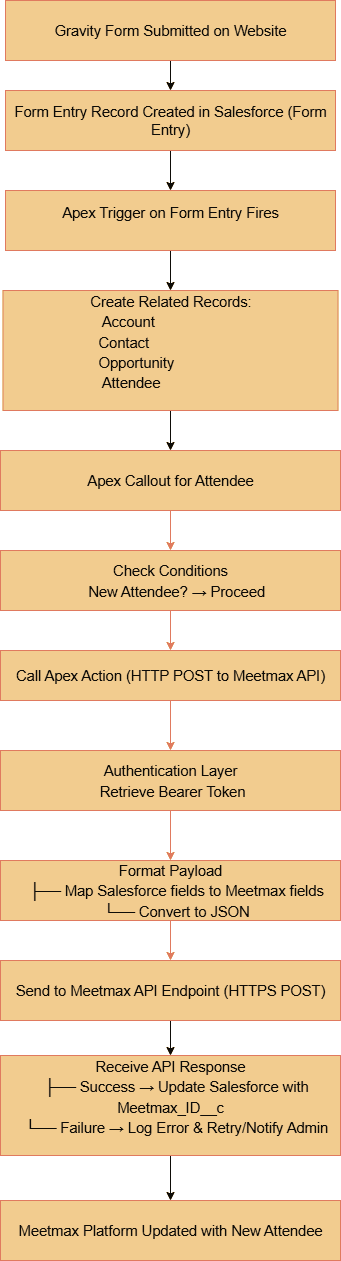
Step-by-Step Data Flow Explanation:
- Gravity Form submission — A visitor submits the Gravity Form on your website; the form sends the payload to Salesforce (via zapier).
- Create Form Entry (staging) — Salesforce receives the payload and creates a Form Entry record that stores raw form fields for validation and auditing.
- Apex trigger fires — An after insert Apex trigger on Form Entry calls a handler to process the submission (bulkified to handle multiple entries).
- Create related records — The handler upserts/creates Account and Contact (matching by company/email), optionally creates an Opportunity, and creates an Attendee__c record..
- Pre-callout checks — Before attempting the external API call, the handler verifies conditions (e.g., IsNewAttendee?, valid Event_ID__c, required fields present). If checks fail, the record is marked and the flow stops or queues for manual review.
- Authentication & credentials — Salesforce uses stored credentials. to authenticate to Meetmax (Basic Auth or OAuth token flow, depending on Meetmax).
- Map & format payload — The handler maps Salesforce fields to Meetmax field names, builds a JSON payload, and JSON-serializes it (handling enums, dates, and nulls according to the API spec).
- HTTPS POST callout — The code performs an HTTPS POST to the Meetmax Attendee API endpoint (performed from a Queueable/@future or a properly bulkified batch to observe governor limits and allow callouts)
- Response handling-
- Success (200/201): parse the response, save Meetmax_ID__c and update Attendee__c status to Synced.
- Failure: record the error in an Integration_Log__c (or a custom error field), set retry metadata, and send an admin notification or create a task for manual intervention
- Success (200/201): parse the response, save Meetmax_ID__c and update Attendee__c status to Synced.
- Meetmax updated & confirmation — The attendee appears in Meetmax.Update the Salesforce attendee field.
Why Use Meetmax-Salesforce Integration?
- Gap 1: Manual CSV Imports Cause Delays
- Scenario: A financial services firm hosted 300+ investor meetings. Post-event follow-ups took 5 days due to manual CSV imports.
Integration Fix: API-driven sync reduced follow-up time to under 2 hours, allowing reps to act while interest was high. - Gap 2: Siloed Attendee Profiles
- Scenario: A Healthcare client had separate systems for event data and patient outreach.
Integration Fix: Unified profiles in Salesforce improved targeting for post-event educational webinars, increasing engagement rates by 40%.
Key Benefits
| Benefit | Technical Insight | Business Impact |
| Real-Time Data Sync | Whenever attendee create callout happen | Follow-ups happen the same day |
| Automated Lead Creation | Upsert logic prevents duplicates | Salespeople spend time on selling, not data cleanup |
| Campaign Automation | Flow auto-adds attendees to campaigns | Accurate marketing ROI tracking |
| Scalable Bulk Processing | Batch Apex handles 50k+ records | Supports enterprise-scale events |
| Customizable Mapping | Custom Metadata drives field mapping | Adjust without code changes |
| Compliance-Ready | API calls over HTTPS, audit logs | Meets GDPR & HIPAA needs |
Practical Must-Use Features
1. Meetmax Attendee API + Salesforce Upsert
Use Case: Automatically create and update contacts and campaign members.
Pitfall: Missing unique identifiers can cause duplicates.
Best Practice: Always use Meetmax Attendee ID as an external ID in Salesforce.
HttpRequest req = new HttpRequest(); req.setEndpoint(‘https://api.meetmax.com/v1/attendees’); req.setHeader(‘Authorization’, ‘Bearer ‘ + authToken); req.setMethod(‘GET’); Http http = new Http(); HttpResponse res = http.send(req); if(res.getStatusCode() == 200){ List<Attendee__c> attendees = parseJSON(res.getBody()); upsert attendees Attendee_ID__c; } |
2. Bulk API 2.0 for Large Events
Use Case: Import 10k+ attendees from multi-day conferences.
Pitfall: Governor limits on synchronous processing.
Best Practice: Stage data in a custom object, then use Bulk API 2.0 for inserts.
3. Automated Campaign Member Management
Use Case: Auto-add new attendees to relevant Salesforce campaigns.
Flow Example: Record-Triggered Flow on Attendee__c → Add to Campaign.
Twopir-Proven Checklist
- Test API calls in Salesforce Sandbox with sample data.
- Configure Custom Metadata for field mapping.
- Schedule Apex batch jobs off-peak to avoid API throttling.
- Enable debug logs during initial sync for troubleshooting.
- Build error handling logic (e.g., retry failed records).
Real-World Use Cases
Case Study 1: Financial Services – Investor Summit
- Industry Context: Annual investor summit with 1,000+ attendees.
- Challenge: Delayed investor follow-up.
- Solution: Scheduled Apex integration fetching attendee profiles every 15 minutes. Automated follow-up tasks created for relationship managers.
- Result: Follow-up completion time dropped from 5 days to 6 hours. ROI improved by 18%.
Case Study 2: Healthcare – CME Event Tracking
- Industry Context: Continuing medical education (CME) events.
- Challenge: HIPAA-compliant integration of attendee data into Salesforce Health Cloud.
- Solution: HTTPS API callouts with encrypted payload, mapped to Health Cloud Person Accounts. Automation triggered patient education journeys.
- Result: 40% increase in post-event engagement rates.
Conclusion
Integrating Meetmax with Salesforce transforms event data from an isolated asset into an actionable growth driver. From real-time attendee sync to automated campaign management, the integration delivers measurable business impact — faster follow-ups, richer profiles, and more accurate marketing attribution.
If you’re ready to unlock this potential:
- Step 1: Test the Meetmax API in your Salesforce Sandbox.
- Step 2: Map fields using Custom Metadata for flexibility.
- Step 3: Deploy automation to convert attendees into loyal customers.
The Twopir approach ensures scalability, compliance, and measurable ROI — positioning your events not just as brand moments, but as revenue catalysts. The future of event-driven CRM is seamless, and with the right integration, you’ll always be one step ahead.
