
Introduction:

In today’s digital commerce landscape, agility depends on how seamlessly systems communicate. For most modern brands, Shopify powers the storefront, while Salesforce manages relationships, pipeline, and service delivery. Yet, when these platforms operate in silos, operational friction emerges — data duplication, missed sales opportunities, and inefficient order management.
Enter Celigo, an integration platform (iPaaS) purpose-built to automate complex data flows between enterprise applications. By connecting Salesforce and Shopify through Celigo, businesses unlock a unified commerce and CRM ecosystem — one that ensures every customer interaction, order, and fulfillment update stays perfectly in sync.
The Integration Imperative: Connecting Commerce and CRM
Without integration, Shopify and Salesforce remain two disconnected data silos.
- Customer data fragmentation: Customer details captured in Shopify often fail to reflect in Salesforce until a manual update occurs.
- Order visibility gaps: Shopify handles sales, but Salesforce reports don’t reflect real-time revenue.
- Inventory inaccuracies: Stock levels updated in one system lag in the other, leading to overselling or understocking.
- Disjointed marketing insights: CRM campaigns miss valuable eCommerce behavior data.
These challenges directly impact business efficiency, analytics accuracy, and customer satisfaction.
Integration changes the equation.
A real-time sync between Shopify and Salesforce ensures sales data, inventory updates, and customer profiles flow effortlessly — giving teams a single, trusted source of truth.
Why Celigo? The Middleware Advantage
Celigo stands out as a powerful integration platform as a service (iPaaS) that bridges cloud systems without the need for heavy custom coding.
Instead of building one-off APIs or manual workflows, Celigo provides prebuilt integration templates — known as Integration Apps — that drastically reduce deployment time while maintaining flexibility for customization.
| Celigo Feature | Benefit for Salesforce–Shopify Integration |
| 📦 Prebuilt Templates | Get up and running quickly with standard Shopify–Salesforce sync flows. |
| 🎨 Flow Builder Interface | Configure integrations visually — no code required. Drag-and-drop logic for data transformation. |
| ⚡ Real-Time Data Sync | Ensure instant updates between systems for orders, inventory, and customers. Real-time webhooks eliminate delays. |
| 🛡️ Error Management Console | Automatically retry failed flows and alert admins. Detailed error logs for troubleshooting. |
| 📈 Scalability | Manage high-volume transactions without performance degradation. Designed for enterprise-scale operations. |
Unlike basic connectors, Celigo lets users extend or modify integration logic — accommodating unique data models or business rules. This makes it ideal for fast-scaling Shopify stores that need enterprise-grade flexibility within Salesforce.
Integration Architecture Overview
Celigo’s integration between Salesforce and Shopify operates through a bidirectional sync, ensuring data consistency across the following core objects:
- Customers: Shopify customers sync with Salesforce Contacts and Accounts.
- Orders: Shopify orders become Salesforce Opportunities or Orders.
- Products & Inventory: Salesforce product catalogs and stock levels sync to Shopify listings.
- Fulfillment & Shipping: Salesforce updates Shopify with shipment confirmations and tracking data.
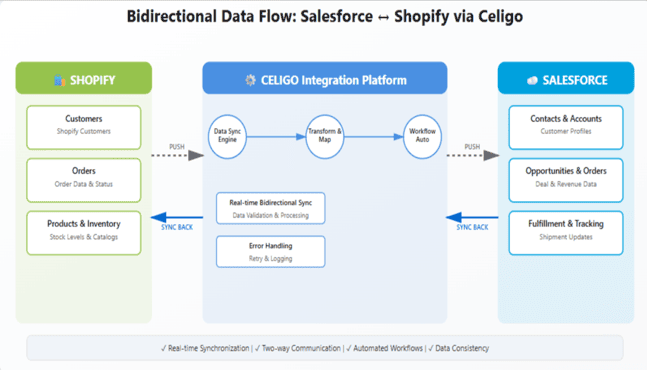 Example Data Flow
- A customer places an order in Shopify.
- Celigo pushes the order to Salesforce, automatically creating an Opportunity linked to the corresponding Account.
- Salesforce triggers workflow automation for inventory deduction and order fulfillment.
- Fulfillment and shipping updates sync back to Shopify in real time.
This two-way communication creates a closed-loop process — from cart to customer loyalty — ensuring every department has accurate, timely data.
Key Use Cases
a. Order-to-Cash Automation
Orders flow automatically from Shopify into Salesforce. Instead of manually entering order details, teams see every transaction in Salesforce instantly — complete with customer info, products, discounts, and taxes.
Business outcome: Faster order processing and reduced operational overhead.
b. Real-Time Customer Data Sync
Every Shopify customer profile, including order history and contact information, is mirrored in Salesforce. This empowers marketing and sales teams to deliver personalized experiences and automate follow-up based on real purchase data.
Business outcome: Unified view of customer journey across channels.
c. Product and Pricing Alignment
Celigo synchronizes Salesforce product catalogs with Shopify storefronts. Pricing changes, product descriptions, and SKUs update automatically.
Business outcome: Consistent product information across systems without double entry.
d. Returns and Refund Sync
Return requests initiated in Shopify automatically reflect in Salesforce for reconciliation and analysis.
Business outcome: Streamlined financial reporting and reduced refund delays.
Implementation Steps with Celigo
Integrating Salesforce and Shopify via Celigo typically follows a five-step process.
Step 1: Connect Salesforce and Shopify Accounts
Authenticate both applications through Celigo Integrator.io.
- Generate API credentials from Shopify and Salesforce.
- Paste the credentials into Celigo’s connection setup wizard.

Step 2: Choose Prebuilt Template or Create Custom Flow
Celigo offers a Shopify–Salesforce Integration App that includes default data flows for orders, customers, and products.
Alternatively, organizations can build custom flows tailored to unique data structures.
Step 3: Configure Data Mappings
Define how fields align between systems. Example:
- Shopify “Customer Email” → Salesforce “Email”
- Shopify “Order ID” → Salesforce “Opportunity Name”
Add transformation rules for data standardization (e.g., currency conversion, SKU formatting).

Step 4: Set up Real-Time or Scheduled Sync
Choose between:
- Real-time webhooks: Instant data updates between Shopify and Salesforce.
- Batch syncs: Periodic updates for bulk data loads.
This flexibility allows businesses to balance speed, API usage limits, and cost.
Step 5: Test, Monitor, and Optimize
Run initial test flows to validate data accuracy and ensure successful record creation.
Use Celigo’s monitoring dashboard to track integration performance and troubleshoot any sync issues.

Common Pitfalls and How to Avoid Them
Despite Celigo’s simplicity, integrations can fail if best practices aren’t followed.
| Challenge | Solution |
| Duplicate records | Configure Celigo’s unique key matching logic to prevent duplicates. |
| Field mismatches | Validate field types and mandatory fields in both systems. |
| Data latency | Use Celigo’s retry and queue management features. |
| Permission errors | Ensure Salesforce and Shopify APIs have proper permissions. |
| Untracked failures | Enable alerting and error notification workflows. |
Advanced Scenarios
As integration maturity evolves, organizations often expand use cases beyond standard order and customer syncs.
- Multi-store Shopify Integration: Sync multiple Shopify storefronts into one Salesforce instance for unified visibility.
- Draft Order Integration: Convert Shopify draft orders into Salesforce quotes for B2B sales workflows.
- Discount & Coupon Synchronization: Keep promotion data consistent across systems.
Marketing Cloud & Pardot Integration: Enrich marketing automation with Shopify purchase data.
Business Impact
Operational Efficiency
Manual data entry between Shopify and Salesforce often consumes hours daily. Celigo automates this end-to-end process, freeing sales and operations teams to focus on revenue-driving activities.
Result: Up to 80% reduction in manual work.
Data Accuracy & Visibility
Real-time sync eliminates inconsistencies across sales, inventory, and fulfillment. Leadership teams gain accurate dashboards and forecasts.
Result: Reliable insights for decision-making.
Improved Customer Experience
With unified data, sales and service teams can view complete purchase histories within Salesforce — enabling faster support and more personalized marketing.
Result: Enhanced loyalty and retention.
Case Example: Retail Transformation Through Celigo
A mid-sized lifestyle retailer operating on Shopify integrated with Salesforce using Celigo’s prebuilt connector.
- Order processing time reduced by 90%.
- Data sync errors dropped by 40%.
- Customer service resolution time improved by 30%.
This transformation positioned them to scale their online operations during seasonal spikes — without hiring additional operations staff.
Best Practices for Scalable Integration
To ensure long-term performance and maintainability, follow these proven practices:
- Use a Sandbox First: Always test new flows and mappings in a non-production environment.
- Document Everything: Maintain a living document of data mappings, field names, and dependencies.
- Monitor Regularly: Use Celigo’s integration health dashboards to detect issues early.
- Keep APIs Updated: Regularly update Salesforce and Shopify API versions.
Align Teams: Coordinate data governance policies between sales, marketing, and operations.
Conclusion
Integrating Salesforce and Shopify through Celigo transforms fragmented systems into a cohesive, automated commerce engine. With Celigo acting as the middleware layer, businesses gain:
- A real-time, bidirectional data flow between storefront and CRM.
- Accurate customer insights that drive personalized engagement.
- Operational agility to scale with demand.
In a market where speed, accuracy, and customer experience define success, Celigo’s integration framework provides the architecture to connect, automate, and scale — without the technical debt of custom APIs.
For enterprises and growing brands alike, the message is clear:
Integrate smarter. Operate faster. Serve better.

