
The Modern Legal CRM: How Law Firms Use Salesforce and AdvoLogix to Drive Growth
A legal CRM only drives growth when it connects the work that wins clients with the work that serves them. This guide shows how law firms combine Salesforce with AdvoLogix, now Mitratech CaseCloud, to run one record from first inquiry to repeat client, and which licences, metrics and rollout steps that takes.
Key Takeaways
- A modern legal CRM covers the whole client relationship: marketing and referrals, intake, conflicts, the matter itself, billing and repeat work, on one platform.
- On Salesforce, that usually means two layers: Sales Cloud for business development, and AdvoLogix, now sold as Mitratech CaseCloud, for intake and matter management.
- The CaseCloud licence includes the Salesforce platform but not Sales Cloud leads, opportunities or campaigns. Firms that want a referral and marketing pipeline license Sales Cloud for the people who run it.
- Growth comes from closing the gaps between stages: slow intake follow-up, conflicts checked outside the system, unbilled time and no view of which sources bring profitable matters.
- Start with one practice area, prove the full loop from inquiry to invoice in a sandbox, then extend it.
A Salesforce legal CRM gives a law firm one system for the work that brings clients in and the work that serves them. AdvoLogix, now sold by Mitratech as CaseCloud, adds legal intake, conflict checks, matters, docketing, time and billing to Salesforce. Sales Cloud adds campaigns, referral sources and a business development pipeline. Together they let a firm see which sources produce matters, and which matters produce revenue.
This guide is for managing partners, marketing and business development leads, legal operations managers and Salesforce admins at growing and mid-market law firms, as well as larger firms that run AdvoLogix or are evaluating it. It replaces our 2025 post on the same topic with current product names, sourced product facts, and the licensing detail that most "legal CRM" articles leave out.
What Is a Modern Legal CRM?
A modern legal CRM is a system that manages a law firm's relationships across their full life: how prospects and referral sources are found and nurtured, how inquiries are screened and accepted, and how clients are served, billed and brought back. Traditional legal software splits that into a marketing tool, an intake spreadsheet and a practice management system. A modern legal CRM keeps it on one data model.
The distinction matters because the two halves answer different questions. Practice management asks "What is happening on this matter?" Client relationship management asks "Where did this client come from, what are they worth to us, and what will bring them, or someone like them, back?"
| Practice management | Legal CRM | Modern legal CRM on Salesforce | |
|---|---|---|---|
| Main record | Matter | Contact, referral source, prospect | Both, linked: one client and one matter history |
| Typical users | Attorneys, paralegals, billing | Marketing, business development, intake | Everyone, each with their own view |
| Key questions | Deadlines, tasks, time, invoices | Sources, follow-up, conversion | Which sources bring profitable matters, and where work stalls |
| Weak point alone | No view of where work comes from | No view of what happens after sign-up | Needs deliberate design and licensing |
How Do Salesforce and AdvoLogix Fit Together?
AdvoLogix is a legal application that installs inside a Salesforce org, so it shares the same accounts, contacts, users, security, automation and reports as the rest of Salesforce. Mitratech announced CaseCloud on November 20, 2024, developed from Salesforce and AdvoLogix technology, and the AppExchange listing now reads Mitratech CaseCloud (formerly AdvoLogix).
In a growth-focused setup, think of the org in three layers:
Sales Cloud: Campaigns, Leads, Referral Sources and Pipeline
Web forms, events, newsletters and referral partners create leads and campaign members. Corporate and institutional work can run through opportunities. This layer answers "where does our work come from?"
CaseCloud: Intake, Conflicts, Matters, Docketing, Time and Billing
The inquiry becomes an Intake record, its parties are conflict-checked, an approved intake converts to a matter, and the matter carries deadlines, documents, time and billings. This layer answers "how well do we deliver?"
Reports, Dashboards, Client Access and Automation
Salesforce reports join both layers, Experience Cloud gives clients controlled access to their matters, and Flow automates the handoffs. This layer answers "what should we do more of?"
The old version of this post described client relationship tracking as part of AdvoLogix itself. That is not accurate for most firms. The vendor's licence documentation says a Matter Management licence includes a Salesforce Enterprise platform licence, but Sales Cloud and Service Cloud products, such as leads and opportunities, must be licensed separately. Layer 1 is a licensing decision, not a default.
Where Do Law Firms Lose Growth Without a Connected CRM?
Most firms do not lose growth for lack of demand. They lose it in the handoffs: between a referral and the first call, between intake and conflict clearance, between work done and work billed, and between a closed matter and the next one. Each handoff that runs on email or memory leaks clients or revenue.
What Does the Client Growth Lifecycle Look Like in Salesforce and AdvoLogix?
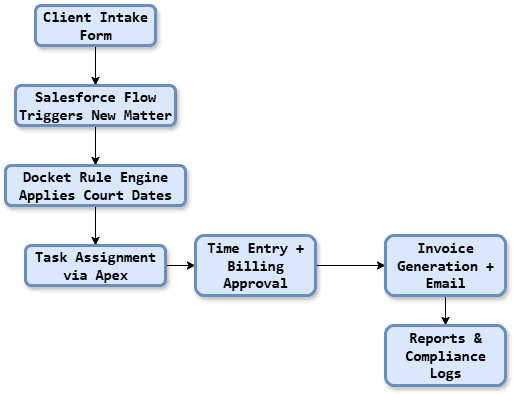
The lifecycle runs in seven stages: attract, capture, screen, open, deliver, bill and grow. The first two live in Sales Cloud, the middle four in CaseCloud, and the last one uses data from both. Because every stage writes to the same org, one report can follow a client from the campaign that found them to the invoice they paid.
| Stage | What happens | Where it runs |
|---|---|---|
| 1. Attract | Campaigns, events, content and referral partners generate interest | Sales Cloud campaigns |
| 2. Capture | A web form, call or referral creates a record with its source | Web-to-Lead, or CaseCloud intake forms |
| 3. Screen | Parties are conflict-checked and the request is approved or rejected | CaseCloud Intake and conflict check |
| 4. Open | The approved intake becomes a matter with a team, fee arrangement and plan | CaseCloud Convert to Matter, assignment rules |
| 5. Deliver | Deadlines, tasks, documents and client updates | CaseCloud docketing, activity plans, Experience Cloud |
| 6. Bill | Time and expenses become billings and invoices | CaseCloud time and billings, plus accounting |
| 7. Grow | Closing prompts reviews, referrals and repeat work; reports show what to invest in | Flow, reports and dashboards |
Which Salesforce and AdvoLogix Features Drive Growth?
Each feature below is linked to the vendor's own documentation, so you can check it against your edition and package version. For each one: what it does for growth, and what to plan for.
1. Campaigns and referral source tracking
AttractBest for: knowing which marketing and referral relationships bring in work.
Salesforce campaigns group events, seminars, newsletters and ads, track who responded, and report on performance. For firms that track pipeline on opportunities, Customizable Campaign Influence shares the credit for revenue across the campaigns that touched it. Referral partners, such as other firms, accountants or past clients, can be modelled as accounts and contacts with a referral relationship.
The catch: campaigns, leads and opportunities are Sales Cloud features, so business development users need Sales Cloud licences. Decide early whether "referral source" is a lookup to a contact, a campaign, or both, and make it required at capture.
2. Web-to-Lead and intake forms
CaptureBest for: getting every inquiry into the system with its source attached.
Salesforce Web-to-Lead turns website forms into leads, up to 500 a day. CaseCloud's intake forms, built in the Intake Designer, can be completed by staff, portal users or external users through Salesforce Sites, and write straight to the Intake object. Salesforce duplicate rules stop the same person arriving twice.
The catch: pick one front door per inquiry type. Marketing inquiries that need nurturing suit leads; requests for legal help that need screening suit CaseCloud intakes. Running both for the same request splits the data.
3. Intake approval and conflict checks
ScreenBest for: saying yes to good work faster, with a record of why.
The Intake object is a staging area before a matter exists. It moves through request, review and approval, and runs a conflict check on its associated accounts and contacts automatically. The conflict check searches contacts, accounts and participants, records the results against the matter with an audit trail, and can be started by hand, from Flow, through the API or in batch.
The catch: approval processes cannot ship in a managed package, so an admin builds the intake approval after installation. A conflict check also only finds what was migrated: bring over historic parties, not just open matters.
4. Convert to Matter, assignment rules and activity plans
OpenBest for: starting work the same day a client says yes.
An approved intake becomes a matter through the packaged "Convert to Matter" flow, which you can adapt in Flow Builder, with each intake type mapped to a matter record type. Assignment rule sets assign the matter and can email the new owner, and activity plans add the practice area's standard tasks and events, counted in the court's business days.
The catch: if you also use Sales Cloud leads, decide how a converted lead links to its intake and matter. Without that link, campaign reports stop at sign-up and never reach revenue.
5. Rules-based docketing
DeliverBest for: protecting the firm's reputation by not missing court deadlines.
Through the CalendarRules integration, applying a trigger, such as a filing or service date, creates a docket of tasks and events tied to the matter's court. If the trigger date changes, the related activities can be rescheduled. For deadlines that are not court-driven, such as limitation dates, a Flow scheduled path can send reminders at set intervals before a date field.
The catch: CalendarRules is a separate subscription. Docketing protects growth rather than creating it: one missed deadline costs more goodwill than any campaign earns.
6. Fee arrangements, time and billings
BillBest for: turning work into revenue without leakage.
CaseCloud fee arrangements support hourly, fixed, capped and contingency models, and billings are generated from time and expense entries and can be split across billing parties. Packaged Einstein Next Best Actions prompt users to log time for completed tasks and events, and to track time for uploaded documents. For full accounting, firms connect a ledger such as Accounting Seed or QuickBooks.
The catch: billing is where integrations break first. Name an owner for the accounting sync and reconcile it monthly.
7. Client portal and matter updates
RetainBest for: a client experience that earns repeat work and referrals.
Experience Cloud builds branded portals, and CaseCloud's participant-based sharing controls which matters an external user can see: the user must be a participant on the matter, with Read, Write or No Access set at account, contact or participant level.
The catch: portal users need Experience Cloud licences, and sharing must be tested with real client logins before launch.
8. Reports and dashboards across both layers
GrowBest for: deciding where to invest partner time and marketing budget.
Mitratech's CaseCloud product page points to Salesforce's native reporting and analytics, and the AppExchange listing describes dashboards on caseloads, spend and outcomes. Because campaign, intake, matter and billing data sit in one org, the same report builder can join them.
The catch: a report is only as good as the fields behind it. Source, practice area and matter type must be required picklists, not free text.
Which Growth Metrics Should a Law Firm Track in Its Legal CRM?
Track a small set of measures that follow the client from source to revenue: inquiry volume by source, speed to first contact, intake conversion, conflict-check turnaround, time from approval to matter opening, realization and revenue by source. Each one depends on a field captured at a specific stage, so design the fields before the dashboard.
| Metric | What it tells you | Data it needs |
|---|---|---|
| Inquiries by source | Which campaigns and referrers bring demand | Required source field on leads and intakes |
| Speed to first contact | Whether good inquiries go cold | Created time and first logged activity |
| Intake conversion rate | How many inquiries become matters, by practice area | Intake status and the matter it converted to |
| Conflict-check turnaround | Whether screening slows acceptance | Conflict check created and completed dates |
| Approval to matter opening | How fast work starts after a client says yes | Intake approval date and matter created date |
| Unbilled time and realization | How much work turns into revenue | Time entries, billings and payments |
| Revenue by source | Which sources bring profitable matters, not just many | A link from source to intake to matter to billings |
| Repeat and referred matters | Whether clients come back or send others | Matter history per account and referral source |
We have deliberately not printed benchmark targets. Published "legal CRM" statistics are rarely sourced, and your own baseline from the first quarter on the new system is the only number worth improving.
Which Salesforce and CaseCloud Licences Does a Legal CRM Need?
License by role, not by headcount. Attorneys, paralegals and billing staff who work matters need CaseCloud. Business development and marketing users who run campaigns, leads or opportunities need Sales Cloud. Clients or co-counsel who log in from outside need Experience Cloud. Confirm the current options with Mitratech and Salesforce before you budget.
| Role | Works in | Licence to plan for |
|---|---|---|
| Attorneys, paralegals, intake staff | Intakes, conflicts, matters, docket, time | CaseCloud Matter Management (includes a Salesforce Enterprise platform licence) |
| Billing and finance | Billings, fee arrangements, accounting sync | CaseCloud, plus your accounting application's licences |
| Marketing and business development | Campaigns, leads, opportunities, referral reports | Sales Cloud |
| Partners who only read dashboards | Reports across both layers | Whichever licence gives access to the objects the reports use |
| Clients and co-counsel | Their own matters in a portal | Experience Cloud |
Firms that do not want a separate Sales Cloud pipeline can still track source on the CaseCloud Intake record, and report intake-to-matter conversion by source. What they give up is campaign management, lead nurturing and campaign influence on opportunities.
How Should a Law Firm Roll Out a Salesforce Legal CRM?
Prove the full loop in one practice area before you scale. A 90-day pilot that takes one practice from inquiry to invoice, in a sandbox first and then in production, shows partners real data quickly and exposes the design questions you would otherwise find after a firm-wide launch.
The 90-day frame suits a single practice with a clean data source. More practice areas, messy legacy data or several integrations add time. For the intake build in detail, see our guide to automating client intake with AdvoLogix and Salesforce Flow.
What Mistakes Stop a Legal CRM From Driving Growth?
Most failures come from treating the CRM as a filing system rather than a revenue system: no required source, two front doors, and dashboards nobody owns. These are the patterns we see most often when we review legal Salesforce orgs.
Is Salesforce and AdvoLogix the Right Legal CRM for Your Firm?
It suits firms that want intake, matters and business development on one configurable platform, and that will run Salesforce as a platform with an owner. It is a heavier choice than an all-in-one practice management tool, so the case is strongest where workflows, integrations or reporting needs are complex.
It fits if you run several practice areas or offices, depend on referrals or marketing for new work, need intake and conflict records you can audit, want matter data joined to accounting, documents and phone systems, or already run Salesforce.
It may not fit if you are a small practice with simple billing, few referral sources, no integration needs and nobody to own a Salesforce org. A lightweight practice management tool will usually be simpler.
If you are weighing AdvoLogix against other tools, our comparisons of AdvoLogix and PracticePanther and of Salesforce legal applications such as Litify and NuLaw cover the trade-offs in detail.
What Does a Growth-Focused AdvoLogix Rollout Look Like in a Real Firm?
In our projects, the gains come from automating the handoffs: inquiry to intake, intake to matter, and matter to cash. Three published Twopir case studies show the pattern.
- Intake to settlement. For a US personal injury firm, we configured AdvoLogix with matter stages from intake to closing, automatic lead-to-matter conversion and 90/60/30-day statute-of-limitations alerts. The case study reports 40% faster case processing and 60% less intake admin. Read the case automation case study.
- Matter to cash. For a multi-state US personal injury firm, we connected AdvoLogix to QuickBooks Online, including trust accounting. The case study reports 45% less accounting effort and 40% faster case-to-cash. Read the finance automation case study.
- Connected inquiries. For another law firm, we set up AdvoLogix with Formstack intake, a custom lead-to-matter conversion, CallRail and RingCentral call tracking, Egnyte documents, Conga Composer and SMS reminders. Read the AdvoLogix case study.
Results depend on each firm's data, people and process, so treat these as examples of the pattern, not benchmarks. Our CaseCloud implementation services and legal CRM implementation pages describe how we deliver this work.
The Bottom Line
Salesforce and AdvoLogix, now Mitratech CaseCloud, can give a law firm one view from first inquiry to repeat client. The growth comes from the connections, not the software alone.
- 1
Treat business development and matter management as two layers of one org, and license each for the people who use it.
- 2
Capture the source of every inquiry as structured data, and carry it from intake to matter to billing.
- 3
Automate the handoffs: intake approval, conflict check, matter opening, docketing and time capture.
- 4
Pick a few metrics, give each an owner, and measure against your own baseline.
- 5
Pilot one practice area for 90 days, then scale what works.
Want Your Legal CRM to Show Where Growth Comes From?
On a 30-minute discovery call, a Twopir Salesforce architect will walk through how inquiries, intake and matters move through your firm today, and show where Salesforce and CaseCloud would close the biggest gaps first.
Schedule a Discovery CallFrequently Asked Questions
A legal CRM is software that manages a law firm's client and referral relationships: where inquiries come from, how they are followed up and screened, and how clients are retained. A modern legal CRM also connects to matter management, so the firm can see which sources produce profitable matters.
AdvoLogix, now Mitratech CaseCloud, is legal case and matter management built on Salesforce, with intake, conflict checks, docketing, time and billing. It runs on the Salesforce platform, but Sales Cloud features such as leads, opportunities and campaigns need separate Salesforce licences.
Yes. Mitratech announced CaseCloud on November 20, 2024, developed from Salesforce and AdvoLogix technology, and the AppExchange listing is now titled Mitratech CaseCloud (formerly AdvoLogix). Existing AdvoLogix orgs run the same package under the new name.
Only for the people who run business development. CaseCloud covers intake, matters, docketing, time and billing. Firms that want campaigns, lead nurturing, referral pipelines or campaign influence reporting add Sales Cloud licences for their marketing and business development users.
It closes the gaps where work is lost: slow follow-up on inquiries, conflicts checked outside the system, delays between approval and matter opening, and unbilled time. It also shows which campaigns and referral sources bring profitable matters, so partners invest time where it pays back.
Clients and co-counsel can access matters through a Salesforce Experience Cloud site. CaseCloud's participant-based sharing only shows a matter to an external user who is a participant on it, with Read, Write or No Access set at account, contact or participant level.
A single practice area with clean data can run a full pilot in about 90 days. Timelines grow with the number of practice areas and matter types, the state of legacy data, the number of integrations, and whether the firm already runs Salesforce.
