
Introduction
For growing mid-sized and enterprise businesses, managing customer relationships and back-office operations in silos leads to inefficiency, data duplication, and poor decision-making. That’s where integrating MYOB Advanced (powered by Acumatica) with Salesforce CRM comes in.
MYOB Advanced is a robust cloud ERP platform, while Salesforce dominates the CRM landscape. Yet, by default, they don’t talk to each other, creating friction for sales, finance, operations, and support teams. According to a recent Forrester study, companies that integrate ERP and CRM systems experience over 30% faster order processing, 25% reduction in manual entry, and greater forecast accuracy.
In this guide, we break down the process of integrating MYOB Advanced and Salesforce, including architectural options, integration tools, key benefits, and real-world examples. Whether you’re trying to sync accounts, automate invoice creation, or connect financial reporting with sales pipelines, this guide will give you a technically rigorous, solution-focused approach to implementation.
What is MYOB Advanced and Salesforce Integration?
- API Connectivity: Both MYOB Advanced and Salesforce expose RESTful APIs, allowing data to be programmatically pushed or pulled between the two systems. MYOB Advance uses a contract-based REST API, while Salesforce supports both REST and SOAP APIs, Apex, and declarative automation.
- Authentication & Security: OAuth 2.0 is the standard protocol used for authenticating with both MYOB Advance and Salesforce APIs. Salesforce simplifies this further with Named Credentials and Auth Providers, while MYOB.
Key Terminology
- Contract-Based API: A structured API format in MYOB Advance where you define the contract (data shape) for endpoints.
- Named Credential: A Salesforce feature that securely stores endpoint URL and authentication settings.
- Delta Sync: A method of syncing only the changed data instead of the entire dataset.
- ETL (Extract, Transform, Load): A common process for syncing data between systems.
Common Data Points to Sync
Salesforce Object | MYOB Advanced Entity |
Account | Customer |
Opportunity | Sales Order |
Product | Inventory Item |
Invoice | Invoice |
Architecture Overview
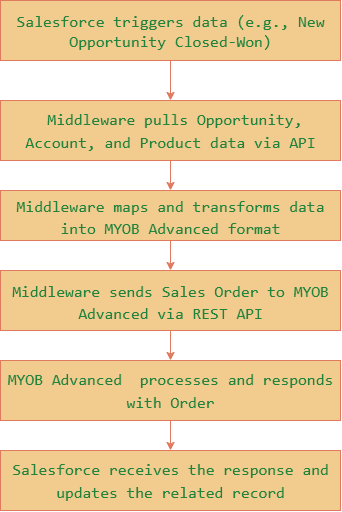
Key Considerations:
- Use delta updates to minimize API usage and avoid duplication.
- Maintain logging and error handling mechanisms for sync failures.
- Implement bi-directional sync where necessary, e.g., syncing invoice status to Salesforce.
Why Use MYOB Advanced And Salesforce Integration?
Eliminate Manual Entry & Double Handling :
Without integration, finance teams manually copy order data from Salesforce to MYOB Advanced. This leads to errors, delays, and duplicate records. Automating this process with middleware allows real-time order syncing.
Scenario: A sales rep closes a deal in Salesforce. Instantly, a Sales Order is created in MYOB Advanced, including all customer and product details.
Improve Order-to-Cash Cycle :
With synced data, the time between a closed deal and invoice generation shrinks. Clients receive invoices faster, can be tracked automatically in both systems.
Scenario: Invoices generated in MYOB Advanced are synced back to Salesforce, allowing sales to follow up on unpaid invoices during customer calls.
Enable Cross-Functional Visibility :
Executives and operations teams often lack a unified view of sales and financial health. Integration ensures that dashboards in Salesforce.
Key Benefits
Benefit | Technical Detail | Business Impact |
Real-Time Sync | Achieved using Apex callouts from Salesforce to push data immediately to the MYOB advanced API | Faster quote-to-cash turnaround |
Error Reduction | Reduces manual re-keying and sync mismatches | Minimizes costly billing and fulfillment issues |
Improved Forecasting | Syncs closed deals with ERP financials | Accurate revenue planning and inventory management |
Enhanced Reporting | Combines ERP and CRM data for 360° analytics | Better decision-making across departments |
Role-Based Access Control | Security managed by system roles + OAuth scopes | Ensures only authorized users see sensitive data |
Scalable Architecture | Cloud-based, event-driven, modular APIs | Future-proof and easy to extend |
Compliance & Audit Trail | All data movement is logged and traceable | Supports SOX, GDPR, and internal audit requirements |
Practical Must-Use Features
1. Named Credentials in Salesforce :
Used to securely store and authenticate connections to MYOB API. Avoids hardcoding tokens and simplifies Apex callouts.
Best Practice: Use with an Auth Provider and JWT Bearer Flow for server-to-server integrations.
2. Apex Callouts to External APIs :
For custom logic, Salesforce can perform HTTP callouts to MYOB’s REST API via Apex.
HttpRequest req = new HttpRequest(); req.setEndpoint(‘callout:MYOB_API/Salesorder’); req.setMethod(‘POST’); req.setBody(jsonString); Http http = new Http(); HttpResponse res = http.send(req); |
Tip: Always handle errors and log responses using a custom logging object.
3. MYOB Integration via Apex Callouts :
Salesforce uses Apex callouts to query or send data directly to MYOB Advanced’s REST API when a specific event occurs (e.g., after an Opportunity is Closed-Won or when syncing invoice status). This push/pull mechanism is controlled entirely from the Salesforce side, ensuring timely updates without relying on webhooks or polling.
Tip: Implement retry logic and error logging in Apex to ensure callout reliability and traceability.
4. Field Mapping Layer :
Use an integration layer (middleware or custom metadata in Salesforce) to maintain a clear, flexible mapping between fields across systems.
Real-World Use Cases
Case Study 1: Manufacturing Firm – Sales Order Automation
Industry: B2B Manufacturing
Challenge: Sales teams closed deals in Salesforce, but finance had to manually enter order details into MYOB. This led to frequent errors and slow processing.
Solution: Integration using MuleSoft connected Salesforce Opportunities with MYOB Sales Orders. Account and product data synced in real time. A status update from MYOB marked Salesforce deals as fulfilled.
Results:
- 100% reduction in manual entry
- Sales-to-fulfillment time dropped from 48 hours to under 3 hours
- Improved data accuracy across systems
Case Study 2: Professional Services Firm – Invoice Reconciliation
Industry: Consulting
Challenge: Invoices created in MYOB were not visible to client-facing teams in Salesforce, confusing client calls.
Solution: Custom middleware queried MYOB invoices nightly and pushed summary details into related Salesforce Opportunities and Accounts.
Results:
- 70% reduction in billing-related client complaints
- Enabled proactive outreach on unpaid invoices
- Better visibility of project profitability
Conclusion
Integrating MYOB Advanced and Salesforce brings your front-office and back-office teams together, streamlining sales, finance, and operations. From automated order creation to real-time financial visibility, the benefits are undeniable.
To get started:
- Define your sync use cases (e.g., orders, invoices).
- Choose your integration method (middleware vs. custom).
- Use Named Credentials, field mapping, and error logging to build secure, scalable, and supportable integrations.
