
Introduction:
Managing follow-ups inside Salesforce can quickly become overwhelming—especially when important actions are buried inside Chatter conversations.
Every Salesforce org has the same silent productivity drain — decisions made in Chatter that never become Task records. For teams, this translates directly into incomplete activity data, broken accountability chains, and reports that underrepresent actual team execution. Chatter Activity to Task Automation, available on the Salesforce AppExchange from Twopir Consulting, closes this gap at the infrastructure level. This guide covers everything from architectural information and rationale depth to governance frameworks and deployment best practices, and execution environment.

This powerful Salesforce app lets you convert Chatter posts and comments into structured Tasks automatically—using simple commands like #task, @username, and #date.
What is Chatter Activity to Task Automation?
Chatter Activity to Task Automation is an Apex-based solution built on Salesforce AppExchange that converts simple Chatter posts into actionable Tasks automatically. It listens to Chatter activity and, based on a structured syntax, creates Tasks with key fields like owner, subject, and due date—without requiring users to manually open or fill forms.
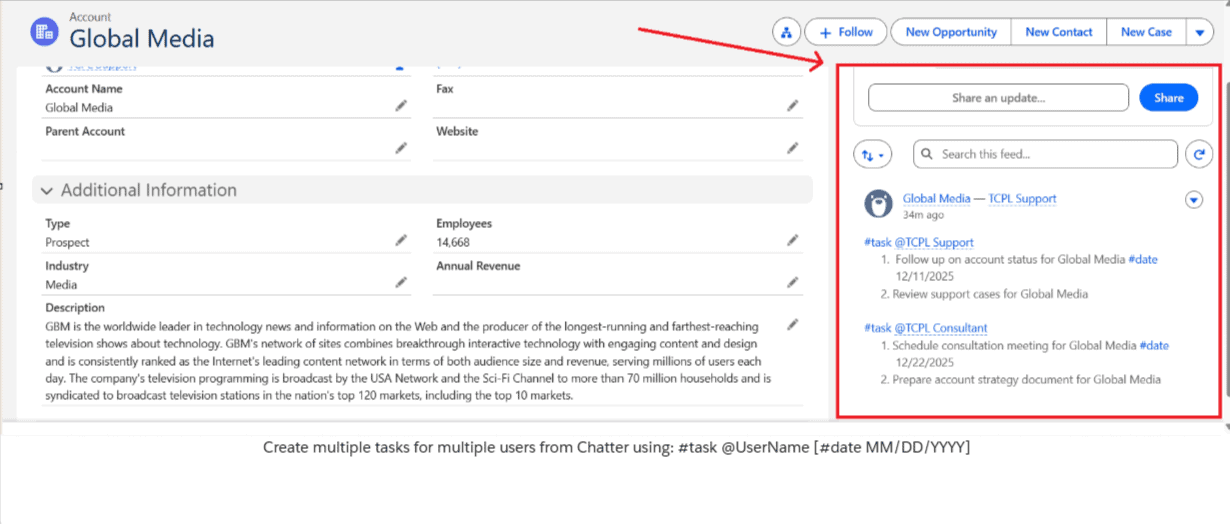
The parser extracts four data elements from the Chatter body:
- #task — the trigger token that activates the automation for that block
- @UserName — the mention that resolves to the Task’s OwnerId
- Numbered line items (1., 2., etc.) — each line becomes a separate Task Subject
- #date MM/DD/YYYY — the per-task due date, mapped to ActivityDate
Chatter Activity to Task Automation is a Salesforce solution designed to streamline task creation directly from Chatter.
Instead of manually creating tasks, users can simply write structured instructions in Chatter, and the system will:
- Automatically create tasks
- Assign them to the right users
- Set due dates (manual or automated)
This works across:
- Salesforce Lightning Experience
- Salesforce Classic
- Chatter Posts & Comments
Why Existing Approaches Don’t Solve This:
Admins have tried. The usual interventions are flows triggered on record updates, reminders via email notifications, or manual Task creation conventions enforced through enablement. Each has the same structural flaw: they require discipline at the point of execution, not automation at the point of conversation.
Flow-based task creation works well when the trigger is a record state change — a stage update, a field populated, or a closed-won event. It doesn’t work for the ad-hoc, conversational commitments that live in Chatter. Those aren’t recorded events. They’re human decisions that need a bridge to structured data.
That bridge is what Salesforce Chatter Task Automation provides — and the reason it works where other approaches don’t is that it intercepts the signal where the commitment is actually being made: inside the post or comment itself.
Why This App Matters:
Most Salesforce Admins/Users know that follow-ups discussed in Chatter rarely become actual Task records—creating a major visibility gap. The core issue isn’t user intent, but system friction: reps must leave the conversation to manually create tasks, causing lost actions and incomplete activity tracking.
This leads to a weak Activity timeline, unreliable reporting, and poor forecasting for RevOps teams. The most important point: this is not a user problem—it’s a system design problem, where eliminating context switching and automating task creation is the real solution.
Sales, support, and RevOps teams often collaborate in Chatter—but execution still happens elsewhere.
This gap leads to:
- Missed tasks
- Delayed follow-ups
- Manual data entry
With this app, you:
- ✅ Eliminate manual task creation
- ✅ Capture action items instantly
- ✅ Improve accountability
- ✅ Boost team productivity
Before vs After: What Changes For Each Team
Customer Support Teams:
Before | After |
Case action items buried in Chatter comment threads | Case follow-up tasks are assigned with due dates from the Case Chatter feed directly |
Cross-team handoffs communicated informally; ownership ambiguous | Cross-team delegation (Support → Consultant → RevOps) in a single post |
Support leads in manually auditing feeds to identify open commitments | Open task visibility on the Case record without reading the thread history |
Sales Teams:
| Before | After |
| Follow-up commitments live in Chatter threads, invisible to CRM reports | Every account-level next step becomes a Task at point of commitment |
| Reps create tasks manually hours later — or not at all | Activity timelines populated in real time from Chatter |
| Activity timelines sparse; pipeline reviews require manual thread audits | Manager visibility into follow-through without additional process overhead |
| No differentiation between reps who execute and reps who don’t document | Rep performance data in reports reflects actual execution, not recall |
RevOps and Admin Teams:
| Before | After |
| Operational tasks communicated via Chatter or Slack; no CRM record | RevOps commitments become Tasks on related Opportunities or Accounts |
| Data hygiene and pipeline audit tasks are tracked externally | Pipeline hygiene tasks are auto-due-dated and visible in standard Task reports |
| No activity-level reporting on RevOps operational execution | Complete operational audit trail inside Salesforce — no external tools needed |
Key Features:
1. Create Tasks Directly from Chatter:
- Easily convert Chatter posts and comments into actionable Salesforce tasks without switching screens
- This helps teams capture important actions instantly and improves overall workflow efficiency.
2. Assign Tasks Instantly:
- Quickly assign tasks to specific users using the @UserName mention within Chatter.
- This ensures clear ownership and faster execution without manual assignment steps.
3. Flexible Due Date Management:
- Set precise deadlines using the #date command or let the system assign one automatically.
- This flexibility ensures every task has a timeline, reducing delays and missed follow-ups.
4. Multiple Tasks in One Post:
Create multiple tasks in a single Chatter message using a simple numbered format. This allows users to break down work efficiently without creating tasks one by one.
#task @UserName
- First task #date 05/01/2025
- Second task
5. Assign Tasks to Multiple Users:
Assign different tasks to multiple users within the same Chatter post using separate #task blocks. This makes team collaboration seamless and keeps responsibilities clearly defined.
#task @UserA
- Task for UserA
#task @UserB
- Task for UserB
6. Customizable Automation Controls:
Admins can control when and how automation runs through configurable trigger settings. They can enable/disable features and adjust the default due date logic as per business needs.
Admins can easily:
- Enable/disable automation
- Control triggers for posts/comments
- Adjust default due dates
Measurable Business Impact:
Activity Data Completeness:
Baseline your Task creation volume before deployment. Measure the increase at Day 30 and Day 90. For most orgs with active Chatter usage, expect a 40–70% increase in Task records on Accounts and Opportunities within the first month.
Time-to-Task Creation:
The lag between a commitment being made and a Task record existing drops from hours (or never) to seconds. In active deal cycles, this compresses follow-through latency directly measurable in pipeline velocity metrics.
Cross-Team Accountability:
Multi-user task delegation from a single Chatter post gives RevOps a complete record of who was assigned what, when. Eliminates the “I didn’t know I was responsible” gap in post-deal reviews and support escalations.
Admin Overhead Reduction:
Removes the recurring need to coach users on manual Task creation. One configuration, one training session, and the behavior becomes structural rather than dependent on discipline or reminder cadences.
Real Use Cases:
Sales Teams:
- Capture follow-ups directly from deal discussions
→ Sales reps can instantly convert conversation points into actionable tasks without leaving Chatter. - Never miss a client interaction
→ Ensures every lead, follow-up, or commitment is tracked and completed on time.
Support Teams:
- Convert customer issues into tasks instantly
→ Support agents can turn customer queries or problems into tasks as soon as they appear in Chatter. - Improve response time
→ Faster task creation means quicker action, leading to better customer satisfaction.
RevOps Teams:
- Ensure execution from internal discussions
→ Operational conversations can be directly converted into tasks, ensuring nothing gets overlooked. - Maintain process consistency
→ Standardized task creation helps teams follow consistent workflows across the organization.
Final Thoughts:
Chatter is where conversations happen—but execution shouldn’t be disconnected.
Chatter is widely used for team discussions, updates, and collaboration inside Salesforce. But without automation, important action items often stay in conversations instead of turning into actual tasks.
With Chatter Activity to Task Automation, you turn every discussion into action—instantly.
This app automatically converts Chatter messages into tasks using simple commands. It ensures that every important discussion leads to immediate action without manual effort.
It’s simple, powerful, and built for teams that want to move faster without extra effort.
The app is easy to use and requires minimal setup, making it accessible for all teams. At the same time, it boosts productivity by reducing manual work and speeding up execution.
For more information, please refer to this page: Salesforce Chatter Task Automation
For more information and to implement the integration, please refer to the documentation provided in the AppExchange app link here.
