
How to Increase Customer Engagement in the Digital Age
How to increase customer engagement at growing and mid-market companies: the seven strategies that make customers reply, return and buy again, the messaging channels worth adding, and how to run them from Salesforce Service Cloud or HubSpot with one history, fast routing, AI agents and honest measurement.
Key Takeaways
- Customer engagement is the two-way relationship a customer has with your company across every channel. It grows when replies are fast, personal and connected, not when you post more.
- Customers notice the seams: in Salesforce's research, 79% expect consistent interactions across departments, yet 56% often have to repeat themselves.
- Seven strategies do most of the work: right channels, one history, smart routing, personalisation, self-service and AI agents with a human handoff, proactive outreach with consent, and a feedback loop.
- In Salesforce, legacy Chat was retired on February 14, 2026. Web and app chat now runs on Enhanced Chat, alongside WhatsApp, SMS, Messenger, Apple Messages for Business and LINE, all routed by Enhanced Omni-Channel.
- HubSpot Service Hub Professional covers the same ground for HubSpot-first teams: a help desk, WhatsApp, the Customer Agent and CSAT, CES and NPS surveys.
We first published this guide in July 2024. This version replaces the general social-media tips with a working plan, brings the Salesforce section up to date (legacy Chat, standard messaging channels and Standard Omni-Channel have all been retired since), adds the HubSpot option, and corrects the pricing and bot claims against current Salesforce, HubSpot and Meta documentation.
If you want to increase customer engagement, the fastest gains rarely come from a new campaign. They come from answering customers where they already are, remembering what they told you last time, and getting them to the right person or AI agent quickly. This guide is for service, marketing and revenue operations leaders at growing and mid-market companies, and for the admins who will configure the tools. Enterprise teams will find the same model applies at a larger scale.
What Is Digital Customer Engagement?
Digital customer engagement is the ongoing, two-way interaction between a company and its customers across digital channels: website and in-app chat, messaging apps, SMS, email, social media and self-service portals. It is measured by whether customers respond, return, resolve issues easily and buy again, not by how many messages you send.
Likes, opens and clicks are signals, but they are not engagement on their own. Engagement is the relationship those signals add up to: a customer who asks a question on WhatsApp, gets a useful answer in minutes from someone who can see their order, and later renews without being chased. That relationship is built by marketing, sales and service together, which is why it lives or dies in your CRM.

Why it matters is well documented. In the sixth edition of Salesforce's State of the Connected Customer research (14,300 consumers and business buyers), 80% of customers said the experience a company provides is as important as its products and services, and 88% said good customer service makes them more likely to purchase again.
Why Do Customer Engagement Efforts Stall?
Engagement stalls when channels are added faster than the systems behind them. Customers can reach you in more places, but each channel has its own inbox, agents cannot see earlier conversations, and nobody measures what happened after the reply. The same research shows how visible those seams are to customers.
How Can You Increase Customer Engagement? Seven Strategies That Work
To increase customer engagement, meet customers on the channels they use, keep one conversation history per customer, route each conversation to the right person fast, personalise with data you already hold, let self-service and AI agents handle routine requests, reach out proactively with consent, and measure every interaction. Each strategy below is something a CRM can enforce, not just a good intention.

Content still matters. Helpful articles, videos and interactive tools such as calculators bring customers to your site and give them a reason to start a conversation. But the seven strategies above decide whether that first conversation turns into a relationship.
Which Digital Engagement Channels Should You Use?
Choose channels by where your customers already talk and what they need from you: messaging apps and SMS for updates and quick questions, web and in-app chat for help while buying or using your product, email for detail and records, and social media for reach. Start with two, run them well, then add more.
| Channel | Best for | Conversation style | Salesforce | HubSpot |
|---|---|---|---|---|
| Web and in-app chat | Help while buying or using the product | Asynchronous and persistent with Enhanced Chat | Enhanced Chat | Live chat |
| Service and notifications in WhatsApp-first markets | Asynchronous; free-form replies within 24 hours of the customer's last message | Enhanced WhatsApp | Inbox and help desk | |
| SMS | Reminders, delivery and appointment updates | Asynchronous, short | Enhanced SMS | Marketing Hub add-on |
| Facebook Messenger | Customers who find you on Facebook | Asynchronous | Enhanced Messenger | Inbox |
| Apple Messages for Business, LINE | iPhone-heavy audiences; Japan, Thailand, Taiwan | Asynchronous | Supported | Custom channel apps |
| Email and web forms | Detailed requests, attachments, records | Asynchronous, long | Email-to-Case | Inbox and help desk |
| Public social posts | Reach, reputation, community | Public, one-to-many | Usually run from a social management or marketing tool, with service questions moved into a private channel | |
Salesforce lists its supported messaging channels as WhatsApp, Facebook Messenger, Apple Messages for Business, LINE, SMS, Enhanced Chat for websites and mobile apps, and Bring Your Own Channel for anything else (Salesforce Help). HubSpot connects team email, chat, Facebook Messenger, forms, WhatsApp, calling and custom channels to its conversations inbox, with SMS through a Marketing Hub add-on.
How Does Salesforce Service Cloud Support Digital Engagement?
Service Cloud brings every digital channel into one Service Console: customers message on the channel they choose, Enhanced Omni-Channel routes each conversation to an AI agent, a bot or a rep, and the conversation, contact and case stay linked in Salesforce for reporting. Salesforce's documentation still uses the name Digital Engagement in places; its pricing page now calls the add-on Contact Center Digital.
Messaging and Enhanced Chat
Enhanced WhatsApp, SMS, Facebook Messenger, Apple Messages for Business and LINE channels, plus Enhanced Chat (formerly Messaging for In-App and Web) for your website and app. An org can create up to 2,000 messaging channels.
Enhanced Omni-Channel and Omni-Channel flows
Queues, skills, priorities and rep capacity decide who gets each conversation. Omni-Channel flows look up the customer, link records and choose between an AI agent and a human queue.
Agentforce Service Agent, enhanced bots and reps
Agentforce Service Agent handles inquiries across messaging, chat, voice and portals around the clock and escalates to reps with full context. Einstein enhanced bots remain available for scripted, rule-based dialogs.
Command Center for Service and session metrics
Supervisors monitor reps and AI agents in Command Center for Service (formerly Omni Supervisor). Reports use the Messaging Session, Messaging Session Metrics and AgentWork objects.
What Has Changed in Salesforce Digital Engagement Since 2024?
Almost every component named in 2024 setup guides has been replaced: legacy Chat by Enhanced Chat, standard messaging channels by enhanced channels, Standard Omni-Channel by Enhanced Omni-Channel, and Einstein for Service by Agentforce Service. If your org was configured before 2025, check each row below.
| Then | Now | Date or status |
|---|---|---|
| Legacy Chat (Live Agent), real-time only, with a Chat Session object | Enhanced Chat: asynchronous and persistent across devices | Retired February 14, 2026 |
| Standard WhatsApp channel | Enhanced WhatsApp | Upgrade due July 30, 2025 |
| Standard Facebook Messenger and SMS channels | Enhanced Messenger and SMS | Upgrade due February 14, 2026 |
| Standard Omni-Channel | Enhanced Omni-Channel, with orgs upgraded automatically | Retired in Summer '26 |
| Einstein for Service and Einstein Bots | Agentforce Service and Agentforce Service Agent; enhanced bots still documented | Renamed; bots still available |
| Omni Supervisor | Command Center for Service | Renamed |
| Chat ownership fixed once the chat starts | Reps transfer sessions to another rep, a queue or a routing flow | Enhanced channels |
| Chat reports | Rebuilt on Messaging Session Metrics and AgentWork | Required after migration |
Enhanced channels also add interactive messaging components, audio messages, outbound "Send a Message" for opted-in customers, and new session statuses (Inactive, Consent and Error) that you can use in routing and reports.
How Do Conversations Link to the Right Customer Record in Salesforce?
An inbound Omni-Channel flow runs when a conversation arrives. It reads the messaging session and any pre-chat details, finds the matching contact (and, if needed, an order or open case), links them to the session, then routes the conversation to an AI agent or a queue. Older guides called this step "triage flows"; today it is built in Flow Builder as an Omni-Channel flow.
- The session holds the links. The MessagingSession object has standard lookups to the case, the end user's contact and account, and the conversation. Fill them in the flow and every report and related list works.
- Pre-chat inputs do the lookup. Enhanced Chat flows can use pre-chat form inputs to find contacts or orders and associate them with the session.
- Escalation is a second flow. When Agentforce escalates, an outbound Omni-Channel flow checks rep availability and routes the session and its history to a queue. If no rep is available, the agent resumes, and escalation is attempted once per session, so plan an after-hours path such as creating a case.
How Do You Set Up Messaging in Salesforce Service Cloud?
Turn on Messaging, give reps the messaging licences and permissions, create a routing configuration and a queue for Messaging Session, set up presence statuses and grant access to them, then create your channels with consent settings and an Omni-Channel flow, add messaging to the Service Console, and test end to end. The sequence follows Salesforce's Messaging module and service deployment workshop.
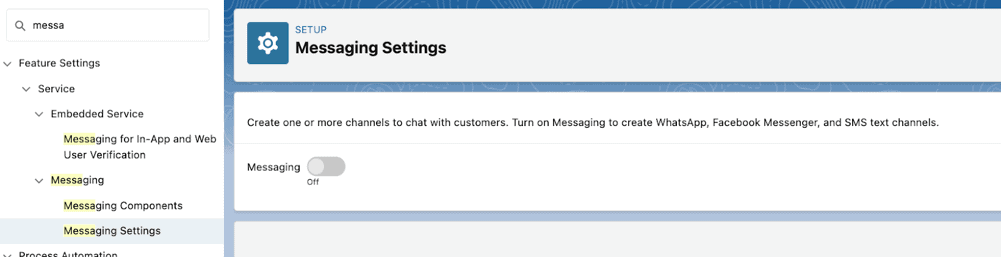


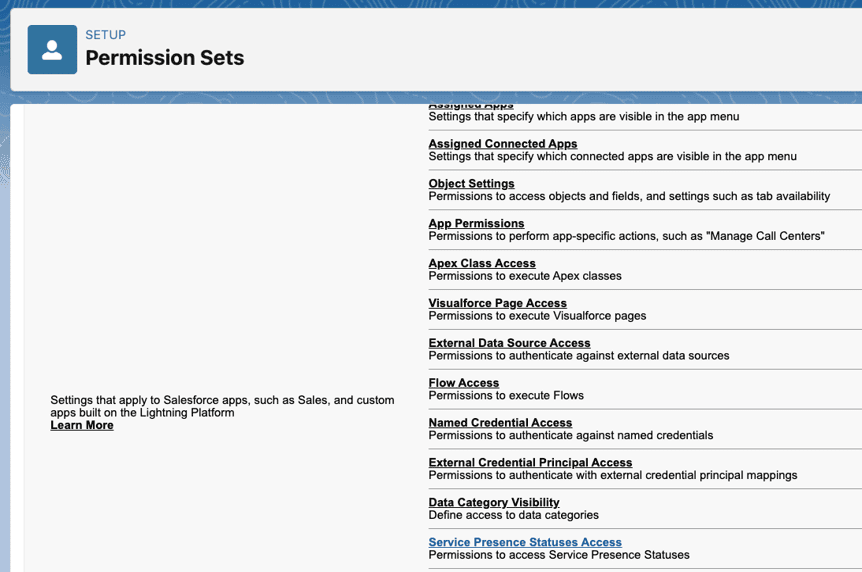

Screens may differ slightly in your org: these were captured before the Enhanced Omni-Channel upgrade, and Salesforce now upgrades every org automatically. Two steps from older guides no longer apply: there is no Chat Session object to add to queues, and no Standard Omni-Channel checkbox to enable.
What If Your Team Runs on HubSpot?
HubSpot-first teams can run the same engagement model in Service Hub Professional or Enterprise: a help desk workspace for chat, email, forms, WhatsApp and Messenger, the Customer Agent for AI answers with a human handoff, and built-in CSAT, CES and NPS surveys on the same CRM record.
- Help desk and inbox. HubSpot recommends its help desk for ticket management; accounts created after April 1, 2024 cannot create tickets from conversations inbox channels.
- WhatsApp. In Service Hub Professional and Enterprise, each WhatsApp message creates a thread and ticket in help desk. It needs a WhatsApp Business account, and the pricing page lists up to 1,000 WhatsApp messages per month.
- Customer Agent. HubSpot's Customer Agent can be assigned to live chat, email, forms, Facebook, WhatsApp and calling (beta), with working hours and a handoff process to a person. It needs a Professional or Enterprise hub and HubSpot Credits.
- Feedback. Professional includes 50 NPS, 50 CES and 100 CSAT surveys, plus custom surveys. Enterprise adds conditional SLAs, skill-based routing and capacity limits.
| Choose | When |
|---|---|
| Salesforce Service Cloud | High conversation volume, many queues and skills, complex case and entitlement rules, or Sales Cloud and an ERP already in Salesforce. |
| HubSpot Service Hub | Marketing and sales already run in HubSpot, the team is small to mid-sized, and speed to launch matters more than deep routing. |
| Both, integrated | Marketing in HubSpot and service in Salesforce. Agree which system owns each field, and sync contacts and engagement data between them. |
How Much Does Digital Engagement Cost in Salesforce and HubSpot?
On Salesforce's US list prices, digital channels cost $75 per user per month as the Contact Center Digital add-on, billed annually, or come included in Service Cloud Max at $550. AI agents are priced separately, and WhatsApp and SMS carry usage charges. HubSpot Service Hub Professional starts at $90 per seat per month.
| Item | List price (USD) | Notes |
|---|---|---|
| Salesforce Contact Center Digital (formerly Digital Engagement) | $75 per user per month, billed annually | Chat for web or app and messaging channels. Salesforce pricing notes 25 SMS or WhatsApp inbound conversations are included; SMS and WhatsApp usage is on separate rate cards. |
| Service Cloud editions | Starter Suite $25 · Pro Suite $100 · Core $195 · Advanced $395 · Max $550 per user per month | Pro Suite includes enhanced real-time chat. Max includes digital channels and Agentforce for Service. Service Cloud pricing |
| Agentforce | Flex Credits at $500 per 100,000 credits, or per conversation | Pay per action for customer-facing AI agents. Agentforce pricing |
| WhatsApp (Meta) | Per message, by category and country | Customer messages to you are free. From October 1, 2026, 1,000 service messages per business number per month are free. Source: Meta's WhatsApp Business Platform pricing documentation. |
| HubSpot Service Hub | Professional from $90 per seat per month · Enterprise from $150 | Professional adds the Customer Agent, help desk workspace and surveys; one-time onboarding fees apply. HubSpot pricing |
Prices were checked on the vendors' US pricing pages in October 2026 and change often; regional prices differ. The 2024 version of this post said each licence included 25 bot conversations a month. That is no longer on Salesforce's pricing page: AI agent usage is now billed through Agentforce.
Which Metrics Show Customer Engagement Is Improving?
Track a short set of metrics that cover speed, effort, satisfaction and loyalty: first response time, resolution in one contact, customer effort score, CSAT, NPS and repeat purchase or retention. Baseline them before you add a channel, then review monthly. Likes and open rates belong in marketing reports, not here.
| Metric | What it tells you | Where to get it |
|---|---|---|
| First response time | How long customers wait for a first reply | Salesforce Messaging Session Metrics (average and maximum agent response time); HubSpot help desk reports |
| Handle time and speed to answer | Rep workload and staffing gaps | Salesforce AgentWork records |
| First contact resolution | How often an issue is solved in one interaction | Cases closed without a reopen or second session |
| Customer effort score (CES) | How easy it was to get help | HubSpot CES survey; a post-chat survey in Salesforce |
| CSAT | Satisfaction with a specific interaction | HubSpot CSAT surveys by email, chat or web page; Salesforce surveys or Feedback Management |
| NPS | Loyalty: likelihood to recommend, as % promoters minus % detractors | HubSpot NPS survey; your survey tool linked to the account |
| Repeat purchase and retention | Whether engagement turns into revenue | Opportunities, orders and renewals on the same account |
Salesforce generates Messaging Session Metrics only for enhanced and Enhanced Chat sessions created after October 1, 2024, and you report on them through a custom report type that joins Messaging Session to its metrics.
What Mistakes Reduce Customer Engagement?
The most common mistakes are launching every channel at once, deploying AI without a working handoff to people, messaging customers without consent, and measuring activity instead of outcomes. Each one makes engagement worse while the dashboards look busy.
How Does Twopir Consulting Help Increase Customer Engagement?
We start by mapping where your customers reach you today and what happens to each conversation, then configure the channels, routing, AI agents and reports in Salesforce or HubSpot, and test every path before go-live. Twopir Consulting is a Salesforce Partner and HubSpot Partner. We implement, rescue, optimize, and integrate complex CRM and revenue systems for growing, mid-market, and enterprise organizations.
- Service Cloud Digital Engagement. WhatsApp, Messenger, chat and SMS channels, bots and routing in one Service Console. See Service Cloud Digital Engagement and our Service Cloud implementation services.
- Agentforce. AI agents that answer routine requests and hand off to your team. See Agentforce automation services.
- HubSpot Service Hub. Help desk, Customer Agent and feedback surveys, plus WhatsApp integration with HubSpot. See HubSpot Service Hub services.
- Self-service. For one service-industry client, we built a Lightning customer community where customers submit requests by topic, category and sub-category, and see their requests with status and location. Read the customer community case study.
For a broader look at the platform, read our guide to transforming support with Salesforce Service Cloud.
The Bottom Line
Customers engage with companies that answer quickly, remember them and make help easy to get. The tools to do that are mature in both Salesforce and HubSpot. What decides the result is choosing the right channels, connecting every conversation to one record, and measuring what customers actually experience.
- 1
Pick two channels your customers already use and staff them well.
- 2
Link every conversation to the contact, case and account in your CRM.
- 3
Route by skill and capacity, and give AI agents a tested handoff to people.
- 4
Reach out proactively, with consent recorded per channel.
- 5
Baseline response time, CSAT and effort before launch, then review monthly.
Plan Your Digital Engagement Setup With a CRM Architect
On a 30-minute discovery call, a Twopir consultant will review how customers reach you today and outline which channels, routing and AI steps to set up first in Salesforce or HubSpot.
Schedule a Discovery CallFrequently Asked Questions
Meet customers on the channels they already use, keep one conversation history per customer in your CRM, route each conversation to the right person quickly, personalise replies with data you hold, let self-service and AI agents handle routine requests with a human handoff, reach out proactively with consent, and measure satisfaction and effort after every interaction.
Digital engagement in Salesforce is Service Cloud's set of digital channels: Enhanced Chat for websites and apps, plus WhatsApp, SMS, Facebook Messenger, Apple Messages for Business and LINE messaging. Conversations are routed by Omni-Channel to AI agents, bots or reps and answered in the Service Console. Salesforce's pricing page now calls the add-on Contact Center Digital.
Legacy Salesforce Chat was retired on February 14, 2026. Its replacement is Enhanced Chat, formerly called Messaging for In-App and Web. Enhanced Chat is asynchronous and persistent, so customers can leave and resume a conversation on the same or a different device, and it is routed with Omni-Channel flows.
Salesforce's US pricing page lists digital channels as the Contact Center Digital add-on at $75 per user per month, billed annually. Service Cloud Max, at $550 per user per month, includes digital channels. SMS and WhatsApp usage is charged on separate rate cards, and Agentforce AI agents are priced separately.
Yes, when they resolve routine requests quickly and hand off to a person with the full conversation when needed. Salesforce's Agentforce Service Agent and HubSpot's Customer Agent both work on messaging and chat channels. Tell customers when they are talking to AI: 72% say it is important to know, according to Salesforce research.
Yes. In Service Hub Professional and Enterprise, a WhatsApp Business account can be connected to the help desk, where each WhatsApp message creates a thread and a ticket. HubSpot's pricing page lists up to 1,000 WhatsApp messages per month, and the Customer Agent can also be assigned to the WhatsApp channel.
Use first response time, first contact resolution, customer effort score, CSAT, NPS and repeat purchase or retention. In Salesforce, Messaging Session Metrics record agent response times for enhanced messaging sessions; in HubSpot, help desk reports and built-in CSAT, CES and NPS surveys cover the same ground.
References
Every product fact and figure in this guide comes from Salesforce's, HubSpot's or Meta's own documentation, pricing pages or research, checked in October 2026. Features, names and prices change, so confirm current details with each vendor before you buy.
- Salesforce: Customer expectations (State of the Connected Customer, 6th edition)
- Salesforce: State of the Connected Customer
- Salesforce: What is customer engagement?
- Salesforce Help: Messaging channels
- Salesforce Help: Enhanced Chat
- Salesforce Help: Omni-Channel
- Trailhead: Migrating from legacy Chat to Enhanced Chat
- Trailhead: Upgrading to enhanced messaging
- Trailhead: Salesforce Messaging channels
- Trailhead: Agentforce messaging connection and escalation
- Trailhead: Agentforce Service
- Salesforce Developers: Configure a service deployment
- Salesforce Developers: MessagingSession object
- Salesforce Developers: MessagingSessionMetrics object
- Salesforce: Digital channels pricing
- Salesforce: Service Cloud pricing
- Salesforce: Agentforce pricing
- Meta: WhatsApp Business Platform pricing (developer documentation, “Pricing on the WhatsApp Business Platform”)
- HubSpot: Connect channels to the conversations inbox
- HubSpot: Connect WhatsApp to help desk
- HubSpot: Deploy the Customer Agent to channels
- HubSpot: Customer satisfaction surveys
- HubSpot: Customer feedback FAQs
- HubSpot: Service Hub pricing
