
How To Maximize HubSpot In 2026: Data, Automation, Reporting And AI Agents
A practical guide to getting more value from the HubSpot portal you already pay for: what changed in 2026, where to audit first, how to clean the data, which reports and agents to switch on, how HubSpot Credits are spent, and a 90-day plan to put it all in order.
Key Takeaways
- To maximize HubSpot, fix the foundation before adding features: clean data, a lean set of workflows, reports each team actually opens, and seats and permissions that match how people work.
- HubSpot changed a lot in 2026. Agents now live in Agent Hub (launched in public beta in July 2026), Breeze Assistant is on every plan, Revenue Hub brings quote-to-cash into HubSpot, and AI usage is billed in HubSpot Credits.
- Three agents are generally available today: the Customer agent, the Prospecting agent and the Data agent. Content, Nurture, Knowledge base and custom agents are still in beta.
- Credits are included with every paid tier, reset monthly and do not roll over. Set feature-level spend limits before you switch agents on, not after the first invoice.
- Many of the highest-value controls sit on specific tiers: the custom report builder and SSO on Professional, sandboxes and field-level restrictions on Enterprise, bulk deduplication and formatting automation on Data Hub. Check your tier before you plan the work.
Most companies use a fraction of the HubSpot they pay for. The usual pattern is a strong launch, then two or three years of drift: duplicate records, workflows nobody owns, dashboards nobody opens, and new AI features switched on without anyone checking what they cost. To maximize HubSpot is to reverse that drift, so the portal earns back its subscription in pipeline, retention and hours saved.
This guide is written for the people who run HubSpot at growing and mid-market companies: RevOps leads, HubSpot admins, and the marketing, sales and service leaders who depend on them. It covers what changed in HubSpot in 2026, where to audit first, and how to improve data, automation, reporting, AI agents, credits, adoption, governance and integrations, then turns it all into a 90-day plan. Every product capability and tier requirement below was checked against HubSpot's own Knowledge Base, pricing pages and product catalog in October 2026.
What Does It Mean To Maximize HubSpot?
Maximizing HubSpot means getting full value from the hubs, seats and credits you already pay for before buying more. In practice it rests on five levers: trustworthy data, automation that removes manual work, reporting that drives decisions, AI used with guardrails, and a team that actually works in the portal every day.
The levers depend on each other. AI agents and lead scores are only as good as the records underneath them. Dashboards are ignored if the data is wrong. Workflows misfire when properties are inconsistent. That is why the order of work matters as much as the features themselves.
Trustworthy data
No duplicates, consistent formats, properties that are filled and used, and one owner for every important field.
Lean automation
Workflows and sequences that each do one documented job, with exit rules and an owner, and nothing running that nobody understands.
Decision-grade reporting
A small set of dashboards per role, built on definitions everyone agrees on: what counts as an MQL, a pipeline deal, a churned customer.
AI with guardrails
Agents switched on for a defined job, fed with your business context, watched for quality and capped on credit spend.
Real adoption
The right seat and permissions for each person, short role-based training, and a portal simple enough that people prefer it to spreadsheets.
What Changed In HubSpot In 2026?
Four changes matter most. AI agents moved into one workspace, Agent Hub, with a builder for custom agents. Breeze Assistant became available on every plan. Revenue Hub brought quoting, contracts, billing and payments into HubSpot. And AI usage is now metered in HubSpot Credits, with a newer seats-and-credits pricing model alongside the classic one.
If your HubSpot playbook was written in 2024 or 2025, several of its names and assumptions are out of date. Here is what the official sources say now:
| Area | Where things stand in October 2026 |
|---|---|
| Agent Hub and Agent Builder | Launched in public beta on July 23, 2026. Agent Hub is one place to view, activate, configure and monitor every agent and agentic workflow, under Agents > Agent Hub. Agent Builder creates custom agents in natural language. |
| Breeze Assistant | HubSpot's conversational assistant, available on all products and plans. It drafts content, summarizes records, prepares for meetings and completes tasks. An admin has to switch it on in AI settings. |
| Generally available agents | Customer agent, Prospecting agent and Data agent. |
| Agents in beta | Content, Nurture, Knowledge base, Revenue and Customer agent voice, plus custom agents and work agents. |
| Revenue Hub | Announced in June 2026 to bring quoting, contracts, billing and payments into HubSpot. |
| HubSpot Credits | Usage-based features such as AI agents and buyer intent consume HubSpot Credits. Agents are priced per outcome, for example per resolved conversation or per recommended lead. |
| Pricing models | Two models now coexist: classic hub and seat pricing (Core, Sales, Service and Revenue Seats) and Flexible Seats-and-Credits pricing (GTM, Ops and View-only Seats), as set out in HubSpot's product and services catalog. |
| Data quality tools | One Data Quality page (currently labelled beta) for duplicates, formatting issues, enrichment coverage and property insights, on every paid hub. |
Two features named in many 2025 guides, a standalone "Social Media Agent" and "AI-guided selling", do not appear in HubSpot's current agent list. Social posts now fall under the Content agent, which is in beta on Marketing Hub Professional. For a fuller explainer of the AI layer, see our guide to HubSpot Breeze AI.
Where Should You Start? With A HubSpot Portal Audit
Start with a portal audit, not a new feature. In one or two weeks, review seats and permissions, data quality, workflows, reports, integrations and credit usage, and rank what you find by the revenue or time it costs. The audit tells you which of the sections below to work on first, and which to leave alone.
HubSpot itself surfaces much of what an audit needs. Work through these checks in order:
If you would rather have it done independently, Twopir's CRM and AI audit covers the portal and multi-hub health, pipeline and lifecycle stages, workflow logic and automation conflicts, attribution and campaign reporting, and integration and sync integrity, using read-only portal access.
How Do You Clean Up And Protect HubSpot Data?
Use HubSpot's Data Quality page to find duplicates, formatting issues and unused properties, merge duplicates with the duplicates manager, and stop new mess at the source with unique identifiers on every import and integration. Clean data comes first because every workflow, report, score and AI agent reads from it.
HubSpot already prevents the most common duplicates: it deduplicates contacts by email and companies by primary domain when records come in from forms, imports or manual creation. Everything else needs a process. These are the tools, and the tier each one needs:
| Tool | What it does | What HubSpot requires |
|---|---|---|
| Data Quality page (beta) | Summary, recommended actions, duplicates, formatting issues, enrichment coverage, property insights and a weekly digest email | Any Starter, Professional or Enterprise hub; Smart CRM or Revenue Hub Professional or Enterprise |
| Duplicates manager | Review and merge duplicate pairs one at a time, up to 10,000 pairs; custom matching rules | Professional or Enterprise of Marketing, Sales, Service, Data Hub or Smart CRM |
| Bulk duplicate management | Handle duplicates in bulk: up to 30,000 pairs, or 100,000 on Enterprise | Data Hub Professional or Enterprise |
| Formatting automation and property anomalies | Fix formatting automatically with rules, and flag unusual property values | Data Hub Professional or Enterprise |
| Property insights | Flags properties with duplicates, no data, or no use | Part of the Data Quality page |
Three habits keep the portal clean once it is fixed. First, map a unique identifier on every import (Record ID, email, domain or a unique-value property) so imports update records instead of duplicating them. Our guide to clean HubSpot imports walks through the rules. Second, recheck formatting after big imports and migrations: HubSpot does not flag a value again if a user, API, integration or import later overwrites it in a bad format. Third, hide or archive properties that property insights shows are empty or unused, so reps see fewer, better fields.
How Do You Get More From HubSpot Workflows, Sequences And Lead Scoring?
Cut before you build. Turn off workflows nobody owns, give every remaining workflow one job and clear exit rules, use sequences for a rep's personal follow-up rather than marketing email, and rebuild lead scores on today's fit and engagement data. A smaller set of well-documented automations outperforms a large set nobody trusts.
Three tools do most of the work, and each sits on a specific tier:
| Tool | Use it for | What HubSpot requires |
|---|---|---|
| Workflows | Routing, property updates, tasks, notifications and marketing email across records and teams | Professional or Enterprise of Marketing, Sales, Service, Data Hub, Smart CRM or Revenue Hub |
| Sequences | Timed one-to-one emails and tasks from a rep's own inbox, which stop when the contact replies or books a meeting | Sales Hub or Service Hub Professional or Enterprise, with a Sales or Service seat |
| Lead scoring | Engagement, fit or combined scores on contacts, companies and deals | Marketing Hub or Sales Hub Professional or Enterprise; AI-built contact scores need Marketing Hub Enterprise |
Workflows can now also call AI. The Data agent's Smart Actions run inside workflows, and each AI action in a workflow uses credits, so treat AI steps as you would any paid action. For rules that apply to every workflow, see our HubSpot workflow best practices. For scoring models, see the HubSpot lead scoring guide. For lifecycle automation in a subscription business, see our HubSpot workflows for SaaS.
How Do You Build HubSpot Reporting That Teams Actually Use?
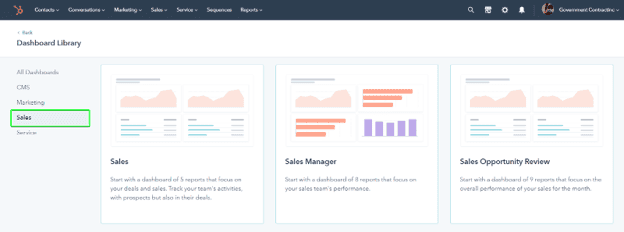
Start from the dashboard and report libraries, which every plan includes, and build one dashboard per role around the meeting it supports. Use the custom report builder on Professional for cross-object questions, and attribution reports on Marketing Hub Professional to connect campaigns to pipeline. Agree on metric definitions before anyone builds a chart.
| Reporting tool | Best for | What HubSpot requires |
|---|---|---|
| Dashboards and dashboard templates | One view per role or meeting | All products and plans; assigning dashboards to specific teams and users is Enterprise only |
| Report library | Standard reports saved straight to a dashboard | All products and plans; customizing template filters needs Professional or Enterprise |
| Custom report builder | Questions that span contacts, companies, deals, tickets and activities | Professional or Enterprise of Marketing, Sales, Service, Data, Content or Revenue Hub; datasets and formula fields need Data Hub Enterprise |
| Attribution reports | Which channels and assets create contacts, deals and revenue | Marketing Hub or Content Hub Professional or Enterprise; Deal Create and Deal Revenue Attribution need Marketing Hub Enterprise |
| Forecast tool | Pipeline forecasts against goals, weighted or total | Sales Hub or Service Hub Professional or Enterprise |

Two details save a lot of confusion. Dashboard access does not override report sharing, folder permissions or a user's data permissions, so a shared dashboard can look different to different people. And HubSpot renamed its attribution reports (Deal Attribution became Deal Create Attribution, Revenue Attribution became Deal Revenue Attribution), so older internal documentation may use the old names.
Which HubSpot AI Agents Should You Switch On?
Start with one generally available agent tied to a measurable job: the Customer agent for repetitive support questions, the Prospecting agent for outbound research and drafts, or the Data agent for filling properties at scale. Pilot it, check the quality, cap its credit spend, then expand. Treat beta agents as experiments, not production processes.
| Agent | What it does | Status and tier | Credits |
|---|---|---|---|
| Customer agent | Answers customer questions from your content, asks follow-ups when unsure, and hands off to a human | Generally available · Professional or Enterprise | 50 per resolved conversation |
| Prospecting agent | Finds good-fit companies from intent signals, identifies contacts and drafts personalized outreach from your "plays" | Generally available · listed from Starter | 100 per lead recommended |
| Data agent | Fills Smart Properties, runs Smart Actions in workflows and Smart Columns in Data Studio, from web research, your website, CRM data or call transcripts | Generally available · from Starter | 10 per prompt, per record |
| Knowledge base agent | Drafts help articles from closed tickets and suggests edits to existing ones | Beta Service Hub Professional or Enterprise | 200 per new article |
| Content agent | Creates blog posts, social posts and landing pages | Beta Marketing Hub Professional | 1,000 per piece |
| Nurture agent | Personalized nurture email | Beta Marketing Hub Professional | 10 per email |
| Custom agents (Agent Builder) | Agents and automations you describe in natural language | Beta | 1 per action unit |
| Breeze Assistant | Conversational assistant for drafting, summarizing records, meeting prep and tasks | All products and plans | No per-action rate listed |
Sources: HubSpot Knowledge Base articles linked above, the Agent Hub overview, HubSpot pricing and the product and services catalog credit rates, checked October 2026. Rates apply to classic hub and seat pricing; Flexible Seats-and-Credits customers have different rates.
What decides whether an agent helps or embarrasses you is the context you give it. Agent Hub's Context tab holds your messaging, tone, brand and ideal customer profiles, and knowledge vaults hold product details, internal documents and support guidance. Fill both before you activate anything. Then decide in AI settings which data (CRM records, conversations, files) AI features may use, and test: previewing the Customer agent uses no credits, and its first-time setup offers a free trial period.

A few rules worth knowing before you start: once created, the Customer agent can be paused but not deleted; deleting any agent in Agent Hub permanently removes its data; and credit-using Prospecting agent actions do not run in sandbox accounts, so test with care. HubSpot publishes its own results for the Customer agent (it reports a 65% resolution rate across more than 8,000 customers in its April 2026 announcement). Treat vendor figures as a ceiling, and measure your own.
How Do HubSpot Credits Work, And How Do You Control The Spend?
HubSpot Credits pay for usage-based features such as AI agents, buyer intent and AI actions in workflows. Every paid tier includes a monthly allowance that resets each month and does not roll over. When included credits run out, those features pause unless you have bought more, so set alerts and spend limits early.
| Highest tier in the account | Starter | Professional | Enterprise |
|---|---|---|---|
| Marketing, Sales, Service, Content, Smart CRM or Revenue Hub | 500 | 3,000 | 5,000 |
| Data Hub or Customer Platform | 500 | 5,000 | 10,000 |
Included monthly credits on classic hub and seat pricing, from HubSpot's product and services catalog, October 2026. The allowance follows your highest tier and does not add up across hubs. Extra credits were listed at $0.010 each pay-as-you-go or $10 per pack of 1,000 a month. Check your own contract.
Five controls keep credit spend predictable:
Only users with paid seats (and Partner seats) can use credits; free and view-only users cannot. If you have unassigned seats from the audit, HubSpot lets you swap them for credits. The full rules are in HubSpot's guide to features that use credits.
How Do You Drive HubSpot Adoption Across Teams?
Give each person the right seat and permissions, simplify what they see, train by role rather than by feature, and make HubSpot the only place a number is reported. Adoption follows usefulness: if the pipeline review runs from a HubSpot dashboard, reps keep their deals up to date in HubSpot.
Seats and permissions are separate. Seats decide which tools a user can open; permissions decide what they can do, and changing one does not change the other. Many "HubSpot doesn't do that" complaints are really a missing seat or permission. Practical steps that work:
Role-based views
Hide unused properties, set default record views and build one dashboard per role, so each team sees only what it needs.
Role-based training
HubSpot Academy offers free courses and certifications. Pair them with a short internal playbook on how your stages and fields work.
Assistant in daily work
Switch on Breeze Assistant in AI settings and show reps two or three saved prompts for record summaries and meeting prep they will use every day.
Watch the signal
Check the audit log's 30-day Login History each month. A seat that has not logged in is a training gap or a seat to reassign.
The old advice still holds: name one HubSpot owner, run a short admin rhythm, and keep goals visible. This table turns the usual admin goals into a schedule:
| Admin goal | HubSpot tool | Cadence |
|---|---|---|
| Accurate, governed data | Data Quality page, duplicates manager, property insights | Weekly digest, monthly cleanup |
| Lean automation | Workflow list, unused-workflows count, automation issues | Monthly |
| Trusted reporting | Role dashboards, dashboard activity log | Quarterly review of what is used |
| Sharper targeting | Lead scoring, segments | Quarterly score recalibration |
| Healthy integrations | Connected apps, data sync errors | Monthly |
| Security and compliance | Permissions, audit log, SSO | Quarterly access review |
| Productive AI | Agent Hub, credit usage by feature | Monthly |
| Ongoing adoption | Login History, HubSpot Academy, internal playbook | Monthly, plus onboarding for new hires |
How Do You Keep HubSpot Secure And Well Governed?
Keep Super Admins to a minimum, build permission sets by role, use SSO if you are on Professional or Enterprise, review the audit log, and test changes in a sandbox on Enterprise. Two-factor authentication is already mandatory on paid HubSpot accounts. Decide in AI settings which data AI features may use.
| Control | What it gives you | What HubSpot requires |
|---|---|---|
| Two-factor authentication | Required for password logins and cannot be turned off; HubSpot recommends passkeys or authenticator apps over SMS | All Starter, Professional and Enterprise accounts |
| Permission sets | Role-based access; only a Super Admin can create another Super Admin | All accounts |
| Single sign-on (SAML) | Log in through your identity provider, and optionally require it | Professional or Enterprise |
| Audit logs | Login history and security activity for the last 30 days; Enterprise adds categories such as workflows and content | Starter, Professional or Enterprise; Super Admin |
| Standard sandbox | Copy production assets, test changes and deploy supported changes back | Enterprise |
| Property view and edit restrictions | Limit who sees or edits specific fields | Enterprise |
| Sensitive Data | Store regulated data under HubSpot's Sensitive Data terms | Enterprise |
One caution from HubSpot's own documentation: property restrictions are not a security control, because a restricted property can still be set through the API or when a record is created manually. Sensitive data belongs under HubSpot's Sensitive Data terms, not behind a hidden field. On AI, HubSpot states on its AI product page that third-party AI providers are contractually barred from training on customer data. Your own policy should still say which data AI may read.
How Do You Connect HubSpot To The Rest Of Your Stack?
Use native integrations and HubSpot data sync for standard apps, decide which system owns each field before you connect anything, and use an integration platform or custom API work when the logic is more complex. Many "HubSpot problems" are really sync problems: fields overwritten by another system, or records created twice.
HubSpot data sync is on every plan and supports one-way or two-way syncs. After the first full sync, HubSpot checks for changes every five minutes. Custom field mappings need a Data Hub subscription. The App Marketplace covers most common tools, from email and calendars to finance systems.
If your sales team works in Salesforce, the HubSpot-Salesforce integration needs a Professional or Enterprise HubSpot subscription and a Salesforce edition with API access. It connects one Salesforce instance per HubSpot account, and records do not sync automatically on install. Field ownership, sync rules and duplicate handling are worth designing up front. See how we approach Salesforce and HubSpot integration.
A 90-Day Plan To Maximize HubSpot
Spend the first 30 days on the foundation (audit, access, data), the next 30 on automation and reporting, and the last 30 on AI with guardrails. The order matters: each phase depends on the one before it, and AI layered on messy data simply produces errors faster.
Audit, access and data
Run the seven audit checks. Reassign or release unused seats, review Super Admins and permission sets, and switch on SSO if your tier has it. Work through the Data Quality page: merge duplicates, fix formatting, and hide unused properties. Write one definition for each lifecycle and deal stage.
Automation and reporting
Turn off orphaned workflows, document the rest, and add exit rules. Recalibrate lead scores. Build one dashboard per role from the libraries, plus the cross-object and attribution reports leadership needs. Review every integration's field mappings and sync errors.
AI agents with guardrails
Switch on Breeze Assistant for the team in AI settings. Fill Agent Hub's Context tab and knowledge vaults. Pilot one generally available agent against a baseline metric, with a feature-level credit limit. Expand only once the pilot beats the baseline.
How Twopir Consulting Helps Companies Get More From HubSpot
Twopir Consulting is a Salesforce Partner and HubSpot Partner. We implement, rescue, optimize, and integrate complex CRM and revenue systems, and we help growing and mid-market companies solve complex CRM, integration, and business system challenges. For HubSpot customers, that usually starts with an honest look at the portal they already have.
Our CRM and AI audit runs on read-only portal access and ends with a severity-ranked findings report, a revenue-impact assessment, a prioritized fix sequence and a walkthrough with the architects who ran it. From there we fix the foundation and build on it: AI in HubSpot from first activation to custom agents, and our Marketing Hub, Sales Hub and Service Hub practices. One published example: for a mid-market B2B services company, we built HubSpot workflows that qualify leads on booking and payment status, create deals, assign follow-ups and exclude no-shows automatically.
Find Out What Your HubSpot Portal Is Leaving On The Table
In a 30-minute discovery call, we review how your teams use HubSpot today, where data, automation or reporting is holding you back, and which AI agents are worth switching on for your tier and credits.
Schedule a Discovery CallThe Bottom Line
HubSpot in 2026 does far more than it did when most portals were set up: agents in Agent Hub, Breeze Assistant on every plan, quote-to-cash in Revenue Hub, and a single Data Quality page. None of it pays off on a messy foundation. The companies that get the most from HubSpot audit first, clean their data, simplify their automation and reporting, and then add AI one measured step at a time.
- 1
Audit the portal before you buy or switch on anything new: seats, data, workflows, reports, integrations and credits.
- 2
Fix data first. Duplicates, formatting and unused properties undermine every report, score and agent.
- 3
Keep automation and dashboards lean, owned and documented, with one dashboard per role.
- 4
Pilot one generally available agent at a time, with business context loaded and a credit limit set.
- 5
Check tier requirements early. Many of the controls that matter sit on Professional, Enterprise or Data Hub.
Frequently Asked Questions
Audit the portal first, then work in order: clean the data, cut and document workflows, build one dashboard per role, train each team on its own process, and only then switch on AI agents with spend limits. Most portals gain more from fixing what they already have than from adding new hubs or features.
Agent Hub is the workspace where you view, activate, configure and monitor HubSpot's AI agents and agentic workflows, including custom agents made with Agent Builder. HubSpot launched it in public beta in July 2026. Its Context tab and knowledge vaults hold the business information agents use.
Agents use HubSpot Credits. Every paid tier includes a monthly allowance, for example 3,000 credits on a Professional hub, that resets monthly without rollover. As of October 2026, the Customer agent used 50 credits per resolved conversation and the Prospecting agent 100 per recommended lead. Extra credits can be bought pay-as-you-go or in packs.
Dashboards and the report library are on every plan. The custom report builder needs a Professional or Enterprise subscription of Marketing, Sales, Service, Data, Content or Revenue Hub. Attribution reports need Marketing Hub or Content Hub Professional, and datasets and formula fields need Data Hub Enterprise.
Open Data Management, then Data Quality, to see detected duplicates, then review and merge them in the duplicates manager, which needs a Professional or Enterprise subscription. Bulk merging needs Data Hub Professional or Enterprise. Prevent new duplicates by mapping a unique identifier, such as email or Record ID, on every import.
Run a full audit at least once a year, and before any major change such as a new hub, a migration, a new integration or an AI rollout. In between, review data quality, workflows, integrations and credit usage monthly, and permissions and dashboards quarterly, so problems never pile up.
Yes. HubSpot's native Salesforce integration syncs records between the two, and needs a Professional or Enterprise HubSpot subscription and a Salesforce edition with API access. It connects one Salesforce instance per HubSpot account. Decide which system owns each field before you turn the sync on.
