
Propertybase: The Complete Guide To The Real Estate CRM On Salesforce
Propertybase is a real estate CRM that runs inside Salesforce. This guide explains what it is today, who owns it, how its Inquiry, Listing, Offer and Closing records carry a deal from first enquiry to commission, how portal syndication works by region, and what to plan for before you implement or rescue it.
Key Takeaways
- Propertybase today means Propertybase Salesforce Edition: a real estate CRM installed as a managed package in a Salesforce org, sold by Lone Wolf Technologies, which acquired Propertybase in 2021.
- Propertybase GO, the non-Salesforce product, was renamed Lone Wolf Front Office in 2024. The Salesforce Edition continues as its own product.
- The deal runs on a set of real estate records: Contacts, Companies and Households, Inquiries, Properties and Listings, Linked Listings, Offers and Closings, with Matching, Quicksend and Action Plans working across them.
- Portal syndication is regional: Property Finder, Bayut and Dubizzle in the UAE, Rightmove and Zoopla in the UK, Idealista in Spain, Zillow in the US, and a generic XML feed for aggregators.
- Because it is a managed package, you extend Propertybase with standard Salesforce tools. New automation belongs in Flow, since Salesforce ended support for Workflow Rules and Process Builder on 31 December 2025.
- Upgrades, sandboxes and data backups are the customer's responsibility, which is where most live Propertybase orgs drift.
Propertybase is one of the longest-running real estate applications on Salesforce, and also one of the most misunderstood. Search for it and you will find reviews that mix two different products, feature lists copied from 2019, and claims nobody can source. Brokerages evaluating it, or already living with an org that has stopped keeping up, need a clearer picture: what the product is now, how its data model actually works, and where configuration ends and real Salesforce work begins.
This guide is written for managing brokers, operations leads and Salesforce admins at growing and mid-market companies in real estate, from a single-office brokerage scaling past its spreadsheets to a multi-office group running listings across several countries.
Is Propertybase The Right Real Estate CRM For Your Brokerage?
Propertybase fits brokerages that want a real estate data model, portal syndication and lead matching inside Salesforce, and that have, or can hire, the Salesforce skills to run it. It is less suited to small teams that want a simple, ready-made CRM and have nobody to own the platform.
Propertybase fits if you list on several portals, work across offices or countries, need listings, leads, offers and commissions in one system, and want Salesforce reporting, security and automation underneath. Lone Wolf positions it for brokerages growing from 10 agents to more than 200 with multi-office and multi-territory structures.
Propertybase is a harder fit if you are a small team that wants a plug-and-play CRM with no administration, you have no one to own upgrades and data quality, or your workflow is so unusual that you would be fighting the package's model at every step. In that last case a custom Salesforce build may serve you better.
What Is Propertybase In 2026, And Who Owns It?
Propertybase is a real estate CRM built on Salesforce that manages leads, listings, transactions and commissions in one platform. Lone Wolf Technologies acquired Propertybase in August 2021, and the Salesforce product is now sold as Propertybase Salesforce Edition.
The name causes confusion because, at the time of the acquisition, "Propertybase" covered several products. Since then Lone Wolf has folded the non-Salesforce products into its own suite. In August 2024 it announced that Propertybase GO is now Lone Wolf Front Office, while Salesforce Edition users kept their own product and login. If you read a review that compares "GO" and "Salesforce Edition" as current options, it predates that change.
| Product line at acquisition (2021) | What it was | Status today |
|---|---|---|
| Propertybase Salesforce Edition | Enterprise real estate CRM built on Salesforce, sold worldwide | Continues sold by Lone Wolf as Propertybase |
| Propertybase GO | CRM and website for brokerages and teams, not on Salesforce | Renamed Lone Wolf Front Office (2024) |
| Propertybase Back Office / BackAgent | Back-office and transaction accounting | Renamed Lone Wolf Workspace (2024) |
| BoldLeads and Unify | Lead generation, and a mortgage CRM | Separate Lone Wolf product lines, outside the scope of this guide |
Sources: Lone Wolf's 2021 acquisition announcement and its August 2024 Front Office announcement. The rest of this guide is about Propertybase Salesforce Edition.
How Does Propertybase Work On Salesforce?
Propertybase is a managed package: a sealed set of objects, fields, pages and code that installs into a Salesforce org and upgrades automatically. Its records sit beside standard Salesforce data, so reports, sharing rules, Flow and integrations work across both, while the package's own internals stay under Lone Wolf's control.
The Propertybase listing on AgentExchange (Salesforce's marketplace, formerly AppExchange) describes it as installed as a managed package that receives automatic upgrades, is Lightning-ready, and supports multiple currencies. Every Propertybase object and field carries the pba__ namespace. The Inquiry object, for example, has the API name pba__Request__c, and Listings are pba__Listing__c. Lone Wolf lists pricing from $89 per user per month with the Salesforce platform licence included (vendor pricing, checked October 2026).
Security, Data, Reporting, Flow, Apex, Integrations
Users, profiles and sharing; reports and dashboards; Flow automation; APIs; the mobile app; anything installed from AgentExchange.
The Real Estate Data Model And Tools
Inquiries, Properties, Listings, Offers and Closings, plus Matching, Quicksend, Action Plans, Front Desk lead intake and portal syndication, configured in the Propertybase Control Center.
Custom Fields, Flows, Integrations, Dashboards
Lead routing rules, compliance steps, commission logic, regional portal fields, and the reports leadership actually uses. This is the layer that decides whether the org works.
What Are The Core Records In Propertybase?
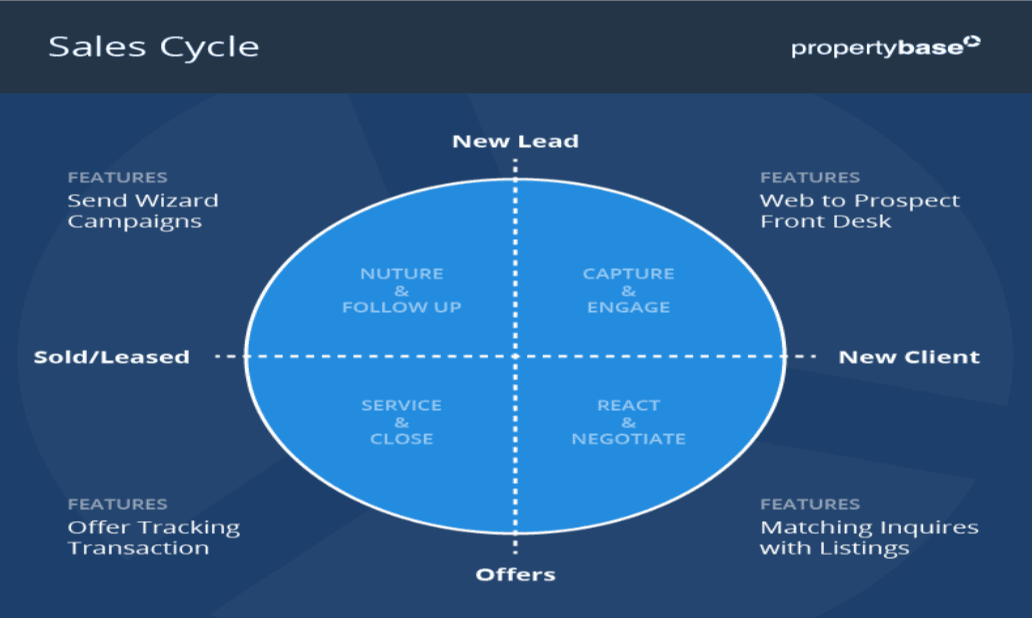
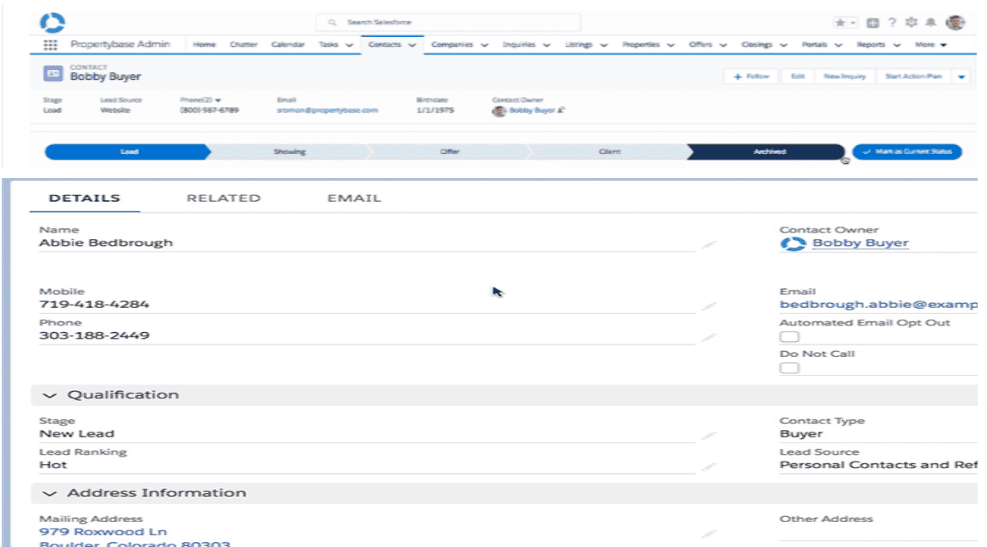
Propertybase models a brokerage with a small set of related records. People are Contacts, grouped into Companies and Households. What a buyer or tenant wants is an Inquiry. What is for sale or rent is a Listing based on a Property. Offers and Closings carry the deal from negotiation to commission.
| Record | What it holds | Worth knowing |
|---|---|---|
| Contact | Buyers, sellers, tenants, landlords, vendors and referrers, with every call, email and showing logged | Record types Individual and Company; changing a Contact to Company links it to a Company record |
| Company | Businesses you deal with: developers, lenders, law firms, other agencies | Tracks each Contact's role within the Company |
| Household | Contacts who buy or rent together | Households can be selected as Quicksend recipients |
| Inquiry (API name Request) | What a person is looking for: type, location, size, bedrooms, budget | The anchor for Matching; add custom fields for your own criteria |
| Property | The physical asset and its attributes | One Property can appear in several Listings over time |
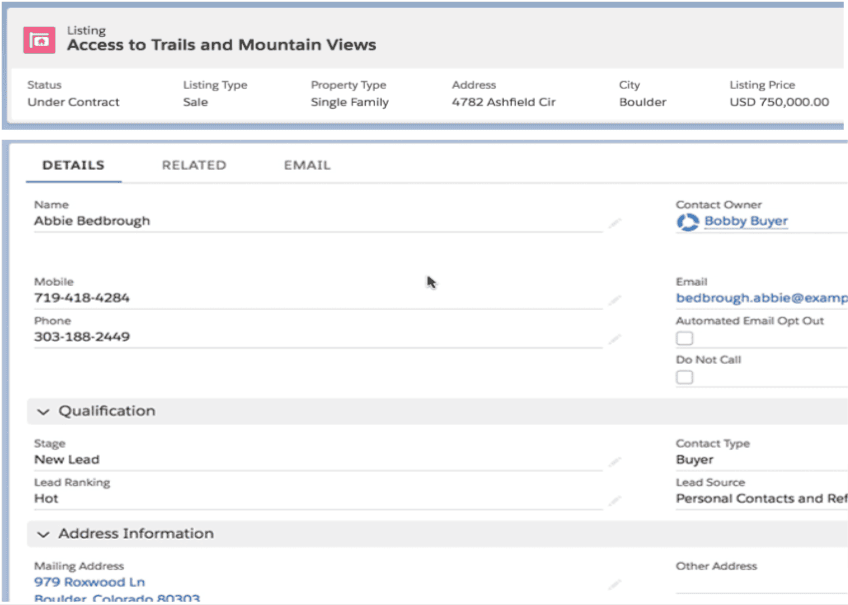
| Listing | A Property offered for sale or rent, with price, status, media and agent | Record types Rent and Sale, which cannot be changed after creation |
| Linked Listing | A Contact's feedback on a specific Property | Related to both the Inquiry and the Contact |
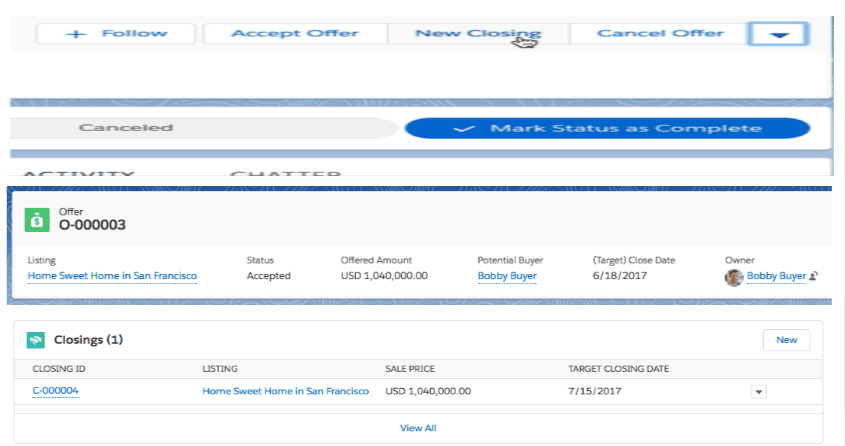
| Offer | An offer on a Listing, with buyer and seller, counter offers, addenda and notes | Actions to accept, cancel or create a Closing |
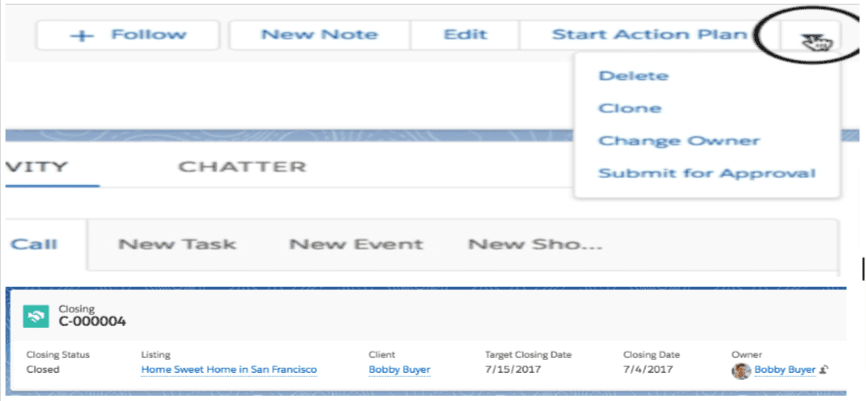
| Closing | The transaction to completion: status, parties, commission overview, closing checklist | Custom fields can calculate commissions and desk fee deductions |
Source: Propertybase Help Center articles on Companies, Listings and Properties, Offers and Closings.
The distinction between Property and Listing matters more than it first appears. Lone Wolf's documentation states that Listings are always based on Property data, and which fields sync from Listing to Property is configurable. Get that mapping wrong and you end up with prices and statuses that disagree between the two records, which then flow straight out to the portals.
How Does A Deal Move Through Propertybase, From Enquiry To Closing?
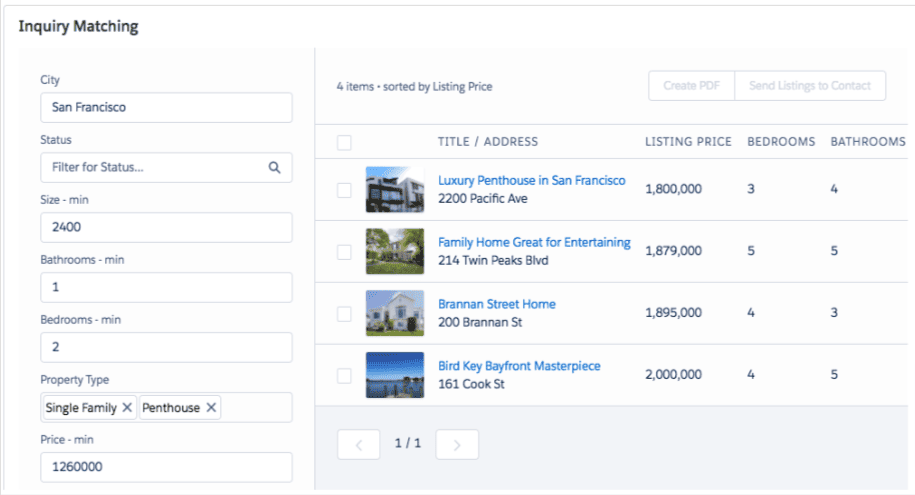
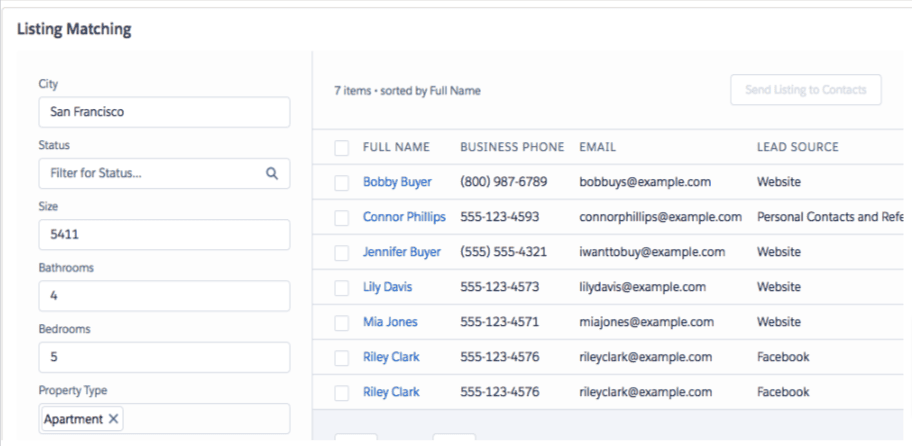
A typical deal enters through Front Desk as a Contact and Inquiry, is matched to Listings, receives property emails through Quicksend, moves to an Offer when the client bids, and becomes a Closing when the offer is accepted. Action Plans keep the tasks moving at every stage.
What Are The Key Features Of Propertybase?
Beyond the data model, the features brokerages use most are lead intake, matching, email, task automation, portal syndication and reporting. Some are Propertybase's own tools; others are standard Salesforce capabilities that Propertybase relies on, and knowing which is which matters when something needs to change.
Front Desk lead intake
Parses leads from portals, forms and email into Contacts and Inquiries, so nothing waits in an inbox. Propertybase feature.
Matching and Linked Listings
Two-way matching between Inquiries and Listings, with filters and exact-match fields set in the Control Center. Propertybase feature.
Quicksend email
Templates, merge fields and inline listings for one-to-few emails from the record. Propertybase feature.
Action Plans
Reusable task templates with dependencies, day offsets, assignees, priorities and email reminders, for new buyers, sellers, listings and closings. Propertybase feature.
Portal syndication
Publishes Listings to portals through per-portal feeds and field mappings, with Auto Publish. Propertybase feature.
Reports and dashboards
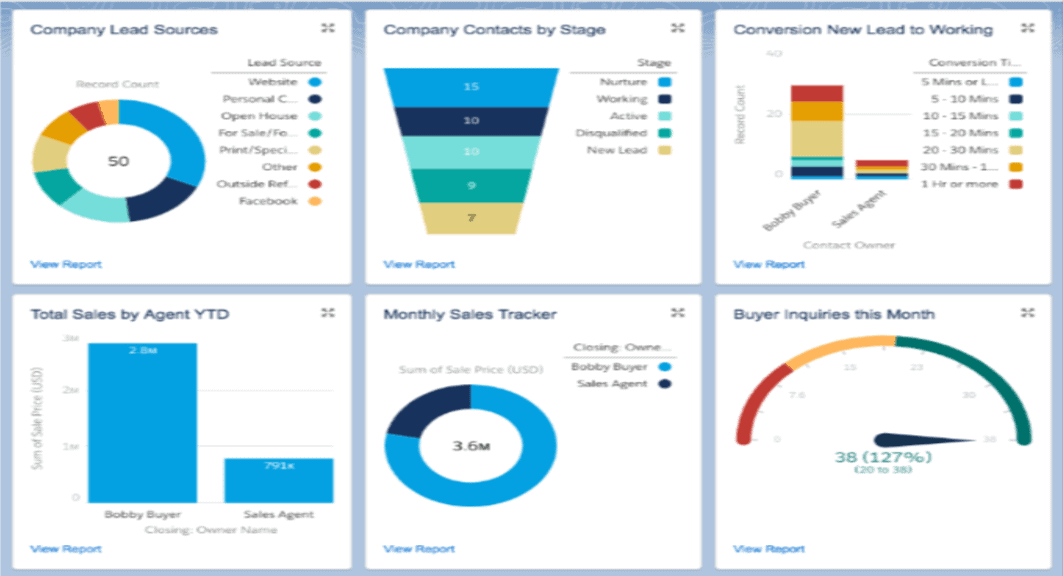
Lead sources, conversion, sales by agent and pipeline, built with standard Salesforce reports and dashboards. Salesforce platform.
Mobile access
Propertybase runs in the Salesforce mobile app on iPhone and Android, so agents work the same records in the field. Salesforce platform.
Flow automation and AI
Lone Wolf lists workflow automation built on Salesforce Flow, and Salesforce Agentforce for lead scoring and deal predictions. Salesforce platform.
Which Property Portals And Integrations Does Propertybase Support?
Propertybase syndicates Listings to property portals through feeds configured under Portal Mapping in the Control Center. Supported portals vary by region, so the right question is not "does it integrate?" but "does it support the portals my market uses, with the fields they require?"
| Region | Portals documented by Propertybase | What to plan for |
|---|---|---|
| UAE and Middle East | Property Finder, Bayut, Dubizzle, Houza | A separate package installed by Propertybase support; adds UAE fields, including the RERA permit (Trakheesi) number and the DTCM permit for short-term rentals; Arabic titles and descriptions |
| United Kingdom | Rightmove, Rightmove Overseas, Zoopla, Zoopla Overseas, On the Market, LonRes | Per-portal feeds and field mapping in the Control Center |
| Spain and Europe | Idealista | Per-portal field mapping |
| United States | Zillow; Front Desk intake from Realtor.com, Zillow and Trulia | MLS and IDX depend on your market and website set-up |
| Everywhere else | Generic Propertybase XML feed, used by aggregators such as XML2U | Every listing needs a unique Broker Listing ID and must be allowed for portals |
Sources: Propertybase Help Center on portal syndication, the Middle East portal integration and the generic XML feed. Confirm the current portal list with Lone Wolf before you commit to a go-live date.
For e-signature, Lone Wolf says its Authentisign product is built into Propertybase, so offers are sent, signed and tracked inside the CRM. Beyond that, integration is standard Salesforce work: AgentExchange apps, middleware, or custom APIs.
When a portal or website needs something the standard feeds do not provide, the answer is usually a Salesforce integration rather than a workaround. In one of our projects, a UAE brokerage moved listing publishing for Zoopla and Rightmove into a native Salesforce integration with one-click Publish, Unpublish and Check Status. In another, we built an Apex REST service that generates live XML feeds in the exact schema each external property website required.
How Far Can You Customize Propertybase?
You can extend Propertybase as far as Salesforce allows, but not by editing the package itself. Add custom fields, objects, Flows, Apex, page layouts and integrations around the pba__ objects; leave the package's own code and components alone, so automatic upgrades keep working.
| Requirement | Usually done with | Example |
|---|---|---|
| Settings and options | Configuration | Matching filters and result columns, portal mappings and Listing-to-Property sync in the Control Center |
| New data points | Configuration | Custom fields on Inquiry and Listing; a custom matching criterion needs the same field, with the same API name, on both objects |
| Process automation | Flow | Lead routing, listing-agent assignment, status-change alerts, compliance tasks |
| New business processes | Custom objects + Flow | An anti-money-laundering (AML) check object with approvals before an Offer can proceed |
| Complex logic or APIs | Apex / integration | Commission engines, portal or website feeds, ERP and accounting sync |
Two points catch out many orgs. First, an AML or KYC process is not a Propertybase module: it is a custom build on Salesforce, designed around your jurisdiction's rules. Second, automation. Salesforce ended support for Workflow Rules and Process Builder on 31 December 2025. Existing ones still run but receive no fixes, and Salesforce recommends moving them to Flow Builder. Some older Propertybase help articles still show Process Builder steps, so build anything new in Flow, and plan to migrate what an older org already has. Our Propertybase customization work starts by drawing that line between configuration and code before any build begins.
Where Do Propertybase Implementations Go Wrong?
Most struggling Propertybase orgs are not suffering from a product failure. They are suffering from a capable package that was installed but never owned: upgrades skipped, automation left on retired tools, feeds nobody monitors, and data nobody cleans.
How Should You Implement Propertybase?
Implement Propertybase workflow first. Map how a lead becomes a closing in your brokerage, then configure the package to that path, migrate clean data, connect portals, automate in Flow and build role-based reports, testing each stage in a sandbox before it reaches agents.
Moving from another CRM is usually the riskiest step, because listings, contacts and history have to land in the right Propertybase records. See our Propertybase data migration approach for how we sequence it.
Propertybase Best Practices: A Checklist For Brokerages
These are the habits that keep a Propertybase org accurate and trusted after go-live. Each one is cheap to keep up and expensive to recover from once it slips.
- Set a lead response rule. Route every Front Desk lead to an owner automatically, and follow up in Flow when nobody responds within your agreed time.
- Keep matching fields in pairs. Any criterion you add to Inquiries needs its twin on Listings, or matching silently ignores it.
- Own the feeds. Name someone responsible for portal errors, and check listing status on portals after every major data change.
- Test upgrades in a sandbox and keep your own backups, as Lone Wolf recommends.
- Move legacy automation to Flow, starting with the processes that touch leads, listings and closings.
- Build dashboards by role: agents see their pipeline, managers see conversion and stalled deals, leadership sees sources that produce closings.
- Review user access every quarter, especially for agents who join or leave, and for sensitive client and compliance data.
- Balance automation with personal contact. Use Action Plans and templates for consistency, not to replace the agent's own follow-up.
- Monitor API and integration usage, so a chatty integration does not hit Salesforce limits at month end.
- Train continuously. Propertybase upgrades add and change features; short refreshers keep agents in the system.
When Should You Bring In A Propertybase Partner?
Bring in a partner when the work goes beyond configuration: a new implementation, a migration from another CRM, regional portal set-up, custom objects or integrations, or an existing org that agents have stopped trusting. Those are Salesforce architecture problems as much as real estate ones.
Twopir Consulting is a Salesforce Partner and HubSpot Partner. We implement, rescue, optimize, and integrate complex CRM and revenue systems, and we help growing and mid-market companies, alongside enterprise brokerages, run Propertybase on Salesforce. That covers implementation, integration, customization and data migration. Because we build on Propertybase rather than sell it, we can tell you plainly when configuration is enough, when you need custom work, and when a different approach would serve you better.
Get A Clear Plan For Your Propertybase Org
On a 30-minute discovery call, a Twopir Salesforce architect will review how leads, listings, portals and closings run in your brokerage today, and tell you what to configure, what to fix and what to build.
Schedule a Discovery CallThe Bottom Line
Propertybase gives a brokerage a proven real estate data model, portal syndication and lead matching on top of Salesforce's security, reporting and automation. Its strength is also its demand: it is a Salesforce org, and it rewards brokerages that own it like one. Get the records, feeds and automation right, keep upgrades and backups under control, and it can carry the business from first enquiry to commission in one system.
- 1
Propertybase today means Propertybase Salesforce Edition, sold by Lone Wolf; Propertybase GO is now Lone Wolf Front Office.
- 2
Learn the data model: Inquiry, Property, Listing, Linked Listing, Offer and Closing are what every workflow, report and feed depends on.
- 3
Check portal support and required fields for every market you list in before you set a go-live date.
- 4
Extend around the managed package with Salesforce tools, and build new automation in Flow.
- 5
Assign an owner for upgrades, backups, feeds and data quality; that is what keeps the org trusted.
Frequently Asked Questions
Yes. Propertybase Salesforce Edition is a real estate CRM installed as a managed package in a Salesforce org. It adds real estate records such as Inquiries, Listings, Offers and Closings, plus matching, email, task automation and portal syndication, on top of Salesforce's security, reporting and automation.
Lone Wolf Technologies announced its acquisition of Propertybase in August 2021. The Salesforce product is now sold as Propertybase Salesforce Edition by Lone Wolf, and propertybase.com redirects to Lone Wolf's Propertybase site.
In August 2024 Lone Wolf announced that Propertybase GO, its non-Salesforce CRM and website product, is now Lone Wolf Front Office. Propertybase Salesforce Edition was not merged into it and continues as a separate product with its own login.
Yes. Propertybase documents a Middle East portal package for Property Finder, Bayut, Dubizzle and Houza, and portal syndication to Rightmove, Zoopla, On the Market, LonRes, Zillow and Idealista. Other portals can take its generic XML feed through aggregators. Confirm the current list with Lone Wolf for your market.
Largely, yes. You can add custom fields, objects, Flows, Apex, layouts and integrations around the Propertybase objects. You cannot edit the managed package's own code, which is what lets it upgrade automatically. Build new automation in Flow, because Workflow Rules and Process Builder are no longer supported.
Propertybase runs in the Salesforce mobile app on iPhone and Android, and Lone Wolf lists full mobile CRM access on both. Agents use the same Contacts, Inquiries and Listings in the field as in the office, so page layouts should be designed with mobile use in mind.
Propertybase upgrades as a managed package, and Lone Wolf recommends testing each upgrade in a sandbox, backing up data first and checking integrations afterwards. Lone Wolf also states that backing up Salesforce Edition data is the customer's responsibility, so every org needs its own backup plan.
