
Salesforce Account Engagement Design Guide: Landing Pages, Forms and Templates
Account Engagement (formerly Pardot) gives marketers two ways to design landing pages, a separate system for forms, and a set of rules about images, code and domains that decide what actually publishes. This guide explains which builder to use, how to build and publish a page, and the design settings that keep pages on-brand, trackable and fast.
Key Takeaways
- Account Engagement has two landing page experiences: classic pages built on HTML layout templates, and enhanced pages built in a drag-and-drop builder in the Account Engagement Lightning App.
- The drag-and-drop builder belongs to Account Engagement. Salesforce CMS only supplies the images, through a CMS workspace and a non-enhanced channel.
- Every enhanced landing page needs a connected campaign, moves through Draft, Published and Published (Changes Pending), and reports views, submissions and errors on its Salesforce record.
- Enhanced pages do not run JavaScript or SVG and cap content at 384 KB. When a page needs scripting, custom CSS or dynamic content, a classic page on a layout template is still the better fit.
- Brand, tracking and trust depend on set-up work done before design: a validated HTTPS tracker domain, vanity URLs, form bot protection and the right edition for dynamic content.
What does "design" mean in Salesforce Account Engagement? It is how you build the pages and forms prospects see: landing pages, the forms on them, the layout templates that hold your brand, and the personalised content inside them. Account Engagement, formerly Pardot, is Salesforce's B2B marketing automation product. Its landing page builder, forms and templates decide how a campaign looks and how reliably it captures leads into Salesforce.
We first published this guide in 2023. This version is rebuilt from Salesforce Help, the Salesforce object reference, Trailhead and the Winter '27 release notes, checked in October 2026. It corrects the old version, which described the drag-and-drop builder as part of Salesforce CMS, and adds the classic and enhanced choice, publishing rules, forms, personalisation, domains and testing. It is written for marketing operations teams, Salesforce admins and marketing leaders at growing and mid-market companies that run Account Engagement on Salesforce.
What Can You Design in Account Engagement Landing Pages and Beyond?
Four kinds of asset, each with its own design tool. Landing pages are built in the enhanced drag-and-drop builder or on classic layout templates. Forms are built in the form wizard and styled per page or through layout templates. Emails use the enhanced email builder or classic templates. Dynamic content and HML merge fields personalise all of them for each prospect.
Landing pages
Enhanced pages in the drag-and-drop builder, or classic pages on HTML layout templates with full control of code.
Forms
Hosted forms with progressive profiling and bot protection, or form handlers that pass data from forms you already have.
Personalisation
Dynamic content that swaps HTML by grade, score or field value, and HML merge fields that insert prospect data.
Emails get only a short mention here, because our Pardot email guide covers list emails, templates and the email builders in depth.
Classic or Enhanced Landing Pages: Which Should You Use?
Use enhanced landing pages for most new campaign pages, and keep classic pages for anything that needs code. Since Winter '22, Account Engagement Lightning App users choose between the two experiences. The enhanced builder gives marketers drag-and-drop editing, responsive layouts and Salesforce reporting. Classic pages keep scripting, custom CSS, dynamic content and the merge field picker.
| Enhanced (Lightning builder) | Classic | |
|---|---|---|
| How you design | Drag-and-drop builder with prebuilt row and column layouts | HTML or WYSIWYG editor on a layout template, or a stock template |
| Where it lives | Landing Page record in Salesforce; Account Engagement Lightning App only | Account Engagement, under Content › Landing Pages |
| Code | No JavaScript or SVG in the page; scripts only in header and footer code | Scripting and custom CSS supported |
| Images | Salesforce CMS channel or public https image URLs; Salesforce Files not supported | Account Engagement Files |
| Reporting | Salesforce reports and list views; metrics on the record | Account Engagement reporting |
| Limits | Content up to 384 KB; up to 1,000 enhanced pages in most editions | Unlimited classic pages (Growth: 50 pages in total) |
Sources: Salesforce Help on landing page experiences and enhanced landing page considerations. On Growth Edition the 50-page limit counts classic pages plus published enhanced pages, so plan a retirement routine for old campaign pages early.
Choose enhanced when marketers build pages without a developer, the page is a standard campaign layout (hero, copy, form, button), and you want metrics on a Salesforce record next to the campaign.
Stay classic when the page needs JavaScript in the body, dynamic content blocks, a pixel-exact template your web team controls, or a form layout styled by custom CSS across many pages.
How Do You Build an Enhanced Landing Page, Step by Step?
Set up the builder once, then create a Landing Page record, attach a campaign, and design it with Edit in Builder. The enhanced experience switches on automatically with enhanced email. An admin creates the content permission set and a Salesforce CMS workspace and channel for images. After that, each page is a record you build with layouts and five component types.
One-time set-up
- Permission set. In Marketing Setup › Content Setup, Create Permission Set adds "Create Account Engagement Content". Users with it can create and edit pages; publishing needs the Administrator or Marketing role, or a custom role with create and edit on landing pages.
- Image library. Create a Salesforce CMS workspace and a public channel in the Digital Experiences app. The channel must be created with "Use non-enhanced APIs", because the enhanced email and landing page experiences do not support enhanced channels.
- Business units. Each page's campaign must be connected and tied to one business unit, or the page cannot be published.
Salesforce documents the steps in its landing page builder set-up and CMS set-up for Account Engagement articles.
Building the page
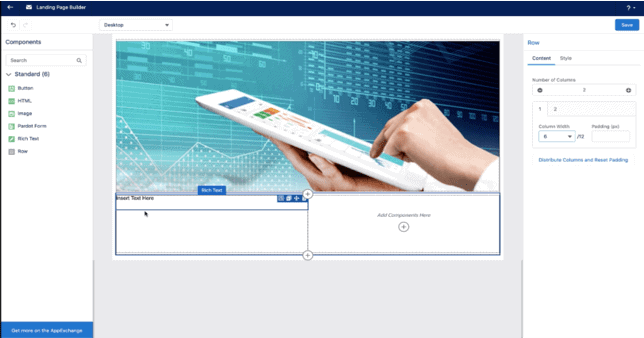
| Component | Use it for | Design note |
|---|---|---|
| Image | Hero images, logos, product shots | From the CMS channel or a public https URL; add alt text |
| Rich Text | Headlines, body copy, lists | Keep headings in order and copy short above the form |
| Pardot Form | Lead capture | Colours and fonts set here apply to this page only, not the form record |
| Button | Calls to action and downloads | One primary action per page |
| HTML | Embeds such as video iframes, custom blocks | Iframes render only on the published page; use a percentage width for responsive embeds |
Component behaviour comes from Salesforce's create a landing page article. Pages are responsive by default: on screens narrower than 480 px, the default width is 320 px.
How Do Publishing, Status and Campaign Metrics Work?
A page is Draft until someone with publish rights clicks Publish, and every later edit waits as "Published (Changes Pending)" until it is republished. Publishing fills the Public Link field from your primary tracker domain and creates a linked Account Engagement record that tracks engagement. Views, form submissions and errors then sync back to the Salesforce Landing Page record.
| Status | What visitors see | What to do |
|---|---|---|
| Draft | Nothing; there is no public link yet | Design, preview and review |
| Published | The live page at its public link or vanity URL | Share the link and watch the metrics |
| Published (Changes Pending) | The previous published version, not your edits | Review the changes, then click Publish again |
The pending state is useful for approvals: the live page stays unchanged while edits are reviewed. Status values are listed in the LandingPage object reference and the edit a landing page article.
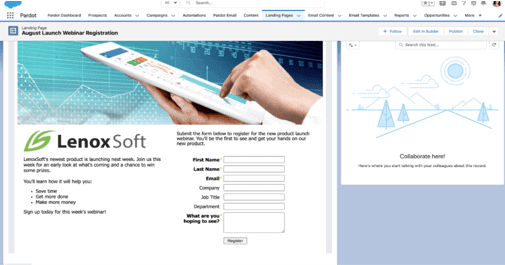
Campaigns and the page record
Because every enhanced page belongs to a connected campaign, pages appear in a Landing Pages related list on the campaign. The campaign is where marketers move between the campaign's pages, emails and links, and open a page's builder from its row menu.
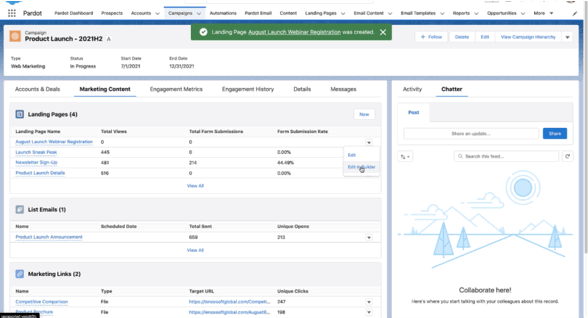
The page record holds the fields that matter after launch: Status, Public Link, Vanity URL, Hide from Search Engine Indexing, Unpublish Redirect URL, Content Last Saved and Last Published. Engagement metrics include total and unique views, form submissions, submission rate, form errors and tracked link clicks. If your admins have customised the landing page layout, they must add new fields such as Unpublish Redirect URL by hand.
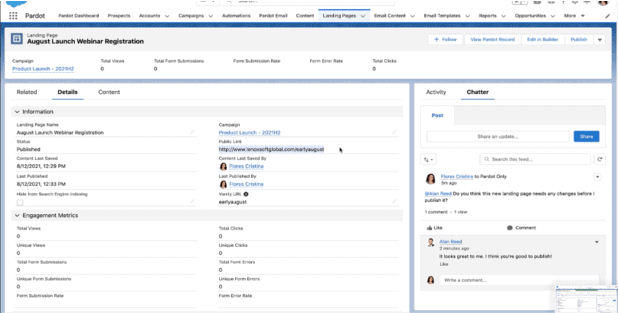
Unpublishing removes the public link and sends visitors to the unpublish redirect URL, or to the website set in Account Engagement Settings. Republishing restores the page and keeps its earlier metrics. Field details are in Salesforce's landing page fields reference.
How Do Layout Templates Keep Classic Pages and Forms on Brand?
A layout template is the HTML and CSS shell that classic landing pages, forms and site search results sit inside. Your web team builds it once with your header, fonts and colours. Marketers then create pages on it and only edit the regions you allow, so every page matches the website without anyone touching code.
- Three tabs. Layout holds the HTML and CSS. Form and Site Search are optional, and Salesforce says the default code is best for most cases.
- Required tags. Keep
%%title%%,%%description%%and%%content%%in the layout. The page content and the form are inserted at%%content%%. - Start points. Import a layout from a URL of your website (then add the three tags), or start from a responsive template. Stock templates exist for quick classic pages.
- Editable regions. Add
pardot-region="name"to an element to make it editable, andpardot-region-typeto limit the editor to a link, image, plain text or rich text. Regions cannot be nested, and renaming a region on a live page can break its content. - No server-side scripts. Layout templates do not support server-side scripting languages.
See Salesforce's guides to creating a layout template and content regions. A practical rule: build one master layout per website or brand, and lock everything except the headline, body, image and form regions.
How Should You Design Account Engagement Forms That Convert?
Ask for as little as possible, let progressive profiling collect the rest over time, and keep bot protection on. Forms are built in Account Engagement's form wizard, not in the landing page builder. On an enhanced page you restyle a form for that page only. For consistent styling across many pages, use a layout template and customise the form code.
| Design need | Feature | Where to set it |
|---|---|---|
| Shorter first form | Progressive profiling: show a field only once the prospect already has data in other fields | Form wizard, Fields step, Progressive tab (all editions) |
| Spam control | Honeypot field on every hosted form; conditional CAPTCHA for known spam IPs; optional reCAPTCHA for everyone | Look and Feel step, Advanced tab |
| Consistent styling | Layout template Form tab and form code | Content › Layout Templates |
| Page-specific styling | Colours and fonts in the builder's editing pane | Enhanced landing page builder |
| Existing website forms | Form handler that passes submissions to Account Engagement | Form handler record |
| Event or booth capture | Kiosk/Data Entry Mode, which does not cookie the visitor | Form record |
Sources: Salesforce Help on forms, progressive profiling and bot protection. Salesforce notes that bot protection reduces spam but does not remove all of it. To place a form on your own website in an iframe, turn on "Allow iframed assets on this domain" for the tracker domain. In emails, link to a form rather than embedding it.
For deeper form work, see our guides to Pardot form handlers with Salesforce and form dependent fields.
How Do Dynamic Content and HML Personalise a Page?
Dynamic content swaps a block of HTML based on who is viewing, and HML merge fields insert a prospect's own data. A dynamic content item has a default and variations based on grade, score or custom criteria, such as a prospect's industry. You embed it in a page, form, layout template, email or your own website, and visitors who match no variation see the default.
- Editions. Dynamic content is included in Plus, Advanced and Premium, and costs extra on Growth.
- Where it works. In classic landing pages, forms (above and below the form, and the thank-you content), layout templates and classic emails. Enhanced email does not support dynamic content, snippets, folders or A/B testing.
- Styling. The dynamic block inherits the CSS of the page or template it sits in, so design variations inside your existing styles.
- HML. Handlebars Merge Language works in email templates, list emails, landing pages, forms, dynamic content and signatures. Fields with no value show nothing, so set default values or use HML conditional logic. Enhanced email supports HML but not the older PML tags.
Details: Salesforce Help on dynamic content on pages and HML guidelines. A useful pattern for B2B pages is one landing page with an industry-based dynamic block for the proof section, instead of five near-identical pages.
Where Do Images and Brand Assets Live: Salesforce CMS or Account Engagement Files?
Enhanced pages and emails take images from a Salesforce CMS channel; classic assets use Account Engagement Files. Salesforce CMS is the image library, not the page builder. Set up one workspace and one non-enhanced public channel for marketing images, and copy existing Account Engagement image files into it rather than uploading them again.
To move images, open the Files page, choose the "CMS Compatible" view and use Copy to CMS. Folder permissions do not transfer, and images must sit in a "Workspace 1.0 + Channel 2.0" set-up for the Lightning builder (copy image files to CMS). Snippets give classic emails, forms and pages a reusable value, such as an event date or a logo, for one campaign.
Which Domain, URL and SEO Settings Does a Landing Page Need?
A validated HTTPS tracker domain on your own website domain, a short vanity URL, and a deliberate choice about search indexing. The tracker domain decides the address of every public page and link, so set it before design work starts. Pages on go.yourcompany.com look like your website and keep tracking first-party.
- Tracker domain. Add a CNAME record pointing to go.pardot.com and a DNS TXT validation key, then switch the default protocol to HTTPS once it validates. DNS can take up to 24 hours. With several websites, give each its own subdomain, such as go.siteA.com for siteA.com.
- Vanity URLs. Use dashes, not spaces, for example go.example.com/winter-event. A vanity URL works on one page at a time, and one left on a deleted page cannot be reused, so clear it and republish before you delete.
- Search indexing. Pages are indexable by default. Tick Hide from Search Engine Indexing for gated offers, thank-you pages and short-lived event pages that would compete with your main website.
- Meta description. On classic pages, the page description becomes the meta description, so write it for search results.
See Salesforce's tracker domain set-up and vanity URL articles. When we rebuilt Account Engagement for a new Salesforce org in a published Pardot migration and rebuild case study, the email sending domain, tracker domain and website tracking code were configured and validated from scratch before campaigns restarted.
How Do You Test and Improve Landing Page Design?
Run multivariate tests between page versions, read submission and error rates on each page record, and change one thing at a time. Multivariate tests are available in all Account Engagement editions and work with classic and builder pages. You choose the pages and their traffic weights, then share the test's link instead of the page links.
Salesforce's multivariate test article covers the set-up; to end a test, delete it. For emails, classic email A/B testing is available in all editions, while enhanced emails do not support A/B tests.
What Belongs on an Account Engagement Landing Page Design Checklist?
Check the foundations, the page and the launch separately. Most landing page problems we see are not visual. They are a missing business unit on the campaign, an image stored as a Salesforce File, a form without bot protection, or a page indexed by search engines when it should not be. This checklist is our working practice, built on the Salesforce rules above.
| Stage | Check |
|---|---|
| Foundations | HTTPS tracker domain validated; CMS workspace and non-enhanced public channel; content permission set assigned; one master layout template per brand |
| Page | Connected campaign with a business unit; one headline and one primary action; images from CMS with alt text; form of three to five fields with progressive profiling for the rest; content under 384 KB |
| Mobile | Preview at phone width; form fields and buttons easy to tap; embeds use percentage widths |
| Tracking | Completion actions on the form; analytics in header code; vanity URL set; unpublish redirect URL set |
| Launch | Search indexing decided; test submission checked on the Salesforce lead or contact; page reviewed before Publish; owner set to retire the page after the campaign |
Behaviour tracking is part of design, too. In a published Pardot for manufacturers case study, we used page actions, scoring and grading to separate request-for-quote activity from routine inquiries and alert reps when a prospect was ready.
Account Engagement vs Marketing Cloud: Does the Choice Change How You Design?
Yes: each Salesforce marketing product has its own content editors. Account Engagement uses its Lightning builder for emails and landing pages and classic builders for forms. Marketing Cloud Engagement, formerly ExactTarget, uses Content Builder and CloudPages. Marketing Cloud Next uses Experience Builder editors and Data 360 segments.
| Account Engagement | Marketing Cloud Engagement | Marketing Cloud Next | |
|---|---|---|---|
| Content editors | Lightning builder for emails and landing pages; classic builders for forms | Content Builder, CloudPages | Experience Builder editors |
| Automation | Engagement Studio, completion actions, automation rules | Journey Builder, Automation Studio | Flow Builder |
| Audience | Prospects, leads, contacts; lists | Subscribers; data extensions | Data 360 segments |
Source: Trailhead's Salesforce marketing solutions overview. The old version of this post called Marketing Cloud a B2C tool. Salesforce no longer frames it that simply, so choose on data model, channels and team skills. Account Engagement customers also get Marketing Cloud Next through Account Engagement+, which Salesforce says works alongside your existing instance without migrating data. Pages built in the CMS-powered builder can be used in Marketing Cloud Next campaigns (Trailhead). Our HubSpot vs Marketing Cloud vs Pardot comparison covers the wider choice.
The Bottom Line
Good Account Engagement landing pages come from set-up as much as from layout: the right builder, a branded tracker domain, one image library, and forms that ask little and protect themselves. Twopir Consulting implements, audits and rebuilds Salesforce Marketing Cloud Account Engagement, from tracker domains and layout templates to forms, scoring and Salesforce sync.
- 1
Use enhanced pages for standard campaign pages and classic pages when the page needs code or dynamic content.
- 2
Set up the HTTPS tracker domain, CMS channel and permission set before anyone designs a page.
- 3
Keep brand in one master layout template and one image library.
- 4
Keep forms short with progressive profiling, and leave bot protection on.
- 5
Review changes before republishing, test one change at a time, and retire old pages.
Get Landing Pages That Look Right and Report Right
Tell us how your team builds Account Engagement pages and forms today. We will review your builder set-up, templates, domains and forms, and show you what to fix first.
Schedule a Discovery CallFrequently Asked Questions
Yes. Pardot is now called Marketing Cloud Account Engagement, Salesforce's B2B marketing automation product. The old name still appears in places, including inside the app, for example the Pardot Form component in the landing page builder.
Enhanced landing pages are built in a drag-and-drop builder in the Account Engagement Lightning App and stored as Salesforce records with Salesforce reporting. Classic landing pages use HTML layout templates, support scripting, custom CSS and dynamic content, and report in Account Engagement. Both are still available.
No. The drag-and-drop builder is part of Account Engagement. Salesforce CMS, set up in the Digital Experiences app, is the image library the builder uses. You need a CMS workspace and a public channel created with the non-enhanced APIs option.
Not in the page body. Enhanced landing pages do not support active content such as JavaScript or SVG files. You can add script, style, link, noscript and comment tags to the header and footer code on the record's Settings tab, for example for analytics. For scripting inside the page, use a classic page.
Growth Edition supports 50 landing pages in total, counting classic pages and published enhanced pages. Most other editions support up to 1,000 enhanced landing pages, and classic landing pages are unlimited.
Because the page was edited after it was published. Saving an edit does not publish it: visitors keep seeing the previous version until someone with publish rights clicks Publish again. This lets a reviewer approve changes while the live page stays unchanged.
Dynamic content is included in Account Engagement Plus, Advanced and Premium editions, and is available for an additional cost on Growth Edition. It works in classic landing pages, forms, layout templates, classic emails and your website, but not in enhanced emails.
