
Broken Finance-to-Sales Data Loop Fixed —
Salesforce + MYOB Advanced Integration for an Australian Agricultural Equipment Manufacturer
An Australian-headquartered agricultural equipment manufacturer serving APAC mid-market clients was losing hours every week to manual re-entry between their CRM and accounting system. Twopir rebuilt their data pipeline — connecting Salesforce and MYOB Advanced via secure OAuth API — and cut order processing time by 50%.
& delivery speed
across sales & finance
in dealer onboarding
delivery in 8 weeks
remaining post-launch
- Active Salesforce org with Sales Cloud and Opportunity data in use
- MYOB Advanced tenant with admin API access credentials
- Defined data ownership — which system is source of truth for each object
- Clean Account records — deduplicated before integration begins
- Stakeholder alignment between sales ops and finance on field mapping
- API endpoint docs from MYOB Advanced available to Twopir team
- How to integrate Salesforce with MYOB Advanced via OAuth 2.0 and Apex callouts
- How to prevent auth failures with a token refresh framework
- How to surface sync errors in real time without polling or manual checks
- How to architect a Salesforce ERP integration that can scale to MuleSoft middleware
A Fast-Growing APAC Agricultural Equipment Manufacturer Whose Finance and CRM Systems Stopped Talking
By the time they engaged us, this client had been running Salesforce as their CRM and MYOB Advanced as their financial system of record for several years — but the two platforms had never been formally integrated. Sales reps were updating Accounts and Opportunities in Salesforce while the finance team independently managed customer and order data in MYOB Advanced. The sync happened through a manual process: someone would export a CSV from one platform, clean it, and import it into the other. It worked until it didn't.
As their APAC dealer and distributor network grew — particularly across the agricultural and industrial equipment segment — the manual reconciliation process became a weekly bottleneck. We were brought in after an internal IT project to build the integration had stalled due to authentication complexity with MYOB Advanced's OAuth layer. A fresh diagnostic revealed the prior attempt had skipped building a token refresh mechanism — the integration worked in testing but broke in production whenever a session expired.
Four Operational Gaps That Were Costing Real Revenue
A disconnected CRM and ERP isn't just an IT inconvenience — it's a revenue risk. The client's sales team was making decisions based on account and order data that was often 24–72 hours behind what finance had in MYOB Advanced.
Manual Record Updates Across Both Systems
Every new Account in Salesforce had to be manually re-entered in MYOB Advanced by a finance team member. The process added an average of 3–4 hours per week per staff member in pure re-entry time — and introduced errors that surfaced as billing discrepancies weeks later.
Authentication Instability Broke the Prior Integration Attempt
The internal team had built a proof-of-concept integration using MYOB Advanced's REST API, but it lacked a token refresh mechanism. OAuth sessions expire — without auto-refresh logic, the connection silently broke whenever a session timed out, leading to failed syncs that nobody noticed until data discrepancies surfaced days later.
No Error Handling — Failed Syncs Were Invisible
There was no logging, no alerting, and no retry mechanism for sync failures. When an API call failed, the failure was silent. Finance would only discover the problem during month-end reconciliation. In one instance, 17 orders had failed to sync over a 3-week period without anyone knowing.
Bulk Data Volume Hit Salesforce Governor Limits
When the team attempted a backfill — syncing historical MYOB Advanced customer records into Salesforce — the process hit Salesforce API governor limits and failed partway through. The result was a partial data set in Salesforce that couldn't be trusted for reporting or segmentation.
How We Structured the Engagement
We've built Salesforce-to-ERP integrations for companies across the US, UK, Australia, and UAE — in industries from legal tech to real estate to healthcare. The integration pattern for a manufacturing company connecting Salesforce to an accounting platform like MYOB Advanced follows a well-defined architecture: establish secure auth, define the canonical data model, build the sync engine with proper error handling, then validate at volume before go-live.
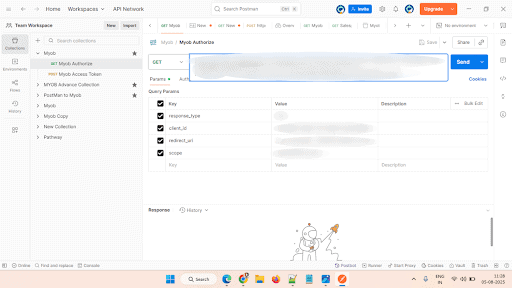
What made this engagement specific was the MYOB Advanced authentication model, which uses a tenant-scoped OAuth flow with short-lived tokens. We came in with a pre-tested token refresh framework that we adapted to their MYOB tenant configuration — saving the client 2–3 weeks of debugging that the prior internal team had spent on authentication failures.
Diagnostic Audit — Mapping the Architecture Before Writing a Line of Code
We started with a structured two-week audit. Our team reviewed the client's existing Salesforce org — object schema, data quality, API usage patterns, and governor limit headroom. In parallel, we documented the MYOB Advanced setup: which endpoints were active, what authentication model was in use, and how customer and order records were structured.
The audit produced two artefacts: a field mapping specification covering every Salesforce object and its MYOB Advanced counterpart, and a gap analysis identifying where data transformation would be needed. We also ran stakeholder interviews with the sales ops manager and finance team lead to confirm business logic — specifically which system should be considered authoritative for each data type in a conflict scenario.
Build & Integration — Authentication Framework and Sync Engine
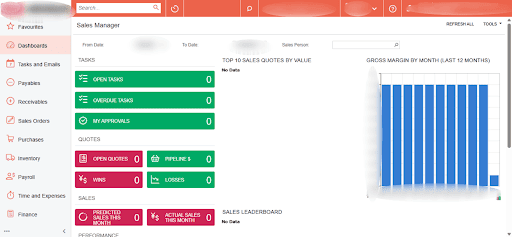
Phase two was the core build. We developed the OAuth 2.0 authentication framework first — a token management class in Apex that handles token acquisition, storage in Salesforce Custom Settings, and automatic refresh before expiry. This was the most critical piece: without a reliable auth layer, everything downstream fails silently, which is exactly what happened in the prior attempt.
With authentication stable, we built the data sync engine using Apex callout classes for real-time triggers (new Account created, Opportunity closed-won, Quote finalised) and Apex batch classes for bulk operations. The Postman test suite covered 40+ endpoint scenarios, including edge cases like duplicate detection, null field handling, and network timeout simulation. Every callout included retry logic with exponential backoff before logging a failure event to Salesforce for manual review.
Optimisation & Training — Tuning Performance and Handoff
The third phase covered performance optimisation, user acceptance testing, and team enablement. We ran a controlled volume test — syncing 2,000 records in a single Apex batch job — to validate the architecture under realistic load. We identified one governor limit edge case during this phase (CPU time approaching limits on complex Order records with many line items) and refactored the batch chunking logic to process in smaller sets without impacting throughput.
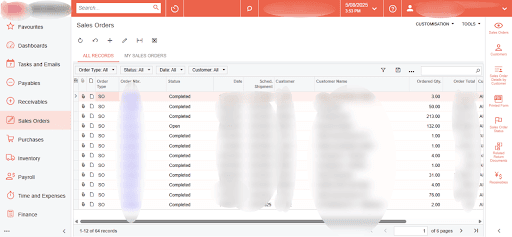
Enablement sessions were structured differently for the two user groups. For the finance team, we focused on the error monitoring view inside Salesforce — how to read a sync failure alert and when to escalate. For the sales ops team, we covered how the integration changed their Opportunity and Account workflow — specifically the fields that are now read-only in Salesforce because they're owned by MYOB Advanced.
Running Salesforce alongside an ERP or accounting system — and not sure where the data breaks?
We run a free integration diagnostic and return written findings within 5 business days. No retainer required.
What Changed — In Numbers and In Practice
The metric that stuck with the finance team wasn't the percentage improvement in sync speed — it was the first month-end close after go-live. For the first time, the reconciliation process required no manual data exports, no cross-referencing spreadsheets, and no back-and-forth between finance and sales ops to resolve discrepancies.
"The authentication instability had killed the previous integration attempt. We rebuilt it with a proper token refresh framework — and the first thing the finance manager said after go-live was that they could see their data was current for the first time in three years. That's the kind of outcome that matters."
— Twopir Project Lead · Agricultural Equipment Integration · APAC · 2025What Companies Ask Before Working With Us
Related Case Studies
Your Salesforce and finance system should share
the same data — not two versions of it
We audit your Salesforce-to-ERP or accounting integration, identify exactly where the sync breaks, and return written findings within 5 business days. No retainer, no commitment.
Serving US · UK · Australia · New Zealand · UAE · Canada · US EST · UK GMT · AEST coverage · Response within 24 hours guaranteed
