
Manual Data Entry Was Costing Real Revenue
at Every Executive Forum
A North American executive forum company with 250 staff was losing pipeline to slow CRM updates, duplicate registrant records, and payment failures nobody caught in time. We rebuilt their entire attendee data architecture — Salesforce connected to MeetMax in real time, zero manual imports.
eliminated across all events
MeetMax to Salesforce, bi-directional
created since go-live
— phased delivery
— enterprise-grade security
- Active Salesforce org — Sales Cloud or above, with admin access for Apex deployment
- MeetMax account — with API credentials and at least one active event configuration
- Defined attendee data model — clarity on which Salesforce objects map to registrant types
- Gravity Forms on your website — or equivalent form tool connected to Salesforce via Zapier
- Stripe account — for payment processing with webhook access enabled
- Sandbox environment — required for safe API endpoint testing before production deployment
- How to architect a bi-directional Salesforce–MeetMax sync that never creates duplicates
- How to build Apex triggers that are Governor Limit-safe even at high event volumes
- How to configure OAuth 1.0 authentication to resolve flaky MeetMax API connections
- How to automate Stripe payment retries so failed registrations never slip through unnoticed
- How to secure attendee data in transit with AES-256 encryption and rate limiting
- How to hand off a monitored, documented integration your team can operate without a developer on call
A High-Volume Executive Forum Operator Whose CRM Was Stuck in 2015
By the time they engaged us, the disconnect between MeetMax and Salesforce had become a structural problem. Every forum generated hundreds of registrant records in MeetMax. Those records were getting exported as CSVs — by hand, by someone on the ops team — and imported into Salesforce after each event. The lag was days. The duplicates were constant. The sales team was following up on stale data and sometimes missing sponsors entirely because their updated contact details never made it across.
The organisation had tried to solve this with Zapier automations twice before — neither attempt survived the first high-volume event. The real issue was that nobody had properly interrogated the MeetMax API authentication model or designed the Salesforce data architecture to handle the upsert logic cleanly. They came to us specifically because they needed someone who had done this before at scale, not someone who would figure it out on the job.
Four Integration Failures That Were Costing Real Revenue and Trust
When we ran our initial workflow audit, the problems were not subtle. Each one was measurable, and each one had a direct line to missed revenue or damaged sponsor relationships.
Manual CSV exports created a 48–72 hour CRM blind spot after every event
The ops team was spending 4–6 hours per event exporting MeetMax data, cleaning it in Excel, and importing it to Salesforce. During that window, the sales team had no post-event data to act on. Warm sponsors cooled off. Follow-up sequences triggered on outdated information. One senior account manager told us she had called a sponsor to thank them for attending an event they cancelled 10 days prior — because the cancellation never reached Salesforce.
Gravity Forms submissions were creating duplicate Contact records at a rate of 12–15% per event
Their website registration form sent data to Salesforce via a basic Zapier zap with no duplicate-checking logic. A returning delegate who registered with a slightly different email variation — first initial vs full first name, for example — would generate a second Contact record. After 18 months of events, the Salesforce org had over 3,400 confirmed duplicate records, making pipeline reporting meaningless for repeat attendees.
Payment failures were silent — no retry logic, no alerting, no recovery
Stripe was configured with a basic single-attempt charge. When a payment failed — network error, card limit, anything — the registration appeared complete to the attendee but was flagged as unpaid in MeetMax with no notification to the ops team. The team discovered 22 unpaid registrations from the previous quarter only when reconciling MeetMax against their finance system — weeks after those events had already run.
MeetMax API authentication was unreliable — dropping connections mid-sync
The previous two Zapier integration attempts had both failed because of OAuth issues with the MeetMax API. Without understanding how MeetMax's OAuth 1.0 handshake worked — specifically the signature base string construction — any integration would authenticate successfully in testing and then drop connections under real event load. The team had spent over $18,000 in developer time on two prior failed attempts without anyone properly diagnosing the root cause.
How We Structured the Engagement
We've integrated Salesforce with event management platforms across a dozen engagements — MeetMax, Cvent, Eventbrite, and bespoke systems. The pattern that fails is always the same: someone builds a surface-level Zapier automation, it works in testing with 10 attendees, and it collapses under the load of a real event. The pattern that works is designing the Salesforce data model first, then building the integration on top of it with proper Governor Limit-safe logic.
For this engagement, we started with a full workflow audit — no assumptions. We tested the MeetMax API endpoints with Postman before writing a line of Apex, mapped every data object to its Salesforce equivalent, and designed the duplicate-checking logic before we configured the first form. The same methodology we used for enterprise clients like Mitratech on their Salesforce integration work: architecture before implementation, every time.
Workflow Audit, Data Mapping & Architecture Blueprint
We started by cataloguing every place attendee data touched their systems: MeetMax registration, the Gravity Forms website form, the Stripe payment flow, Salesforce manual imports, and the spreadsheets the ops team maintained in parallel. Every one of those touchpoints was a potential duplication source. We documented the full data lineage before touching any configuration.
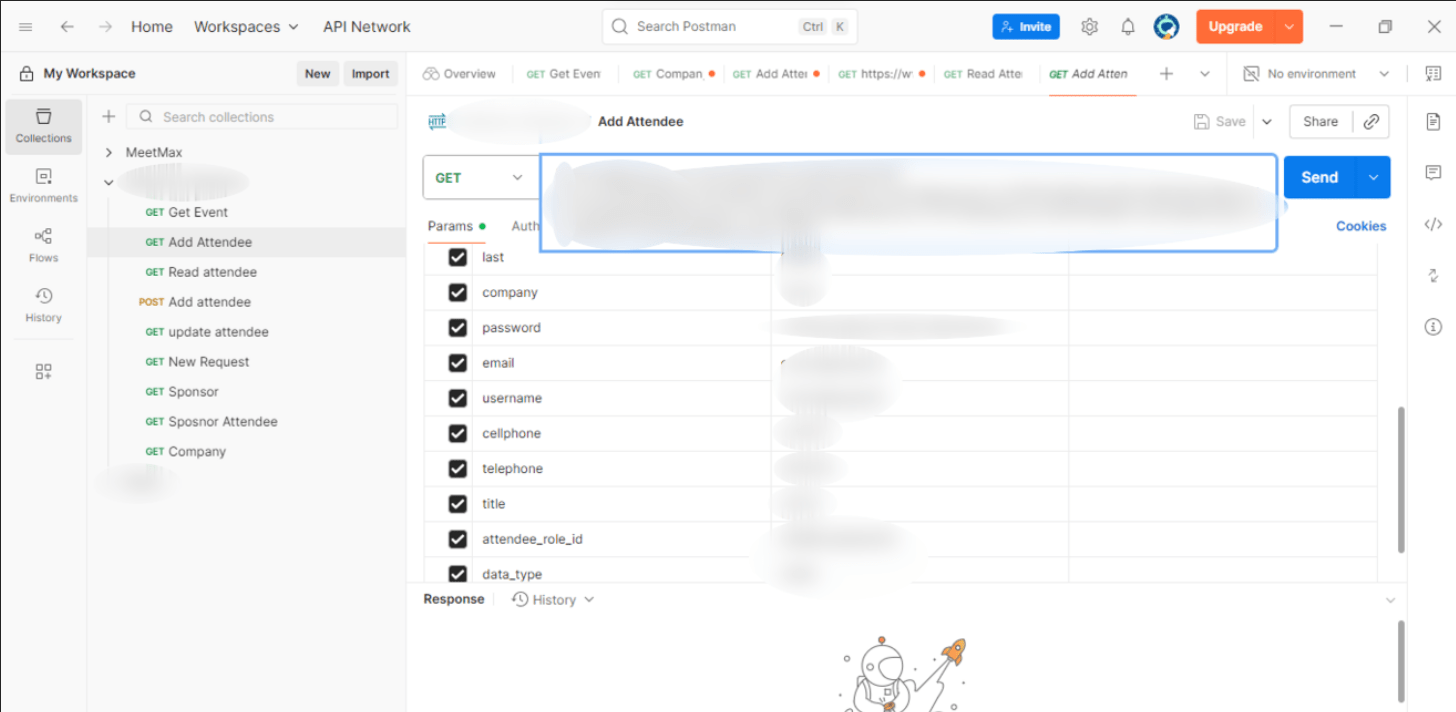
We used Postman to test every MeetMax API endpoint before writing a line of Apex. This revealed the OAuth 1.0 authentication issue immediately — the previous integrators had been constructing the signature base string incorrectly, causing token expiry under load. Once we identified the pattern, we designed the authentication layer to handle token refresh automatically. We also defined the Custom Metadata Type structure for field mapping — storing the MeetMax-to-Salesforce field map in metadata rather than hardcoded in Apex, so ops staff could adjust mappings without a developer.

Core Salesforce–MeetMax Integration: Bi-Directional Sync & Apex Build
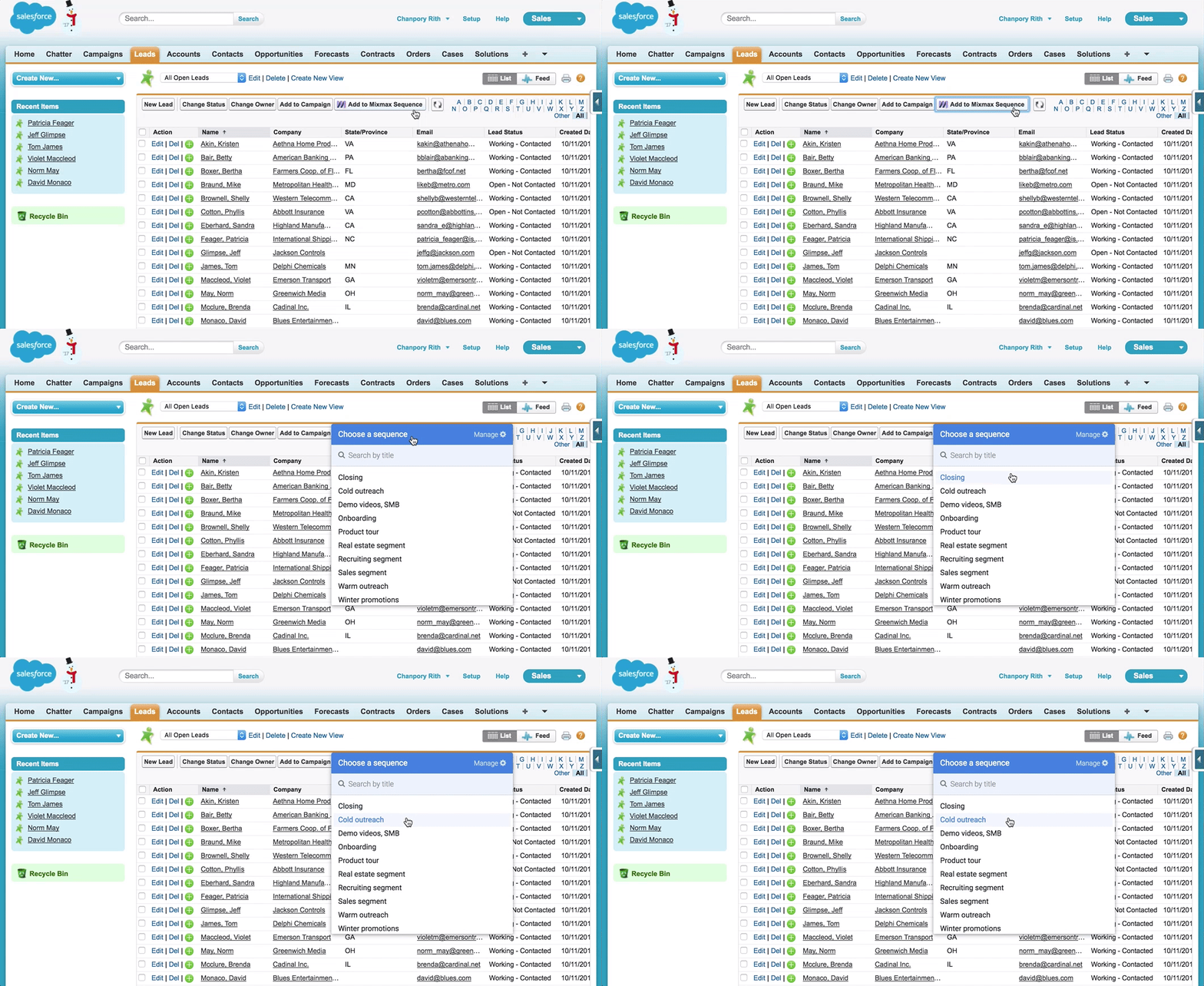
The core integration connects MeetMax's REST API to Salesforce using a combination of scheduled batch jobs and real-time Apex triggers. When an attendee registers or updates their record in MeetMax, a callout job fetches the delta via the MeetMax API and runs an upsert on the Contact and Attendee__c objects in Salesforce — matching on email with fuzzy-name fallback to catch the variant-email duplication problem. In the reverse direction, Salesforce status changes push back to MeetMax on a scheduled 15-minute cycle.
All Apex was written bulkified from the start — every trigger handler uses collections, every SOQL query runs outside loops, every callout uses future methods to avoid Governor Limit conflicts. We tested against a simulated event payload of 500 simultaneous registrations in sandbox before touching production. The Custom Metadata mapping layer meant that when the client's event team added a new MeetMax field in month two, ops updated the mapping in Salesforce Setup without raising a developer ticket.
Gravity Forms, Zapier Flows & Stripe Payment Automation
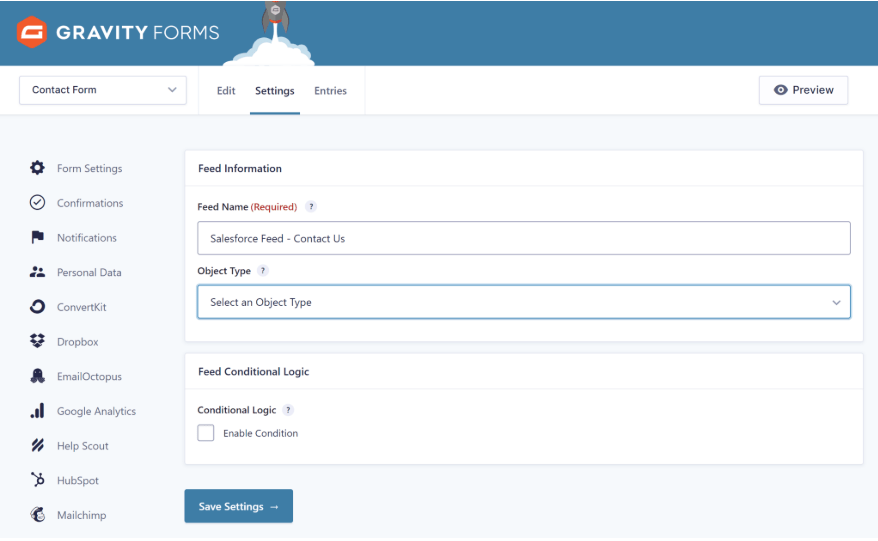
The website registration flow had its own set of problems independent of the MeetMax sync. Form submissions from Gravity Forms were going to Salesforce via a simple Zapier zap with no validation, no staging record, and no duplicate check. We rebuilt this as a structured pipeline: Gravity Form submission triggers a Zapier step that creates a Form Entry staging record in Salesforce, which then fires an Apex trigger to validate, deduplicate, and create the related Account, Contact, and Attendee__c records. The staging record acts as an audit trail — every form submission is logged regardless of outcome.
Stripe was reconfigured with full error handling and exponential backoff retry logic. When a payment fails, the system now retries automatically at 1, 6, and 24 hours, sends an automated notification to the registrant, and flags the Attendee__c record in Salesforce for ops review. A Salesforce Flow then sends a follow-up credential email with the attendee's MeetMax login details once payment is confirmed. The ops team went from discovering unpaid registrations weeks later to receiving a Slack alert within 60 seconds of any payment failure.
Security Hardening, Performance Optimisation & Staging QA
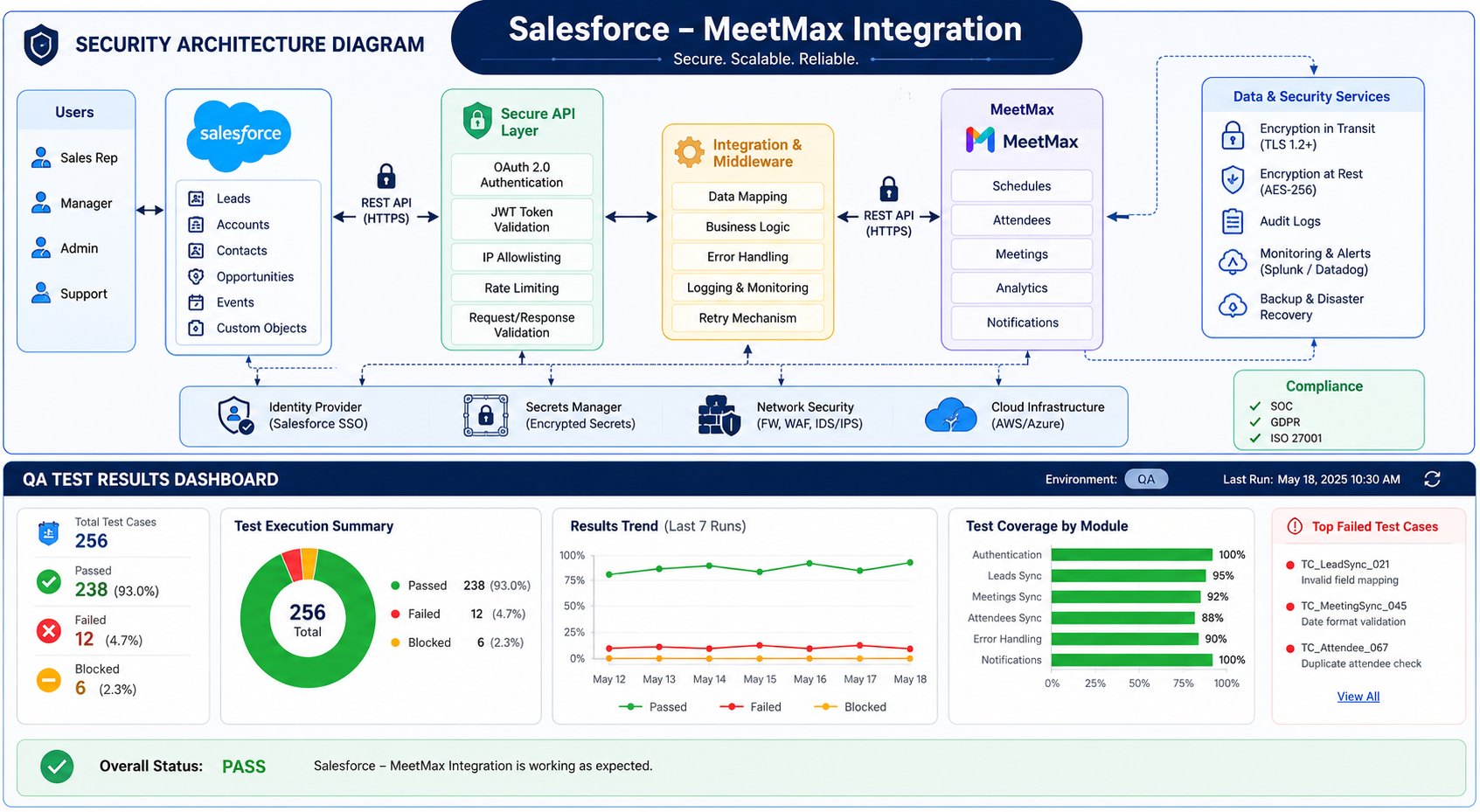
Once the core integration was built, we ran a full security and performance pass before moving to production. All attendee data in transit between MeetMax and Salesforce is encrypted with AES-256. The MeetMax API callouts use rate limiting to prevent hitting MeetMax's API throttle during high-volume event registrations — we implemented a request queue with configurable concurrency limits, stored in Custom Settings so the client's Salesforce admin can adjust without a code change.
We conducted staged testing that simulated three simultaneous events with 400 registrants each — the scenario most likely to stress both the Governor Limits and the MeetMax API rate limits. We also tested every failure mode deliberately: forced authentication expiry, Stripe webhook failures, Zapier timeout, and bulk-load edge cases. Every failure mode had a recovery path and an alert before we signed off on production deployment. The client's IT team reviewed and approved the security architecture before go-live.
Team Training, Documentation & Monitored Handoff
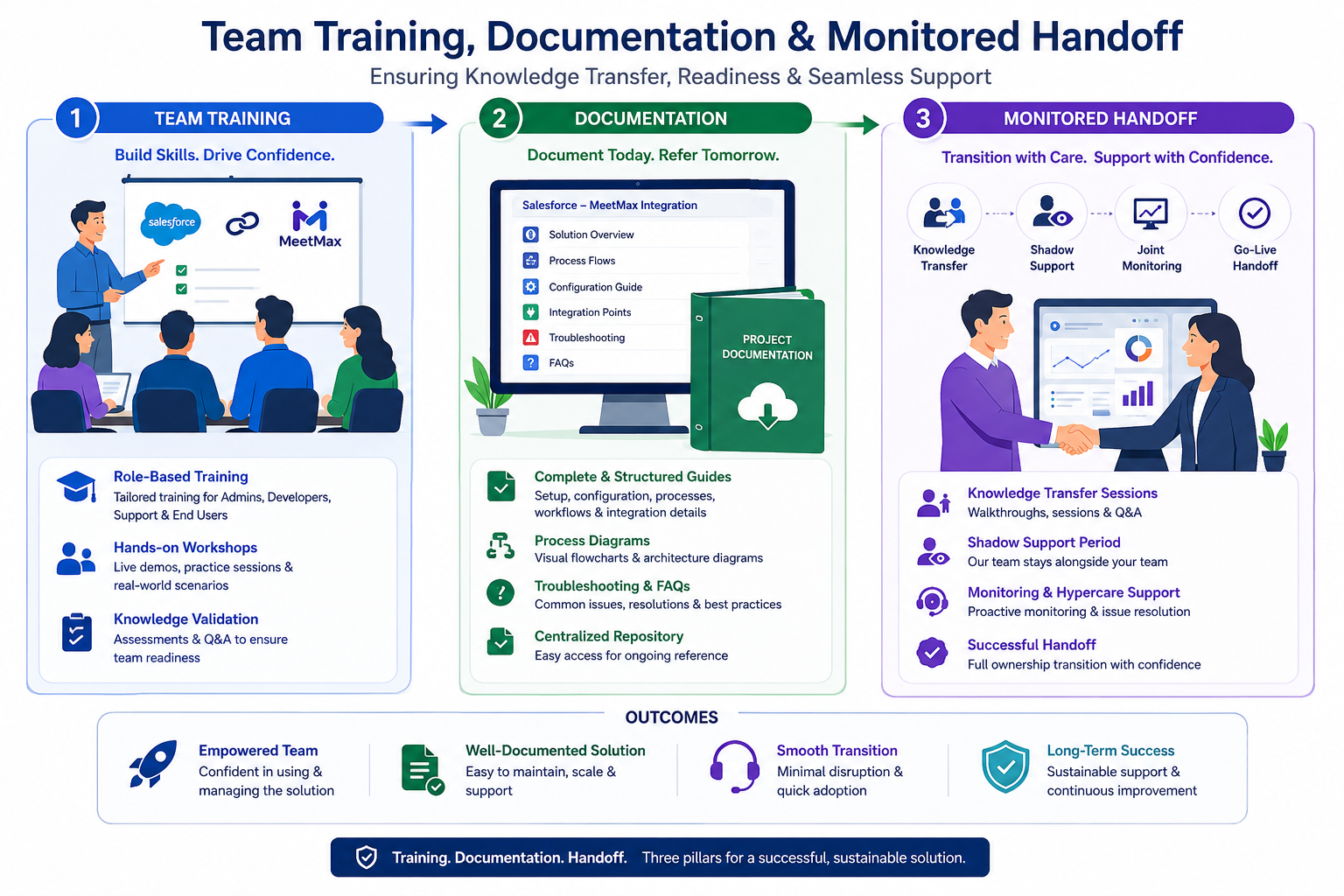
A Salesforce integration is only as durable as the team that runs it. We ran four structured training sessions: one for Salesforce admins (Custom Metadata management, monitoring dashboards, error log reading), one for the ops team (payment failure response, manual override procedures), one for IT (OAuth token management, rate limit configuration), and a combined Q&A session with all three groups. Every session was recorded and added to their internal Confluence documentation.
We also built a Salesforce monitoring dashboard that shows live integration health: last successful MeetMax sync timestamp, count of records processed in the last 24 hours, Stripe payment success rate, and any open error flags. The ops team can see at a glance whether the integration is healthy — they don't need to query logs or contact a developer to answer that question. We stayed on a weekly check-in cadence for the first six weeks post-launch, covering the first two live events. The client's team ran the third event independently, without raising a single support ticket.
Is your Salesforce CRM flying blind between events?
If your ops team is still running manual exports after every conference, you're making post-event sales decisions on stale data. We'll audit your current Salesforce–event platform setup, identify every data gap, and give you a prioritised fix list — at no cost. Findings delivered within 5 business days.
What Changed — In Numbers and in Practice
The metric that resonated most with the client's leadership team wasn't the speed improvement — it was the zero. Zero duplicate records created since go-live. Zero manual imports. Zero payment failures that went undetected. For an organisation that had normalised those problems over years, the absence of noise was the most meaningful change of all.
"The integration we tried to build twice before looked simple on the surface — MeetMax to Salesforce, how hard can it be? After working with Twopir, I understand why both attempts failed. They diagnosed the OAuth problem in the first week of discovery that two other developers had completely missed. The monitoring dashboard alone has saved us more hours than I can count."
— Twopir Project Lead · North American Executive Forum · 2025What Event Teams Ask Before Working With Us
Related Case Studies
.jpg)
Your Event CRM Data Should Be Live, Not Late
Start with a free Salesforce and MeetMax integration audit. We review your current setup, map the gaps, and deliver written findings in 5 business days — no commitment required.
Serving US · UK · Australia · UAE · Canada · US EST · UK GMT · AEST coverage · Response within 24 hours guaranteed
