

Introduction
In today’s dynamic world of enterprise technology, effective data integration stands as a cornerstone for enhancing operational efficiency. Salesforce Field Service extends the capabilities of Service Cloud by offering a comprehensive approach to managing workforce operations outside traditional office settings, commonly known as “the field.” This platform enables seamless service delivery to customers through mobile technicians, dispatchers, and service managers.
The guide explores Salesforce Field Service in depth, covering its user roles such as dispatchers who assign tasks, field technicians who perform on-site services using mobile apps, service agents who manage customer interactions, and service managers who oversee operations and analytics for efficiency and customer satisfaction. It details essential features like reporting tools for performance metrics, scheduling for optimized resource allocation, and the Field Service Dispatcher Console for real-time task management.
Understanding Salesforce Field Service
Salesforce Field Service, previously known as Field Service Lightning (FSL), is an enhancement of the Service Cloud designed to streamline workforce management. Imagine a cable installer arriving at your home; everything from their current location to the tools they carry is managed through Salesforce Field Service. Over time, Field Service Lightning has evolved, with new functionalities being added with each Salesforce release.
1. Service Appointments:
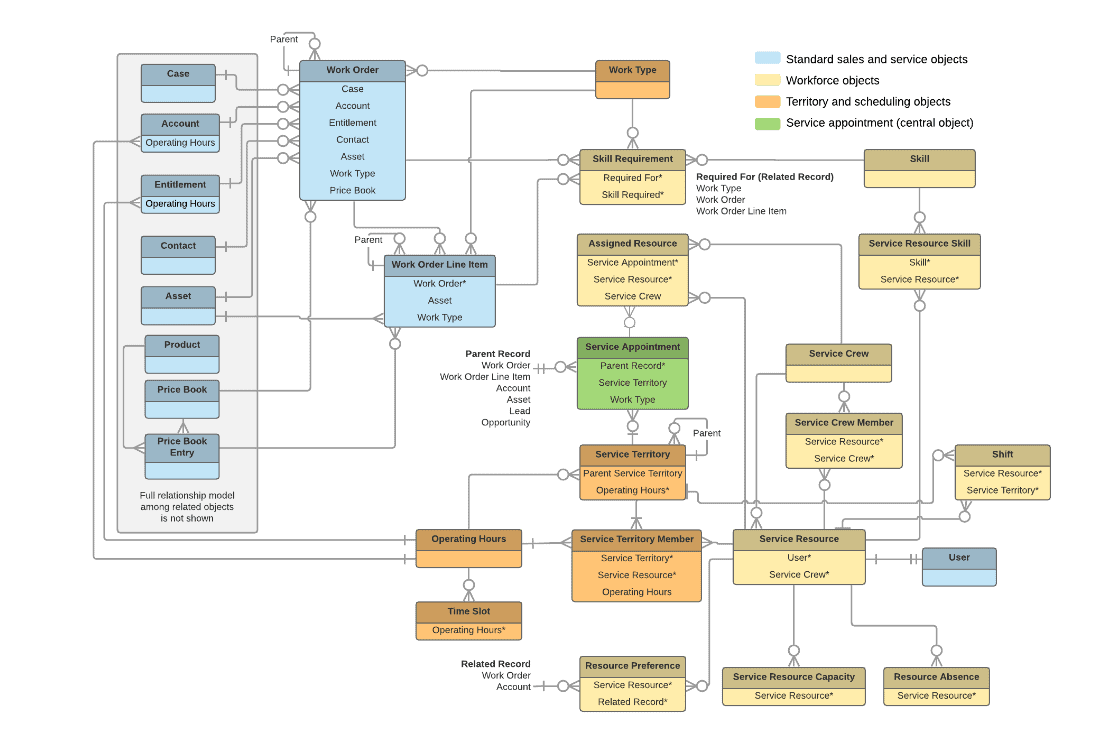
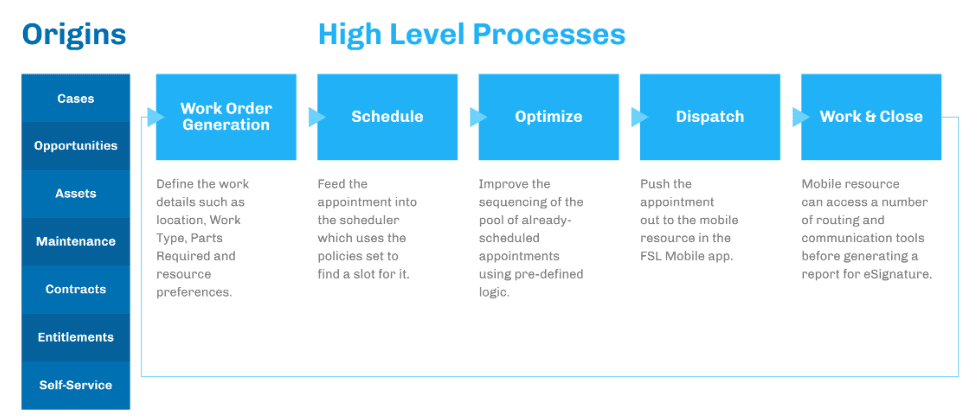
Service Appointments are central to Salesforce Field Service operations, integrating standard Salesforce Service capabilities with territory and scheduling. They ensure the right technician is dispatched by including detailed information about the service required, priority, and necessary skills. Integration with territory management allows for efficient routing and resource allocation, reducing travel time and improving response times. Real-time updates and tracking provide visibility into the status of each job, enhancing overall service quality.
2. Salesforce Service Cloud:
Salesforce Field Service aligns closely with Salesforce Service Cloud, particularly through the “Work Order” object. Work Orders are detailed records specifying tasks required during a service call, including issue nature, necessary parts, and steps for resolution. This integration ensures a seamless information flow between the service center and field, enabling better coordination and efficient operations. Service Cloud’s case management capabilities help service agents handle customer inquiries, validate service requests, and create Work Orders.
3. Territory and Scheduling:
Territory and Scheduling are critical elements in Salesforce Field Service, facilitating efficient appointment booking and optimization. These features ensure that service appointments are scheduled with the right technicians based on their skills, availability, and location. Advanced scheduling algorithms help optimize routes and reduce travel time, enhancing operational efficiency. By managing territories effectively, businesses can balance workloads, improve response times, and deliver timely, high-quality service to their customers.
4. Field Service User Interface:
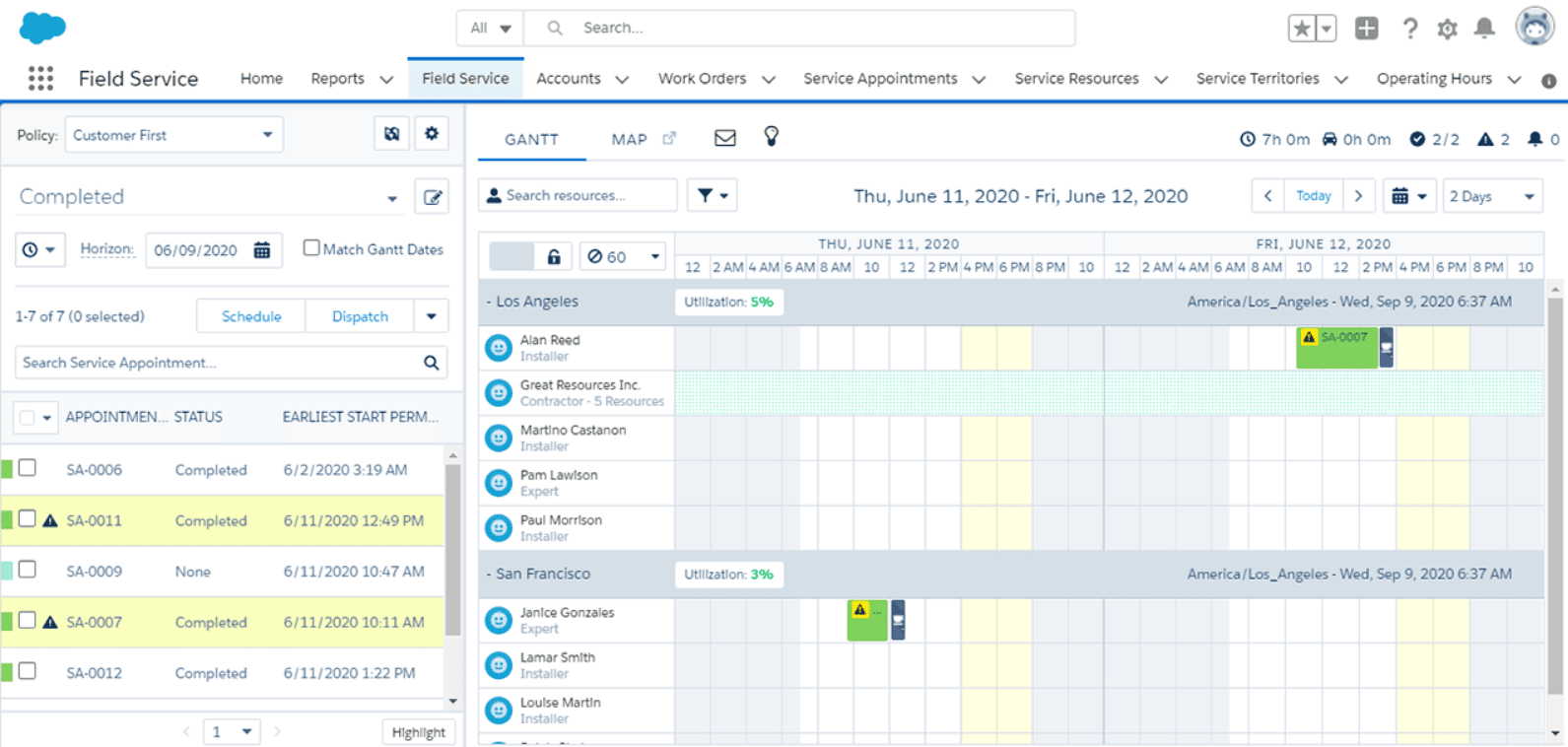
The Field Service Dispatcher Console is the primary interface for managing field service operations in Salesforce Field Service. It provides dispatchers with a comprehensive view of all service appointments, technician schedules, and real-time updates. The console allows for efficient management of work orders, resource allocation, and route optimization. Its intuitive design helps dispatchers quickly assign the best-suited technician for each job, ensuring timely service delivery and improving overall operational efficiency.
5. Field Service Mobile App:
The Field Service Mobile App, available for Android and iOS, is designed for field technicians, offering offline capabilities to ensure they can access necessary information and update job statuses without an internet connection. The app provides technicians with detailed job information, navigation tools, and the ability to capture customer signatures. This ensures accurate and efficient service delivery, even in remote areas, and enhances the overall customer experience by enabling real-time communication and updates.
Essential Salesforce Field Service Terms
Understanding key terms is crucial for mastering Salesforce Field Service:
- Work Orders vs Service Appointments: Work Orders define the tasks that need to be completed, while Service Appointments detail when and where these tasks will occur, ensuring organized and timely service delivery.
- Contract Line Items and Entitlements: Contract Line Items and Entitlements are standard Salesforce objects used to manage and enforce service-level agreements, ensuring customers receive the support they are entitled to.
- Work Type: Work Type templates standardize field service tasks, streamlining the creation of work orders and ensuring consistency across similar jobs for efficiency and accuracy.
- Service Territory: Service Territory defines the geographic or functional areas where work can be performed, optimizing resource allocation and minimizing travel time for field service personnel.
- Operating Hours: Operating Hours specify when teams can perform tasks, taking into account entitlements and service contracts, to ensure services are provided within agreed-upon timeframes.
- Resource Resource refers to the personnel and their capabilities, detailing their expertise, availability, and capacity, to ensure the right person is assigned to each task.
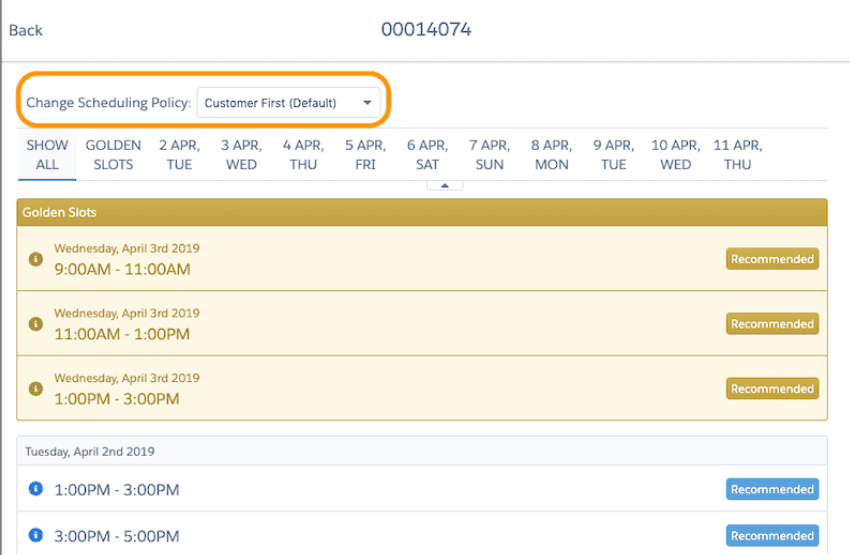
- Scheduling Policy Scheduling Policy combines factors like location, time, and personnel capabilities to guide dispatchers in efficiently assigning tasks, balancing business priorities and customer needs.
Streamlining Operations with Salesforce Scheduling
Effective scheduling and optimization are crucial for maximizing field service efficiency. The Dispatcher Console UI facilitates this by allowing dispatchers to access all necessary information to make informed decisions.
Methods to Schedule Appointments
- Book Appointment Action: Book Appointment Action offers flexible service windows, enabling customers to choose convenient times for their appointments, enhancing satisfaction and efficiency.
- Get Candidates Action: Get Candidates Action empowers service agents to select specific individuals based on availability and skill ratings, ensuring the right person for the job every time.
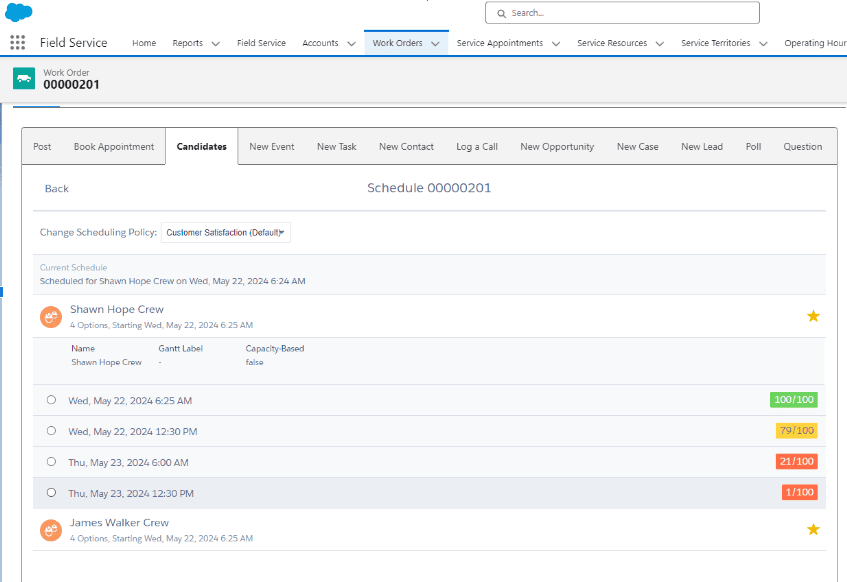
- Auto-Create Appointments via Work Type: Auto-Create Appointments via Work Type leverages predefined templates to automatically generate service appointments, streamlining the scheduling process and reducing manual effort.
- Auto-Create Appointments via Maintenance Plan: Auto-Create Appointments via Maintenance Plan automates the scheduling of regular maintenance visits, ensuring timely and consistent service delivery without manual intervention.
- Custom Appointment Booking: Custom Appointment Booking allows for the creation of bespoke interfaces and scheduling functionality, extending beyond the standard Field Service package to meet unique business needs.
Key Players in Salesforce Field Service
Salesforce Field Service is beneficial for organizations with mobile field technicians. The more complex the service delivery process, the more value Field Service brings.
Consider a high-end door installation company. Before the door fitting crew can start, the space must be prepared and the new door delivered. Each step involves different specialists, coordinated to ensure efficiency and customer satisfaction.
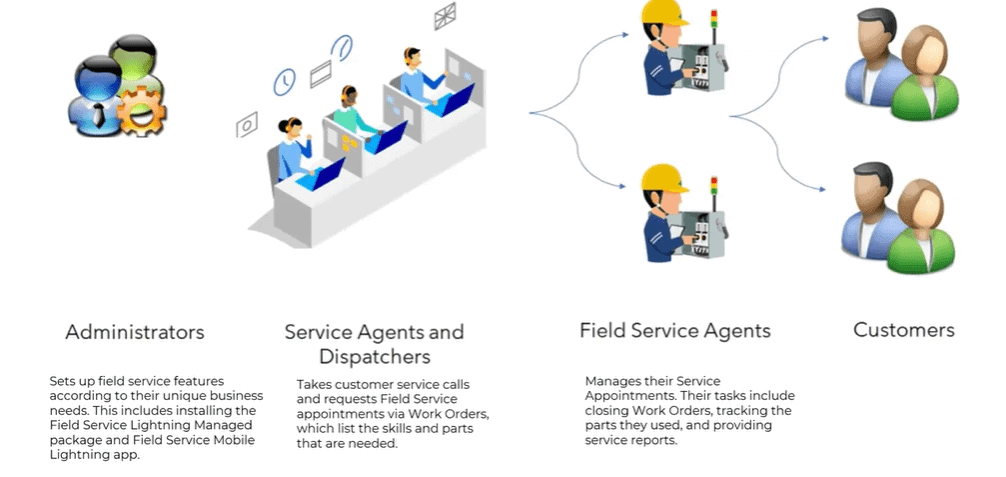
Here are the primary personas using Salesforce Field Service:
- Dispatchers: Dispatchers are essential in service operations, handling customer “work orders” by assigning skilled personnel based on availability and proximity. They ensure efficient deployment of field technicians to promptly meet customer needs.
- Field Technicians: Specialized professionals are often assigned diverse tasks at customer sites, such as installations, repairs, and maintenance, leveraging specific expertise crucial for delivering high-quality services across industries like technology, utilities, and construction.
- Service Agents: Service Agents are pivotal in managing customer communications for service-related inquiries or requests. They facilitate initial contact, verify service needs, explore solutions, and ensure effective communication to resolve issues promptly and maintain high customer satisfaction.
- Service Managers: Professionals are responsible for overseeing and managing the operational aspects of service delivery within an organization. Their primary role involves monitoring and optimizing service-related processes to ensure efficiency, quality, and customer satisfaction.
Field Service Mobile App
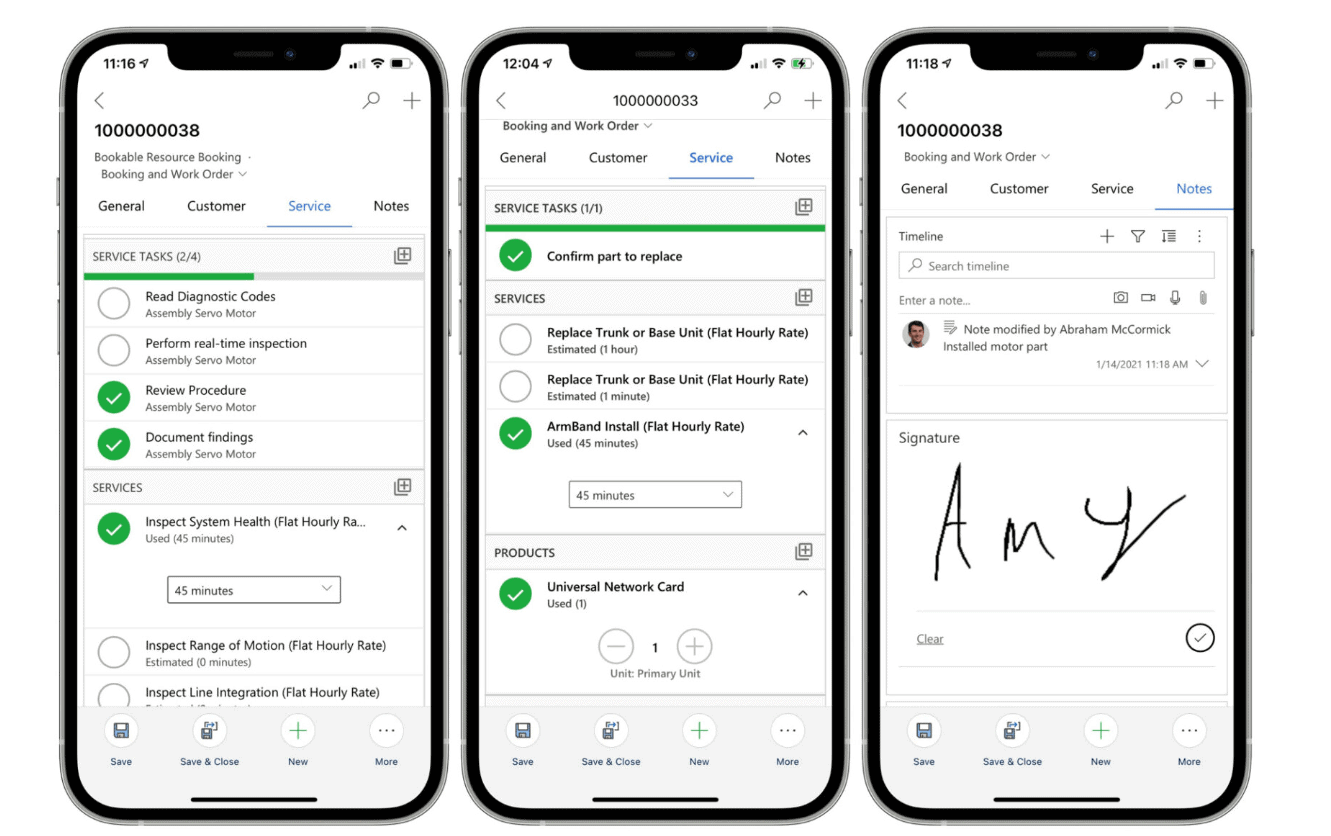
The Salesforce Field Service Mobile app is essential for mobile workforces. It provides technicians with the necessary information to optimize their tasks and travel, even offline. This ensures minimal disruption to their work and improves first-visit resolution rates.
- Access to Information: Provides technicians with real-time access to work orders, customer history, and asset details.
- Offline Capability: Allows technicians to access and update information even without internet connectivity, ensuring continuous productivity.
- Optimized Travel: Offers route optimization features to minimize travel time and improve efficiency.
- Task Management: Enables technicians to view, update, and complete tasks on the go, improving time management.
- First-Visit Resolution: Increases the likelihood of resolving issues on the first visit by providing all necessary information and tools.
- Signature Capture: Allows for capturing customer signatures electronically, streamlining the approval process.
- Parts and Inventory: Provides real-time visibility into parts availability and inventory management.
- Photo and Notes Upload: Allows technicians to document their work by uploading photos and notes directly to work orders.
- Time Tracking: Enables accurate tracking of work hours and job completion times.
- Customer Communication: Facilitates direct communication with customers regarding service updates and arrival times.
- Safety Compliance: Provides access to safety protocols and checklists to ensure compliance with regulations.
- Notifications and Alerts: Sends push notifications for new assignments, schedule changes, and important updates.
- Seamless Integration: Integrates seamlessly with other Salesforce tools, ensuring a unified and efficient workflow.
- User-Friendly Interface: Features an intuitive interface designed for ease of use in the field.
- Customizable Features: Allows customization to meet the specific needs of different field service operations.
Use Cases for Salesforce Field Service
Salesforce Field Service caters to various industries and scenarios, including:
- Repairs: Repairs in Salesforce Field Service involve single or multiple visits to address service needs with specialized skills and equipment, ensuring efficient and precise issue resolution directly at the customer’s location. This approach optimizes service delivery and enhances customer satisfaction by resolving issues effectively on-site.
- Maintenance: Maintenance in Salesforce Field Service comprises regular, scheduled visits that adhere to a consistent pattern. These visits are essential for ensuring that systems and equipment remain in optimal condition through routine checks and preventive measures. This proactive approach helps organizations minimize downtime and extend the lifespan of their assets, ensuring reliable operation over time.
- Sales: Sales coordination in Salesforce Field Service entails efficiently organizing multiple visits for sales representatives. This process ensures timely engagement with prospects and customers, facilitating effective sales activities. By optimizing scheduling and resource allocation, organizations enhance customer interactions and maximize sales opportunities, contributing to overall business growth and customer satisfaction.
- Healthcare: In Salesforce Field Service, healthcare involves scheduled or urgent care visits to patients, ensuring timely medical attention and support. This process supports healthcare providers in delivering personalized care, maintaining patient health, and adhering to medical schedules. By optimizing appointment scheduling and resource allocation, healthcare organizations enhance patient outcomes and operational efficiency, ultimately improving overall healthcare delivery.
Designing Service Territories
Effective service territory design is crucial for operational efficiency. Territories can be categorized into:
- Primary Territory: Primary Territory is the main area where a technician regularly works, ensuring familiarity and efficiency in service delivery.
- Secondary Territory: Secondary Territory consists of adjacent areas that a technician occasionally services, providing flexibility and extended coverage.
- Relocation Territory: Relocation Territory encompasses distant areas where a technician may work temporarily, allowing for adaptability in meeting service demands.
Reporting in Salesforce Field Service
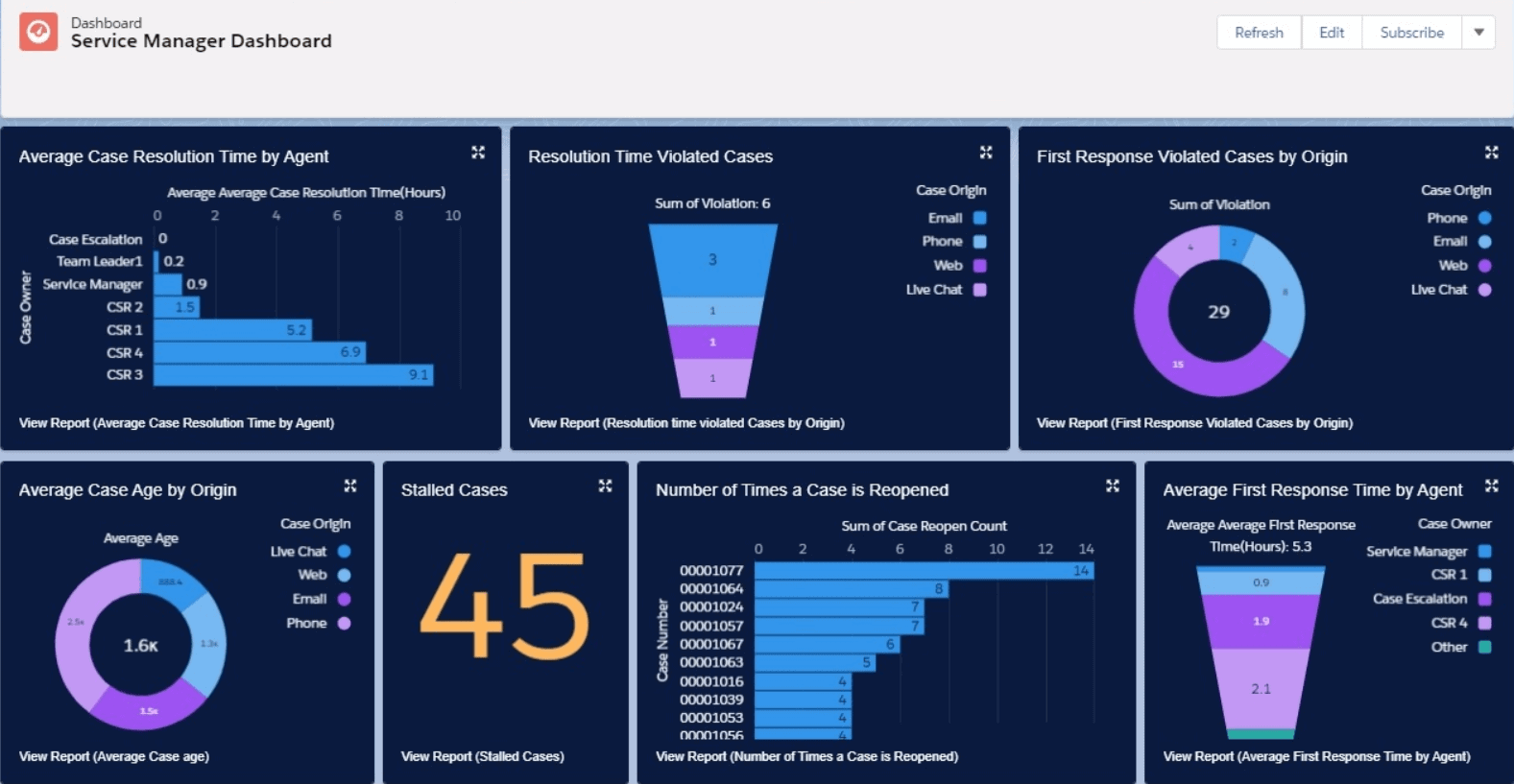
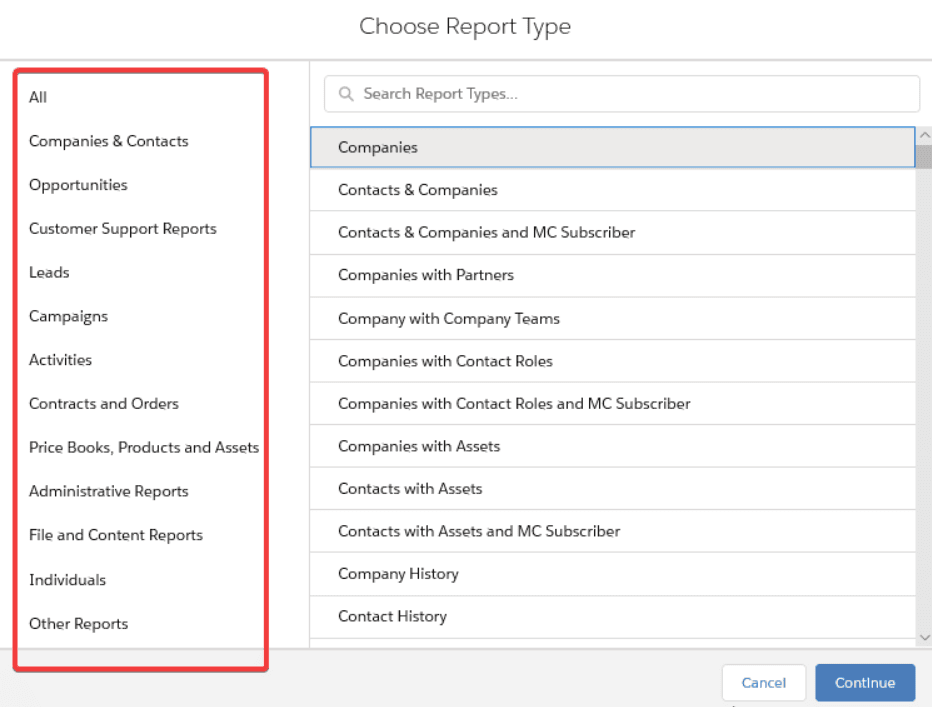
Field Service Report Types:
Salesforce offers standard and customizable report types to meet diverse reporting needs, ensuring comprehensive visibility into service operations.
Enabling Salesforce Field Service
Enabling Salesforce Field Service involves several critical steps to ensure smooth implementation and effective utilization within your organization. Here’s a comprehensive guide to getting started:
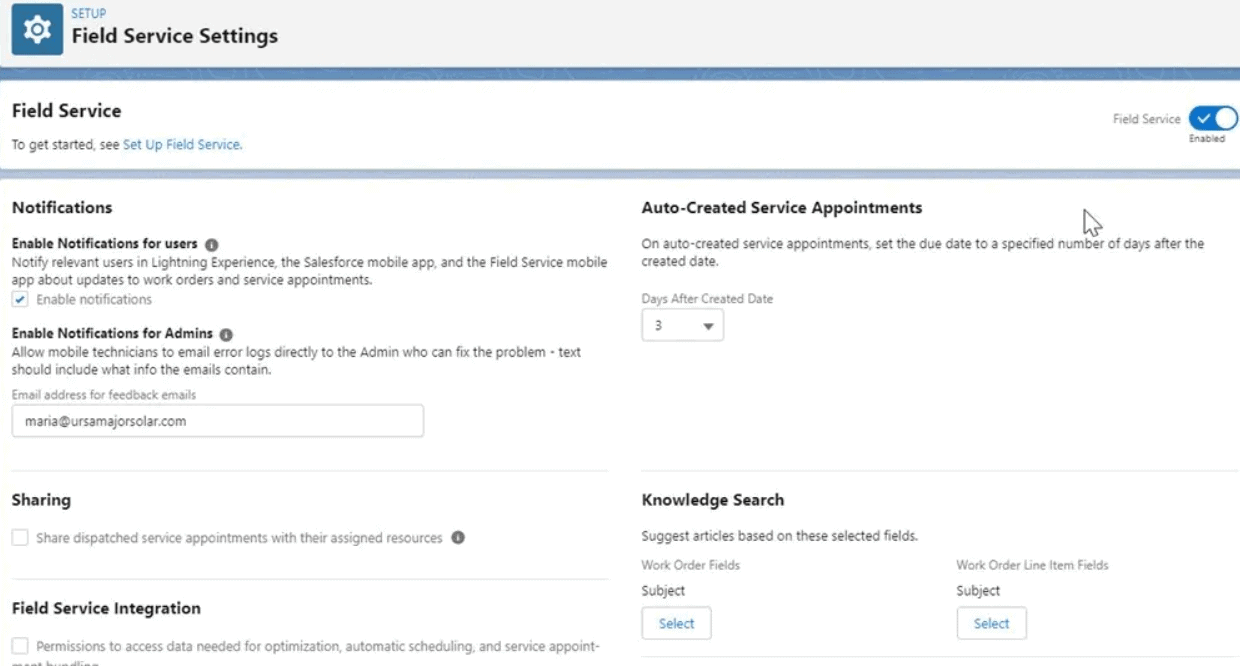
- Install the Managed Package: Salesforce Field Service operates as a Managed Package, which needs to be installed into your Salesforce org. This package includes all the necessary components and features required to run Field Service operations smoothly.
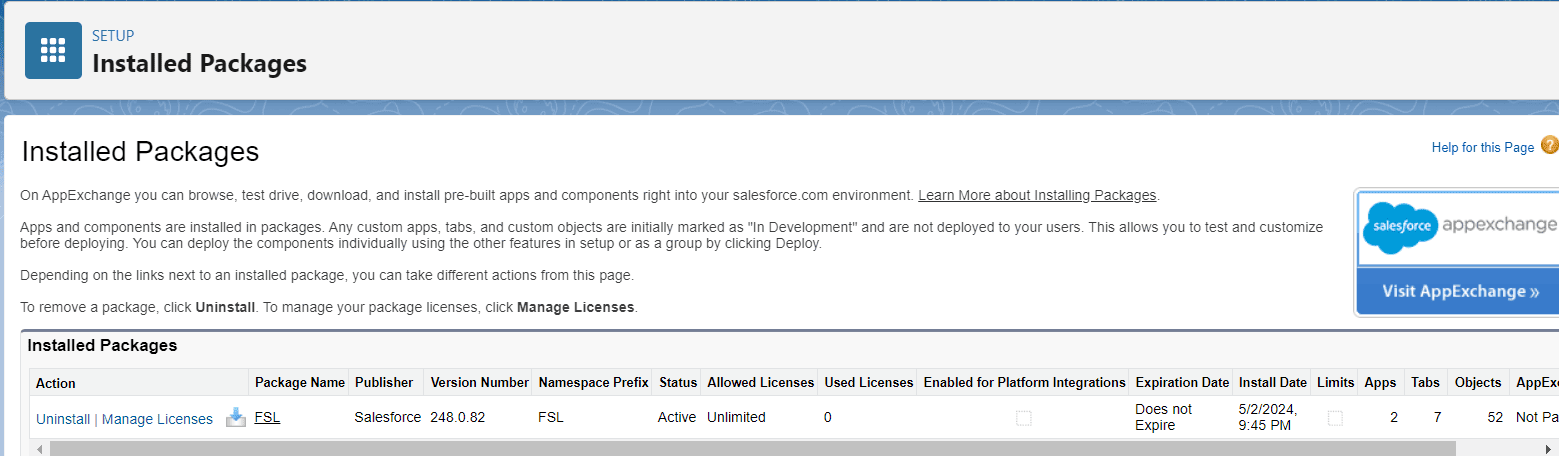
- Assign Field Service Licenses: After installing the Managed Package, you need to assign Field Service licenses to users who will be utilizing the Field Service functionalities. This step ensures that the right personnel have access to the tools they need to perform their roles effectively.
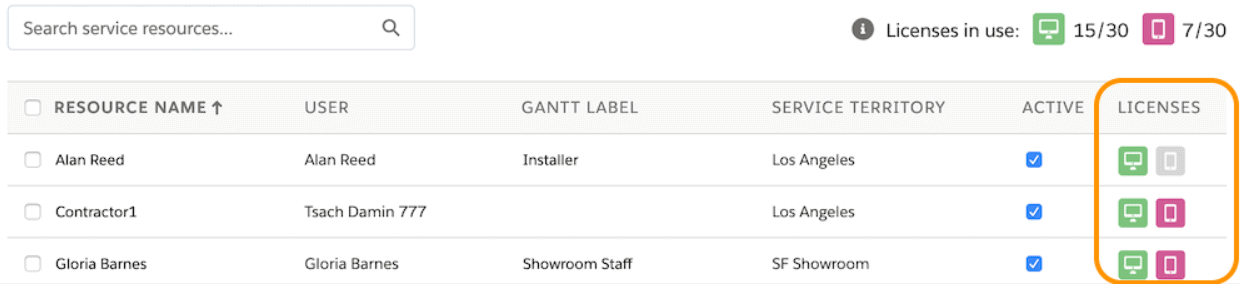
- Configure Standard Objects: Field Service heavily integrates with standard Salesforce objects such as Accounts, Contacts, and Work Orders. It’s essential to configure these objects to align with your organization’s specific workflows and requirements. This may involve customizing page layouts, fields, and related lists to optimize usability and data visibility.
- Set Up Service Territories: Define Service Territories based on geographic or functional divisions within your service area. Territories play a crucial role in efficiently dispatching technicians and managing service delivery. Consider factors like proximity, workload distribution, and specialization when designing territories to enhance operational efficiency.
- Define Service Resources: Service Resources include personnel, equipment, and vehicles used to fulfill service requests. Configure these resources within Salesforce to accurately track availability, skills, and capacity. This step ensures that dispatchers can assign the most suitable resources to each service appointment, maximizing productivity and customer satisfaction.
- Configure Operating Hours: Establish Operating Hours that define when service appointments can be scheduled and performed. These hours take into account contractual agreements, service-level commitments, and customer expectations. By aligning operating hours with service contracts and entitlements, you ensure that service delivery meets predefined standards and agreements.
- Customize Field Service Features: Salesforce Field Service offers various features that can be customized to fit specific business needs. This includes configuring scheduling policies, defining custom work types, and setting up automation rules for appointment creation and dispatch. Customization allows organizations to streamline operations, reduce manual effort, and improve service delivery efficiency.
By following these steps and leveraging the resources available in the official Salesforce documentation, organizations can effectively enable Salesforce Field Service to optimize service delivery, improve operational efficiency, and enhance overall customer satisfaction.
Managing Salesforce Field Service Projects
Rolling out Salesforce Field Service can be done in-house or with the help of a Salesforce partner consultancy. Consider breaking down requirements into phases, starting with a minimum viable product (MVP) and expanding later.
Simple vs Complex Requirements
- Simple Requirements: Standard work types involve routine tasks easily replicated across appointments. Single-visit jobs mean technicians complete tasks in one trip, minimizing coordination. Straightforward team processes ensure consistency and ease of management, requiring minimal customization and standard scheduling policies. This simplicity results in quicker deployments, fewer configuration needs, and streamlined training for field technicians.
- Complex Requirements: Multi-stage jobs require multiple visits, intricate coordination, and dependencies between tasks. Varied team processes demand tailored workflows to meet diverse service needs. Customized scheduling policies optimize resource allocation, considering factors like technician skills, availability, and customer preferences. These complexities necessitate extensive configuration, detailed planning, and robust project management to ensure successful deployment and efficient operations.
Salesforce Field Service vs Service Cloud Projects
With extensive experience in both Field Service and Service Cloud projects, Twopir Consulting has identified several critical differences and similarities. Understanding these nuances is crucial for optimizing project planning, configuration, and user adoption, ultimately maximizing the benefits of Salesforce Field Service (FSL) for your organization. Here are the key differences:
- User-Acceptance Testing (UAT): Due to the complexity of field service processes and the diverse user roles involved (dispatchers, technicians, managers), UAT needs to cover various scenarios and user interfaces extensively.
- Exception Handling: Field Service involves handling unexpected situations such as technician unavailability, equipment breakdowns, or customer emergencies, requiring robust exception handling mechanisms.
- Project Management: Managing a Field Service project involves coordinating multiple stakeholders, including field teams, IT, and business units, requiring effective project management to ensure alignment and timely execution.
- Deployment Planning: Deploying Field Service involves moving extensive data sets and ensuring integration with existing systems, necessitating meticulous planning to minimize disruptions and ensure data integrity.
- Change Management: Implementing Field Service often requires significant changes in workflows and processes, necessitating effective change management strategies to ensure smooth adoption and minimize resistance.
- Training and Support: Field Service teams, including dispatchers and technicians, require specialized training on using the Salesforce platform and mobile apps effectively, along with ongoing support to resolve issues promptly.
- Integration and Customization: Integrating Field Service with existing CRM systems and customizing it to meet specific business needs often requires advanced technical expertise and thorough testing to ensure seamless operation.
- Scalability: Planning for future growth and scalability is crucial, as Field Service solutions need to accommodate increasing service demands and expanding service territories without compromising performance or user experience.
Deploying Salesforce Field Service
- Lengthy Deployments: Deploying Salesforce Field Service can be time-consuming due to its reliance on object data, which includes configuring service territories, resources, and scheduling policies. Planning for data migration and integration is crucial to avoid delays.
- Leadership Buy-In: Securing buy-in from leadership is essential for successful deployments. Leadership support can help allocate necessary resources, align priorities across departments, and advocate for the adoption of new technologies and processes.
- Addressing Automation Concerns: Field Service deployments often introduce automation to streamline operations. Addressing concerns from the scheduling team or field technicians about automation can be critical. Highlighting how automation enhances productivity, optimizes resource allocation, and improves service delivery can alleviate resistance.
- Training and Change Management: Comprehensive training and change management strategies are vital. Ensuring that all stakeholders, from dispatchers to field technicians, are well-trained on using the Field Service mobile app, interpreting reports, and understanding new workflows can enhance adoption rates and minimize resistance to change.
- Continuous Improvement: Recognize that Field Service deployments are iterative processes. Monitoring performance metrics post-deployment, gathering feedback from users, and implementing continuous improvements based on insights can refine operations and ensure long-term success.
By considering these additional points, organizations can better prepare for and execute Salesforce Field Service deployments, fostering smoother roll-outs and maximizing the benefits of the platform.
Summary
This guide provides a thorough exploration of Salesforce Field Service, covering user roles, technical aspects, and deployment considerations. Field Service projects, although complex, offer substantial rewards by enhancing operational efficiency and customer satisfaction. By integrating with Service Cloud, managing service appointments, and optimizing scheduling through robust tools like the Dispatcher Console and Mobile App, organizations can streamline field operations and improve service delivery. Addressing challenges such as deployment length, automation concerns, and ensuring leadership buy-in are crucial for successful implementations. Continuous training, monitoring, and iterative improvements post-deployment ensure sustained benefits and ROI. Salesforce Field Service stands out as a pivotal tool for organizations aiming to elevate their field service management capabilities and achieve operational excellence.
Field Service Lightning, in synergy with Twopir Consulting’s consultancy and delivery services, guarantees a smooth transition from strategic planning to flawless execution. As a reliable partner in driving technological excellence, Twopir Consulting adeptly navigates complex technological terrain, fostering innovation and unlocking unprecedented growth opportunities for client organizations.
